Ultraviolet Raver Concept - Akali K/DA
This LoRA is intended to apply an ultraviolet luminiscent style to characters, with bodypaint and paint splatters.
I've extended the dataset in following versions, including Hunyuan Video and Wan.
ℹ️ LoRA work best when applied to the base models on which they are trained. Please read the About This Version on the appropriate base models and workflow/training information.
Information below relates to the SDXL base model versions.
Goal was create a generalised ultraviolet before/after concept that could be generally applied to any character/scene without much style bleed.
Almost all works relating to this concept in the training data are based on the the League of Legends character Akali's appearance in the K/DA Pop/Stars video.
So can expect much of her appeance, including the outfit details and bodypaint markings, to be replicated with this LoRA:
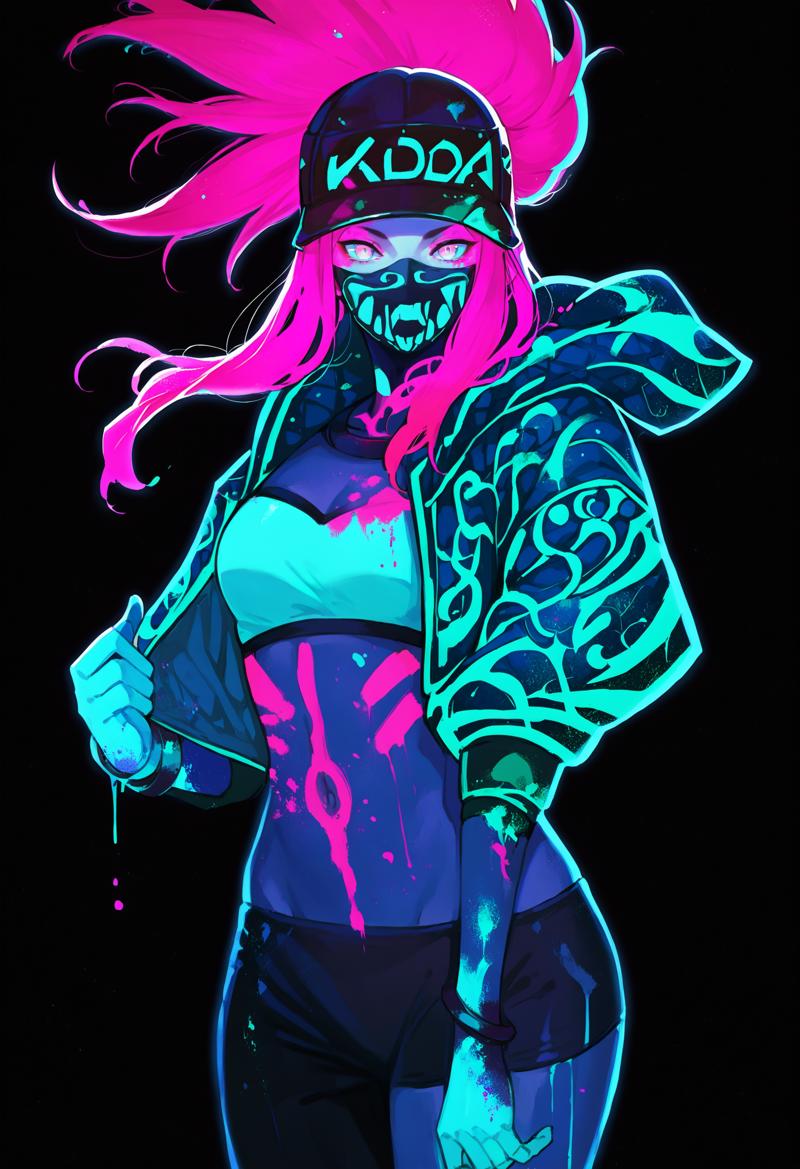
This wasn't really the intention, and I used a regularisation dataset of Akali images (not ultraviolet) to try to narrow down the ultraviolet concept.
The result seems to work pretty well with other characters as intended though, see it applied to other characters in the previews.
Recommended prompt structure:
Positive prompt:
ultraviolet, ultraviolet light, paint splatter, bodypaint, glowing skin,
{{tags}},
black background, dark theme, backlighting
Adetailer settings:
Adetailer extension is used to automatically segment and upscale faces/hands/bodies as needed:
--> https://github.com/Bing-su/adetailer
I recommend default settings with face_yolov8n.ptand the inpaint denoising setting reduced to 0.3
License
Description
Trained with https://github.com/tdrussell/diffusion-pipe
Training data consists of:
33 images as a combination of
Images used from other versions this model card
Images extracted as keyframes from several videos
11 short video clips ~65 frames each
Training configs:
dataset.toml
# Aspect ratio bucketing settings
enable_ar_bucket = true
min_ar = 0.5
max_ar = 2.0
num_ar_buckets = 7

[[directory]] # IMAGES
# Path to the directory containing images and their corresponding caption files.
path = '/mnt/d/huanvideo/training_data/images'
num_repeats = 5
resolutions = [1024]
frame_buckets = [1] # Use 1 frame for images.


[[directory]] # VIDEOS
# Path to the directory containing videos and their corresponding caption files.
path = '/mnt/d/huanvideo/training_data/videos'
num_repeats = 5
resolutions = [368]
frame_buckets = [42, 65, 75] # Define frame buckets for videos.
config.toml
# Dataset config file.
output_dir = '/mnt/d/huanvideo/training_output'
dataset = 'dataset.toml'

# Training settings
epochs = 50
micro_batch_size_per_gpu = 1
pipeline_stages = 1
gradient_accumulation_steps = 4
gradient_clipping = 1.0
warmup_steps = 100

# eval settings
eval_every_n_epochs = 5
eval_before_first_step = true
eval_micro_batch_size_per_gpu = 1
eval_gradient_accumulation_steps = 1

# misc settings
save_every_n_epochs = 15
checkpoint_every_n_minutes = 30
activation_checkpointing = true
partition_method = 'parameters'
save_dtype = 'bfloat16'
caching_batch_size = 1
steps_per_print = 1
video_clip_mode = 'single_middle'

[model]
type = 'hunyuan-video'

transformer_path = '/mnt/d/huanvideo/models/diffusion_models/hunyuan_video_720_cfgdistill_fp8_e4m3fn.safetensors'
vae_path = '/mnt/d/huanvideo/models/vae/hunyuan_video_vae_bf16.safetensors'
llm_path = '/mnt/d/huanvideo/models/llm'
clip_path = '/mnt/d/huanvideo/models/clip'

dtype = 'bfloat16'
transformer_dtype = 'float8'
timestep_sample_method = 'logit_normal'

[adapter]
type = 'lora'
rank = 32
dtype = 'bfloat16'

[optimizer]
type = 'adamw_optimi'
lr = 5e-5
betas = [0.9, 0.99]
weight_decay = 0.02
eps = 1e-8
FAQ
Comments (1)
super neat concept! I really enjoy seeing this kind of creativity here.