


DOWNLOAD THE YAML FILE DOWNLOAD THE YAML FILE DOWNLOAD THE YAML FILE
READ THE INSTRUCTIONS OR THE MODEL WILL NOT WORK
FluffyRock Unbound is a finetune of Fluffyrock Unleashed v1.0 trained on an expanded, curated e621 dataset and with training changes adapted from Nvidia Labs EDM2.
This model can produce detailed sexually explicit content and is not suitable for use by minors. It will generally not produce sexually explicit content unless prompted.
More details about model training + additional resources, including quality embeddings and tag autocomplete lists, are available on our Huggingface page: https://huggingface.co/RedRocket/Fluffyrock-Unbound
Prompting Guide
This model is trained on e621 tags seperated by commas, but without underscores. "by" has been added before artist names. Trailing commas are used.
Example prompt: solo, anthro, female, wolf, breasts, clothed, standing, outside, full-length portrait, (detailed fur,) by artist name,
Some tags have been shortened to save on tokens, so be sure to use the tag completion files if you can.
Most purple "copyright tags" have been removed from the model, so you must not prompt
dreamworks, how to train your dragon, toothlessbut instead prompt justtoothless.Rare tags are excluded from the autocompletion file so as to not give false hope.
Automatic1111 Stable Diffusion WebUI Instructions
Place the model and the corresponding .yaml file in the models/Stable-diffusion/ folder. The model will not work properly without the .yaml file.
You will most likely need the CFG Rescale extension: https://github.com/Seshelle/CFG_Rescale_webui A setting of 0.7 seems to be good for almost all cases.
For ideal results go to Settings -> Sampler Parameters and choose Zero Terminal SNR as the "Noise schedule for sampling" and set sigma max to 160 if using a Karras schedule.
Users of newer builds of A1111 may wish to use the KL Optimal schedule or the AYS schedule instead, at default sigma max. This tends to produce good results with fewer steps.
ComfyUI Instructions
Place the model checkpoint in the models/checkpoints folder. The optional Boring-E621 embeddings go in models/embeddings.
The model is zero-terminal-SNR with V-prediction. Use the ModelSamplingDiscrete node to configure it properly. 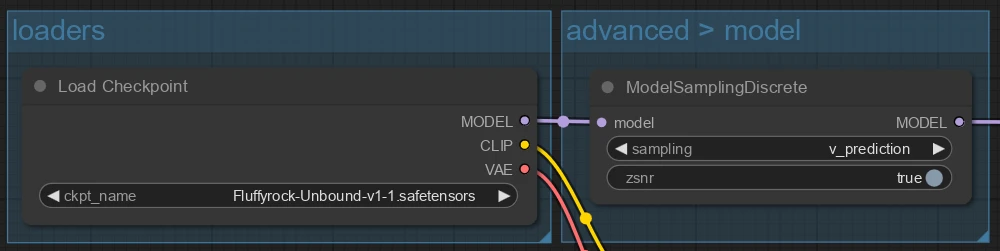
If you are using a KarrasScheduler and zsnr, set sigma_max to 160. Do not use zsnr with the default KSampler karras schedule as the sigma_max will not be set correctly.
Description
FAQ
Comments (2)
Two questions:
1. Is Furception VAE baked into the model like how it is for Fluffyrock Unleashed?
2. Would you still recommend the old refiner model from Fluffyrock Unleashed? https://civitai.com/models/322296?modelVersionId=361465
Furception is baked in. The old refiner model is no longer recommended; the changes we made to resolution bucketing and timestep weighting make it unnecessary.
Details
Files
Available On (1 platform)
Same model published on other platforms. May have additional downloads or version variants.