


These are some XL models based on NoobAI/pony XL with a little modifications, they are mainly for anime/realistic bara kemono content, and should be ok for all contents.
I chose pony purely because of its NSFW ability. (Now I'm thinking about switching to NoobXL because Pony is a pain in the ass to tweak)
NoobAI based model out now.
If you like my work, consider buy me a coffee please <3 (completely voluntary)
如同License内提及的,本模型及其生成的图像禁止商业化使用!
For CkNoob_EPS_Ⅺ_11:
This is a new EPS model that based on Chenkin Noob v0.1. Based on my testing, compared to EPS10, this model features better background coherence, higher contrast, slightly more detail, and a bit more responsiveness to artist styles. Just note that the composition of the generated images with the same prompt can sometimes differ noticeably from EPS10. And the overall feel and behavior of this model can sometimes differ from EPS10.
Just as the EPS10, when using this model, try using a CFG scale between 3–7 (recommended 5). It is recommended to keep using Euler a sampler for best overall results, but switching to DPM++ 2M may produce more detailed (and chaotic) outputs.
For NoobAI_EPS_Ⅹ_10:
This is a new EPS model that merges the the core features (hopefully) of EPS3 and EPS7. It aims to increase overall versatility while sacrificing just bit of fine detail. Backgrounds are much more stable compared to EPS3, though occasionally not as consistent as EPS7.
EPS10 fixed the issue of overly saturated or blown-out colors at high CFG values. Artist tags still work well as before, and stability when using the DPM++ 2M sampler has been improved.
When using this model, try using a CFG scale between 3–7 (recommended 5). It is recommended to keep using Euler a sampler for best overall results, but switching to DPM++ 2M may produce more detailed (chaotic) outputs.
For NoobAI_EPSReal_Ⅸ_9:
This is a new photorealistic model. Compared to EPSReal5, it sacrifices some photorealism in exchange for greater versatility, and also fixes a few minor bugs from EPSReal5. When using EPSReal9, set CFG to 4–7. The default sampler is Euler a, but in some cases switching to DPM++ 2M can enhance fur texture.
For NoobAI_VPR_Ⅷ_8:
This is a new VPRED model. Compared to VPR4, it still keeps the ability to generate very dark images, but fixes the issue of overly high contrast. At the same time, it greatly improves the photo-realistic style, while basically keeping the artistic style unchanged.
Plz use 'eular a' or 'eular' sampler for generation only, CFG 5-7, CFG Rescale(optional) 0-0.6.
Like VPR4, this model is also a v-prediction model, which means it requires some extra setup to work properly:
If you’re using this model in A1111 WebUI (none dev branch), make sure to download the .yaml file and place it next to the model. Also, don’t forget to enable the 'Zero Terminal SNR' option in the settings — it’s more likely for this model to get better results with ztsnr. If you’re using A1111 dev branch, enable ztsnr is all you need.
If you are using comfyui: download this image and drag it into your comfyui to get workflow: https://huggingface.co/Laxhar/noobai-XL-Vpred-0.5/blob/main/comfy_ui_workflow_sample.png
If you’re using webui reforge, make sure to enable 'advanced model sampling for reforge'. (Image below in VPR4 part)
For NoobAI_EPS_Ⅶ_7:
A slightly improved version campared with EPS6, it's slightly more detailed, more sharp/clear overall, and it can generate more stable backgrounds, this model's usage and purpose is basically the same as EPS6, please refer to the introduction of EPS6 (below).
For NoobAI_EPS_Ⅵ_6:
This is a model designed to optimize EPS3 (hopefully). Compared to EPS3, it has more vibrant colors, stronger contrast, and while it keeps most of the high detail that EPS3 is known for, the backgrounds are cleaner and more organized (not as messy or chaotic as EPS3 often does to backgrounds, and rarely generates messy dots/particles). It also has some of the Illustrious models mixed in as parts, and it seems to work better with Illustrious-based LoRAs than EPS3?
This model is still responsive to artist tags, and has a less "3D-like" default style compared to EPS3 when you're not using any style/artist tags. Note that some artist tags may react differently than EPS3.
Currently, the issues with this model are: At higher CFG, images can sometimes turn out too vibrant or overexposed. And when not using artist tags, the images can sometimes be too simple (not very detailed) compared to EPS3. Finally, this model seems more likely to generate images with watermarks or signatures.
Keeping a low CFG scale when using this model may give you better results (the ideal CFG=3~6), use a lower CFG scale (Minimum CFG=2) when the prompt is short (or when you feel the image is too saturated), and increase it as the prompt gets longer (maximum CFG=7).
Overall, this model performs equal/slightly better than EPS3 most of the time (especially when you're using artist tags) IMO, but the vibe’s sometimes different... So if you prefer EPS3, feel free to swap models as needed.
Still use dan tags and e621 tags plz, csv here: https://drive.google.com/file/d/1FuME-Ch5a9PsfDX5DN68ygjQaR28EdXZ/view?usp=drive_link
For NoobAI_EPSReal_Ⅴ_5:
This is a photorealistic model that fixes the brightness and contrast issues, compared to EPSReal 2, this model no longer generates very bright nights and it has slightly more details than EPSReal 2, but the tag(prompt) obedience of this model may be slightly worse.
This model still struggles to make photorealistic fur textures (sometimes the fur can look like fursuit/plush suit textures) and it sometimes tends to generate pov perspectives. And, this model struggles to make nipples disappear.
For NoobAI_VPR_IV:
VPRED version of checkpoint was recently updated to add VPRED autodetection, redownload it plz.
This is an experimental v-pred model based on Noobai V-Pred 1.0. Compared to EPS3, it gives you higher contrast, more vibrant colors, and can create darker images. The overall style leans more towards e621 than danbooru. But it’s trickier to use than EPS-based models, and tends to produce less detailed results.
Plz use 'eular a' or 'eular' sampler for generation only, CFG 5-7, CFG Rescale(optional) 0-0.6.
If you’re using this model in A1111 WebUI (none dev branch), make sure to download the .yaml file and place it next to the model. Also, don’t forget to enable the 'Zero Terminal SNR' option in the settings — it’s more likely for this model to get better results with ztsnr. If you’re using A1111 dev branch, enable ztsnr is all you need.
If you are using comfyui: download this image and drag it into your comfyui to get workflow: https://huggingface.co/Laxhar/noobai-XL-Vpred-0.5/blob/main/comfy_ui_workflow_sample.png
If you’re using webui reforge, make sure to enable 'advanced model sampling for reforge'.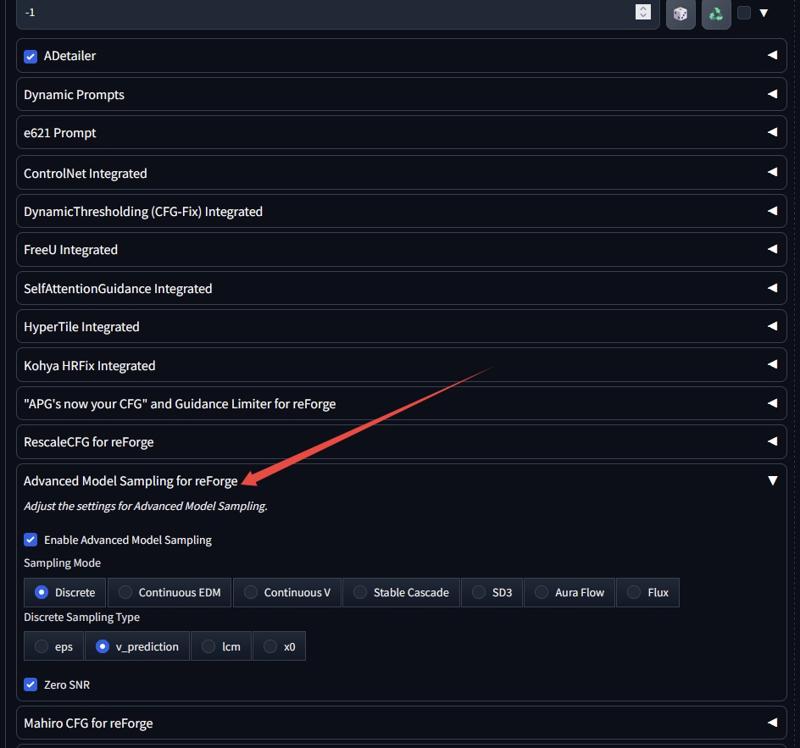
For NoobAI_eps_III:
This model is an advanced version of Eps I. Compared to Eps I, Eps III's method is more aggressive, it has more details, and it's more responsive to artist tags, and has brighter colors, but may be slightly less stable than Eps I.
Still use dan tags and e621 tags plz, csv here: https://drive.google.com/file/d/1FuME-Ch5a9PsfDX5DN68ygjQaR28EdXZ/view?usp=drive_link
For NoobAI_epsReal_II:
This is an experimental model, trying to convert the style of a noob model into photorealism, the final result is kinda ok?
Add 'realistic, photo, photorealistic' to positive and 'flat colors, toony' to negative prompt can enhance realistic style, but these tags may affect anatomy (especially the penis), please use selectively <33
For NoobAI_eps_I:
A merged model using NoobAI epsilon-pred, can react to artist tags. Use both danbooru tags and e621 tags, add quality tags plz.
Tag csv here: https://drive.google.com/file/d/1FuME-Ch5a9PsfDX5DN68ygjQaR28EdXZ/view?usp=drive_link
For realistic_delta:
A more versatile model compared with beta version, it's more accurate with tags, has better compatibility with loras, but may lose some details and has less photo-realistic style.
For v4.0:
v4.0 is just a regular update :o
For realistic_beta:
This is a version based on pony realism model, intended to do photo-realistic furry contents, should be able to do all furry/human contents(male furry bias). It looks good if nothing's wrong xd.
Issues:
The background of the generated image is not well controlled by prompts, this model is not very obedient, it often generates canyons and some green plants as background, and cannot do large sky background. This problem can kinda be solved by prompting.
Sometimes it does a lot of unnecessary blurring/depth of feild.
Cannot do very dark/high contrast images.
Somewhat unstable in doing NSFW contents. (Compared with those anime pony models)
Sometimes the body parts of furry characters will become human(hands especially).
Having trouble getting characters out of the ground! (They seem to be stuck to the ground XD)
For v3.0:
This version has reduced anime style, enhanced details, and seems to be more responsive to artist tags.
For v2.0:
A model similar to v1.0 that fixes the yellowing issue, increases color saturation and may have more details, but it is worse at doing realistic contents?
For v1.0:
It's ok to use 'score' tags or 'zPDXL' embeddings or not, use score tags will generate kemono-styled (japanese furries) images, not using score tags will generate western-styled (those common ones on e621) images.
Prompt length can significantly affects the style and the effect of score tags.
Can react to some artist tags.
Optional style tags: 'by mj5', 'by niji5', 'by niji6'.
Sometimes output images can be too yellow with score tags. (especially with short prompts)
Description
This is a version based on pony realism model, intended to do photo-realistic furry contents, should be able to do all furry/human contents(male furry bias). It looks good if nothing's wrong xd.
Issues:
The background of the generated image is not well controlled by prompts, this model is not very obedient, it often generates canyons and some green plants as background, and cannot do large sky background. This problem can kinda be solved by prompting.
Sometimes it does a lot of unnecessary blurring/depth of feild.
Cannot do very dark/high contrast images.
Somewhat unstable in doing NSFW contents. (Compared with those anime pony models)
Sometimes the body parts of furry characters will become human(hands especially).
Having trouble getting characters out of the ground! (They seem to be stuck to the ground XD)
FAQ
Comments (60)
Looks awesome thus far. As for the legs and body in the ground, I had those moments enough with other models in the past that I got used to putting (( legs in ground, body in ground, legs in water, body in water, )) in the negative prompts. It works well and often.
can this model be used for lora training?
yes, but no guarantee that the trained lora can be used on other models :(
@indigowing I just want to find an XL model I can train on that will give me results that don't look like junk when I try to use it. Pony has been a real disappointment in that regard.
The anwser is definately yes cos I did so. The best version to train lora is v1.0.
你是,我的神!!!!
3.0可能是因为混了SeaArt Furry的原因, 把它的BUG也继承过来了, 一旦输入了不存在的提示词出图直接就崩了
Definitely still in its 'rough draft' phases, but it's off to a really good start. I always liked this series of models, because of how well it executes realism, and I'm really happy the XL version is getting a realism version in the works. Can't wait to see what it does once it's cleaned and polished some more.
I am happy to see you bringing your realism checkpoint training for SDXL. I will be looking forward to each realism update you will release. <3
I have given the beta a try: I am very satisfied with the eye quality it produces, though I feel like your next realism model will need more female anatomy references in the database. Other than that, it is an awesome starter and happy to see this model to bring anthros closer to reality, lol! :D
This one does really great m/m POVs
I see you have to download this model to run it. How do you use a downloaded model? Can I use it with CivitAI if I download it or do I need some other software?
You would need to use something like Automatic 1111 to run it, plenty of tutorials for it.
female compatible plz
Naw, download something else. Everything is trained on like, 95% females, 5% males.
v2/v3 do females just great, I'd say even better than some female-oriented models 😎
@oaf40 I'd have no prob with that, if not for my endless frustrations with models tryin to put boobs on my boys. Like, stop that shit already.. We seriously NEED more male-focused content.
@oaf40 are you sure?
@Lazman a you is gey when need you male?!
@fog1 Gay, bi, straight but open-minded. Meh.. Not a fan of titles or labels. Either way, over half the population of the planet is women, so it don't make no sense that there ain't more male content than there is.
Indigo Furry Mix is a model intended to have an excellent performance generating men in almost any presentation.
What if you ask dingbatt for a Pony6 XL based version of Furry Vixens?
@CuauhtemocI5MAL Requesting females is so redundant.. Even if the model is one of the whole 5 on here that doesn't specifically cater to women, there's enough loras that'll put tits on your boys. so those would prob add females to non-female centered models. Whoever said females need more representation, didn't have their heads screwed on right.
Will definitely return and try this out as soon as I get a new GPU! Which... could be a while, but keep this up pls.
Extremely good with backgrounds, lots more than PonyRealism, but struggles with poses, viewpoint descriptions, and multi-characters if poses are involved... really looking forward to future updates though! It knocks RedWater out of the park.
What kind of updates can we expect for the model beyond 3.0? Any chance for expanding the prompt understanding?
I don't know yet...I've been busy with work lately, so I might be late in updating, so hope you understand <3
Hi, how can I use this model? When I go to create it doen´t appear
I believe the model's creator has to make it on-site compatible, in order to use it. Seeing as this version isn't available to use, the creator hasn't made it compatible for Civit's generator. The only other way to use it is if you have an image generator that's off-site, such as A1111, Forge, Comfy, or really any generator that allows you to import models.
@NeonShepherd ah ok, then that´s why that happens with other models too, is a shame to have to use other programs, but I will try to investigate. Thanks!
I find an issue in generating white tiger. I just can't do it no matter what prompts I use. The tiger's fur is always be orange.
Can you fix this in your next version?
The prompt I use:
((white tiger)),((white fur)),1boy,male focus,muscular male,bara,solo,muscular,furry,pectorals,weapon,holding sword,furry male,animal ears,tiger ears,sword,large pectorals,tiger boy,white hair,snow,holding,pectoral cleavage,tail,holding weapon,short hair,tiger tail,holding sword,white fur,feet out of frame,looking at viewer,snowing,tree,tiger stripes,east asian architecture,sleeveless,architecture,japanese clothes,thick eyebrows,chest hair,mature male,facial hair,bare shoulders,outdoors,sidepec,armband,alternate costume,covered abs,kimono BREAK score_9_up,score_8_up,score_7_up,detailed fur,fluffy fur,detailed fur texture,
Which model are you referring to, XL3 or realistic_beta?
In fact, the model has weird tendency with fur colors, and it’s not just tigers that have this issue. I've noticed it with XL3—when I try to draw a wolf with an artist tag, the model will stubbornly lean towards making blue wolves.
Fortunately, using positive and negative color tags with high weight can help get other fur colors. And interestingly, even when blue is included in the negative tags, the model still insists on adding blue to the clothing, background, or decorations.
Back to how to get the model to draw a white tiger. After repeatedly tweaking the prompt, I successfully generated the desired white-furred tiger using the same set of prompts on both XL3 and realistic_beta. Here are the core parts of the prompts I used, which I hope will help you out:
Positive prompt: score_9, score_8_up, score_7_up, male, furry, anthro, solo, white tiger, (white eyebrows, white fur, white body:1.5)
Negative prompt: (orange, orange color)
Agreed. I think white fur should be addressed as white body in prompt. And you don't need many words.
The key is to put related prompts close and clean. I tried your prompt and I rearranged the order. The results were most of the time desired.
solo,anthro,male,felid,tiger,(white body:1.2),white fur,muscular,short hair,thick eyebrows,
large pectorals,pectoral cleavage,covered abs,feet out of frame,tail,
sleeveless,japanese clothing,armband,alternate costume,
holding sword,
outside,east asian architecture,snow,
Negative prompt: yellow body,
Could always try a fur Lora. TBH, the likely culprit for the inaccuracy in fur colors, is prob due to bad tagging in the model. Not necessarily the uploader's fault. The fact is, the mainstream captioning/tagging methods are sub-par at best. WD14, and Blip1/2. WD14 uses the booru tagging system while Blip is descriptive tagging, but both are mediocre when it comes to defining details within the images used for the dataset.
This is a big part of the reason that a lot of Loras can do stuff better than the models, and also why so many Loras are required in order to perfect an image (in many cases). Because apart from the fact that Loras are specialized in their target output, they're also small enough in their dataset that it's realistic to go through and manually tag the images.
A lot of people don't, but imho (from what I've learned so far), that's what separates the good Loras from the less good ones. Lack of deeper details and context aside, those captioning models are also often inaccurate in their tagging. They may tag stuff that's not in the image, or get things outright wrong. In the context of the discussion at hand, it probably labeled all of the images in which the characters had fur, with 'fur', or 'furry' while failing to describe the color of the fur, or adding the color as a separate tag, that way when the tag 'white' is called on, it isn't necessarily connecting that color to the fur, but rather to anything in the image, eyes, lights, walls, etc. Alternatively, the dang thing might even have tagged a lot of the images with fur color tags, but got the color completely wrong. If that's the case, and it tagged a lot of blue fur images as 'white fur', then that would definitely describe the model stubbornly trying to give blue fur when white is prompted.
When they open up more checkpoint space, you think this might be on site gen? the detail on fur looks great.
Thank you! I hope so <33
Dolphins/sharks characters always comes out with ears or hair even with positive "hairless", "earless" and negative "ears", "hair". Any suggestion to make them only with a single fin on the head?
I've noticed this as well, unfortunately I think there's no good solution for now, you can either roll a few more times or use Photoshop to get rid of the extra fins.
This even does non-fur really really well, like v20 is probably my go to now. Only issue is when I try to merge with other checkpoints, my images always get super greyed out. Do I need to merge a VAE as well?
V20 has VAE issues, you can try merging fix fp16 SDXL VAE <33
Any tips on prompting for pawed feet? Or at least a proper term for dog shaped legs? All pony models seem to enforce oversized human feet on anthro characters and I cant address this effectively
Try using 'digitigrade' in positive and 'plantigrade' in negative when prompting, if these don't work, it's most likely the problem with pony model itself :(
If you make an Illustrious based version of this model...
Please, use NoobAI-XL as the base model, the original Illustrious model isn't responsive to prompts made with e621 tags according to my first interactions with that model.
Sure, I am indeed gonna use Noob, because Illustrious doesn't have e621 datasets for training while Noob does. Noob is more like a beefed up version of pony xd
不知道博主为什么要用这个SD模型来制作红色的形象呢?
FEEDBACK
Take this as a pat on the back, and an encouragement to continue iterating on this model that I really love :)
With that said, here are some things I find it struggles with. I don't have experience with other PONY models, they are too heavy for my GTX1080.
1 pic @824 x 1360 /20-25 steps takes about 5-6 minutes, going at. 8-12 iterations/s
-/+ Model struggles with resolutions that work great with SD 1.5. With the regular Realistic Indigo model, I typically used 768x1280. That's not enough for this model. The image devolves into tiny spiky ball artifacts. Hard to explain exactly, I'm sure you know what I mean though.
824x1360 seems to be a good compromise, but yet higher resolutions yield yet better results. Below 824x1360, images also become blurry by the depth of field not really finding any focal point. I love using depth of field/bokeh in my images, but it must work. Again, a resolution Issue mostly, and probably that's a general PONY model thing.
- It does NOT work well with LORA's. I have to be very careful with the strength of a LORA, and often use less than strength 1.0. Images tend to 'overcook' very quickly, or simply never cook at all - 100% noise.
- It does not know what nighttime is. I've not been succesful in making any nighttime pics, the best I've seen is dusk, or slightly gloomy interior shots.
- Body types tend to be wider/heavier, and fur is often very unkempt. Inconvenient for my brand of smut :)
Just for info, here are my specs:
Asus Z790 Aorus MB
13th gen 13600K @3,49GHz
64GB 5600 RAM @4800MT/s (DDR5)
GTX 1080 8GB - until Nvidia stops being ******** with their pricing.
Win11, pc tuned as a DAW workstation, not a gaming pc.
Thank you! I think the problem you're having is with the model itself.
The model has the following problems: it's not dark enough, it needs high resolution to look good, and the LORA compatibility is poor, these may be caused by XL and pony together.
XL models are often trained with 1024px with arb bucket, which means resolution lower than 1024px usually result in poor results.
And as for pony based models, they are notoriously hard to finetune and pony basically can't produce very dark images, using lora on pony is also very random, even lowlight loras sometimes do nothing to the image's brightness.
So I'm considering switching to noobAI <33
Understood.
I love your models, so I'll be keeping an eye on whatever you do. Apart from all the smut I've been posting here, I previously worked on a Visual novel where I used your Indigo hybrid model (V90, I think). I decided it needs a complete rewrite though. Probably with a new model as well, controlling minute details while keeping others in place is super hard with stable diffusion in general..
I've also used other furry models in a board game I've been developing for the last 4 years. I hope people consider it fair game. I'm a musician primarily, so I understand the nature of creating. My goal with the things I create is generally not monetization..
If I do end up posting a Visual Novel somewhere and I used your model, I'll be sure to let you know, and I hope you'd be okay with it? Again, it would not be for monetary gain.. :)
@FoxDude sure, thank you!
Your spec shouldn't be struggling that bad lol, although I have a RTX 2080ti, I only have 48gb ddr4, and I recommend to use upscaler (I find R-ESGAN 4x+ Anime6B work best for my case) instead of fully load it, not only that it's quicker, the image would also improved imo. for example, if I plan to do 1920x1080, i would put 2x upscale and 960x540.
I do find it work with lora, maybe there's something conflicting in your config?
@Querts I switched from A1111 to Forge, and now I can do 2-3 second/iteration with 1536x960, and easily higher resolutions/hires.fix/etc. Can recommend!
why not have someone else upload it, or make an alt to do so? see if either help, since I and presumably many others can't run this and any other downloaded resources.
i have an amd gpu i won't have the money to replace probably for a solid couple of years minimum, and running stability matrix and other ai gens offline is pretty much non-feasible.
Sorry, I don't want to touch that mess of my sd1.5 models or reuploading anything because I'm such a lazy dog xddd, and I really hope that civitAI gives us the option to choose which model we can use on site for online generation despite the model limitation per user thing :(
What they're doing now is basically handing over the all maintenance costs to the users :(
@indigowing k
Nothing beats the good old HybridV120... which is kinda sad, since I really want to move on from SD1.5. But as long things like proper artist tagging e621 support or backgrounds don't really work, I have to wait...
你好 老大! 請問有建議的controlnet嗎?在其他地方下載的總是怪怪的,我真的很需要那些酷酷的openpose
可以使用union:xinsir/controlnet-union-sdxl-1.0 at main
這是一個all in one的controlnet模型,請使用promax版本,同時下載config_promax.json這個配置文件,放在controlnet插件資料夾裏面。(註意,這個controlnet需要至少16G顯存來使用)
openpose的話在這個模型上可能不好用(我測試是不太好用),但其他模式比如lineart之類的還是挺好用的 OwO
@indigowing 16G顯存嗎? 我只有8G,感覺就算用forge還是會不夠...
我先試試看,謝謝老大!