


Ver.4
Attention:
Using ControlNet will be a LOT more better than Hi-res fix when you have some good base images
Dynamic Thresh Holding is a must-use plugin when you try to paint some Futa images, here is my settings for this plugin
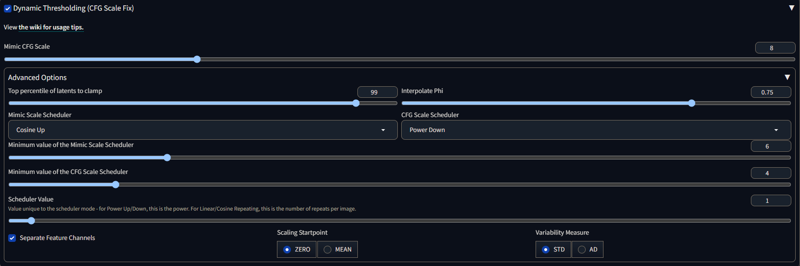 Please give it a try. I have made hundreds of tests of this setting that it will stablize a lot for your Futa output :)
Have fun and good night :)
Ver.1
Credit to:
The Realistic Futa generation model is inspired by Futagen made by stablydiffused and is based on Art & Eros (aEros) - A tribute to beauty made by aine_captain , AIroticArt's Penis Model made by airoticart.
How to get this model:
Roughly similiar as Futagen, using AIroticArt's Penis Model to let the other realistic based model know what is " futanari : the woman with penis". After processing, then blend it with Futagen, the consistent futanari but its style is more anime and cartoon.
Prompt recommendation:
Largely same as Futagen
Penis, frenulum, penerec, erect penis
p.s.
Using "futanari woman" but not "girl" , because girl contains latent information about female genitial which may distort with penis in weird chaos.
Naked body will have more consistent output, better more with "spread legs" added.
Interesting thing is that you may not put "pussy, vagina" into negative prompt.
Why? I guess because this is how the algorithm learn the concept, futanari, to substitute pussy with penis, so pussy here provide important location related info which tell the model where penis should be.
Limitation:
Cannot generate consistent and decent futa output when one or more clothes prompt exist.
Temporary solution:Try to use "AND" prompt grammar in Stable Diffusion, as it works to add two separate things together. So you may get a futa with clothes.
Using impaint "DDIM" sampler to re-paint clothes but remain penis as the original
"Spread legs" or the other sex related prompt may blend penis in anal with penis on your futa, so you need toy it around serveral times. (But if you like it..... :D )
Update 02/02/2023
Limitation 1: Cannot generate futa with clothes.
Example outputs: The first picture with black blouse.
Solution:
Using "Prompt Substitution", "Composable-Diffusion", details in Prompt Editing.
I will not dive too deep within the grammar, cuz it needs some time and practices with specific model. Then you can understand what prompt is the most suitable one.
To be brief, With prompt grammar we can firstly render male and then we render Futa.
Interesting thing is here. Algorithm will reserve space for male's penis because Algorithm take male's penis as granted but not the Futa's. So the interaction between penis and clothes is kept through male.
And through "Prompt Substitution", we can retain penis by using Futanari woman with .....(descriptive words about penis)... but add more Feminine adjectives at the same time to shift shape of male body into female.
As the output show, penis looks even better than directly rendering a Futa's penis (it may look very similiar but the way they comes from are totally different.). And clothes looks well too.
Hope this can help. :D
Enjoy~
Description
Please check the latest update info in main context.
Changes:
exchange base model
Merging path:
0.5(0.7(0.7(airoticartsPenis_10) + 0.3(chilloutmix_)) + 0.3(FutanariRealistic_step_3600_11_14)) + 0.5(futagen_2)
Features:
Better portrait
Better erect penis
Limitation:
Hard to generate flaccid penis since model weights about flaccid penis have been discarded before merging (which usually generates weird mess)
FAQ
Comments (6)
Is there any prompt to control the size and length of the penis?
No, prompt is a soft guide for model to generate outputs, but not exactly do what you want. You may try to ust inpaint mask or lora model weights to control size or length of penis. :)
@Miru00 Thanks for the reply. I use inpaint mask in img2imag mode, the generated penis length/size will exceed the mask/canvas/frame. Is there any prompts to limit the penis length/size not to exceed?
@Miru00 Invalid tested prompt:(penis length< canvas),(penis short than canvas),(penis fits canvas),(penis<canvas)
@Shirely Well, first, you should draw a penis-shaped mask, right?
And then, your "Mask blur" should be 4-8 around (This weight is to control how far beyond the mask boundaries should model to consider to blend with content inside the mask, so the mask boundaries will be natural but not be artificial or man-made like feelings.)
Your "Only masked padding, pixels" should be less than 32 (or larger, depends on what size of output you defined with Width* Height). This weight is to control how much is the object you defined with prompts variate inside mask! So, this is very important, if you want your "penis" exactly obey the mask shape, then you shoulde lower down "Only masked padding, pixels" , vice versa.
For other Inpaint parameters, i use
Mask mode: Inpaint mask
Masked Content: Fill
Inpaint Area: Only masked
Hope this can help you somehow :D
@Miru00 thx OP!
Unfortunately I use the Drawthings App Tool instead of WebUI... I cannot reuse the parameters you gave me, I will continue to try to generate results using prompt boot. I've actually generated some "readable" results, and I'll repost a comment (look forward to discussing suggestions).
Details
Available On (1 platform)
Same model published on other platforms. May have additional downloads or version variants.