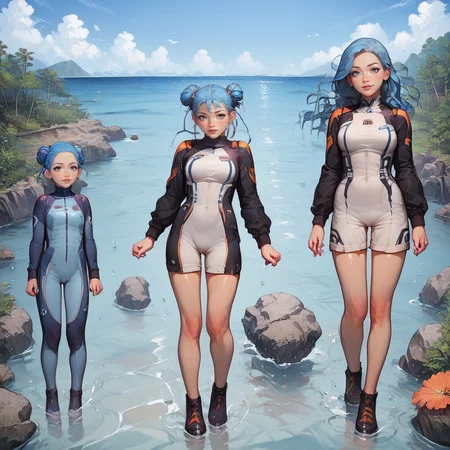
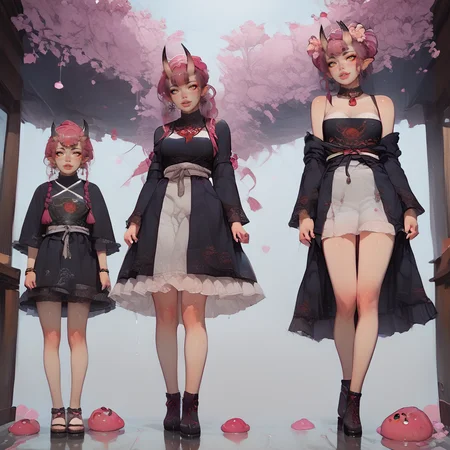
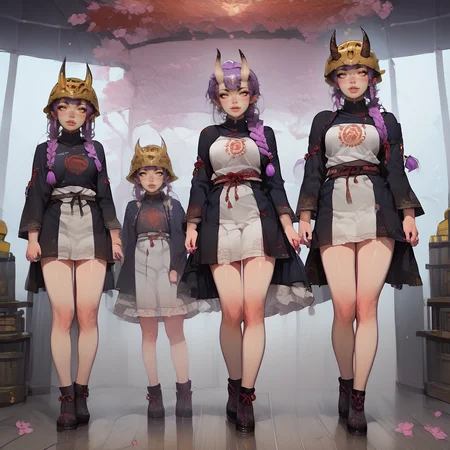
Dudes that was HARD 🥵
WARNING READ THIS :
-This lora will work far away better with Adetailer into faceyolov8
-If you want a background you'll have to use BG lora due to hard training. Check the amazing work of cocoat i used in those exemples. Dont forget to cheer him.
Here we go for my hardest project until now. A STABLE triptych of the same girl aging.
How to use :
For all generation
<lora:Age_difference_Lascalae_r1:1>, 4ge_pr0gress1on_lascalae, age difference, triptych, 3 girls, multiple view, clothed, sfw,1 NSFW can work. But you know the rules, leave the little girl in peace. Basicly just replace "clothed, sfw" by "naked, nsfw". You can specify the rules to the girl of your choice using this type of prompt :
BREAK
(first girl clothed, sfw:1.3),
(second girl clothed, sfw:1.3),
(third girl naked, nsfw:1.3),
Exemple of final prompt :
(score_9,score_8_up,score_7_up), __haircolor__, __haircut__ ,(all the girls wearing swimsuit:1.4)  , ((always 3 girls)),

BREAK

(detailed background:1.3),

BREAK

<lora:Age_difference_Lascalae_r1:1>, 4ge_pr0gress1on_lascalae, age difference, triptych, 3 girls, multiple view, clothed, sfw,
<lora:backgroundsetXL:0.7>, wood house, full of carnivorous plants,

------------------------------------------------------------------------------------
NEGATIVE NEGATIVE
SimpleNegativeV3, (deformed, distorted, disfigured:1.5), (mutated hands and fingers:1.5), monochrome background, furry, poorly drawn, bad anatomy, wrong anatomy, extra limbs, missing limb, floating limbs, missing fingers, elongated hands, disconnected limbs, mutation, mutated, ugly, disgusting, blurry, blurry eyes,  (closed eyes:1.3),(no background:2),
Weaknesses :
*Erase background due to hard training on white BG.
*For the moment nearly only one position. If people like the lora i'll do more.
Last tips :
*Remember to put "no background:2) to your neg. That will grantly improve your BG.
*Sometimes pushing background will erase one girl, or remove one. Just use (always 3 girls:1.3).
*Do not use "females", i trained for "girls"
*If you play a lot with the clothes adding (dress:2) to your negative can give you more flexibility.
If you like the LORA consider like, comment and posting image of your outputs here.
That'll give me tons of civitai points and i need them to train more.
Thanks for reading have fun kings
Description
V3 Age progression, age difference multiple view triptych.
FAQ
Comments (15)
If you like the project post your creation ;)
I feel like this would work well with region prompter. Ill give it a try and report back.
Hoho i didn't know this exist! Thanks, i'm having a look too.
@lascalae Ya. This reminds me a little of the split face LoRA that uses regional prompter. If you want some instructions, just look at the LoRA page. https://civitai.com/models/380125/split-screen-or-concept-lora-xl?modelVersionId=424387
@CountCandy @lascalae Works quite well with forge couple. Need to seperate the masks a bit and reinforce there only being 3 girls but it can be quite effective. I used /n to seperate out the different areas. I posted an example. Used Adetailer as well for the faces.
Hey. Back after some experimentations. It's not so wonderful for me, maybe i'm bad but i have really poor quality using region prompter or latent couple. Even with common prompt. What about you ?
@lascalae I have had some success, but that is without using your LoRA. I think you would have to retrain it with regional prompter in mind but this is certainly not my forte.
Very creative Lora!
I can't stop it from spawning four girls.
Did you try what I suggest in description. 4 girls is often because you use another lora which "take the authority" of mine. Use (always 3 girls:1.4) and lower the strength of other lora.
My training was always with 3 girls. So basically if you have four just find ways to boost my lora.
@lascalae I tried variations and combinations of 3girls and ((always 3 girls)) as in the prompt examples. Ultimately I resolved it by simply ignoring those tags and just specifying each individual girl.
Really wonderful idea, lots of fun! <3
Great idea, but very limited useability.
I want to like it, but can't reliably get rid of the cape/shawl/off-the-shoulder-jacket thing from #2 and #3, which kinda breaks it (kinda ironic that girl #1 is the only one who without forced clothing). Also forces a very specific look, pose, and expression, but lowing the lora's strength to the point it's no longer forced tends to completely kill the lora.
Lora outfits tend to bleed from girl to girl. I get that that's hard to prevent, but definitely a factor worth noting. Regular outfits do at lower strengths as well.
Also quite aggravating that height/age can't be adjusted at all, but that was mostly just me wanting a bigger difference between #2 and #3. Tried aging #3 to middle aged first, then shortening #2, then tagging it with child. Nothing worked.
The character I was doing was a slave (in rags), so the fancy coats REALLY stood out.
You're right : it has very limited use. Problem is this is a very hard model to train, so yeah it's hardcore trained
Works for specific situations. Adjusts clothes (dress with waist cape), cleavage, purple hair, makes a sword
My workaround. ADetailer it, hard. Use this lora to create the bones of the image (a couple different height blobs on a background is good enough lol) Works very well
Generate at half or 2/3s resolution
Upscale, I use lollypop for speed
Adetailer the whole image, twice, with lower (like 0.1) values of this Lora
Adetailer Person
Adetailer Face