




Read the version details and recommendations in the "About this Version" section first.
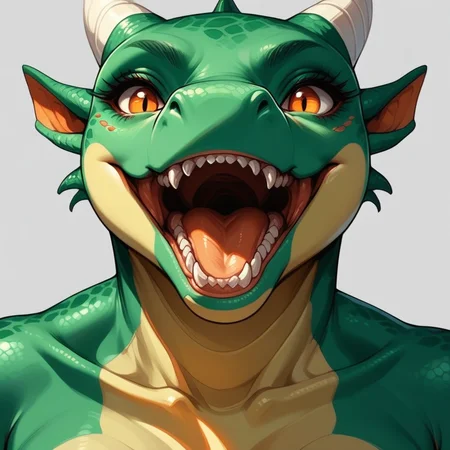
Lora for generating anthropomorphic Dragons (male/female) using different angles, styles, colors and poses.
1) This LoRA was based on the SDXL version
3) Even though the Pony V6 base model is used, some other models may have some inconsistencies in the images, especially in the eyes and hands, if used in Civitai, use some Embedding to get better results. For those who use Comfyui, the best results will be with some Hirefix / DDetailer to improve the image of the character's face.
4) Don't forget to use related tags if you use the pony model.
score_9, score_8_up, score_7_up, score_6_up, score_5_up, score_4_up,5) LoRA weight change in Civitai is at your discretion
6) Some SDXL/Pony models will have some kind of artifacts, distortions or will not be compatible with this LoRA, it is up to you to choose the best option.
7) For realistic models, I recommend using a Sampler from the DPM++ family or UNI PC if you are using ComfyUI
8) Steps and CFG use according to the model / LoRA author's recommendation
Below is an initial configuration, but any other type of configuration is up to you:
Model
Pony Diffusion V6 XL
Lora
Furry Dragon Lora - 0.5 ~ 1.0 (Preferably 1)
Advanced
CFG Scale - 5.0 ~ 9.0 (Preferably 8)
Sampler - DDIM / Euler a / Euler / DPM++ 2M Karras / DPM++ 3M Karras / Uni PC
Steps - 20 ~ 50 (Preferably 30)
Clip Skip - 1/2
VAE - none
Prompt (Positive)
score_9, score_8_up, score_7_up, dragon, furry, anthro, mythological creature, mythological scalie, mythology, scalie, tapering penis, erection, genital slit, genitals, membrane (anatomy), wings, tail, dragon wings, bara, muscular male, male focus, solo, muscular, 1boy, pectorals, abs, penis, large pectorals, nipples, erection, standing, horns, nude, thick thighs, looking at viewer, navel, veins, random posePrompt (Negative)
score_6, score_5, score_4, zPDXL-neg, 3D, human
As this model is based on Pony Diffusion there's not much need to specify anything in the negative prompt, because the Pony model is very flexible, but I always leave the zPDXL-neg tag (https://civarchive.com/models/332646/pony-pdxl-negative-embeddings).
General Observations:
Do not sell or commercialize this LoRA
Do not remove metadata from images generated by LoRA.
Description
About this version
More distant images may show some artifacts, distortions or disproportions in the face and hands when generating images in Civitai, which is why the recommendation of this LoRA is to use characters closer to the image or use some Embedding to reduce errors in the face.
FAQ
Comments (30)
Dude, I use Comfy, but even I don't understand everything here. Next time, write more clearly. Lol! Not everyone is a programmer who uses 1111 or Comfy.
What is Hirefix / DDetailer? UNI PC ???
I'll explain it without any problems :-D
Hirefix - This is the generation of high-resolution images, that is, you will enlarge the image (for example, from 1024px to 2048px) without losing any details of the image. In this enlargement, you can even add details that were not previously present in the original image. We generally use the most common ComfyUI node, which is SD Ultimate Upscale (https://github.com/ssitu/ComfyUI_UltimateSDUpscale). There is this article explaining it (https://stable-diffusion-art.com/comfyui/#SD_Ultimate_upscale_8211_ComfyUI_edition)
DDetailer - This is an automatic face detection and image refinement feature, that is, this component detects a face with poor details and can refine the image until it is in a perfect state. Here is an explanation of this feature in ComfyUI, to do so you need to download this node (https://github.com/ltdrdata/ComfyUI-Impact-Pack?tab=readme-ov-file#how-to-use-ddetailer-feature)
Uni PC - is one of the samplers that you choose when generating images, as it is one of the most recent ones created, you can have images with great results using just a few steps. I recommend reading this great article about it (https://www.felixsanz.dev/articles/complete-guide-to-samplers-in-stable-diffusion)
@homer_26 First time I've seen an explanation on this site. Thanks, man. (Hats off to you)
@Metisdark If you need help, I'm here to help. At first, I struggled using ComfyUI because of the complex terms and lack of explanation.
@homer_26 By the way, what do you think of Comfy? I used to use 1111 and recently switched to it. But since I don't have a 4080 or 4090, I didn't notice any difference in speed. Not at all. Continuing to use 1111 for there are no new features for me so far.
Since I mostly create characters (Pony models, Autism and so on), PERSONALLY FOR ME there is no benefit from Comfy at all. The same DDetailer is the brother of ADetailer for 1111.
ps: Yes, the problem of 1111 and Comfy is that programmers who create such programs, strangely look at the convenience and functionality. I myself spent hours until I was able to customize Comfy.
@Metisdark I use ComfyUI via Cloud because my notebook is a very old warrior, but its learning curve is very steep. I managed to learn by testing and playing with ComfyUI for 1 month almost every day. I only learned more about the custom nodes (DDetailer / Hirefix) more than 1 month ago.
If I could, I would prefer 1111 because it is much simpler. Sometimes I have to search for 3 / 4 / 5 nodes to do something. Besides, I have about 15 custom nodes for each type of profile when I want to generate images with different styles.
I recently created a workflow in ComfyUI that generates an image by mixing up to 6 LoRAS at the same time and it already comes out with the metadata ready for Civitai. There are other workflows for this, but they are broken.
I feel your pain.. I just spent like, 8+ hours trying to get 1111 working before I gave up. It wants pytorch installed, I go through the complex steps to do that, the program tells me it's not installed, I uninstall it, install the right version, program still tells me that it's not installed, I redo that process another time or two, I go to uninstall it again, and it tells me that I can't uninstall it because it's not installed, then I go to install it, and it tells me that it can't install it because it's already installed.. I'm almost about to have an aneurysm just thinking about it..
@Lazman I ran into the same problem, but it was Comfy! Lol! Eventually an update came out the next day and it started working fine for me (before that it stopped in the middle of generation because it didn't like something in Python).
@homer_26 I'll ask if you know or can give me a hint. Since I use mostly Pony, Autism. And most often my working LORAs are Incase, Vixon, ExpressiveH, so I faced this problem. Some poses or angles are very low detailed (I do on PC on 1111 and Comfy). I process then through Inpaint, but mostly details are not added at all. How to solve this?
@Metisdark Have you tried using ControlNet to create more personalized poses or angles?
@homer_26 From what I've read, ControlNet doesn't exist for Pony. And can this software help with detailing?
@Metisdark ControlNet exists for poney but you have to test it to see the best result, in my tests I use the model "MistoLine/mistoLine_rank256.safetensors" and with the parameters (Apply ControlNet Advanced): "strength - 0.9 / start_percent - 0.0 / end_percent - 0.9". If you want to test my workflow in ComfyUI, follow the link: https://files.catbox.moe/uldekn.json
@Metisdark These links also explain how they did pony testing using ControlNet:
https://www.reddit.com/r/StableDiffusion/comments/1beksma/control_net_for_ponny_diffusion_xl_6/
https://www.reddit.com/r/StableDiffusion/comments/1ccyrah/controlnet_for_pony_sdxl_or_pdxl/
https://www.reddit.com/r/StableDiffusion/comments/1dwlzbn/controlnet_for_pony_diffusion_v6/
@Metisdark Here is an example with images using ControlNet with the SymPonyWorld model:
1 - https://prnt.sc/qlmcOLL4UrgI
2 - https://prnt.sc/EC8pgS1QgNN2
Workflow
1 - https://prnt.sc/by7G85HMe9ff
2 - https://prnt.sc/ik7EdxEBv6jJ
3 - https://prnt.sc/LfDQjmhTYsT8
4 - https://prnt.sc/lwnoAGvlVUka
5 - https://prnt.sc/ykhCmxh9AeFc
6 - https://prnt.sc/XzsyXNdw_Uw-
7 - https://prnt.sc/2VTVzCSd_-PP
8 - https://prnt.sc/1QS7w5t5q39_
9 - https://prnt.sc/76lSbSKNCowF
10 - https://prnt.sc/pd-yDUG51yfy
11 - https://prnt.sc/grkG1ojrxd3j
12 - https://prnt.sc/3utRZ8YT0K73
If you have any problems with the workflow, download this one
@homer_26 Thank you so much for the step by step photos of the process and the article! I will sit down tomorrow to read and repeat everything.
Links - https://files.catbox.moe/uldekn.json and https://files.catbox.moe/5j9td1.json opens as a text file in a new tab.
@Metisdark You right-click on the link > save as > and then in ComfyUI click on Load to open these workflows
@homer_26 Just finished with the third link so far.
There are questions:
- Load control net model: which one is used for Pony? I have only one default diffusion_pytorch_model.safetensors.
- Apply Control Net: which force is used? I have that on 0.6 a lot of errors and there are normal photos, that on 1.0
Which brings up another question - to get a good variant, do I just have to generate a lot? For generally random. 4 bad generation 1 good.
- What other program can do (mask / negative) for the one at the link https://huggingface.co/spaces/pytorch/MiDaS seems to do what you need, but on them generates badly (Or is it designed to generate poses in solo? That is, not for two characters in the frame? For I tried the solo - great a lot of what I get and went to try a scene of two characters and there just full of image errors).
- Load VAE: only taesdxl works for me. Other errors show. Is this the way it should be?
- CLIP Set Last Layer: what is this? Should I put Lora before them or after them?
Note: i made (mask/negative) from a 1280-720 picture, i am trying the same format to generate. Is this where i am right?
-------------------------------------
I will now proceed to your option.
@homer_26
When loading the graph, the following node types were not found:
Reroute (rgthree)
UltralyticsDetectorProvider
SaveImageWithMetaData
FaceDetailer
KSampler (Efficient)
UltimateSDUpscale
SAMLoader
Nodes that have failed to load will show as red on the graph.
There's a lot missing. I'll try and figure it out.
@Metisdark To install the missing nodes in ComfyUI, click on Manager > Install Missing Custom Nodes, then install each one > restart
@Metisdark - Load control net model: MistoLine/mistoLine_rank256.safetensors (I recommend this one) or diffusers_xl_canny_full
- Apply Control Net: The higher the strength (from 1.0) the greater the fidelity to the image or chosen pose. In my case, for the example image, I chose 1.4, but depending on the model and LORA, this value can "blow up" the image, generating artifacts. So you can decrease it until you find an ideal value. Remember that ControlNet will not create an image that is "exactly the same" as the image, but rather very close.
When it is an image generated by pose (those stick figure drawings) it is easier to generate faithful images, however, to take poses from other images you will have to generate more images until you reach a satisfactory point.
- For poses I recommend this website (https://posemy.art/), you can generate a pose and then use it in ControlNet and the image generation will be correct.
- VAE: The 2 workflows that I left for you to download already include VAE automatically in the image generation and you don't need to worry when generating images for the Pony model, I already left it ready to avoid having to change it all the time
- CLIP Set Last Layer: Determines how many layers will be incorporated into the workflow. It is a very complex subject to explain in a few words, but I will summarize it as if it were an application of several layers to make the generation of images more refined. Generally, Pony models have Clip Skip (or CLIP Set Last Layer) set to 2, while SD 1.5 models have it set to 1.
ComfyUI recognizes the value the other way around, for example, Pony uses 2, in ComfyUI it recognizes it as a negative value (-2) and so on.
Note: I made (mask/negative) of a 1280-720 image, I'm trying to generate the same format. Is this where I'm right? Correct, it has to have the same formats as the original image
@Metisdark Here is a basic tutorial on ControlNet using those poses sites
@homer_26 That's what I've come to:
https://ibb.co/8swk2fY
https://ibb.co/xfzC2vp
https://ibb.co/86Y3010
If something needs to be thrown at Lore, others I have no idea what or where. I had to install Menenger, for I didn't have it. Torch Python broke along the way. After a couple of hours I updated everything I could, but it didn't download some things. And some of them I don't know where to throw (description on files for 1111, not Comfy)
Please give links to the files and the path where to put them.
@homer_26 Here I've taken apart the Daisy example:
https://ibb.co/YNV9NJX
There's not enough “wire” for one square. And as you can see, it doesn't work out (In this case I have a Model Pony) and LORA ExpressH
https://ibb.co/rszZPJ0
This is what happens when I swapped the painted girl (example photo) for a different photo. How to bypass it and why the error I still haven't understood.
The fact that the tab names already contain the path to the folder I only realized now. Lol!
1) Hmm. The error from - https://ibb.co/rszZPJ0 is strange. It can appear just when I change the photo and it can go away from me changing the promt somehow. Including negative. I don't understand what causes it and what removes it.
2) How do I turn on the ‘purple’ windows for lora?
3) And why is it not saving the generated photo now? At first I thought you didn't have the save module plugged in. I did, but still the Comfy Ui\ComfyUI_windows_portable\ComfyUI\output path is empty.
Edit:
I dumbed, it's calling it differently namefile now and that's why i can't see the photo. Do you always disable the save module?
4) How many tries does it take you to get a photo out of a ‘negative’? I put in a detailed picture with a pose (not a negative). Out of 12, none of them are even close.
@Metisdark 1 - Loader / Checkpoint Sym-Pony World - https://civitai.com/models/565749/sym-pony-world
2 - Upscale Model 4x_foolhardy_Remacri - https://huggingface.co/FacehugmanIII/4x_foolhardy_Remacri
3 - Rajii Style Lora - https://civitai.com/models/696131/rajii-style-lora
4 - Load ControlNet mistoLine_rank256.safetensors - https://huggingface.co/TheMistoAI/MistoLine/blob/main/mistoLine_rank256.safetensors
5 - If SAMLoader (Impact) gives an error, delete this node and find the newest version of this same node in ComfyUI itself in Search, for SAMLoader (Impact) to work, it has to have a model_name and device_mode
In model_name leave the option sam_vit_b_01ec64.pth
In device_mode leave it in AUTO
@Metisdark 1 - SAMLoader (Impact) error, see my previous comment to fix it
2 - The purple windows are "disabled" these windows are more LORAS if you want to add more than one, even if disabled it does not break the workflow, to activate them just click on it with the right click > bypass, then it will activate this other LORA, to deactivate it is the same procedure
3 - The photo is generated in the last node called SAVE WITH METADATA, because it will first pass through SAMLoader + Upscale and then the final result is generated.
The Preview Image below KSampler is for a better preview of what is being generated in the image, it is easier to cancel the image generation procedure before the final result
4 - I will show my entire procedure in a video, it will take a while to post but I will send you the link later
@Metisdark
I'll explain how this workflow works, sorry but my English is very bad, so I preferred to leave it on mute
Video 1 - https://streamable.com/fw640p
Video 2 - https://streamable.com/gda4hk
Workflow updated - https://files.catbox.moe/98edtx.json
Image Example - https://prnt.sc/1XtkXjgseumE
Image Final - https://prnt.sc/R03KGJDWm_XE
1 - It all starts with the Load Checkpoint, there I chose symPonyWorld
2 - Then it goes through the Clip Set Last Layer which is set to -2
3 - Now it goes through the chosen LORA called Rajii-Style_Lora
4 - Now it goes through the Prompt Positive and Prompt Negative
5 - Choose the image in the Load Image node so that the positive prompt takes all its characteristics.
6 - With the image chosen, it will now go through the Apply ControlNet (Advanced) node processing. I set the strength to 1.20 to make it look very close to the chosen image. Leave the other options as they are.
7 - Now Load ControlNet Model will model the image as chosen (MistoLine/mistoLine_rank256).
8 - Now it will go through KSampler (Efficient) to leave all the details you chose, such as Steps/CFG and Sampler_Name. Leave the other options as default.
9 - Going through the Preview Image so you can get an idea of how the image is
10 - Now the entire procedure is performed on top of the Upscale of the image, starting with the Load Upscale Model, choose any option but I prefer the model_name 4x_foolhardy_Remacri because it is more tolerant to several Pony models
11 - Now the Face Detector will come into action in the UltralyticsDetectorProvider node, choose the model_name bbox/face_yolov8m
12 - Now the SamLoader (Impact) will make small adjustments to the face, choose the model_name sam_vit_b_01ec64 option and leave the device_mode in AUTO
13 - The game of customizing and redoing the face now begins in the FaceDetailer node, leave the options at the workflow default
14 - You will see a preview of the remade face in the Convert Mask to Image > Cropped (refined) > Mask nodes, if your image is good the FaceDetailer will go straight to it and These nodes that I wrote before will have a black square, this is normal and means that you don't need to change the face of the image.
15 - Now before finalizing the image, we will perform an Upscale on the Ultimate SD Upscale node so that the image receives a final treatment and refinement, leave the default options
16 - Finally, the image will appear in the final result through the Save Image With Metadata node, to save the image, right-click > Save Image, you also have the option to open the image without saving it
@homer_26 There are no words. Good job! (@^◡^)
[English is not my first language either, so it's probably gibberish some time =D].
I have only three positions in the UltralyticsDetectorProvider. But I don't think it's a problem, because I'll use Inpaint to finalize it.
The HUGE PLUS is that in essence three versions of the photo are saved - created, after detailing and finished. You can copy any of them for processing at any time.
Since I'm creating characters, I need them to be as identical as possible so there's no dissonance. Including fiddling with clothes. Sometimes it's not possible at all. That is, I can create a hundred variations of ONE (maximally similar) character. You've given me new layers to work with (and more headaches =D).
How do I get a “similar result” in Comfy? That is, if I want one variation of a picture with minimal changes? (The person reaches for the cup on the table and the hand is gradually closer and closer) In 1111 I go img2img, put Denoising strength 0.5/0.6 (approximately) and get similar results. In Komfi in KSampler (Efficient) if I set 0.6 then a lot of things change - hair color, clothes and so on. Or do I just need smaller numbers?
Lora - there is a parameter Strength. This is the strength of the noise. What is str_clip for? I just do not touch it, it is always at 1.0, but how correct?
And I noticed that for some reason 1280 by 720 images turn out better (more clarity and detail) than in 1111. Why is that? (I'm talking about long and medium shots. Let's say three characters in 1111 in the middle ground will be poor detail and in Comfy it is better. But why if all parameters are plus or minus the same?
Though the stuff Regional Promter has gotten so far alas it can't replicate (Though I don't like RG for very poor controls, if your characters are uncharted by the system it's just a pain)
@Metisdark
In this case, depending on the number of Steps, the number of CFGs and the sampler used, unfortunately there is no standard for this method, you have to test to reach a satisfactory point.
Most of the time I spend 30 minutes or more to get an image that is almost the same, depending on the style or Lora the problem multiplies and I can't achieve the desired result, it's kind of frustrating because ControlNet helps more with the "similar/close" parts than the "same" part.
Lora - str_clip is the intensity of the Lora on the model or the intensity of the Lora on other Loras, usually the default is 1 because you will only worry about changing the "weight" which is the strenght_model.
Not only you, but I have seen many reports on reddit that most images come out better in ConfyUI than in 1111, I don't know because I have never used 1111 (there is no cloud service like ComfyUI)
Unfortunately, you will have a lot of headaches to make a character identical to the generated image, it is a very complex area and there is not much material on the internet detailing all the procedures, it depends a lot on trial / error and user discoveries.
@homer_26 I “try” to create identical characters. Over 15k generation trials and hundreds of pending pictures. Since the eye is often “washed out” I have to ask others how similar the character.
You are one of three people who gave me a boost in this creativity (I learned Photoshop, programming, Renpy, Kotlin, Generations). If I manage to realize myself in life, I will find a way to thank you for the push and direction. =)
@Metisdark I'm very happy that you're progressing, we're together on this journey, whenever I can I'm available to help and be helped. I still have to learn Python but JavaScript won't let me (lol)
Details
Files
Available On (1 platform)
Same model published on other platforms. May have additional downloads or version variants.