


Read Invisible Prompt On Civitai
Before 2 months ago,i reported this bug to civitai
https://civarchive.com/questions/349/why-cant-the-prompt-automatically-read-uploaded-images-now
but they dont keep more attention on it.
So i made this guide for Read Invisible Prompt On Civitai
1、Open your browser, such as Chrome, Firefox, Safari or Edge.
I use Chrome for example.
2、Go to the official website of the user script manager, such as Tampermonkey or Greasemonkey.
I installed Tampermonkey
3、Open this script and install it.
https://greasyfork.org/scripts/459579-stable-diffusion-image-metadata-viewer
4、Find a image on civitai,even it cant show any meta data.

For instance, I'll use the first cover of this model as an example.
5、Right click image and choose open with new tab
also you can choose copy the image address and open the new tab to browse it.

5.5 this BUG is fixed,dont need new extension for chrome.
Please update to version 0.24 over~
5. 5、If you cant see button in this example, it seems that latest browser Content-Security-Policy blocked script.
this is a BUG for script with lastest browser, wait to fix or use this extension to close CSP in png page.
https://chrome.google.com/webstore/detail/disable-content-security/ieelmcmcagommplceebfedjlakkhpden
Install this↑ and click extension button then background will be black and script button will show.

6、Left-click the button in the top left corner, and prompt you want to know will be displayed.
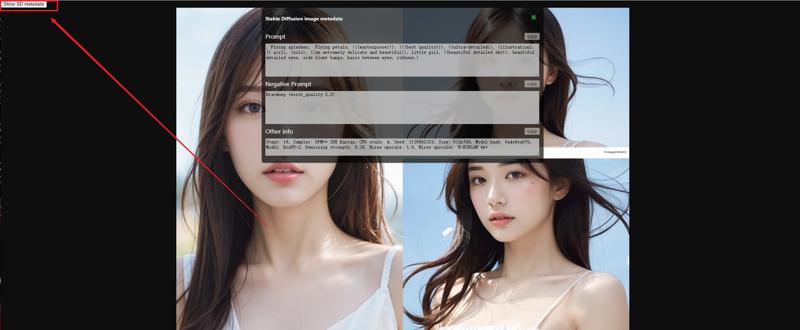
7、if you cant find button, it seems that this image dont have extra prompt.
Description
FAQ
Comments (26)
Pretty cool thanks!
thank u for commenting! Hope civitai fix bugs soon.
我打开BRA同一张图片油猴显示运行了一次但没有按钮

看了下是最新浏览器的CSP保护BUG,用另一个扩展关掉或者等原作者修复
作者修好了
Ok so, after hours of trying to figure it out, it seems that I havent been able to make that button appear. It doesnt work. I followed the guide step by step and did everything right, but it just doesnt work as intended. Do you know what could be the issue? thanks
Same. I even tried on the example picture.
@ghostpotato So did I. At first I thought it was my pictures the issues, but then when I tried on pictures of this website the problem was still there and most likely not my fault. I just wonder now if there is something else we should do to make this work. Im pretty sure this is not the full guide, there must be something missing.
@wl2991z it is a bug that lastest browser blocked this script,i try it and use another way to fix
@bdsqlsz Oh I see, it makes sense. Is there any way to make it work then? Can you upload a new guide about it? Thanks
@wl2991z i report for script author and updated new guide for fix this problem temporary.
need to install another extension to close CSP
@wl2991z OK,author fixed this BUG now,just update to 0.24 and it work well
@bdsqlsz OK, I will try. Thank you!
@bdsqlsz Ok, it seems that it works now. Thanks for letting us know what was wrong. And also, thanks for letting us know about this trick! have a nice day my friend. :)
will not work for me, no button
what is the use case? the prompt information is maintained in the EXIF data of the image (except for the issue civitai had with their hoster having scrapped some of the meta data in the past)... so if you go to file properties and comment field, you'll find all info there ready to copy and paste... OR you use the PNG info tab in A1111 or the image process function in vlad...
However, how can you know if this image has additional EXIF information before downloading it?
i just want to see EXIF on the Internet and especially for SD EXIF
Or you can just download the image and use PNG info tab on the WebUI.
快说多谢青龙哥
After installation, some pictures can display information, but some pictures still don't have any prompt. May I ask why? For example https://civitai.com/images/718148?period=AllTime&periodMode=published&sort=Newest&view=categories&username=mazz_w&withTa gs=false
most jpep dont have extra prompt...
Bonus: mixing this with Mouseover Popup Image Viewer https://greasyfork.org/en/scripts/394820-mouseover-popup-image-viewer