


FLUX COMPACT
I am excited to present a collection of compact Flux models, with Clips and VAE included in a single model, optimized to integrate seamlessly into a variety of existing workflows. These compact versions come with the various combinations of Clips and Models, ensuring that they can be easily loaded directly via nodes such as 'CheckpointLoaderSimple' and others, without the need for additional configuration.
As Sampler Node you can use the ones already present for SDXL using CFG 1, or you can use 'SamplersCustomAdvanced' that is dedicated to FLUX.
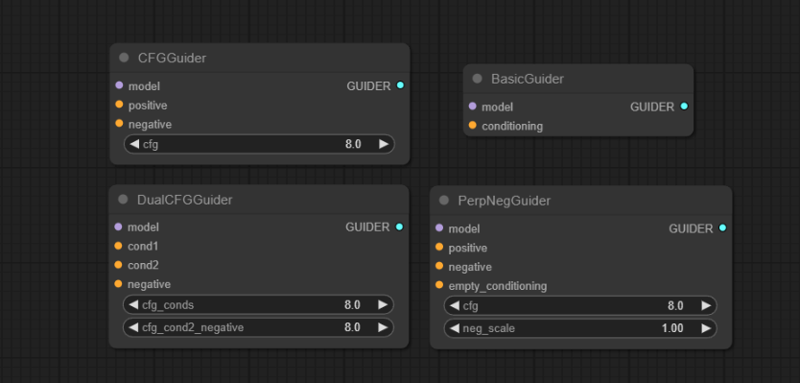
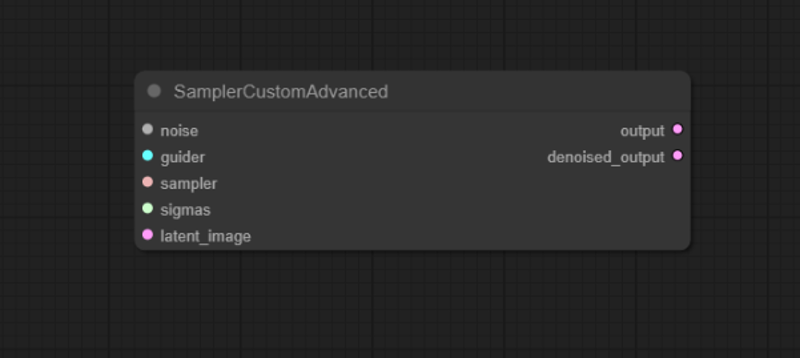 If you use the dedicated FLUX node above , you can use one of the 'Guiders' as nodes to manage the guidance instead of the 'CFG of the sampler'
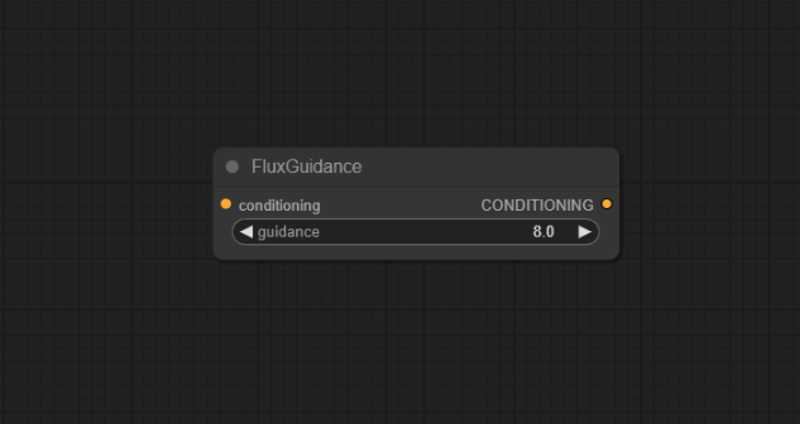
 if not, you can use the 'FluxGuidance' node placed between the prompt and the sampler to manage the guidance on the other samplers already present for SDXL, keeping their CFG at 1 and modifying that of the new node.
By reducing the final size by about 30%, these models are also accessible on less powerful machines, although I am not sure how this is possible. In my tests, I have not observed any differences in the generated outputs compared to the full versions.
Let me know more with your experiments.
I claim no credit for the original creation and publication of these models; all rights are reserved to 'Black Forest Labs' and their talented team. My goal is to make their excellent work more accessible to the community.
I hope these compact Flux models will be useful to you and contribute to your creative and technical endeavors. Your feedback is greatly appreciated as we continue to explore and refine these tools together.
Flux.1-Dev Compact
MAIN SAMPLER: Euler + Simple
NORMAL CFG: 1
FLUX GUIDANCE: 2+
BETTER STEPS: 20+
Flux.1-Schnell Compact
MAIN SAMPLER: Euler + Simple
NORMAL CFG: 1
FLUX GUIDANCE: 2+
BETTER STEPS: 4+
VERSIONS CONTENTS:
Flux.1-Dev fp8
Unet: Flux.1-Dev
weight_dtype: fp8_e4m3fn
Clip1: t5xxl_fp8_e4m3fn
Clip2: clip_l
VAE: ae_Dev
Flux.1-Dev fp16
Unet: Flux.1-Dev
weight_dtype: fp8_e4m3fn
Clip1: t5xxl_fp16
Clip2: clip_l
VAE: ae_Dev
Flux.1-Schnell fp8
Unet: Flux.1-Schnell
weight_dtype: fp8_e4m3fn
Clip1: t5xxl_fp8_e4m3fn
Clip2: clip_l
VAE: ae_Schnell
Flux.1-Schnell fp16
Unet: Flux.1-Schnell
weight_dtype: fp8_e4m3fn
Clip1: t5xxl_fp16
Clip2: clip_l
VAE: ae_Schnell
Flux.1-Dev fp16 ALT
Unet: Flux.1-Dev
weight_dtype: fp8_e5m2
Clip1: t5xxl_fp16
Clip2: clip_l
VAE: ae_Dev
Flux.1-Dev fp8 ALT
Unet: Flux.1-Dev
weight_dtype: fp8_e5m2
Clip1: t5xxl_fp8_e4m3fn
Clip2: clip_l
VAE: ae_Dev
Description
FAQ
Comments (24)
Nice ! Which ComfyUI workflow do you recommended for this compact model ?
Maybe try this: https://civitai.com/models/627377?modelVersionId=706825
You can use the basic workflow from Black Forest:
- Delete the Model and Dual Clip Loader and VAE Loader nodes.
- Add a Standard Load Checkpoint node and link that up and it'll work!
@Graybles thanks!
@bellissima3d thanks for the help! Nice Flow.
@Graybles perfect answer, thank you very much.
@Zojix you can also use XL workflows with CFG 1 and if you want you can insert the 'FluxGuidance' node between the prompt and the sampler to manage the guidance.
'Euler' as a sampler and 'simple' as a safe scheduler work, I haven't had the chance to experiment well with the others yet.
Sorry but where do you download the basic workflow from Black Forest? I'm not sure what site it's located on? Thank you.
Thanks for model! That's the only FLUX model, which is working on my laptop. Any plans for reducing Schnell model?
I'm glad the upload was useful, the other versions will arrive by tomorrow, I'm a bit busy.
Amazing work! This makes it so much easier and the loading speed increases drastically!
kkkkkkkkkkkkk
Is it normal to get blurry images with cfg 2 to 3.5?
i only use CFG1 with Flux . Works best that way
@cathyleverman yeah i realize now, don't know why some Pages recomend 2 to 3.5
@Graybles if i do that its make The image all blurry
@cathyleverman @Graybles @P_Universe thanks for the feedback, I will implement the description with the correct usage right away, I am still in the experimentation phase too.
The basic CFG of the ksampler that for now definitely works is 1, you can insert the 'FluxGuidance' node between the prompt and the sampler, so as to manage it from there. Updates will arrive as I experiment with it.
@P_Universe "Flux-dev is a distilled model. It is recommended to set CFG=1 and then do not use negative prompts. Using “Distilled CFG Guidance” instead. The default value is 3.5." igtfy
@cathyleverman @P_Universe @dirtyape I improved the description with additional information if you want to check it out. I will improve it further soon, as I clarify my ideas as well.
@ALIENHAZE much appreciated!!
@P_Universe 😊
Many thanks for this, does anybody happen to have a working fix for the GPU not being used issue? " 1Torch was not compiled with flash attention. " - a single image generation (20 steps) takes me a 10+ mins and I don't (or barely) see my GPU being used. Many thanks
This is great, and much faster, but it uses fp8 of dev and over a bunch of tests, it was noticeably less likely to render text on a costume for example than full fp16 of dev. No question it's a much better alternative to schnell for general rendering and then use the full when you want the final details in there.
I also loaded the other versions, if you want to take a look, the weight of the model made me take longer than expected. The Dev version is more efficient and actually does not consume too many more resources than the Schnell, performing better. At very low steps, (4-10) it is excellent for a first generation but needs to be refined with an xl model or higher steps, so at this point it is better to use the Dev version unless you have less than 12Gb of VRam. Between the fp16 and fp8 versions, however, the differences are felt more, especially in the details, where the fp8 starts to struggle a bit, but also the load on the GPU especially on not very performing machines.
@ALIENHAZE I would say where this shines if you want to latent upscale. On a 4090 with 24gb it gives you enough breathing room to fit everything in vram while still having enough to upscale without going over.