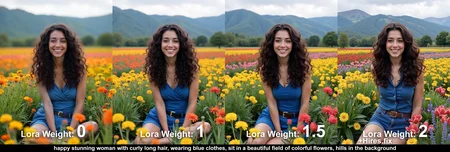
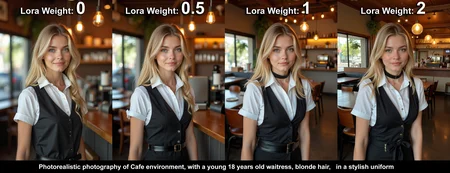
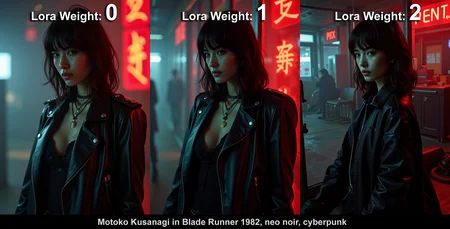
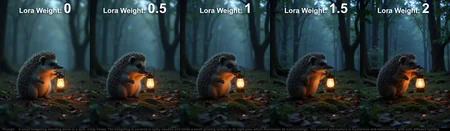

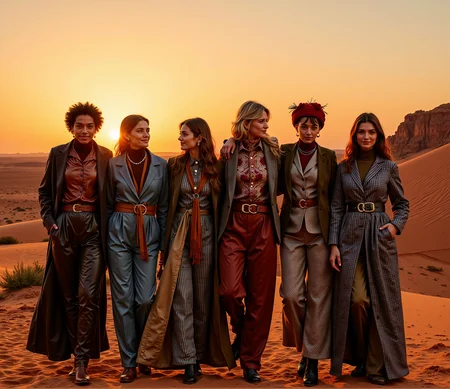
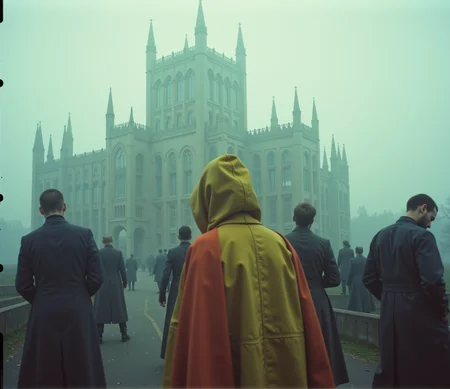
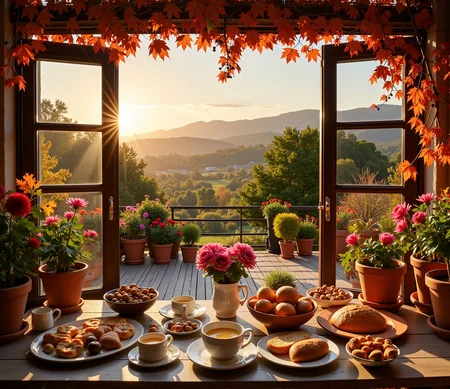

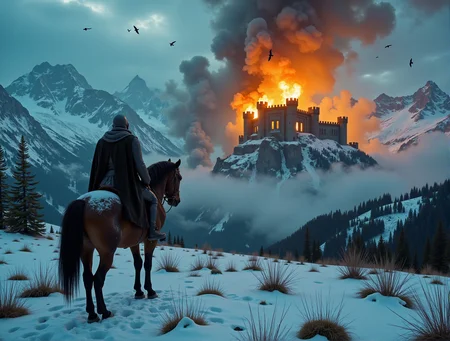
AntiBlur Lora has been significantly improved!
Improvements in new Lora:
DoF can be adjusted by Lora's weight.
So a weight of 0 will give a shallow DoF, typical for Flux generations.
A default weight of 1.0 will reduce DoF to a (hopefully) more pleasant image, without significant changes in style and composition. The goal was to get DoF at weight 1.0 to be exactly how you'd expect it to be: minor good bokeh here and there, without overdoing it as is often the case with Flux (more on that later)
A weight of over 1.0 can be used to make shots with deep DoF. Lora can handle weights up to 3.0 and beyond without significant degradation in quality.
Stylistically neutral
The dataset was made from hundreds of images created with Flux, so as not to take the style too far from the original model, while small number of real photos were used to keep Flux from degrading in composition (which is what happens when you train AI on it's own pictures)
Pairs well with Hires. fix
This Lora works well with hiresfix, allowing you to further increase the details and minimize shallow DoF. This was not the case with basic Flux, because by trying to do hires. fix to a blurred image with shallow DoF, it'd stil remain blurred with the same DoF effect. You just need the details to start appearing in the image, for hires.fix to improve them further.
No more Trigger words
Just connect the Lora and it'll do the job
Much less artifacts
Using Flux-generated images minimizes artifacts. I also trained a lot of models, and made a merge of the best of them, using tool provided by anashel (This smoothed out the edges of individual models that led to artifacts. Also, merging turned out to be especially useful for making the model more stylistically diverse.)
Why does Lora weight 655mb
It seemed to me that Lora with basically a "deep DoF" effect should be small, as it doesn't introduce a new style or concept, it just has to remove shallow DoF.
So I tried different Lora ranks, but as it turned out, information about the backgrounds is everywhere in the latent space, and the larger the model, the better results it gives. That's how I settled on the 128-rank Lora.
It's possible to isolate Lora's layers, and only use layers with DoF information in them, but as it turned out, information about DoF is scattered throughout most of the layers. For example, when generating macro shots, DoF is generated from the first layers. Information that appears in the backgrounds is really everywhere in the model, and constant shallow DoF is just the way training data was like for Flux. To make matters worse, Flux has a really poor understanding of DoF and blur conceptually. So not only it is present in much bigger amount than SD1.5/SDXL, it also provides much worse control over it than SD1.5/SDXL.
How was this Lora made
First, I put together a huge dataset with focus stacking techniques and deep DoF, on this I trained a new Lora. Next, using this Lora, I created images for a new dataset.
I've got several hundred variants of the "antiblur" Lora, selected the best ones each with their advantages, and combined them into a one well-balanced model.
What's next?
Since the higher the rank, the better the quality, the obvious way to improve the result would be to train a full finetune (and effectively touch every corner of the latent space, where there is information related to backgrounds), and then extract the Lora.
Another theoretical option is to find the "blur" or "dof" concept/weights in Flux latent space, and make a Lora out of inverted weights. This method wasn't very effective for dof control in SD-based models though.
As of now though I'm happy with the result. The model will remain my best effort for a while
Description
AntiBlur Lora has been significantly improved!
Improvements in new Lora:
DoF can be adjusted by Lora's weight.
So a weight of 0 will give a shallow DoF, typical for Flux generations.
A default weight of 1.0 will reduce DoF to a (hopefully) more pleasing image, without significant changes in style and composition. The goal was to get DoF at a weight 1 to be exactly how you'd expect it to be: minor good bokeh here and there, without overkills inherent to Flux (more on that later)
A weight of over 1.0 can be used to make shots with deep DoF. Lora can handle weights up to 3.0 and beyond without significant degradation in quality
Stylistically neutral
The dataset was made from hundreds of images created with Flux, so as not to take the style too far from the original model, while small number of real photos were used to keep Flux from degrading in composition (which is what happens when you train AI on it's own pictures)
No more Trigger words
Just connect the Lora and it'll do the job
Pairs well with Hires. fix
This Lora works well with hiresfix, allowing you to further increase the details and minimize shallow DoF. This was not the case with basic Flux, because by trying to hires. fix a
blurred image with shallow DoF, it'd stil remain blurred with the same DoF effect. You just need the details to start appearing in the image, for hires.fix to improve them further.
Much less artifacts
Using Flux-generated images minimizes artifacts. I also trained a lot of models, and made a merge of the best, using tool by anashel (This smoothed out the edges of individual models that led to artifacts. Merging turned out to be especially useful for making model stylistically diverse.)
Why does Lora weight 655mb?
It seemed to me that Lora with basically a deep DoF effect should be small, as it doesn't introduce a new style or concept, it just has to remove shallow DoF.
So I tried different Lora ranks, but as it turned out, information about the backgrounds is everywhere, and the larger the model, the better it gives the result. That's how I settled on the 128th-ranked Lora.
It's possible to isolate Lora's layers, and only use layers with DoF information in them, but as it turned out, information about DoF is scattered throughout the layers. For example, when generating macro shots, DoF is generated from the first layers. Information about backgrounds is really everywhere in the model, and constant shallow DoF is just the way training data looked for Flux. To make matters worse, Flux has a really poor understanding of DoF and blur. So not only it is present in much bigger amount than SD1.5/SDXL, it also provides much worse control over it.
How was this Lora made?
First, I put together a huge dataset with focus stacking techniques and deep DoF, on this I trained a new Lora. Next, using this Lora, I created images for a new dataset.
I've got several hundred variants of the "antiblur" Lora, selected the best ones each with their advantages, and combined them into a one well-balanced model.
What's next?
Since the higher the rank, the better the quality, the obvious way to improve the result would be to train a full finetune (and effectively touch every corner of the latent space, where there is information related to backgrounds), and then extract the Lora.
Another theoretical option is to find the "blur" or "dof" concept/weights in Flux latent space, and make a Lora out of inverted weights. This method wasn't very effective for dof control in SD-based models though.
As of now though I'm happy with the result. The model will remain my best effort for a while
FAQ
Comments (47)
Wow, great work on v1.0!
I hate these blurry blur backgrounds ! ;) thanks a lot !
Works pretty well. Even with character loras.
Maybe you should call it DOF control, since blur and DOF are not the same thing. It is not a background blur either, it is a range, where the subject is perfectly focused, and the blur is both in front and behind. Also that style of a small DOF, is the natural behavior of very high quality professional lenses.
Anyway, great work, and a great tool to add control to Flus. Thanks
I agree, "DoF tweaker" or "DoF control" would be a better name, or atleast a more technically correct one. Anti-Blur on the other hand is intuitive name for non-technically savvy users. That's what people got used to, so I have to stick with that.
But you can always rename your local file to whatever suits you
Is this a fp8 or fp16 Lora ? I want to merge your lora into my model to eliminate the blur but not sure can it be merged
fp16
fun fact: this LoRa can be used with negative values (like weight -2.0) and it will produce even stronger bokeh effect, than Flux does normally
this the same as on shakker HF ye?
yeah, i gave them permission to publish it
@VadimFedenko what will you do with all the money? :D
@tazztone think shakker making money on this? I spend quite some money developing models without getting a dime back. this is purely a project for the community, unprofitable for me. I gave Shakker the rights for free, for the sake of the model's exposure. I don't think they earn anything from it, but I might be wrong
@VadimFedenko just found this in onetrainer readme: "Hardware for development sponsored by shakker
maybe they can send u a 4090 for your LoRA :P
@tazztone the lora was actually made using mainly 4090. would be nice to have another one, indeed. and I didn't know they sponsored anything, that's cool. got no hopes getting money from them though :P
The LoRa is very good, thank you, and the comment below is not a complaint about the model but something to just be aware.
seems to not apply if you have a prompt like "perfect dog"
thi lora is amazing, i have no promblem with my multiple lora :) Thanks Bro!
Works great! I tried posting a before and after but I'm a doof and deleted while I was rearranging. Anyway great job!
Does an amazing job at removing the blur. I was going crazy trying to get flux to not add blur.
Drastically changes the original image and creates a completely different character... how can I fix this?
sounds weird. does it change the composition even on low weights, like 0.5-1?
Heya really enjoy this one, love the added quality, just curious - Why is this lora so big? I've seen other flux quality loras like faetastic can be like 20mb.
you can take a look at description, there are a couple of paragraphs on why the lora ended up this big. quantizing it to fp8 could reduce the size by 50% though. my other loras are much smaller, but this one had to be big
Hi, does it work with Flux Schnell?
Thank you, this Lora is amazing. I have tested it with lots of models, and I prefer the strength set at 1.0 and 1.5 for outstanding results. I am looking forward to testing any other Loras you bring out
Works great at strength 2-3 thank you so much! You're a legend
Just ... amazing!!! Thank you!
Well done!
It works amazingly!
Thank you a lot! :)
Thank you! Oh and no keyword, what a relief.
This is amazing, thank you so much for this. This helped me to get perfect stock photos without the annoying bokeh for my work. I'm super happy man
Maybe i'm doing something wrong, but every backgroud is still blurry. Tried weights from 1 to 9. I should add i tried this on Schnell.
yeah schnell is not properly supported. the training was done on dev version
fantastic lora! truly superb!
Doesn't work for me, I've tried several weights and I do use Dev model
Amazing, works as expected with Flux Dev
not working
Hello!
I tried to use LoRa with flux1_dev_Q5.gguf, and each time it fails when ComfyUI tries to patch the data. Do you have any solution?
This is a must for Flux imo.. at first the DOF was pretty sick for me really cool but the more I used it the more annoying it become haha
What is the difference between this one (655mb) and the one on huggingface (687mb)? I find the sizes are different.
the file here is an original model by me. the one on HG is supposed to be the same model, but uploaded by Shakker. I don't know for sure if they have modified it, maybe they changed the meta-data or something. I'd recommend using the model from here
Are you planning to train a lora in qwen-image? I find it also tends to blur background, although the overall quality is better than flux.
Or, could you please provide more details about how to train this lora? I find it critical in applications.
I like qwen too. Will think about training Lora for that
@VadimFedenko hi, do you have any update?Or could you write some tutorial about how to train this lora?
I set the weight to 2, but the background is still blurry in SimpleSDXL2!
Works great in Flux.1 Dev in SwarmUI! Thanks a lot! Before this I had a futile fight with DOF in Flux - now this fight is over!
This appears to widen the FOV, which is really interesting because in some models you can see it filling the more space with more people as you apply LORA strength.
Hey guys, what is this "hiresfix" mentioned, or which one is a Lora? I'm not really finding it.
Would love to see a Krea2 version if you're willing. Thanks!
Details
Files
AntiBlur.safetensors
Mirrors
AntiBlur.safetensors
AntiBlur.safetensors
AntiBlur.safetensors
AntiBlur.safetensors
FLUX-dev-lora-AntiBlur.safetensors
AntiBlur.safetensors
AntiBlur.safetensors
59-AntiBlur.safetensors
FLUX-dev-lora-AntiBlur.safetensors
FLUX-dev-lora-AntiBlur.safetensors
AntiBlur.safetensors
FLUX-dev-lora-AntiBlur-scale2.safetensors
AntiBlur.safetensors
FLUX-dev-lora-AntiBlur.safetensors
FLUX-dev-lora-AntiBlur.safetensors
FLUX-dev-lora-AntiBlur.safetensors
Flux-降低背景模糊.safetensors
FLUX-dev-lora-AntiBlur.safetensors
AntiBlur.safetensors
AntiBlur.safetensors
AntiBlur.safetensors
AntiBlur.safetensors
AntiBlur.safetensors
FLUX-dev-lora-AntiBlur.safetensors
AntiBlurflux.safetensors
FLUX-dev-lora-AntiBlur.safetensors
flux-AntiBlur.safetensors
AntiBlur.safetensors
test_anti_blur.safetensors
AntiBlur.safetensors
AntiBlur.safetensors
FLUX-dev-lora-AntiBlur.safetensors
merlin-anti-blur.safetensors
AntiBlur.safetensors
AntiBlur.safetensors
AntiBlur.safetensors
AntiBlur.safetensors
AntiBlur.safetensors
FLUX-dev-lora-AntiBlur.safetensors
AntiBlur.safetensors
AntiBlur.safetensors
FLUX-dev-lora-AntiBlur.safetensors
Anti_Blur_FLUX_[VadimFedenko].safetensors
Available On (5 platforms)
Same model published on other platforms. May have additional downloads or version variants.