You can see additional tips and downloads in the gray boxes within the workflow.
To install the missing nodes, go to "manager - Install missing custom nodes".
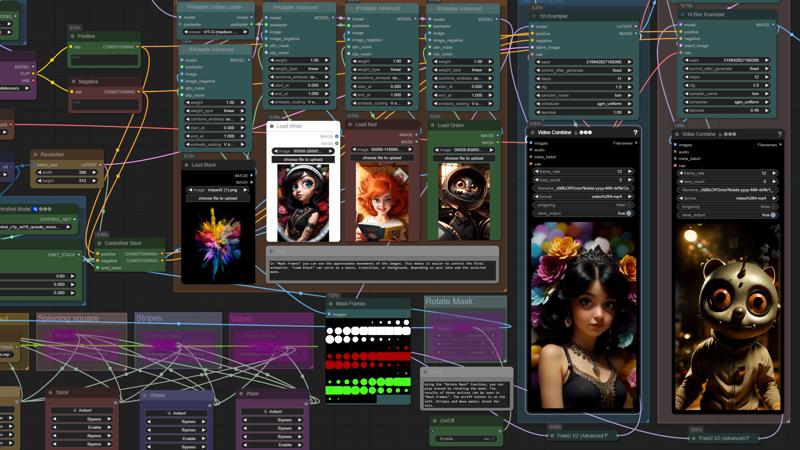
All you need to do is load the images into "Load Black", "Load White", "Load Red" and "Load Green". In "Mask Frames" you can see the approximate movements of the images. This makes it easier to control the final animation. "Load Black" can serve as a basis, transition, or background, depending on your idea and the selected mask.
Description
FAQ
Comments (19)
I get an error message that I cannot figure out which node it is referring to. I don't see any SimpleMath+ nodes either. Do you know where the error might be coming from?
"Prompt outputs failed validation SimpleMath+: - Return type mismatch between linked nodes: b, INT != INT,FLOAT - Return type mismatch between linked nodes: a, INT != INT,FLOAT"
Did you change anything? "SimpleMath+" is under "ControlNet Stack".
@Titto13 I figured it out and it's working now. I had to update my custom nodes. The Simple Math node was hidden behind another node so I was having a hard time finding it. Thanks!
it worked for me, thank you but i want add more images, what should i do?
Is it important for you to do this with a specific mask? I remind you that there are 4 of them in this workflow.
this is awesome, I was able to get my first generation working on the first try, after setup!
Glad you liked it) Thanks for buzz)
I've been trouble shooting this for the last few hours, I keep getting File "asyncio\events.py", line 84, in _run
File "asyncio\proactor_events.py", line 165, in callconnection_lost
ConnectionResetError: [WinError 10054] An existing connection was forcibly closed by the remote host.
- Edit, I'm still getting the error, but switching from Brave to Chrome browser at least let it finish the animation, not sure what the error is though.
Which node is highlighted in red in workflow when this error occurs? Your comfyui is open in one tab or several with this error?
@Titto13 no red at all, I've been watching the renders happen and it happens continuously in the command prompt at certain stages, sometimes when upscaling, and I checked the model, It's as if, when processing, one of the steps is trying to contact a port that just isn't responding, After I switched to the Chrome browser the animation goes through, but when it comes to the last step to upscale it, it will keep sending and failing. Also, I just have one tab open when running comfy. While I have this reply open, I have all the same models you're using, but while you're getting much more realistic animations, mine are all very animated, almost hand drawn. - edit on the quality, I thought I checked the checkpoint, but I missed it with all the windows, oops. I'm still confused how to edit the motion though because the mask shown is not like the single swirl or zoom mp4s I'm used to.
@fluxbloom Sorry, I didn't understand much from your answer. Try writing again. Try updating comfyui and nodes.
@Titto13 I updated already before I wrote the post, there are no errors in the UI popping up, it's all in command prompt, It's been happening with other workflows as well, not just yours. After seeing the .py, I updated python and no luck. I researched, "asyncio\proactor_events.py" the terms in the error and there is a history of it happening before but I can't find a fix. Hope this is clearer.
@fluxbloom since this happens with other worker processes, the problem is either with comfyui itself or with the video card drivers, or with windows. Are you using comfyui portable?
@Titto13 Is there an issue with ComfyUI portable? I downloaded both of them, and I wasn't sure immediately but I just checked and yes I am using portable. Is it configured differently and that's causing the issue? I saved the workflows, so that should be an easy fix if that's the case.
@fluxbloom no problem this is the right choice. Unlike the regular version, python is already installed inside it. Try reinstalling it completely. Don't forget to save the models so you don't have to download them again.
@Titto13 Alright, I'll try that, finger's crossed :) Thanks for trying to troubleshoot this.
sorry, appreciate your work but i can't get it working. i am getting this error if anyone knows how to fix it
thanks you
Error:
VHS_LoadVideoPath
https://i.imgur.com/mUaiPws.mp4 could not be loaded with cv.
node 827, looks like it tries to pull a video from img.ur on using node 832 but fails. i have no idea how to get this working. i can load the video if i paste the url into my browser.
@jgillservices377 I checked, everything works. If you change something in the workflow, I advise you to run without changes and try again. And then update Comfuy and nodes. There seems to be nothing complicated here, there seems to be nothing to break. If all this does not help, try going to Custom Node Manager finding ComfyUI-VideoHelperSuite remove it and install it again.