
















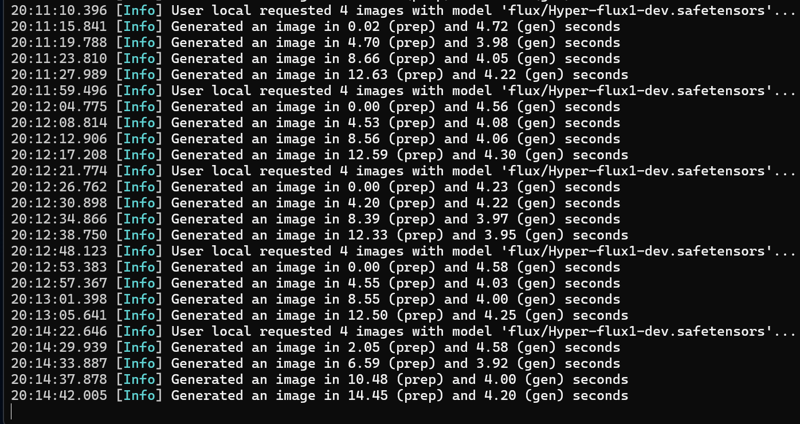
>Make sure the model goes in the UNET< folder and you may notice better image quality with the "flux guidance scale" set to 3.0-3.5, that will vary depending on your taste.. Let me know if you have any issues and a huge thank you to @Grumblebutt for the assistance in testing. This terminal window is generating with this Hyper model, 8 steps, 1 cfg and 896x1152 image size.
I use SwarmUI for 95% of my image generations and encourage you to try it out! Here's the link to the GitHub repo and also checkout this install video from Kleebz Tech AI to get you started!
This hyper dev model you might want to check out.. Checkpoint goes in the unet folder..
8 steps with cfg 1
Original model posted on hugging face by bdsqlsz. I'm reposting it here to CivitAI because it's that good! Do NOT tip me for this model, I didn't create it nor am I taking credit for it.. Click the link above and follow the creator on Huggingface..
I'm getting 4 seconds on my 4090 with 8 steps
Description
FAQ
Comments (8)
I understand it's just a repost, but could you at least explain the difference between these and the other Flux models?
If he merged the lora, why do you need another lora?
Update: I'll leave this thread for visibility but the contents are outdated since the issue with the Lora was figured out and now the model alone works great in 8 steps.
I got it working in ComfyUI but, honestly, it's pretty disappointing to say the least. The output doesn't really look much better than normal Dev does at 8 steps. If you do want to try it then here are 2 tips:
* Distilled guidance needs to be around the normal 3.5 for Dev
* The Lora model strength needs to be around 0.5. It produces spaghetti garbage beyond that and noisy garbage below.
In truth, even at 0.5 it produces noisy garbage but it's the best I could get out of it. My opinion is to save your download and use Schnell if you want fast. Schnell can be just as good as Dev imo with a good upscaling step.
have you uploaded a nf4 version for forgeUI ?
8 steps seems to be the sweet spot for this model. I tried going up to 10 and 12 with very little noticeable benefit. I also tried it at 2, 4 and 6 steps but the extra speed didn't seem worth the degradation in quality.
This is a full model, 24GB of graphics memory is not enough, how did you manage to generate images in 5 seconds with a 4090 graphics card, every time you generate an image, it need to exchange model data with the memory.
GGUF Q4 or NF4 versions?
what am i missing to run this, other flux models work but this cicks out this, link to missing clip file please
File "C:\webui_forge_cu121_torch231\webui\backend\loader.py", line 59, in load_huggingface_component
assert isinstance(state_dict, dict) and len(state_dict) > 16, 'You do not have CLIP state dict!'
AssertionError: You do not have CLIP state dict!
You do not have CLIP state dict!
Details
Files
Available On (1 platform)
Same model published on other platforms. May have additional downloads or version variants.