🚨 IMPORTANT - PLEASE READ EVERYTHING 🚨
YOU MUST USE ALPHA CLIP AS WELL. PLEASE DOWNLOAD IT BY CLICKING ALPHA CLIP AT THE TOP BAR. FOLLOW USAGE INSTRUCTIONS BELOW FOR INSTALLATION.
This model is an early experimental model of our future planned Flux model. It it NOT representative of a final product and has not undergone the necessary training to be considered so. Many tags have not been included within the model for the purpose of this alpha. You may experience certain problems relating to prompt cohesion, text legibility, species understanding, anatomy, style, and backgrounds. LoRA’s that have been trained on this model may or may not work in future iterations of the model. ANYTHING WITHIN THE MODEL IS SUBJECT TO CHANGE.
Join Our Discord Server!
We have a Discord server where we provide updates on our models, take feedback relating to our models and generally enjoy a good chat. We’d love to see you there!
Recommended Settings
For optimal results with our model, we recommend the following settings:
Resolution: 1024x1024
Steps: 15-30
CFG: 1 (Disabled) or 2-4
Guidance: 4
CFG Skip Steps: 4
The choice between CFG 1 and CFG 2-4 depends on your specific needs:
CFG 2-4 advantages:
Produces more coherent text, even with lower step counts
Can generate more detailed images or results closer to base Flux
CFG 1 advantage:
Faster generation times (about half the time of CFG 2-4)
We recommend experimenting with both to find your preference. If using CFG 1, you may need to increase the step count for more coherent results.
When using CFG 2-4, it's crucial to skip steps. We suggest skipping 4 steps at 15 total steps. If your generations appear very blurry and blue, try increasing the number of skipped steps. Our ComfyUI workflow will handle this automatically.
Usage Instructions
Please download the ComfyUI workflow from the link below, or via Suggested Resources on the CivitAI page.
https://huggingface.co/lodestone-horizon/furry-flux-pilot-alpha/blob/main/comfy-workflow.json
Click </> raw
CTRL + S
Save to a location that you know.
Then drag and drop this workflow into your up-to-date ComfyUI interface.
If you do not have ComfyUI, please follow these installation instructions:
https://github.com/comfyanonymous/ComfyUI?tab=readme-ov-file#installing
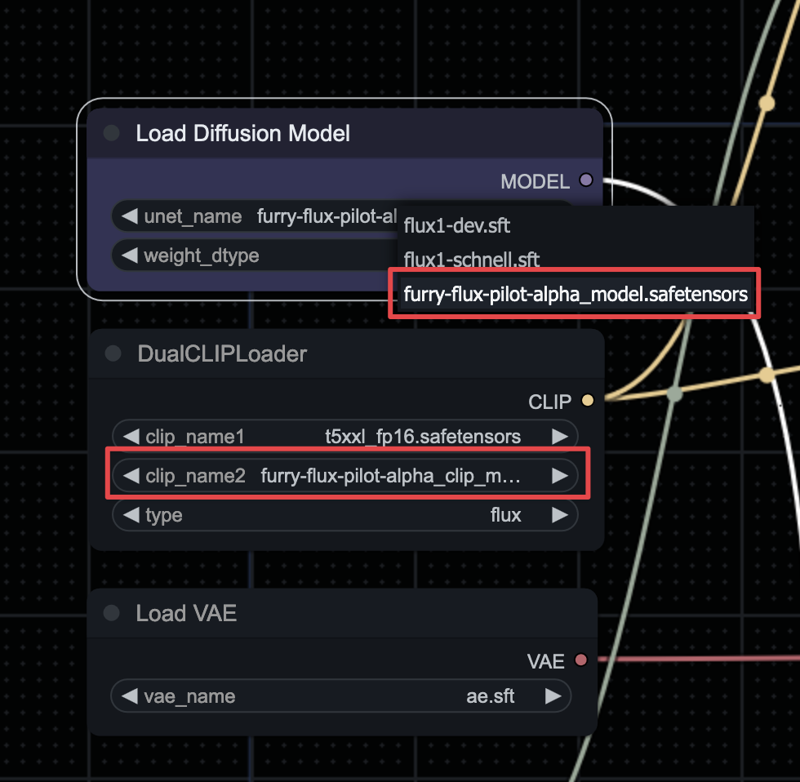
CLIP and "UNET": Once you have loaded the workflow, you must select the appropriate CLIP and “UNET” model. The model should be placed in (ComfyUI Folder)/models/UNET and the CLIP model should be placed inside of (ComfyUI Folder)/models/CLIP
VAE: You must also download the VAE that provided with this model. You do not need to do this if you have already downloaded the FLUX.1 Dev VAE. The VAE should be placed in (ComfyUI Folder)/models/VAE
T5: You must also download T5 which is provided in Suggested Resources. You do not need to do this if you have already downloaded T5. T5 should be placed in (ComfyUI Folder)/models/CLIP
If you have placed these files after the interface has already been loaded, please refresh the page, otherwise they will not appear.
Both the “UNET” + CLIP was trained with this model, so it’s vital to use both of them for appropriate performance. You must download both files available. In the workflow, you should select your model files here.
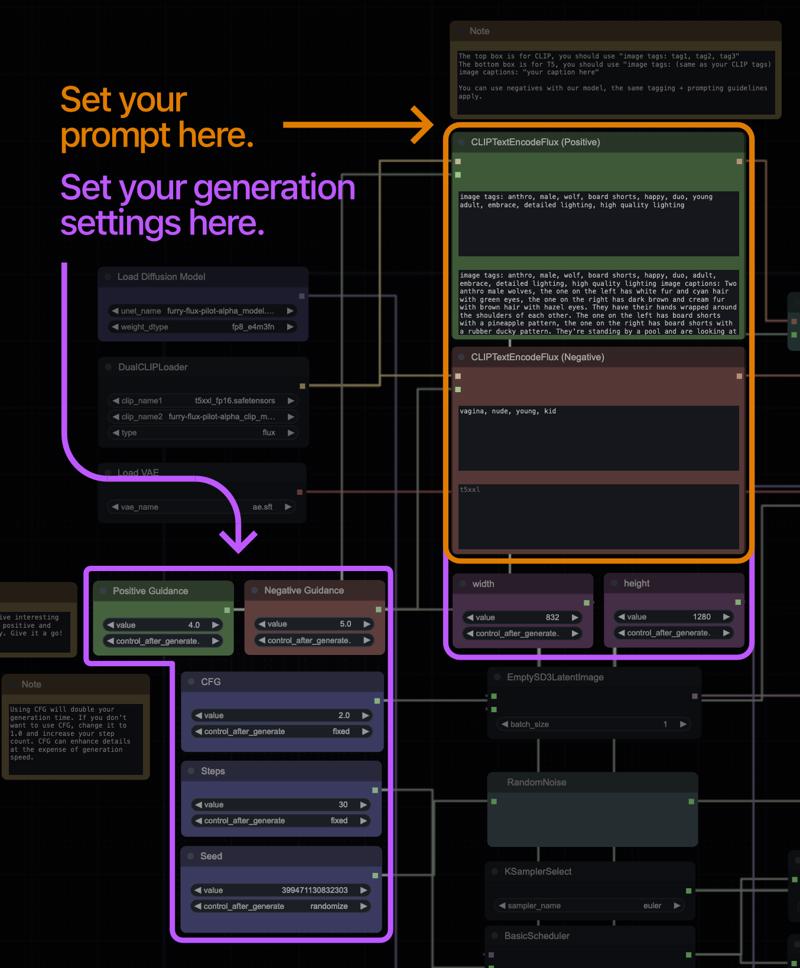
On the left side of the workflow, you’ll see the settings for your generation. At the top in the green box, you’re able to input your positive prompt. The red box is for negatives.
Please read Prompting & Tips below to learn more about how to prompt the model effectively.
Model Info
Chromafur Alpha is an experimental furry AI model built on Black Forest Labs' FLUX.1-dev foundational model. Created by Horizon Team, it's an initial experiment for a larger model planned in the near future. Chromafur Alpha specialises in generating high-quality SFW and NSFW furry artwork as it has been trained on a focused dataset.
The model uses a custom in-house captioning model designed to describe furry artwork naturally, avoiding overly flowery language. It also incorporates both existing and AI-generated tags, allowing it to respond well to prompts while maintaining Flux's strong natural language understanding.
Notably, Chromafur Alpha has demonstrated the ability to use both tags and captions for image generation, whilst excelling at complicated prompts with extensive natural language and tags.
Strengths & Weaknesses
During our evaluation of the model by ourself and the community, we find the following strengths and weaknesses in the model:
Strengths
High-level understanding of natural language, even with complex prompts involving a large variety of objects, fur, colors and more.
Flexible natural language style, accommodating complex and simple English..
Proficient at creating visually appealing anthropomorphic characters.
Capable of generating genitalia and other NSFW elements.
Ability to work with various prompt lengths, from concise to detailed.
Weaknesses
Limited capability for duo+ compositions, as it's not specifically trained for this.
Limited ability to modify style of generation, there tends to be one singular ‘house style’.
Image quality tends to degrade with aspect ratios beyond 1:1.
Tendency to accidentally include genitalia on characters when not specifically requested.
Characters often default to nude unless specific clothing items are prompted.
Reduced text generation comprehension compared to base Flux.
Tendency to include human figures in backgrounds, even when only furry characters are requested.
Occasional issues with image quality, resulting in graininess or blurriness.
Prompting & Tips
It's strongly recommended to use natural language in your generations and to utilise our ComfyUI workflow. Here's how to prompt effectively with our workflow:
ComfyUI Workflow Prompting
1. CLIP Box (Top)
Format: image tags: tag1, tag2, tag3
Use this for listing image tags, as you would’ve done with SD 1.5 or SDXL.
T5 Box (Bottom)
Format: image tags: (same as your CLIP tags) image captions: "your caption here"
Include both tags and a natural language caption
Using Negatives
Negatives are supported, following the same tagging and prompting guidelines
Important: To use negatives, you must use a CFG setting other than CFG 1
Negatives will not work with CFG 1
Prompting Style
Describe your scene in a natural manner
Refer to our provided example images to understand the prompting style
Use natural language for detailed descriptions
By following these guidelines, you can effectively leverage our model's capabilities and achieve better results with your generations.
Credits
This model was developed by the Horizon Team, a team dedicated to creating high-quality furry AI models.
Lead Research: Lodestone Rock
Data: Bananapuncakes
Research: Theos
Research: Clybius
Technical Assistance: Dogarrowtype
Extra Funded Provided By:
Minotoro @ frosting.ai
Anonymous Donor(s) x 2
We'd like to express our heartfelt gratitude to our wonderful Supporters who made this model possible. Golden Supporters received early access to this model as a thank you for their contributions ❤️
Golden Supporter:
3eve3
Gushousekai195
Kadah
Mobbun
Robke223
TheGreatSako
TheUnamusedFox
Serious Supporter:
IlllIs
Supporter
degreeze
Tails8521
Anonymous Donor
If you’d like to support us, you can subscribe to us via SubscribeStar here. A variety of tiers are available.
https://subscribestar.adult/lodestone-rock
We also take donations via Ko-fi.
https://ko-fi.com/lodestonerock
Please contact us if you wish to donate via other means or can provide computational hardware.
Special Thanks
IlllIs
Mo
GodEmperorHydra
Furry Diffusion Moderation Team
You!
Have a good one! \o/
Description
FAQ
Comments (12)
It has begunening. :V
What does "GGUF" mean?
GGUF is a format that is used by llama.cpp for primarily text generation and quantization's of them. Some individuals have now started using them with image generation because they load faster and they give more options for those who have less VRAM. The default workflow doesn't work with GGUF but can be modified to do so, you'd need to get a custom node though.
TL;DR, It's a different model format where its been shrunk down in size to require less VRAM as the cost of accuracy. A different model load is needed to use them.
There is a standard naming scheme for quantized language models, but unfortunately Civitai doesn't support it (they do not provide model downloads with their original filenames consistently), nor work in a way that could encourage such (version tags are used as both the text label for a version's tab and a sufix for the download filename), so we are likely going to have a huge mess of no good standard and every image model group doing naming differently. xD
Very nice model, very clean quality, but I seem to have trouble taming the horny level 😂. I get naked furries without asking, and even with nsfw tags in the negative
Sorry about that! You can try mentioning the clothes specifically which tends to help, you'll need to do it with natural language or tags since it's rather strong. We're certainly aiming on fixing this in the beta.
@HorizonTeam Thank you! I really appreciate your work and effort. This model is definitely a great start.
You should really just call the CLIP thingymabob "Clip_L_Alphafur" to make it very obvious what it's supposed to be a replacement for.
CivitAI automatically sets the name of the file but it should have CLIP L in it now.
@HorizonTeam cheers
I got disappointed when I tried to use "Chroma", a model which according some people is an equivalent of Pony Diffusion V6 XL in the Flux based models and only getting black squares/rectangles everytime I use that model in TensorArt realising my experience with NoobAI-XL based model is useless with that model.
Now my hopes of getting a worthy equivalent spiritual successor of Pony or NoobAI based in Flux are in the definitive version of this model you releasing the definitive edition of this flux based model or making a Z Image Turbo based model which is furry focused and avoiding the mistakes made with this model.
Details
Files
Available On (1 platform)
Same model published on other platforms. May have additional downloads or version variants.