


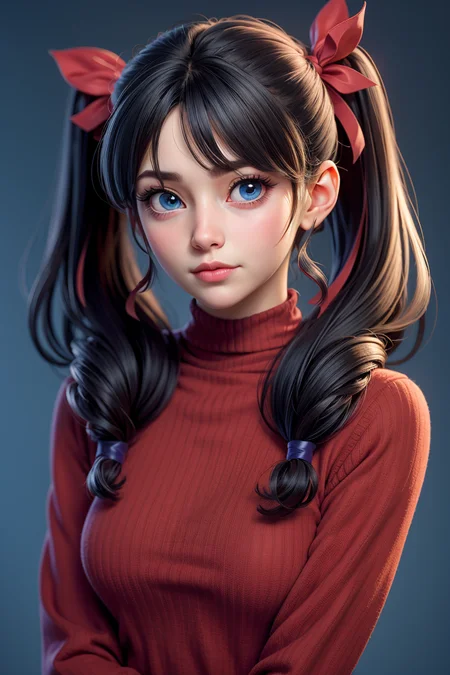


Finally, the XL version of the 3DMM model is here!!!
I have always wanted to migrate the model to XL, but I have been too busy at work. Finally, I found time to complete the model training, and will update several versions later.
What do you want to do with this model?
I want to use this model to achieve a realistic CG 3D rendering effect. The 1.5 version of the 3DMM model can already achieve this goal, but the XL version will be better.
Recommended Use
DreamShaper XL Turbo version should be used at CFG scale 2 and with around 8 sampling steps. This should work only with DPM++ SDE Karras (NOT 2M). The effect is very good and very fast!
Remember to play with the weights of the LoRA model
I hope,
If there is no problem with your test, please upload a picture, thank you!That's important to me~欢迎返图、一键三连,这对我很重要~If possible, don't forget to order 5 stars⭐️⭐️⭐️⭐️⭐️ and 1 like❤️ ^_^ Please~
如果搬运模型,请联系并注明作者~(Draft等网站要点脸行不行)
The larger the version number, the more mature and realistic the rendering style will be. You can choose to download according to your needs(V5 V7 V10 V11 V12↓)check it
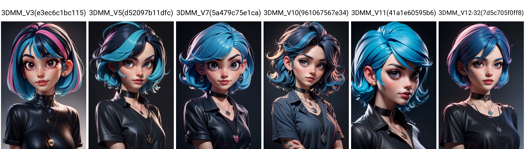
别忘了切换模型版本下载~~Recommend Can switch model versions for download ↑
试试用这些大模型生成图片try use ReV Animated
范例使用了Additional Networks插件来调用LoRA
试试这些提示词 try prompt like this:
1girl,Look straight ahead, long hair, Straight hair, a dark room with lights, close-up shot, Street Background, masterpiece, best quality,3dmm style,3d,realistic, high-quality, 3D realistic works, ultra-high details, 4k, real skin materials,simple background,
Negative prompt: tattooing,lowres, bad anatomy, bad hands, text, error, missing fingers, extra digit, fewer digits, cropped, worst quality, low quality, normal quality, jpeg artifacts, signature, watermark, username, blurry,braid hair
~~~~~~~~~~~~~~~~~~~~~~~o(* ̄︶ ̄*)o~~~~~~~~~~~~~~~~~~~~~~~~~~~~~~
Description
FAQ
Comments (14)
this is the best lora man perfect results everytime.
I am trying to remake the black hair cat girl but she looks dull, are you using and specific vae or or loras? or is there some other way to inject the lora weight to the prompt?
Amazing update
best lora out there~
ぱっちりしたおめめですね
how to use this in img2img? what are the best settings? can you give example how to turn anime image to 3d using this lora?
how to contact you? do you have discord?
Use Ip adapter
do i just have to add 3dmm in my prompts ? or how can i use this? nothing like <lora.xyz:1> ?
So, for people who are like me and wanted to setup SD to use this style you have to do a bit of tweaking.. here's a brief synopsis for new people:
1). SD -> Settings -> Sampler Parameter -> Eta noise seed delta = 31337
2). Settings -> Stable Diffusion -> Clip Skip = 2
3). download the revAnimated model 122 EOL that is linked above
4). Since LoRA is supported by SD now, place the styles above in your models -> Lora folder and add <lora:3DMM_V5:1> to the end of the prompt (change based on what version you're using)
5).Look at all the settings in the prompt of one image and follow all the settings in SD
EDIT
Also, this uses EasyNegative so be sure to download that too and place it in your embeddings folder!
For me worked .. Just "3dmm" not "3dmm style" and add <lora:3DMM_V12:1> depending on your version
Details
Files
3DMM_V12.safetensors
Mirrors
3DMM_V12.safetensors
3DMM_V12.safetensors
3DMM_v11.safetensors
3DMM_V12.safetensors
3DMM_V12.safetensors
3DMM_V12.safetensors
3DMM_V12.safetensors
3DMM_V12.safetensors
3DMM_V12.safetensors
3DMM_V12.safetensors
3dmm.safetensors
3DMM_V12.safetensors
3DMM_V12.safetensors
a76edf5e-4b9d-4db1-a5f6-2fe28cff1e7d.safetensors
3DMM_V12.safetensors
3DMM_V12.safetensors
3DMM_V12.safetensors
3DMM_V12.safetensors
3DMM_V12.safetensors
3DMM_V12.safetensors
3DMM_V12.safetensors
3DMM_V12.safetensors
3DMM_V12.safetensors
3DMM_v12.safetensors
3DMM_V12.safetensors
3DMM_V12.safetensors
3DMM_V12.safetensors
26fda765-cf54-443a-86e8-c4ee1237a1c9.safetensors
3DMM_V12.safetensors
3DMM_V12.safetensors
3DMM_V12.safetensors
3DMM_V12.safetensors
3DMM_V12.safetensors
3DMM_V12.safetensors
3DMM_V12.safetensors
3DMM_V12.safetensors
3DMM_V12.safetensors
3DMM_V12.safetensors
3DMM_V12.safetensors
3DMM_V12.safetensors
3DMM_V12.safetensors
3drndrngstyl.safetensors
3DMM_V12.safetensors
3DMM_V12.safetensors
3DMM_V12.safetensors
3DMM_V12.safetensors
3DMM_V12.safetensors
3drender.safetensors
Available On (1 platform)
Same model published on other platforms. May have additional downloads or version variants.