


2.0 | Rouwei 0.8 V-Pred
Important: This lora is not compatible with illustrious and any derivative models such as hassakuxl, WAI-illustrious etc. If you want to use those models, use V 1.0 of this lora.
more info to come. The workflow archive has .txt files with it that list all the unique tokens.
base model: https://civarchive.com/models/950531?modelVersionId=1882934
workflow: https://civarchive.com/models/2030179?modelVersionId=2297640
As always, resolution is king. the higher you're able to push the resolution with subtle highres fix passes, the more detail you're gonna get. Adetailer is pretty much required, faces get very jumbled and messy otherwise, nothing i could do about that unfortunately.
Rouwei has proven to be extremely good at soaking up concepts with only few samples, skinlines/sets are now much stronger triggers, and you hardly need to prompt anything aside from the skinline/set trigger to get something very close. As a result, prompting is much, much easier now; you can really just put 1girl in the main prompt and change the skinline, and hit go, if you so desire. Additionally, we get the added benefit of a seriously well-crafted V-Pred model, with rich, deep colors and amazing contrast.
Stylistically, the details are more delicate and softer, extremely high quality effects are now much more stable than in previous versions.
prompting format (also embedded in the workflow as a note next to the prompt input boxes):
the format generally is as follows:
L0LSPL4SH, <quality_tags>, <character_name>, <skin_name> <character_name>, <skin_series_name>, <artists/studios>, <year>, <time_period>, <general tags/natlang>Recommended negative prompt is:
(worst quality:1.25), (bad quality:1.1), (average quality:0.8)A good starting point would be something like:
L0LSPL4SH, masterpiece, best quality, Girl, Original Girl, Original, West Studio, Kudos Productions, 2024, 2025, new, newesthere, you could substitute "Original" with any skin name and any skinline/set, and you would get a completely different image, akin to the skin/set.
1.0 | Illustrious:
Create super detailed artworks in the style of League of Legends splash art.
03/10/2024 edit: Removed CivitAI "Create" button / generation service compat, because none of the Illustrious-XL models are available for use on the on-site generator (temporaily?).
TL;DR Recommendations
Base model: Illustrious-XL SmoothFT-SPO
Positive prompt template:
best quality, masterpiece \(quality\), L0LSPL4SH, year2024, year2023, West Studio, sixmorevodka, {prompt}Negative prompt template:
(low quality, worst quality:1.2), year2011, year2010, year2009, year2008, legacy, {prompt}CFG: 6.5
Sampler: DPM++ 2M
Scheduler: Karras
Steps: 28
Resolution: 832x1216 (try some different resolutions, it can handle wide format very well)
Highres Fix: 1.75x using any good upscaler like ESRGAN_4x, denoising 0.6 or less
Adetailer: 1024x1024 res, 0.5 denoise
Full Recommendations
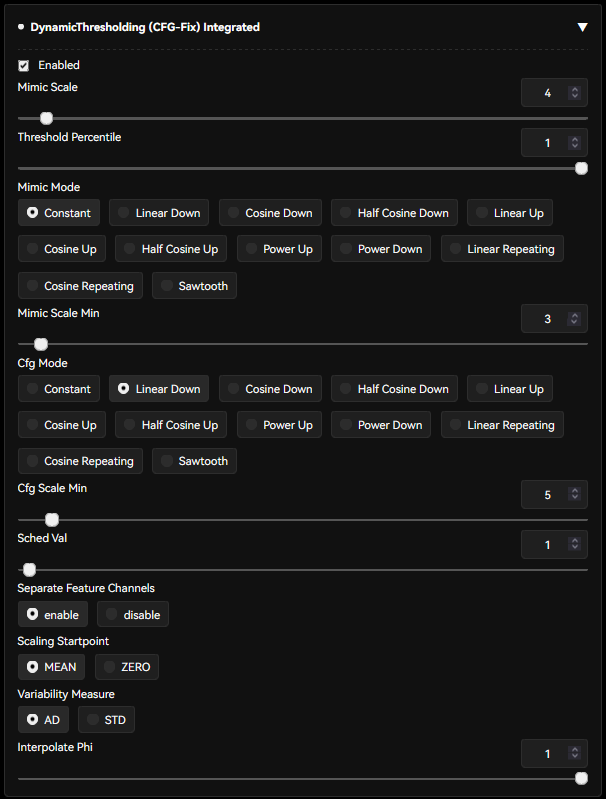
Continuing from above, I recommend these parameters on top.
Dynamic Thresholding
if you're on Forge/reForge, you already have this. If not, you can get it here
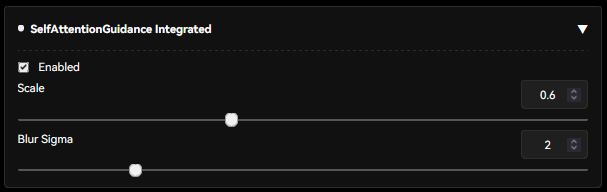
 Self Attention Guidance
Forge/reForge users have this. Others can get it here.
small warning: this one comes with a small 10% generation speed decrease. Worth it for the stability it gives imho.
Special/Custom Tags
you can read all about the dataset specifics on the old Pony model page here, all the same rules apply. In fact, i fucked up during dataset preparation and accidentally left some Score_X tags in the dataset, though seemingly it doesn't matter much at all.
For specific skinlines, try combining 1girl/character tag with whatever skinline it is, plus whatever skin name it would be. For example "Blood Moon, Blood Moon 1girl", or "Anima Squad, Battle Bunny Irelia \(league of legends\)". All the same rules of using any general anime finetune apply. Elaborate in the prompt, and you are more likely to get stable/good gens than just hitting the randomize button 200 times (though that works too if you're feeling uninspired).
Description
Initial version for Illustrious 0.1 and fts based upon it. Significantly better than the Pony version.
FAQ
Comments (29)
This is awesome work! Well done. The samples are gorgeous. Thank you for the detailed settings and defaults information too!
Thanks for the awesome improvements to the already awesome illustrious model. The SmoothFT helps a shitton with getting the little details 💖
Can't it be used on other platforms like PixAi?
When i try to use it tells me (unknown lora)
It has a special architecture (LoKr), so it is possible they just havent implemented or updated Lycoris
Great work! Love it💖
It may be interesting to use it like a quality tag, and sandwich this LoRA with low intensity as a spice to make it an artistic output or to increase the output as an illustration
Yeah that definitely works. I sometimes shove it in at low strength along with style tags. It is flexible enough that you can get away with a medium strength, as long as your style lora/prompting is good.
That version is better than the pony one or you just created for more variety of models to use with?
in my experience strictly better. Concepts learned better, better styling etc.
Will you post all of the prompts that were used for training this LORA?
please
The NoobAI-XL (NAI-XL) 1.0 model was just released. I really love your LoRA and have been using it a lot - do you have any plans to retrain it based on this new model?
I have a question is there a way to use this lora for the characters instead of style? For example I can't find good Hwei loras so I can I use this to generate him since he should be trained in this dataset?
Not really, no. It has only seen splash art of him, so it's going to look like splash art no matter what, unfortunately.
It can, of course, generate him looking like splash art, but you need to use words to describe him visually, just "1boy, hwei" won't work.
The NoobAI-XL (NAI-XL) 0.5/1.0 (eps) model was released. I really love your LoRA! Do you have any plans to retrain it based on this noob0.5 or noob 1.0.I think noob0.5 has better limb generation than noob1.0.I'm really looking forward to the new lora base on noob0.5!!
i will most likely train it on noobv1, if i train it again. should be backwards compatible, i would think.
You should train on the new NoobAI model! This model is grossly underrated, capable of so much
I plan to! was waiting for v-pred 1.0 to come out, as that's what I'm most excited about. Just need to figure out the tooling now.
@RC0N Crazy looking forward to it! I'd be lying if I said I didn't check each day :)
@Fractured_Fate just finished re-collecting every single image in HD, making crops, manually rating each image and ML captioning. Only a matter of time now 👌
Hi! I need some help with a LoRA issue.
I downloaded and correctly installed this LoRA...But it doesn’t show up in Stable Diffusion at all — it just isn’t there. I double-checked the installation path, everything looks fine. I'm currently using the Pony Standard VAE, and I also downloaded the recommended checkpoint model.
Stable Diffusion version: 1.8.0-RC
Is there something I’m missing? Do I need a different VAE, or is there something else I should try?
Some frontends do not work with the specific type of LoRA this is. whatever frontend you use needs to support Lycoris LoKr type LoRA.
What are you using? Tested working with ComfyUI and SDWebUI, potentially works with Invoke but not sure.
can confirm this can make unbelievably good pics
Why do cats always appear when I try to creat images of LeBlanc
Great question, no idea. There is nothing like that in the dataset, only leblanc's prestigious leblanc skin which has her holding a poro in a hat.
This is awesome! I have been trying to create this from scratch with no luck. Thanks OP! I get to try out all my ideas for skins
Details
Files
Available On (1 platform)
Same model published on other platforms. May have additional downloads or version variants.