




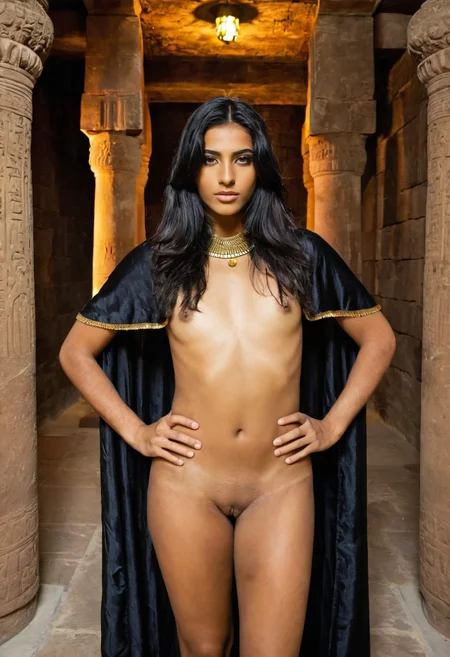
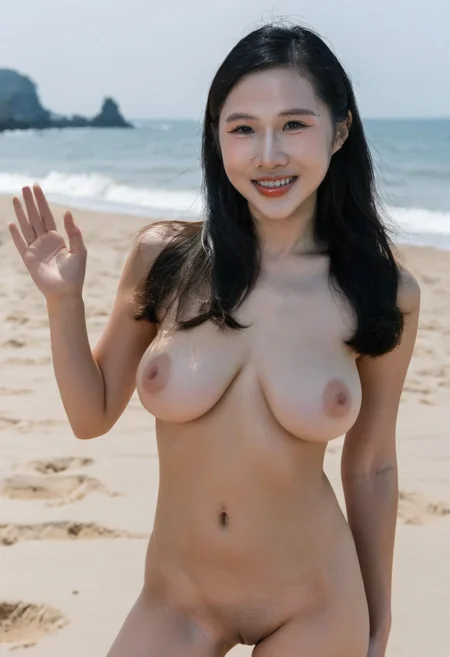
模型介紹為中英雙語,中文使用者可以關閉翻譯。
--
PornMaster_SDXL_Illustrious_noob_Pony_t2i_工作流下載(Workflow Download)
PornMaster Simple 4X Magnification Workflow
--
--
Stable Diffusion WebUI Forge - Neo
--
Creating Photorealistic Images With AI: Using Stable Diffusion
SDXL 1.0 藝術研究。(SDXL 1.0 Artistic Studies)
--
v7之前的版本为sd1.5 "Amateur系列"检查站。
Versions prior to v7 were the sd1.5 "Amateur Series" checkpoints.
--
我的其他檢查站和Lora。
My other checkpoints and Lora.
--
我已將模型上傳至runninghub。
I have uploaded the model to runninghub.
PornMaster-Pro-SDXL-V7-VAE
https://www.runninghub.ai/model/public/1981749531459108865/?inviteCode=rh-v1304
PornMaster-Pro-SDXL-V7-VAE-inpainting
https://www.runninghub.ai/model/public/1981757608040243202/?inviteCode=rh-v1304
PornMaster-Pro-SDXL-V8-VAE
https://www.runninghub.ai/model/public/2008921333920436225/?inviteCode=rh-v1304
PornMaster-Pro-SDXL-V8-inpainting
https://www.runninghub.ai/model/public/2043676887620259841/?inviteCode=rh-v1304
--
AUTOMATIC1111:
Check "Clip skip SDXL" in the settings to enable the Clip function.
勾选设定中的"Clip skip SDXL",可使Clip功能生效。

 ENSD:31337
Eta 噪點種子偏移(ENSD)
(ENSD; does not improve anything, just produces different results for ancestral samplers - only useful for reproducing images)
--
如果你的WEBUI无法显示某些版本的LORA:请到"设定",然后勾选"Always show all networks on the Lora page(otherwise, those detected as for incompatible version of Stable Diffusion will be hidden)"
--
不要問我如何安裝的問題與comfyui如何使用。
客製化lora:我的Telegram ID:@iamddtla0620
我的微信ID:iamddtla
我的line ID:iamddtla
時間寶貴,請直接說明來意,例如:訂製lora.
Do not ask me questions about how to install it or how to use ComfyUI.
Customized lora: My Telegram ID: @iamddtla0620
My WeChat ID: iamddtla
My Line ID: iamddtla
Time is precious, please state your intention directly, for example: customized LORA.
--
面部局部重绘可使用adetailer.
高解析度放大可使用"ultimate SD upscale".
For partial facial redrawing,use adetailer.
High resolution upscaling can be done using "ultimate SD upscale".
--
Adhere to the Fair AI Public License, ensuring that any derivative works are also open source.
遵守Fair AI Public License,確保任何衍生作品也是開源的。
Description
V8與V7相比:
優點:整題細節、手指、背景和整體美感更加提升,解剖學更精準。
缺點:失去V7版本中腋毛的功能,需使用腋毛LORA。
(由於不明原因無法在comfyui上使用,只能在” Stable Diffusion WebUI Forge - Neo”使用。)
使用 Stable Diffusion WebUI Forge - Neo,生成圖片的速度更快,整體品質也更好。
此模型包含VAE,無需使用VAE。
由於SDXL本身的限制,提示詞的令牌數量請保持在225個以下。
-
Compared to V7, V8 offers several advantages-
Advantages: Improved detail, finger placement, background aesthetics, and overall clarity; more precise anatomy.
Disadvantages: Loses the armpit hair feature from V7; requires the use of the armpit hair LoRa tool.
(For unknown reasons, it cannot be used on comfyui and can only be used on "Stable Diffusion WebUI Forge - Neo".)
Using Stable Diffusion WebUI Forge - Neo generates images faster and with better overall quality.
This model contains VAE, there is no need to use VAE.
Due to the limitations of SDXL itself, please keep the number of tokens for prompt words below 225.
FAQ
Comments (56)
I'm getting much worse results on V8 vs the old V7. Blurry and messed up eyes and hands and stuff. Any reason why?
I don't know, but with the same settings, the same prompts, and the same seed, the image generated by v8 is slightly of better quality than that of v7.
@iamddtla Is there a specific resolution? 🤔 I can see the preview images you posted also have some issues with the teeth and such. V7 def looks much better to me. But i give it another round of testing tonight
@BlessedBooba You can try 1024*1024, 1216*832, 832*1216.
It's a really good checkpoint! However it seems difficult to make cunnilingus happen. Seems that it gives the girl a penis if I use 'licking' or 'sucking' or even just 'cunnilingus', even with tags like yuri, lesbian, etc. it reverts to making it fellatio. I used the v7.. don't know if the newest one has this same issue.
To generate a cunnilingus image, you need to use Lora with "cunnilingus" functionality; sdxl's checkpoints cannot easily do this.
@iamddtla I see. I don't entirely understand how training on a base checkpoint works like sdxl. I do understand lora training though. I was under the impression that if you trained it enough with images of it, considering you're training it with various nsfw images, that it could learn new concepts as a lora works in the same way. I guess I was thinking it could be better than a lora considering your training the entire model with it. Is that incorrect thinking? Can new concepts not be learned from training a model on base models with enough various images?
@Light7799 This is "Checkpoint Merge," not "Checkpoint Trained."
I want to cry. My computer broke, so I'm trying to redownload it, but now I have to pay 8K & I no longer can download the Early Access. :/ Civitai really been pissing on their platform lately, huh? :/
You can download version 7 first.
@iamddtla, can you put a URL/link here for me please? I'm having trouble finding how to link right back in. :/ Been with you like almost 2 years now. Definitely don't want to fall out on this project.
is possible to get a discount to get inpainting version for people that already purchased v8? thanks!!
Can someone teach me how to edit the area outside the face? I want to keep the face.
Invert Mask technique. Mask the face and everything else you want to keep, then invert the mask, so the masked area becomes unmasked and vice versa. I don't remember if the built-in masking tool in ComfyUI has this option or if it was a custom node.
it is called img to img inpainting
which workflow do you recommend for img2vid using this checkpoint?
What is the sampling method used? Im getting the worst results here.
The example image shows the parameter settings.
@iamddtla You make no mention of what scheduler it uses? Karras?
@draggedfromthelight859 yes
V8!! Thank you 师父!!
Love the merge!! Any tips for training a realistic character Lora on V8?? I tried training one with 25 HQ images with standard SDXL settings and did not turn out great. I used natural language captions, not sure if I should just try tagging them instead?
Pro-SDXL-V8 is the best checkpoint you've made by far. Behaves a bit like a hybrid with Pony/Illu elements, but has great image quality and realism like SDXL. Very excellent adherence for both prompt and LoRA adherence. Really enjoying this one, thanks for sharing!
I am new to this kind of thing, how do i use this? Do i have to install this in stablediffusion or comfyui?? do i only need this checkpoint or other things too?? i have control net but i not sure if its fully installed properly.. please help..
How do you generate videos here, and what do you use for that?
Do I actually need to enable the settings for "Clip skip SDXL" and "Always show all networks on the Lora page", what do I lose by not enabling them?
Where is list of lora tags which can be used, for example: <lora:pov oral sex-SDXL-V1:0.75>?
how would yall say it compares to lustify?
Very bad. Dont like this Checkpoint. I tried with same seed same all things as images here. DISFIGURED BAD PHOTOS EVERYTIME.
Yeah I get the same with V8, V7 is amazing but V8 has messed up eyes and fingers. Even shows that problem in the example images shown on the model itself. Maybe just unlucky. Hoping V9 will be as great as V7 was!
After a few attempts, the model proved to be very good. The only problem is that in full-body photos at 1024x1024 resolution, the faces are slightly distorted, but in close-up the quality is 1000%. It's nothing more than a limitation of the SDXL or the training, but the checkpoint is fantastic. Keep perfecting it; your work is magnificent.
This is a problem with absolutely all models. Not just SDXL. When moving away from the object. Use ROPE DeepFake to overlay the face onto the final image. Or work with a higher image resolution. I use 1408×1152 or 1408×1024.
This is one of the best models on SDXL.
It is capable of working miracles when trained with ADAFACTOR.
Even low-quality datasets it turns into super high-quality images with LMS.
It preserves faces and body very well.
True, there are problems with fingers, but that's minor and fixable.
The author is a huge great guy did an awesome job!
Adamw8bit work very good too. Adafactor is better?
@broncedelic My main goal is the most accurate transfer of the quality of the original dataset photos. I don't need the model to make improvements on its own, because on Prodigy the model burns the skin texture. I use separate datasets of 100-200 photos for each. Face separately, body separately. With a different number of repeats for the datasets. The photos in the datasets have already undergone 4-level preprocessing and do not need any improvements. I copy the quality 1:1. Adafactor is the most honest optimizer in this sense. It does not smooth out or embellish the data. If the photos are sharp, with pores, highlights, hair volume — the generation will be the same. Prodigy or Adam often give a slightly more glossy and polished look even with the right settings. The only problem with Adafactor is large datasets. If the face dataset is, say, 30-50 photos, it won't remember any features even with a large number of epochs, but will overfit.
Wah... Disini sangat rame sekali, pasti ini model yang bagus
saran model paling bagus bang, pakai bigAsp kok blurry ya
I always get a black image when generating with this model. anyone has a fix for this? Or a comfyui inpainting workflow?
https://pastebin.com/5DHdv3BL
try this one
copy all the text and the paste (ctrl-v) on a unsaved workflow
Sometimes that happens when you set clip skip to -2. Try setting it to -1 and see if that fixes the issue.
How do people know what these models/workflows do? I'm trying to find a NSFW image->Video generator, but all these things are called "Pornmaster" or "Realistic Pony". Is there some sort of codebook I need to read? XD
hahahaha I think you just need to look at other users' creations here to see what a checkpoint like “pornmaster” does.
If you're new to inference, I recommend watching YouTube tutorials, but to make it very quick.
If you want to create an NSFW image and then create a video with that image, you need to do the following:
First, create an image by choosing the model you like (SDXL, Pony, Illustrious, Flux, etc.). Then choose a checkpoint. These are models that have been retrained to often produce NSFW content. Here, for example, pornmaster is based on SDXL, but realistic pony is based on... pony!
Then you will have your beautiful image, which you will need to animate. This is where the video models come into play. Since you are starting from an image and not from scratch, you will need to find an I2V (image-to-video) model. Currently, wan 2.2 is the most popular locally (especially for NSFW), and again, you'll look for the re-trained models available on Civitai, for example, WAN2.2 ENhanced NSFW.
In short, allow a few days if you're starting from scratch, because it takes some learning. And above all, watch YouTube!
And if this was a joke that I took at face value, then RIP xD
LOL, it's not as easy as you imagine. First you have to see what your PC (video card) can support, then pick a base model like SDXL or even stronger depending on what your PC can support, then download checkpoints for that, figure out the parameters and see which ones give you the images you want and which don't. Or create the images online, which is a whole different thing than using your own video card. Pony is another base model for anime, not realistic images. There are various kinds of models even within a base like SDXL, these are called DMD2, lightning, hyper, LCM, etc. They require different parameters and some are much faster than others. Have fun.
I'm not getting this one, for example because it doesn't have a DMD2 or other fast version so it would take 2-3 minutes to generate a single image on my PC.
@forum2233726 Absolutely true. That's why I've pretty much given up on using checkpoints and LORA's from individual contributors on CivitAI. A ComfyUI template for, say, Z-Image-Turbo or Wan 2.2 is usually super simple. Just download and it runs fine. But these freakin' LORA's with either no documentation or very poor documentation, no button that says "Download Basic Workflow", and when you try to get a workflow by downloading a provided image or video often it doesn't work, or doesn't include workflow metadata. And then if you do get a workflow it's 326 custom nodes, and it takes hours figuring out how to install them, or there's an error in the workflow that you can't figure out. And if you're somehow lucky to get it running it either doesn't run on your hardware, or gives terrible results. And then you spend hours and days trying to figure out if it's a setting problem, or a LORA limitation, or you're not using the right magical prompt or trigger word. And then you ask online and you get responses from people who have spent the last 2 years figuring it out and just want to sound smart, so they tell you to figure it out yourself. I've spent so many wasted days with this nonsense and getting nowhere. I'll just stick with the basic Z Image and Wan 2.2.
Thanks, but as with the Pro SDXL V7 it's pretty much guaranteed I'll get grossly distorted eyes and somewhat distorted faces. And unlike Z-Image-Turbo, each run gives vastly different results, which makes it pretty much unusable for generating long videos. I'm also guessing this is designed primarily for very closeup images, and I'm trying to have full body views of two characters. And all I get is ignored prompts and distortions. I'm not using any LORA's, and I've tried cranking up the steps, but nothing seems to work.
Please stop adding videos to SDXL model posts. SDXL obviously doesn't do video, it's just noise
oh I was looking for i2v until I got this. thx.
Does anyone know how to make this SDXL model look like the Pro&DPO-V1 style?
Basically, I want it to have that amateur photo texture/feel.
Friend, I'm using the SD-Neo, and in TXT2IMG mode it's 100%, but when I use IMG2IMG mode, the images come out with blown-out colors! I lowered the CFG to 1/1.5 and it works, but with poor quality!
Is there a setting I'm missing?
Goddamn this model produces some hot and dirty whores. Well done.
Hi guys just a question, did you get it to work in 16:9 (horizontal resolution) ? it always generates weird artifacts. its awesome in vertical resolution but horizontal resolution seems very bad, how to fix?
Details
Available On (1 platform)
Same model published on other platforms. May have additional downloads or version variants.