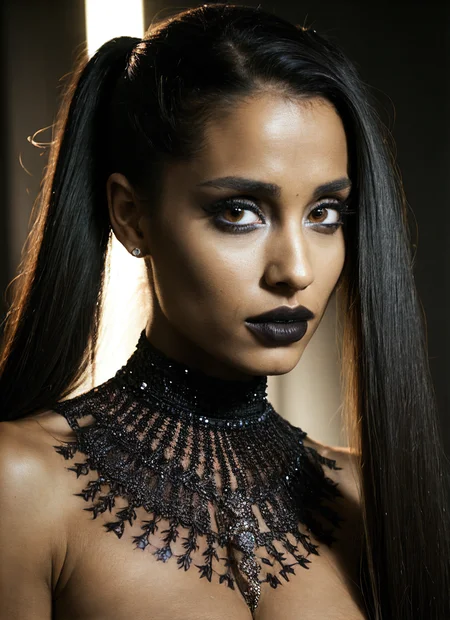



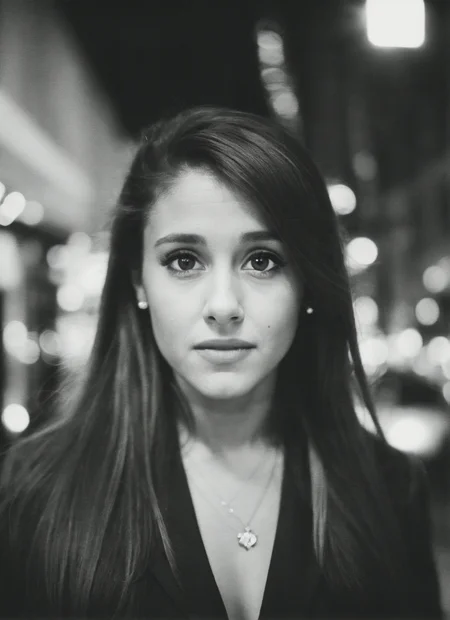




LyCORIS of Ariana Grande
Welcome to my corner!
I'm creating Dreambooths, LyCORIS, and LORAs. If you want to know how I do those, here is the guide: https://civarchive.com/articles/7/dreambooth-lycoris-lora-guide
I upload 2-3 times a week, however, I write down suggestions all the time. If you want to see someone made into a model just leave a comment :)
Suggestions left on my ko-fi page ( https://ko-fi.com/dreambooths ) are taken with the highest priority and you will be able to enjoy them way before they get released here. (I accept also custom requests)
The reason is that I can't keep up with uploading and the models are being made pretty much all the time :-)
As mentioned, via the ko-fi page I accept custom requests, so feel free to engage with me there, I will answer all your questions :)
Description
FAQ
Comments (10)
this looks almost nothing like her, what were you thinking?
Are you looking at my samples or at your generations? Because you may not have the LyCORIS module enabled.
havent tried the lycoris and not super familiar with her but the sample images looks like her to me
Hey, I see multiple posts where lycoris are used with the lora: prefix in the prompts. If I put the lycoris file in my lora folder I get errors related to vector size. If I put them in the Lycoris folder it works but the prompt must use lyco: as a prefix, and my generated images are different from civitai posts. What am I missing? I have installed the a1111-sd-webui-lycoris extension so it isn't related to that.
I got the same error. You should write lyco: instead of lora: (and of course files suppose to be in Lycoris folder):
<lyco:locon_arianagrande_v1_from_v1_64_32:1.25>
I tried to replicate author's images and it worked. But I had another problem: if I copy the prompt, then it's everything is ok. If I try to prolong prompt with my own directions, then I get "leakage"- person becoms unrecognizible, changes even weight of the shape, hairs become curly and etc. Maybe somebody knows how to fix that ?
@pylauziersd917 there seem to be two different extensions "on the market"
I have this one "a1111-sd-webui-locon" and for me, the prefix is <lora but in other installations, you will indeed need to use <lyco
I'm not sure why this is done this way but hey - it is what it is.
@siconitus566 what kind of leakage do you mean? perhaps you are trying to add too many other LORAs to your prompt. it is a know issue that if you add additional models then you need to lower their weight otherwise you will get really bad results (not all Loras work this way, some are working quite nicely)
but without examples it's really hard to help
@malcolmrey I add only one lora, but maybe the problem could be because of BREAK function. But here is an example:
a photoshoot of (sks woman:1) <lyco:locon_arianagrande_v1_from_v1_64_32:1.3>, full body, (petite and skinny shape), BREAK sharp focus, masterpiece, highly detailed, intricate details, highly detailed soft shadows, BREAK detailed wild beach in the background, depth of field
Negative prompt: bad-hands-5, ((bad anatomy)), non proportional anatomy, too many fingers, six fingers, broken nails, out of frame, duplicate, duplicates, deformed head, non proportional to the body head, bad quality, low quality, low resolution, low quality details, artefacts, watermarks, signatures, deformed eyes, red eyes, deformed eye pupils, cartoon, ((((oversized head)))), low quality fingers, jewelry
Steps: 30, Sampler: DPM++ SDE Karras, CFG scale: 7, Seed: 3373354369, Size: 512x768, Model hash: e6415c4892, Model: realisticVisionV20_v20, Version: v1.3.2
If I delete BREAK, then result is acceptable. I mean after hires fix and inpainting should be totally ok. I'm wondering, why BREAK totally destroys lora/lycoris ? I tried with my own trained loras, so it happened the same- destroyed.
EDIT: or just in positive prompt I added words "sitting on a bench" and the face changed to non recognizible, that only inpainting would help:
a photoshoot of (sks woman:1), looking to the viewer, full body, (petite and skinny shape), summer dress, sitting on a bench, sharp focus, masterpiece, highly detailed, intricate details, highly detailed soft shadows, detailed wild beach in the background, depth of field, <lyco:locon_arianagrande_v1_from_v1_64_32:1>
EDIT 2: After rendering 4 batches of the last prompt I posted, I got 1 picture of recognizible face, but still it's very strange... I believe, that either something is wrong with my settings, or I miss something :) I trained 2 loras and experimented with them aaaaa lot, trained with different settings, both loras with 20+ settings variations. I got something I was happy with, but every time I tried to add details to the promt, it changed to kind of the same, but other person. So only inpainting helped. But this is really annoying every time to go to play extra time with inpainting, as it also is not perfect :)
@siconitus566 could you point me in some direction about this BREAK? it is the first time I see it used.
I remember there was AND, but BREAK is new to me :)
As for the constant need to do inpainting: I haven't yet tested it personally but I've read a lot of good things about the aDetailer which pretty much does the inpainting by itself so you don't have to:
https://github.com/Bing-su/adetailer
"sitting on a bench" this part could introduce the bench and the perspective shifted in a way that the character is further away perhaps?
there is an issue with SD in general (but more specifically with my lycoris too) that the further you are, the less recognizable your face is
to combat this without inpainting, the further the character is, the higher the denoise value should be in the high.res.fix
for example, for close-ups, I usually do between 0.15 - 0.3 but if the head is around 30-35% of the photo, then I bump it to 0.5-0.6, and if it is further away then even 0.7
@malcolmrey BREAK is from Auto1111 wiki:
https://github.com/AUTOMATIC1111/stable-diffusion-webui/wiki/Features#break-keyword
If it doesn't show automatically, just Ctrl+F and type in BREAK and it will wind everything with BREAK in the page. BREAK is for starting another chunk. But when the scene has a lot of different information, it's better to split that information to different chunks as SD understands better that information.
And that idea with denoising is very interesting: I've never thought that denoising could work in that way. I tried to experiment and yes, you were right- adding 0.7 denoise and scaling up 2x the face again gets similarities to lycoris character. Higher than 0.7 denoise destroys human body, but face becomes even more close to lycoris character. Without upscaling, only adding denoise and playing with hires steps didn't add any similarities to the lycoris character and face was unrecognizable.
Thank you for the link to Adetailer, I will check it.
amazing, your best lycoris model so far.