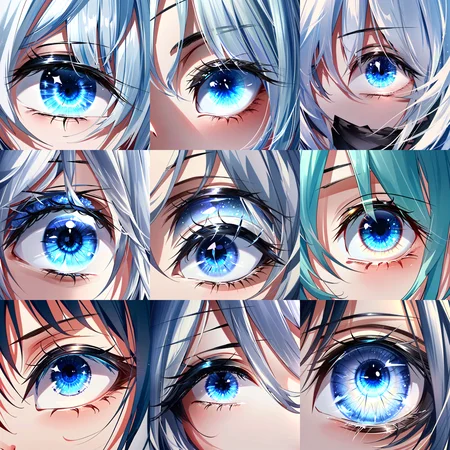
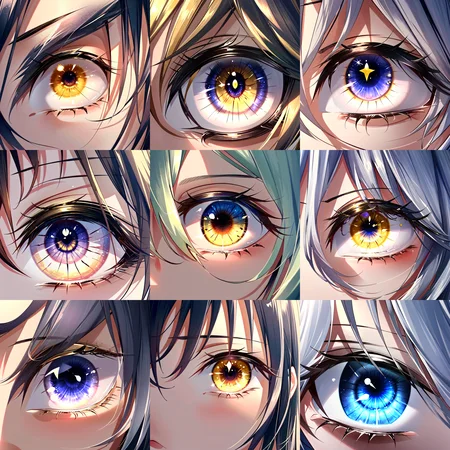
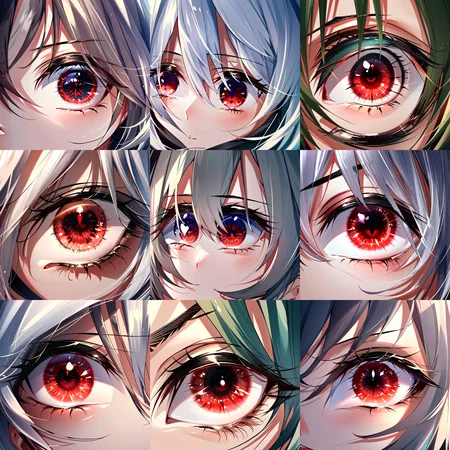
This is a tool that I train to change the style and eye colors of my generated characters. I use the Photoshop tool since inpainting gives most of the time a problem. (if someone can teach me how to train an inpainting model I would appreciate it)
<lora:EyesGen:0.4> works quite well between 0.1 and 0.5.
Prompt: <lora:EyesGen:0.4> Masterpiece, best quality, (red eye:1.3), 1girl, close up eyes, looking a viewer, intricate iris, 1 eye solo
Negative Props: bad-artist, bad_prompt_version2, easynegative, low res,
Description
FAQ
Comments (12)
I like this model very much. Can the author make the sharingan and white eyes in the Naruto anime?
looks really awesome! How did you do the animation of the eye opening? deforum or manually?
I work on it in After Effect, I looked for an anime scene in which someone opened their eye, frame by frame I cut out the eye using a mask (https://prnt.sc/tcg_ZhQqmghK) and put the eye generated in the AI behind.
@DitamAi That is some dedication looks amazing!
@balmonte47 Yes, maybe my models LORA are not great but the covers will be phenomenal. :D
interesting : inpainting works for me WITHOUT inpainting model. give it a try but don't use "send to" int the img2img tab it's bugged sometimes, drag and drop is no issues.
alternatively : use checkpoint merger tool to get an inpainting version (didn't make one myself but still...)
set model A to the inpainting model of your choice
set model B to your own custom model
set model C as the base model that you used for training model B
set interpolation to add difference and multiplier M to model A to 1.
you have now an inpainting version,
to get a Lora variant try this simple standalone script : https://github.com/sashaok123/LoRA-EXTRACTOR
This is the same script integrated in Kohya_SS apparently, I usually use it only but not in this model since it is the result of a LORA training itself. Excuse me if I explain myself like the ass, I'm new to this.
Can you show me some images generated from this mix that you did?
@DitamAi as i said i didn't made one. i need a checkpoint model for this. it is a checkpoint merger after all.
i did have success using inpaint but it is finicky to use your lora like this.
however it's usable !
i have to send a review for this i can't upload images in a comment section
Does this work on realistic eyes?
If you look at the green eye generated in Sticks comment it's a realistic eye.
See the following entry in the wiki for auto1111/stable-diffusion-webui regarding how to create an inpainting model:
https://github.com/AUTOMATIC1111/stable-diffusion-webui/wiki/How-to-make-your-own-Inpainting-model
Details
Files
EyesGen.safetensors
Mirrors
EyesGen.safetensors
EyesGen.safetensors
EyesGen.safetensors
eyesgenLoraWIP_v1.safetensors
eyesgenLoraWIP_v1.safetensors
EyesGenLoraWIP_v1.safetensors
EyesGen.safetensors
eyesgenLoraWIP_v1.safetensors
EyesGen.safetensors
eyesgenLoraWIP_v1.safetensors
EyesGen.safetensors
EyesGen.safetensors
eyesgenLoraWIP_v1.safetensors
eyesgenLoraWIP_v1.safetensors
eyesgenLoraWIP_v1.safetensors
eyesgenLoraWIP_v1.safetensors
Available On (1 platform)
Same model published on other platforms. May have additional downloads or version variants.