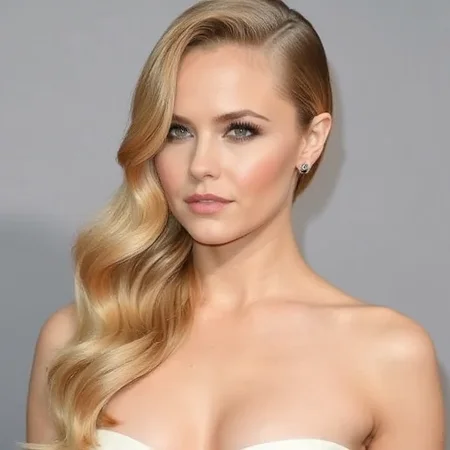
I struggled to do this type of hair style in flux, so here it is!
The dataset for this lora has been prepared like my typical lora. It is captioned in natural language without trigger words. It is mostly trained on close-ups with some wider angle shots in there to prevent view biases. All faces in dataset have been censored in various ways to prevent the result from looking like the persons in the dataset. If you want to see a face, put details of it in your prompt. Random edits were used to prevent the introduction of bias caused by these edits.
Description
{
  "engine": "kohya",
  "unetLR": 0.0005,
  "clipSkip": 1,
  "loraType": "lora",
  "keepTokens": 0,
  "networkDim": 4,
  "numRepeats": 7,
  "resolution": 1024,
  "lrScheduler": "cosine_with_restarts",
  "minSnrGamma": 5,
  "noiseOffset": 0.1,
  "targetSteps": 2310,
  "enableBucket": true,
  "networkAlpha": 8,
  "optimizerType": "AdamW8Bit",
  "textEncoderLR": 0,
  "maxTrainEpochs": 30,
  "shuffleCaption": false,
  "trainBatchSize": 3,
  "flipAugmentation": false,
  "lrSchedulerNumCycles": 3
}
FAQ
Comments (2)
"All faces in dataset have been censored in various ways to prevent the result from looking like the persons in the dataset."
This is interesting and something I haven't thought of. So what do you do here? Just blur them out? Does it not generate blurred faces when you prompt images?
The censoring part is captioned in the training images, hence won’t replicate it in your image unless to prompt for it. It’s also why I suggest to describe the face, so there’s no ambiguity and it won’t put random censorship. Here’s part of an article I’ve been sitting on for a few months; In this article, I’ll share my method for preparing LoRAs using the Flux model, ensuring minimal bias and high flexibility.
Close-Ups and Geometric Obfuscation
Whenever possible, I use close-ups. However, for images where facial features play a role, I anonymize these features by overlaying random colored geometric shapes (green squares, red rectangles, blue circles, etc.). An automated caption system understands these shapes are for anonymization, like “eyes censored by a red circle.”
Image Example: [Insert image of face with geometric shapes overlay]
Randomization to Prevent Replication
I aim to randomize which facial traits are hidden, not just focusing on eyes but also mouths and noses occasionally. This method ensures that the model does not learn to replicate specific likenesses.
Details
Files
Available On (1 platform)
Same model published on other platforms. May have additional downloads or version variants.