


In depth retraining of Illustrious to achieve best prompt adherence, knowledge and state of the art performance.
Big dreams come true
The version number is just an index of current final release, not a fraction of the planned training.
Large scale finetune using gpu cluster with a dataset of ~13M pictures (~4M with natural text captions)
Fresh and wast knowledge about characters, concepts, styles, cultural and related things
The best prompt adherence among SDXL anime models at the moment of release
Solved main problems with tags bleeding and biases, common for Illustrious, NoobAi and other checkpoints
Excellent aesthetics and knowledge across a wide range of styles (over 50,000 artists (examples), including hundreds of unique cherry-picked datasets from private galleries, including those received from the artists themselves)
High flexibility and variety without stability tradeoff
No more annoying watermarks for popular styles thanks to clean dataset
Vibrant colors and smooth gradients without trace of burning, full range even with epsilon
Pure training from Illustrious v0.1 without involving third-party checkpoints, Loras, tweakers, etc.
There are also some issues and changes compared to the previous version, please RTFM.
Dataset cut-off - end of April 2025.
Features and prompting:
Important change:
When you are prompting artist styles, especially mixing several, their tags MUST BE in a separate CLIP chunk. Just add BREAK after it (for A1111 and derivatives), use conditioning concat node (for Comfy) or at least put them in the very end. Otherwise, significant degradation of results is likely.
Basic:
The checkpoint works both with short-simple and long-complex prompts. However, if there are contradictory or weird things - unlike with others they won't be ignored affecting the output. No guide-rails, no safeguards, no lobotomy.
Just prompt what you want to see and don't prompt what shouldn't be on the picture. If you want to have a view from above - don't put ceiling into positive, if you want to have crop view with head out of frame - don't make detailed description of character facial features, and so on. Pretty simple but sometimes people are missing it.
Version 0.8 comes with advanced understanding of natural text prompts. It doesn't mean that you are obligated to use it, tags only - completely fine, especially because understanding of tags combinations is also improved.
Do not expect it to perform like Flux or other models based on T5 or LLM text encoders. The whole size ot SDXL checkpoint is less then only that text encoder, in addition illustrious-v0.1 which is used as the base completely forgot a lot of general things from vanilla sdxl-base.
However, even in current state it works much better, allows to do new things usually impossible without external guidance, as well making manual editing, inpainting, etc more convenient.
To achieve best performance you should keep track of CLIP chunks. In SDXL the prompt is separated into a chunks of 75 (77 including BOS and EOS) tokens, that are processing by CLIP separately, and only then are concatinating and comes as conditions to unet.
If you want to specify some features for character/object and separate them from other prompt parts - make sure they are in the same chunk and optionally separate it with BREAK. It will not solve problem of traits mixing completely, but can reduce it improving overall understanding, since text encoders on RouWei are able to process the whole sequence, not individual concepts better then others.
Dataset contains only booru-style tags and natural text expressions. Despite having a share of furries, real life photos, western media, etc. all captions have been converted to classic booru style to avoid a number of problems from mixing of different systems. So e621 tags won't be understanded properly.
Sampling parameters:
~1 megapixel for txt2img, any AR with resolution multiple of 32 (1024x1024, 1056x, 1152x, 1216x832,...). Euler_a, 20..28steps.
CFG: for epsilon version 4..9 (7 is best), for vpred version, 3..5
Sigmas multiply may improve results a bit, CFG++ samplers work fine. LCM/PCM/DMD/... and exotic samplers untested.
Some schedulers doesn't work well.
Highresfix - x1.5 latent + denoise 0.6 or any gan + denoise 0.3..0.55.
For vpred version lower CFG 3..5 is needed!
For vpred version lower CFG 3..5 is needed!
Quality classification:
Only 4 quality tags:
masterpiece, best qualityfor positive and
low quality, worst qualityfor negative.
Nothing else. Actually you can even omit positive and reduce negative to low quality only, since they can affect basic style and composition.
Meta tags like lowres have been removed and don't work, better not to use them. Low resolution images have been either removed or upscaled and cleaned with DAT depending on their importance.
Negative prompt:
worst quality, low quality, watermarkThat's all, no need of "rusty trombone", "farting on prey" and others. Do not put tags like greyscale, monochrome in negative unless you understand what are you doing. Extra tags for brightness/colors/contrast section below can be used
Artist styles:
Grids with examples, list/wildcard (also can be found in "training data").
Used with "by " it's mandatory. It will not work properly without it.
"by " is a meta-token for styles to avoid mixing/misinterpret with tags/characters of similar or close name. This allows to have a better results for styles and at the same time avoid random style fluctuation that you may observe in other checkpoints.
Multiple give very interesting results, can be controlled with prompt weights and spells.
YOU MUST ADD BREAK after artists/style tags (for A1111) or concat conditioning (for Comfy) or put them in the very end of your prompt.
For example:
by kantoku, by wlop, best quality, masterpiece BREAK 1girl, ...General styles:
2.5d, anime screencap, bold line, sketch, cgi, digital painting, flat colors, smooth shading, minimalistic, ink style, oil style, pastel styleBooru tags styles:
1950s (style), 1960s (style), 1970s (style), 1980s (style), 1990s (style), 2000s (style), animification, art nouveau, pinup (style), toon (style), western comics (style), nihonga, shikishi, minimalism, fine art parodyand everything from this group.
Can be used in combinations (with artists too), with weights, both in positive and negative prompts.
Characters:
Use full name booru tag and proper formatting, like karin_(blue_archive) -> karin \(blue archive\), use skin tags for better reproducing, like karin \(bunny\) \(blue archive\). Autocomplete extension might be very useful.
Most characters are recognized just by their booru tag, but it will be more accurate if you describe their basic traits. Here you can easily redress your waifu/husbendo just by the prompt without suffering from the typical leaks of basic features.
Natural text:
Use it in combination with booru tags, works great. Use only natural text after typing styles and quality tags. Use just booru tags and forget about it, it's all up to you. To get best performance keep track if CLIP 75 tokens chunks.
About 4M of images in dataset had hybrid natural-text captions, made by Claude, GPT, Gemini, ToriiGate, then refactored, cleaned and combined with tags in different variations for augmentation.
Unlike typical captions, these contains character names which is very useful. Better to keep it clean, short and convenient description works best. Better not use long and sloppy BS like
A mysteriously enchanting feminine entity of indeterminate yet youthful essence, whose celestial visage radiates with the ethereal luminescence of a thousand dying stars, blessed with locks cascading like the golden rivers of ancient mythology, perhaps styled in a manner reminiscent of contemporary fashion trends though not necessarily adhering to any specific aesthetic paradigm. Her eyes, pools of unfathomable depth and hue, sparkle with the wisdom of millennia yet maintain an innocent quality that defies temporal constraints...For captioning you can use ToriiGate in short mode.
And don't expect it to be as good as flux and others, it tries very hard and after several rolls usually you can get what you want, but it is not that stable and detailed.
Lots of Tail/Ears-related concepts:
Oh yeah
tail censor, holding own tail, hugging own tail, holding another's tail, tail grab, tail raised, tail down, ears down, hand on own ear, tail around own leg, tail around penis, tailjob, tail through clothes, tail under clothes, lifted by tail, tail biting, tail penetration (including a specific indication of vaginal/anal), tail masturbation, holding with tail, panties on tail, bra on tail, tail focus, presenting own tail...(booru meaning, not e621) and many others with natural text. The majority works perfectly, some requires a lot of rolling.
Brightness/colors/contrast:
You can use extra meta tags to control it:
low brightness, high brightness, low saturation, high saturation, low gamma, high gamma, sharp colors, soft colors, hdr, sdrThey work both in epsilon and vpred version and works really good.
Epsilon version relies on them too much. Without low brightness or low gamma or limited range (in negative) it might be difficult to achieve true 0,0,0 black, the same often true for white.
Both epsilon and vpred versions have like true zsnr, full range of colors and brightness without common flaws observed. But they behaves differently, just try it.
Vpred version
Main thing you need to know - lower your CFG from 7 down to 5 (or less). Otherwise, the use is similar with advantages.
It seems that starting from v0.7 vpred works flawlessly now. It shouldn't suffer from ignorance of tags close to the 75tokens chunk borders like nai. It is more difficult to get burned images - even on cfg7 usually it just over-saturated but with smooth gradients, which can be useful for some styles. Yes it can make anything from (0,0,0) to (255,255,255). You will find brightness meta tags described above quite useful for easier/lazy prompting, natural text expressions also work. To get the most dark image - put high brightness into negative and/or use low brightness, low gamma tags. If you don't like very bright skin on dark background and want to reduce contrast (or on the contrary, enhance the effect) - use hdr/sdr in negative/positive.
It was reported that in rare cases on some prompts there is a drop in contrast. Looks like other vpred models have same behaviour with such prompts, adding a "separator" closer to the border of the 75-token chunk fixes this. However, with 0.7 I haven't encountered this myself.
To launch vpred version you will need dev build of A1111, Comfy (with special loader node), Forge or Reforge. Just use same parameters (Euler a, cfg 3..5, 20..28 steps) like epsilon. No need to use Cfg rescale, but you can try it, cfg++ works great.
Base model:
The model here has a small unet polishint after main training to improve small details, bump up resolution and others. Hovewer, you may be also interested into a RouWei-Base, which sometimes can perform better at complex prompts despite having minor mistakes in small details. It also comes in FP32, for example if you want to use fp32 text encoder nodes in Comfy, merge it or finetune.
It can be found in Huggingface repo
Known issues:
Off course there are:
Artists and style tags must be seperated into a different chunk from main prompt or come very last
There may be some positional or combinational bias in rare cases, but it's not yet clear.
There are some complaints about few of the general styles.
Epsilon version relies too much on brightness meta tags, sometimes you will need to use them to get desired brightness shift
Some newly added styles/characters might be not as good and disctinct as they deserve to
To be discovered
Requests for artists/characters in future models are open. If you find artist/character/concept that perform weak, inaccurate or has strong watermark - please report, will add them explicitly. Follow for a new versions.
JOIN THE DISCORD SERVER
License:
Same as illustrious. Fell free to use in your merges, finetunes, ets. but please leave a link or mention, it is mandatory
How it's made
I'll consider to make a report or something like it later. For sure.
In short, 98% of work is related to dataset preparations. Instead of blindly relying on loss-weighting based on tag frequency from nai paper, a custom guided loss-weighting implementation along with asynchronous collator for balancing have been used. Ztsnr (or close to it) with Epsilon prediction was achieved using noise scheduler augmentation.
Spent compute - over 8k hours of H100 (apart from research and fail attempts)
Thanks:
First of all I'd like to acknowledge everyone who supports open source, develops in improves code. Thanks to the authors of illustrious for releasing model, thank to NoobAI team for being pioneers in open finetuning of such a scale, sharing experience, raising and solving issues that previously went unnoticed.
Personal:
Artists wish to remain anonymous for sharing private works; Few anonymous persons - donations, code, captions, etc., Soviet Cat - GPU sponsoring; Sv1. - llm access, captioning, code; K. - training code; Bakariso - datasets, testing, advices, insides; NeuroSenko - donations, testing, code; LOL2024 - a lot of unique datasets; T.,[] - datasets, testing, advises; rred, dga, Fi., ello - donations; TekeshiX - datasets. And other fellow brothers that helped. Love you so much ❤️.
And off course everyone who made feedback and requests, it's really valuable.
If I forgot to mention anyone, please notify.
Donations
If you want to support - share my models, leave feedback, make a cute picture with kemonomimi-girl. And of course, support original artists.
AI is my hobby, I'm spending money on it and not begging for donations. However, it has turned into a large-scale and expensive undertaking. Consider to support to accelerate new training and researches.
(Just keep in mind that I can waste it on alcohol or cosplay girls)
BTC: bc1qwv83ggq8rvv07uk6dv4njs0j3yygj3aax4wg6c
ETH/USDT(e): 0x04C8a749F49aE8a56CB84cF0C99CD9E92eDB17db
XMR: 47F7JAyKP8tMBtzwxpoZsUVB8wzg2VrbtDKBice9FAS1FikbHEXXPof4PAb42CQ5ch8p8Hs4RvJuzPHDtaVSdQzD6ZbA5TZ
if you can offer gpu-time (a100+) - PM.
Description
Major update
FAQ
Comments (16)
Perhaps its a bit better, but misekai 555 does not look the same as it does on animagine 3.1 (not v4)
Hm, as I can see, it does not represent original grain and extra interface is triggered by artist name. But it is recognizable and much closer to the original then with animagine 3.1. Here is the grid https://files.catbox.moe/fg0amp.jpg . Can you upload example image (with metadata) where you meet a problem somewhere?
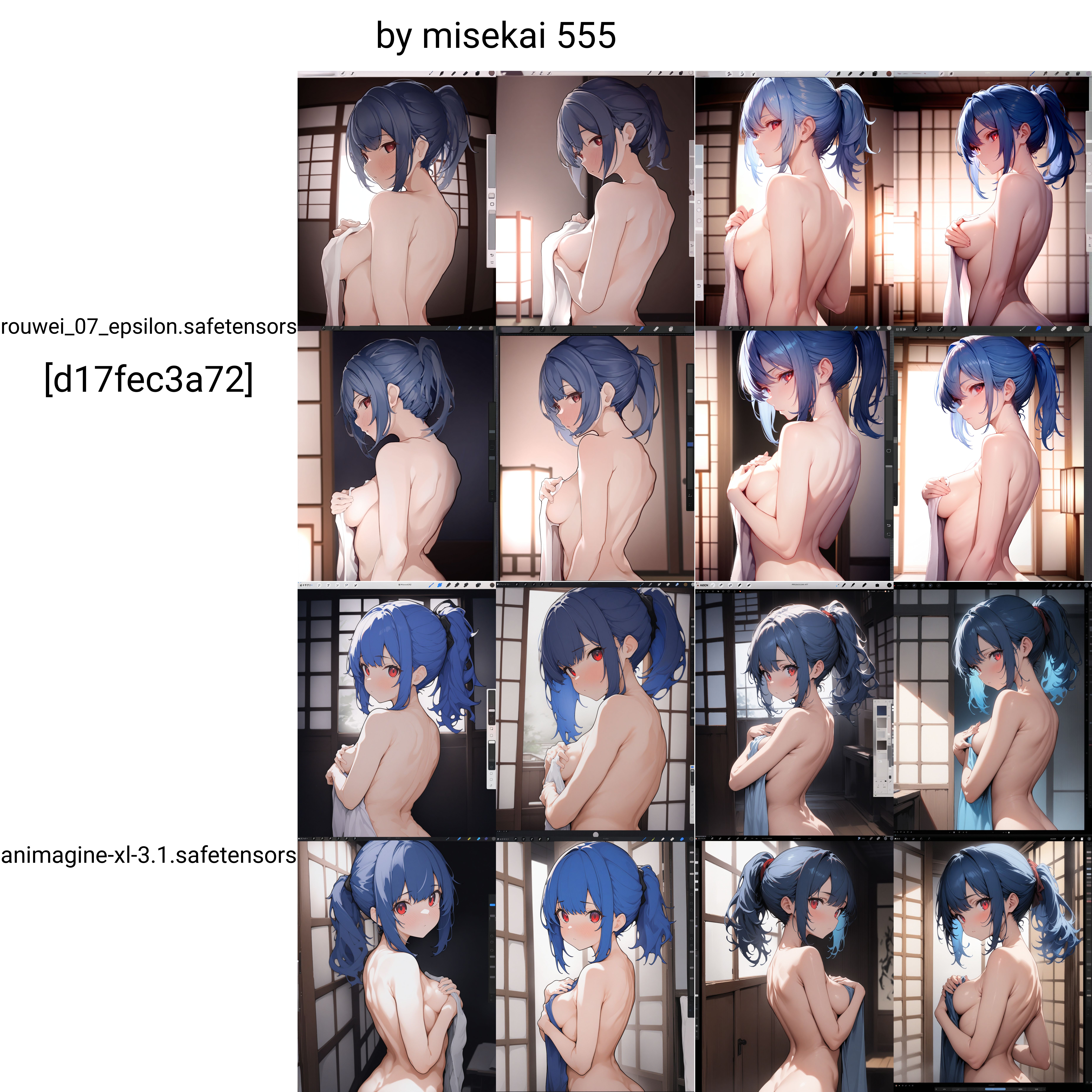
@Minthybasis It might just be that I'm phrasing it wrong, and rather mean its TOO MUCH like misekai ^^;
I love to mix styles on animagine, and misekai was somewhat neutral and could make the composition really good for some reason, and gave a painterly style to everything. In Illustrious models, it's too strong. The outlines seem much thicker and stubborn when compared with animagine 3.1
Here's an example of the misekai style I like: https://safebooru.org/index.php?page=post&s=view&id=3010348 💖
Less so apparent: https://safebooru.org/index.php?page=post&s=view&id=5290304 💖
Examples: https://civitai.com/posts/12104125
I've played around with the illustrious models with different weights on artist tag, higher weights on ai-generated, different cfg, date modifiers, etc., but nothing seems to stop the harsh outlines form appearing.
@Aki_dayo Well, style representation is quite a complex task, especially when you want to see some specific part of artist works (since their style often shifts from time). It becomes even more difficult if you want to recreate the result from other model that differs from original artist.
There are two options: collecting a cherry picked dataset with images that match your preferences to train, or shifting overall style to get what you want by adding extra tags, other styles, changing generation options, etc.
Actually, if you lower artist weight down to about 0.6-0.8, optionally add "flat colors" style tag in positive and lower CFG down to 4..5 (for Euler sampler) - you'll move closer to results that you got with animagine.
@Minthybasis Thank you ! Your replies are very long and comprehensive. Temporal tag and shifting the weight seems to work to some degree.
Here’s a loosely related idea I’ve been thinking about: Given how the artist style shifts over time, I wonder if there's an alternative of having temporal tags were attached to the artist tag if it would make more of a difference in training, though putting them together like: [name temporal temporal] doesn't seem to work better than [name],[temporal],[temporal] in the prompts. Though, given the similarity of the tokens, it would prolly go wrong if it was trained as [name][year] together, instead of simply [name].but by extension, [name] on its own would still perform the exact same function as it does now.
That said, I’m not a model trainer, so this might be a completely uninformed or impractical idea ! I’d love to hear your thoughts—could this approach have any merit, or is it just a dead end ?
@Aki_dayo You actually right, temporal tags can help here. But to make them work as expected (to seperate different epochs in style of artist, not just make strange bias averaged over something else) you need sime tricky augmentation during training. It is not only related to similarity of tags. But first of all, you need to divide images of every artist based on their style and get enough set for each part. There are some approaches based on embedding, but it can be difficult to achieve a good accuracy.
I'm going make some study for this and if it will be successful - try to implement it, but no promises. Thank you for pointing.
@Minthybasis Wait, really? :o Well, if you do decide to test it, I hope it goes well ! ^^ Thank you for the in-depth explanation and for laying out the realities of the situation. I’m glad to hear that something like what I suggested could actually help, even if implementing it is tricky. Separating works by style (of the artist style...) rather than just by year seems like a much better approach (of course, you're the expert)
You did it again, as always, a pleasure using your finetunes!
One of the best hidden gems for anime art. I keep this page bookmarked and return to it daily. Happy to see an update <3
Keep up the exceptional work!
One of my most favorite models strikes again :D I've always loved using your models, and this one is hands down your best work. I'm just curious, but on your next version can you use Gelbooru as the dataset? Gelbooru has so many artist styles that Danbooru doesn't have or that they've removed.
Thank you!
Actually dataset is made from multiple sources, including pictures that you won't find on danbooru. Like cute_and_funny and some dark hardcore stuff, same for requested styles.
Danbooru just provides the most detailed and convenient metatada, that's why it is used as the main source.
If you want some specific artists, characters, concepts, whatever - do not hesitate to post your requests. Without it I won't be able to find out what people are interested in, and there will be only some portion of arts that were included along with other criteria, not by the artist.
@Minthybasis can I request a list of all available tags? If model knows more than Danbooru has
@Sailor_Luna The model is using classic booru-style tagging for all pictures (including from non-booru sources). Whole list can be prepared but that doesn't make much sense because it will be just a huge list that mostly copying danbooru wiki.
But since a significant share of dataset contains captions with natural text, it has some basic understanding for general things and non-formalized descriptions.
Maybe you are interested in something specific?
@Minthybasis full danbooru and e621 lists are already exist. Its here https://github.com/BetaDoggo/danbooru-tag-list/blob/main/danbooru-12-10-24-dash.csv
Maybe you can make one with tags not present there? Image counts isnt necessary. Also it really useful for autocomplete feature
@Sailor_Luna The list from your link is the best fit here. Others are listed in description: quality tags (already in autocomplete list), meta tags for brightness and general style. I don't know if there is any point in copying the entire list just to add a dozen.
And for natural text - there are no strict form or limits, just a regular words and short expressions.
I've always liked the model as it's super creative. It can make pictures in extremely different styles and it can surprise you very often.
The only thing I'd say that it sometimes have strange anatomy problems where a result is weird and wonky but after generating another picture, it's fine again. So little inconsistences. Perhaps it's the price for a very diverse dataset.
Details
Files
Available On (1 platform)
Same model published on other platforms. May have additional downloads or version variants.