简介 / Intro
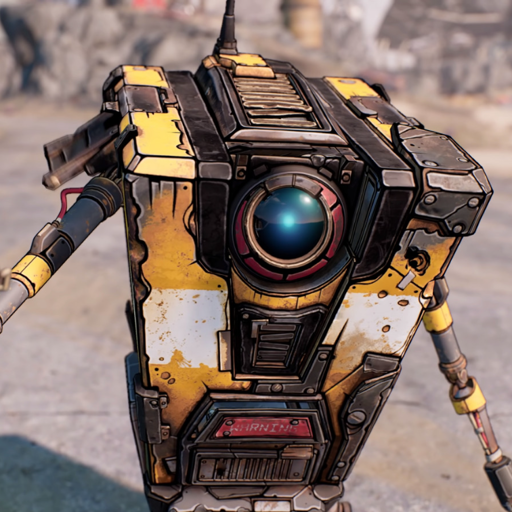
我为Oobabooga-webui制作了一个角色预设,是来自《无主之地》系列中的Cl4P-TP机器人,或者也被叫做“小吵闹”。这个角色是通过先和chatGPT(模型:GPT-4)进行几轮角色扮演,然后将对话文本放入example_dialogue中所创建的。
我已经使用了RWKV-4-Raven-7B模型进行了测试,效果相当不错(隔着屏幕就感觉到挺吵的)。当然,你也可以使用其他模型来查看是否按预期运作。
请注意,这个机器人非常烦人。这就是他的个性。如果你被烦的不行了,就把它关掉吧 :)。
Inspired by this post
I haven't found a better place to share this, so I thought that maybe Civit is a good place. But if it is inappropreate the mods can take any action they see fit.
I made a character preset for Oobabooga-webui that depict the Cl4P-TP unit, or better known as Claptrap, from Borderlands franchise. This character was made by roleplaying with chatGPT(model: GPT-4), and use the text in example_dialogue.
I have tested with RWKV-4-7B model and it works fairly well. You can of course use other model and see if it works as intended.
Just a heads up, the robot is really annoying. It's his persona. If it bothers you just shut him down :).
使用方法 / How to use?
注意:目前我只制作了英文对话,中文会在之后更新。
首先你需要安装Oobabooga-webui 并下载任意一个大语言模型。根据你的显存大小去选择模型的size。16G及以上显存推荐下载7B模型。
You need to have Oobabooga-webui installed and working. Also you need at least a language model installed.
Github repo for Oobabooga-webui
中文用户:如果因为网络连接问题无法顺利使用Oobabooga-webui一键安装程序,请参考这里。
然后,下载本页面提供的文件,解压并将两个文件(Cl4p-TP.yaml and Cl4p-TP.png)放在如下路径中:
.\oobabooga-windows\text-generation-webui\characters
启动webui之后,角色卡应该就会出现在界面下方的Gallary内。
Download the file, extract it, paste the two file (the Cl4p-TP.yaml and Cl4p-TP.png) into
.\oobabooga-windows\text-generation-webui\characters
then you should be able to see the character card in the webui.
Description
Details
Files
Available On (1 platform)
Same model published on other platforms. May have additional downloads or version variants.