
Read the version details and recommendations in the "About this Version" section first.
LoRA, trained at Civitai based on furry artist xxsparcoxx (Ronnie Sparco)
or known as xxsparcoxx1 / xxsparc0xx / xxsrdeathxx
Support the artist using these links:
https://www.furaffinity.net/user/xxsparcoxx/
https://www.deviantart.com/xxsparcoxx
1) Always use the tag by xxsparcoxx
2) This LoRA was based on the Illustrious
3) Even though the Illustrious base model is used, some other models may have some inconsistencies in the images, especially in the eyes and hands, if used in Civitai, use some Embedding / Face Fix to get better results. For those who use Comfyui, the best results will be with some Hirefix / DDetailer to improve the image of the character's face.
4) LoRA weight change in Civitai is at your discretion
5) To better use Lora in Civitai, I recommend using VAE (SDXL VAE) to reduce errors in the details of the hands and eyes.
6) Check first for a model compatible with your chosen image, some models affect Lora in the final result of the image generation for some types such as: furry, human, realistic images, etc. Therefore, the same model may not always be suitable for different types of images.
7) If you want to force the image generator to use the Lora weight you chose, use the following tag in the positive prompt:
Illustrious (v1.0)
<lora:xxsparcoxx_Ronnie_Sparco_Style_Lora_Illustrious:1>Note: the number at the end of the Lora name (1) refers to the Lora weight. In image generators, we have a weight slider, but if you want to "force" it, use the same number as the image generator slider in the positive prompt, for example:
Illustrious (v1.0)
Civitai slider = 1

positive prompt: <lora:xxsparcoxx_Ronnie_Sparco_Style_Lora_Illustrious:1>
8) I added tags related to the artist's best-known characters, if you want an image close to the character, don't forget to enter the character's name, I will leave examples of prompt positive right below each character:
Nineveh
by xxsparcoxx, nineveh (xxsparcoxx), furry, furry female, anthro, animal ears, animal nose, snout, jackal, canine, tan fur, body fur, brown nose, brown eyes, brown hair, long hair, bangs, ????????????, slightly chubby, voluptuous, thick thighs, wide ????, tail, 1girl, solo, jewelry, bracelet, armlet, covered ???????, see-through, ?????????????, navel, panties, ?????????, looking at viewer, smile, from below, low-angle view, cowbot shot, dark yellow background, gradient background, simple backgroundSophia Williams
by xxsparcoxx, sophia williams (xxsparcoxx), furry, furry female, anthro, animal ears, animal nose, snout, wolf, canine, grey fur, white fur, body fur, two tone fur, black nose, green eyes, brown hair, long hair, ????????????, overweight female, voluptuous, curvy figure, huge thighs, tail, 1girl, solo, ????????????????, large ???????, ???????, competely ????, ?????, lactation, navel, closed mouth, smile, fat, plump, big belly, collarbone, stomach, looking at viewer, thick thighs, cowboy shot, half-closed eyes, holding ??????, claws, animal ear fluff, blush, dark grey background, gradient background, simple backgroundNote: The character Sophia Williams has a tattoo on their arm, but the AI cannot create a tattoo pattern like the drawings do. So, if you want to add the tattoo to the arm, just put the following tags in the positive prompt: tattoo, arm tattoo, heart tattoo
Ronnie Sparco
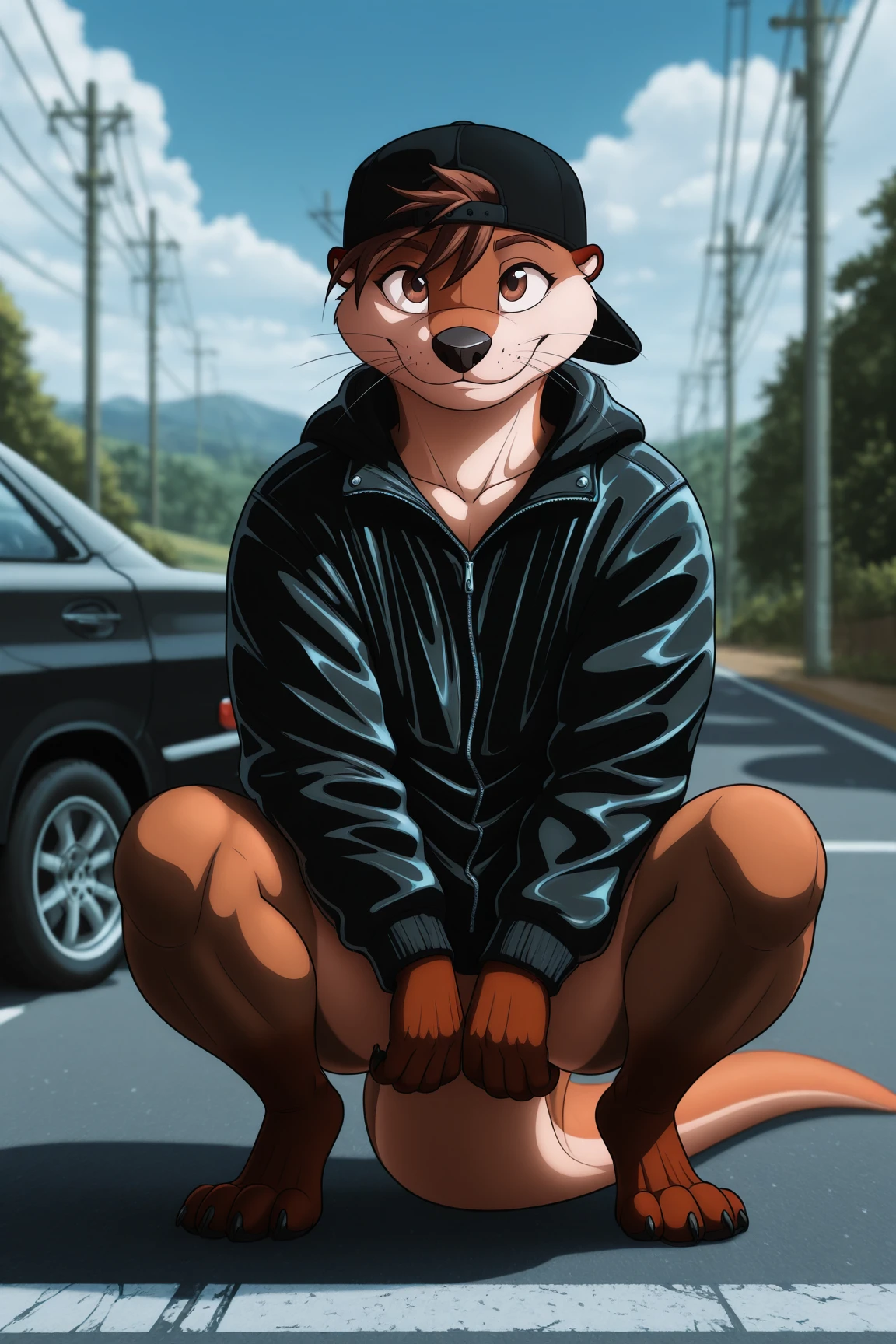
by xxsparcoxx, ronnie sparco (xxsparcoxx), furry, furry male, anthro, animal ears, animal nose, snout, mustelid, otter, brown fur, tan fur, body fur, two tone fur, whiskers, black nose, brown eyes, brown hair, short hair, tail, 1boy, solo, hat, baseball cap, black jacket, black headwear, backwards hat, jacket, ??????????, smile, crouching, full body, motor vehicle, ground vehicle, car, road, utility pole, power lines, outdoors, sky, cloud, day, (blurry background:1.4)Note: The artist uses several well-known furry characters (cartoons, movies, comics, etc.), but in the training I left Lora flexible and malleable to be adapted / mixed with other Loras. My recommendation is that you use a character-specific Lora so that the final result is satisfactory.
Below is an initial configuration, but any other type of configuration is up to you:
ILLUSTRIOUS
Model
World Furry Fusion - v1.0 (Standard)
Lora
xxsparcoxx (Ronnie Sparco) Style Lora v1.0 (illustrious) - 0.5 ~ 1.0 (Preferably 1)
Advanced
CFG Scale - 3.0 ~ 9.0 (Preferably 5)
Sampler - DDIM / Euler a / Euler / Heun / DPM2 / DPM++ 2M Karras / Uni PC (Preferably Euler a)
Steps - 20 ~ 60 (Preferably 30)
Clip Skip - 1/2
VAE - SDXL VAE
Prompt (Positive)
masterpiece, best quality, amazing quality, very aesthetic, high resolution, ultra-detailed, absurdres, newest, scenery, depth of field, scenery, volumetric lighting, by xxsparcoxx, sophia williams (xxsparcoxx), furry, furry female, anthro, animal ears, animal nose, snout, wolf, canine, grey fur, white fur, body fur, two tone fur, black nose, green eyes, brown hair, long hair, ????????????, overweight female, voluptuous, curvy figure, huge thighs, tail, 1girl, solo, ????????????????, large ???????, ???????, competely ????, ?????, lactation, navel, closed mouth, smile, fat, plump, big belly, collarbone, stomach, looking at viewer, thick thighs, cowboy shot, half-closed eyes, holding ??????, claws, animal ear fluff, blush, dark grey background, gradient background, simple backgroundPrompt (Negative)
bad quality, worst quality, worst detail, sketch, censorGeneral Observations:
If possible, give credit to the author xxsparcoxx (Ronnie Sparco) while using this LoRA.
Do not sell or commercialize this LoRA.
Do not remove metadata from images generated by LoRA.
Description
About this version
More distant images may show some artifacts, distortions or disproportions in the face when generating images in Civitai, which is why the recommendation of this LoRA is to use characters closer to the image or use some Embedding / Face Fix to reduce errors in the face.
Example Images - (https://civitai.com/posts/25190698)
Details
Files
Available On (1 platform)
Same model published on other platforms. May have additional downloads or version variants.