
Description
Used in conjunction with sd3 workflow large models
1. Update comfyui to the latest version, which is version c8b5e08

2. Import the json workflow into comfyui, or drag it directly into comfyui
3. Download all text encoders, and at least one large model
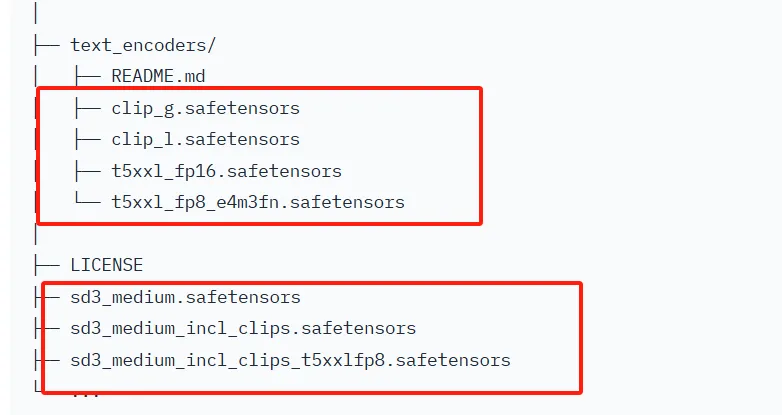
That's right, these are the text encoders, fp8 and fp16, choose one, if the configuration is not enough, you may need fp8
4. Put the text encoder in the clip folder under the models folder in comfyui
5. Put the large model in the checkpoints folder under the models folder in comfyui
You can download all four text encoders completely on my homepage, for other large models, you need to go to the official account to find them
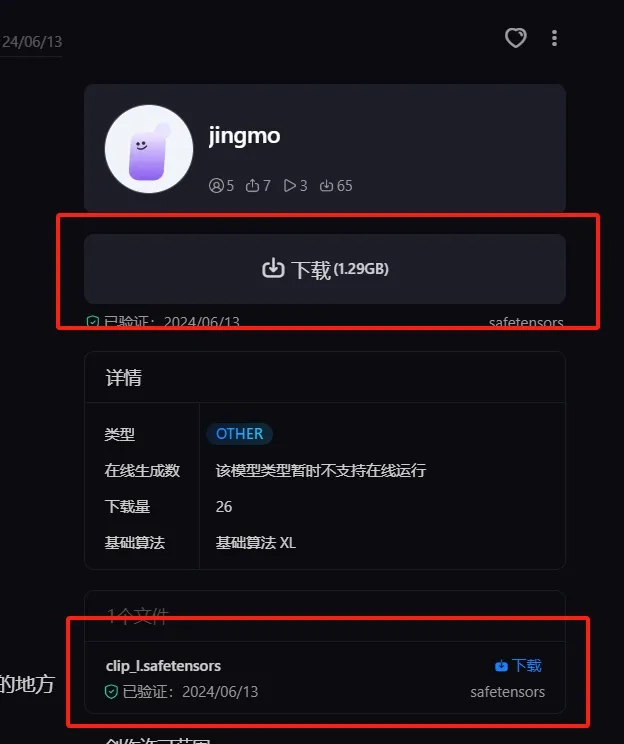
Below is the link for clip-g and clip-l text encoders
https://www.liblib.art/modelinfo/d145cade95b44fcb9b3c317836f1a1c2
Details
Files
t5xxl_fp16.safetensors
Mirrors
flux1T5TextEncoder_stock.safetensors
stableDiffusion3SD3_textEncoderT5XXLFP16.safetensors
t5xxl_fp16.safetensors
t5xxl_fp16.safetensors
clipExperts_t5xxlFp16.safetensors
t5xxl_fp16.safetensors
t5xxl_fp16.safetensors
clipExperts_t5xxlFp16.safetensors
t5xxl_fp16.safetensors
fluxT5XxlTextencoder_v10.safetensors
t5xxl_fp16.safetensors
t5xxl_fp16.safetensors
t5xxl_fp16.safetensors
t5xxl_fp16.safetensors
t5xxl_fp16.safetensors
t5xxl_fp16.safetensors
t5xxl_fp16.safetensors
t5xxl_fp16.safetensors
t5xxl_fp16.safetensors
t5xxl_fp16.safetensors
t5xxl_fp16.safetensors
t5xxl_fp16.safetensors
t5xxl_fp16 (1).safetensors
t5xxl_fp16.safetensors
t5xxl_fp16.safetensors
t5xxl_fp16.safetensors
t5xxl_fp16.safetensors
t5xxl_fp16.safetensors
t5xxl_fp16.safetensors
t5xxl_fp16.safetensors
t5xxl_fp16.safetensors
t5xxl_fp16.safetensors
t5xxl_fp16.safetensors
t5xxl_fp16.safetensors
t5xxl_fp16.safetensors
t5xxl_fp16.safetensors
t5xxl_fp16.safetensors
t5xxl_fp16.safetensors
t5xxl_fp16.safetensors
t5xxl_fp16.safetensors
t5xxl_fp16.safetensors
t5xxl_fp16.safetensors
t5xxl_fp16.safetensors
t5xxl_fp16.safetensors
t5xxl_fp16.safetensors
t5xxl_fp16.safetensors
t5xxl_fp16.safetensors
t5xxl_fp16.safetensors
t5xxl_fp16.safetensors
t5xxl_fp16.safetensors
t5xxl.safetensors
t5xxl_fp16.safetensors
t5xxl_enconly.safetensors
t5xxl_fp16.safetensors
t5xxl_fp16.safetensors
t5xxl_fp16.safetensors
t5xxl_fp16.safetensors
t5xxl_fp16.safetensors
t5xxl_fp16.safetensors
t5xxl_fp16.safetensors
t5xxl_fp16.safetensors
t5xxl_fp16.safetensors
t5xxl_fp16.safetensors
t5fp16.safetensors
t5xxl_fp16.safetensors
t5xxl_fp16.safetensors
t5xxl_fp16.safetensors
t5xxl_fp16.safetensors
t5xxl_fp16.safetensors
t5xxl_fp16.safetensors
t5xxl_fp16.safetensors
t5xxl.safetensors
t5xxl_fp16.safetensors
t5xxl_fp16.safetensors
t5xxl_fp16.safetensors
t5xxl_fp16.safetensors
t5xxl_fp16.safetensors
t5xxl_fp16.safetensors
t5xxl_fp16.safetensors
t5xxl_fp16.safetensors
t5xxl_fp16.safetensors
t5xxl.safetensors
t5xxl_fp16.safetensors
t5xxl_fp16.safetensors
t5xxl_fp16.safetensors
t5xxl_fp16.safetensors
t5xxl_fp16.safetensors
t5xxl_fp16.safetensors
t5xxl_fp16.safetensors
stableDiffusion3SD3_textEncoderT5XXLFP16.safetensors
t5xxl_fp16.safetensors
t5xxl_fp16.safetensors
t5xxl_fp16.safetensors
t5xxl_fp16.safetensors
t5xxl_fp16.safetensors
t5xxl_fp16.safetensors
t5xxl_fp16.safetensors
t5xxl_fp16.safetensors
t5xxl_fp16.safetensors
t5xxl_fp16.safetensors
t5xxl_fp16.safetensors
t5xxl_fp16.safetensors
t5xxl_fp16.safetensors
t5xxl_fp16.safetensors
t5xxl_fp16.safetensors
t5xxl_fp16.safetensors
t5xxl_fp16.safetensors
t5xxl_fp16.safetensors
t5xxl_fp16.safetensors
t5xxl_fp16.safetensors
t5xxl_fp16.safetensors
t5xxl_fp16.safetensors
t5xxl_fp16.safetensors
t5xxl_fp16.safetensors
t5xxl_fp16.safetensors
t5xxl_fp16.safetensors
t5xxl_fp16.safetensors
t5xxl_fp16.safetensors
t5xxl_fp16.safetensors
t5xxl_fp16.safetensors
t5xxl_fp16.safetensors
t5xxl_fp16.safetensors
t5xxl_fp16.safetensors
t5xxl_fp16.safetensors
t5xxl_fp16.safetensors
t5xxl_fp16.safetensors
t5xxl_fp16.safetensors
t5xxl_fp16.safetensors
t5xxl_fp16.safetensors
t5xxl_fp16.safetensors
t5xxl_fp16.safetensors
t5xxl_fp16.safetensors
t5xxl_fp16.safetensors
t5xxl_fp16.safetensors
t5xxl_fp16.safetensors
t5xxl_fp16.safetensors
t5xxl_fp16.safetensors
t5xxl_fp16.safetensors
t5xxl_fp16.safetensors
t5xxl_fp16.safetensors
t5xxl_fp16.safetensors
t5xxl_fp16.safetensors
t5xxl_fp16.safetensors
t5xxl_fp16.safetensors
t5xxl_fp16.safetensors
t5xxl_fp16.safetensors
t5xxl_fp16.safetensors
t5xxl_fp16.safetensors
t5xxl_fp16.safetensors
t5xxl_fp16.safetensors
t5xxl_fp16.safetensors
t5xxl_fp16.safetensors
t5xxl_fp16.safetensors
t5xxl_fp16.safetensors
t5xxl_fp16.safetensors
model.safetensors
t5xxl_fp16.safetensors
t5xxl_fp16.safetensors
t5xxl_fp16.safetensors
t5xxl_fp16.safetensors
t5xxl_fp16.safetensors
t5xxl_fp16.safetensors
t5xxl_fp16.safetensors
model.fp16.safetensors
t5xxl_enconly.safetensors
t5xxl_fp16.safetensors
t5xxl_fp16.safetensors
t5xxl_fp16.safetensors
t5xxl_fp16.safetensors
t5xxl_fp16.safetensors
t5xxl_fp16.safetensors
t5xxl_fp16.safetensors
t5xxl_fp16.safetensors
t5xxl_fp16.safetensors
t5xxl_fp16.safetensors
t5xxl_fp16.safetensors
t5xxl_fp16.safetensors
t5xxl_fp16.safetensors
model.safetensors
t5xxl_fp16.safetensors
t5xxl_fp16.safetensors
t5xxl_fp16.safetensors
t5xxl_fp16.safetensors
t5xxl_fp16.safetensors
t5xxl_fp16.safetensors
t5xxl_fp16.safetensors
t5xxl_fp16.safetensors
t5xxl_fp16.safetensors
t5xxl_fp16.safetensors
t5xxl_fp16.safetensors
t5xxl_fp16.safetensors
t5xxl_fp16.safetensors
t5xxl_fp16.safetensors
t5xxl_fp16.safetensors
t5xxl_fp16.safetensors
t5xxl_fp16.safetensors
t5xxl_fp16.safetensors
t5xxl_fp16.safetensors
t5xxl_fp16.safetensors
t5xxl_fp16.safetensors
t5xxl.safetensors
t5xxl_fp16.safetensors
t5xxl_fp16.safetensors
t5xxl_fp16.safetensors
t5xxl_fp16.safetensors
t5xxl_fp16.safetensors
t5xxl_fp16.safetensors
t5xxl_fp16.safetensors
t5xxl_fp16.safetensors
t5xxl_fp16.safetensors
t5xxl_fp16.safetensors
t5xxl_fp16.safetensors
t5xxl_fp16.safetensors
t5xxl_fp16.safetensors
flux_t5xxl_fp16.safetensors
t5xxl_fp16.safetensors
t5xxl_fp16.safetensors
t5xxl_fp16.safetensors
t5xxl_fp16.safetensors
t5xxl_fp16.safetensors
clip_t5xxl_fp16.safetensors
t5xxl_fp16.safetensors
t5xxl_fp16.safetensors
t5xxl_fp16.safetensors
t5xxl_fp16.safetensors