


Fifth Mix: a furry-anime fusion model series
♥♥♥♥♥♥♥♥♥♥♥♥♥♥♥♥♥♥♥♥♥♥♥♥♥♥♥♥♥♥♥♥♥♥♥♥♥♥♥♥♥♥♥♥♥♥♥♥♥♥♥♥♥♥♥♥♥♥♥♥♥♥♥♥♥♥♥♥♥♥♥♥♥♥♥♥♥
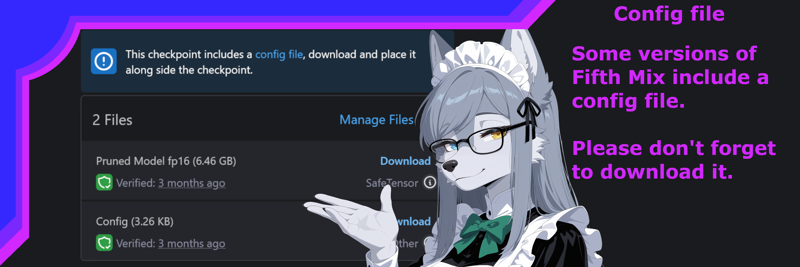
Welcome to Fifth Mix, what mix would you like to start with tonight?
For best results, I recommend use with 1.5x base resolutions (the red row on my resolution chart below), and use of Kohya HRFix with these models.
[Sea Breeze]: Illustrious (EPS)
[Blue Hawaiian]: Illustrious (EPS)
[Screwdriver]: NAI (v-pred) ♥ LS582's recommended choice ♥
[Vieux Carré]: NAI (v-pred)
[Vieux Carré](Beta): NAI (v-pred)
For best results, I recommend use with 1x base resolutions (the green row on my resolution chart below) with these models.
[Banana daiquiri]: Illustrious (EPS)
[Absinthe]: Illustrious (EPS)
[Paradise]: Illustrious (EPS)
Now that you've ordered, please read the instructions below.
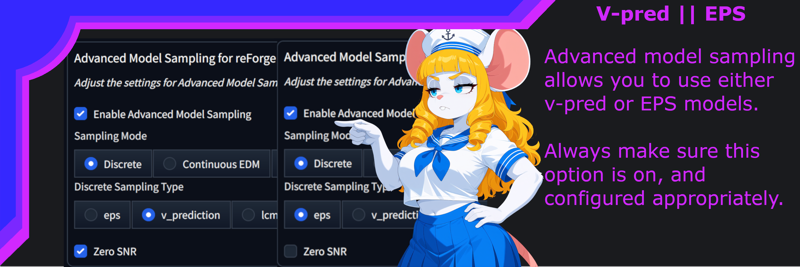
When using the recommended tools and settings, all versions of Fifth Mix should be usable within the same recommended values without alteration.
You are however welcome to approach Fifth Mix in any way you're most comfortable with. Below are my recommendations based on my personal experiences and usage.
♥♥♥♥♥♥♥♥♥♥♥♥♥♥♥♥♥♥♥♥♥♥♥♥♥♥♥♥♥♥♥♥♥♥♥♥♥♥♥♥♥♥♥♥♥♥♥♥♥♥♥♥♥♥♥♥♥♥♥♥♥♥♥♥♥♥♥♥♥♥♥♥♥♥♥♥♥
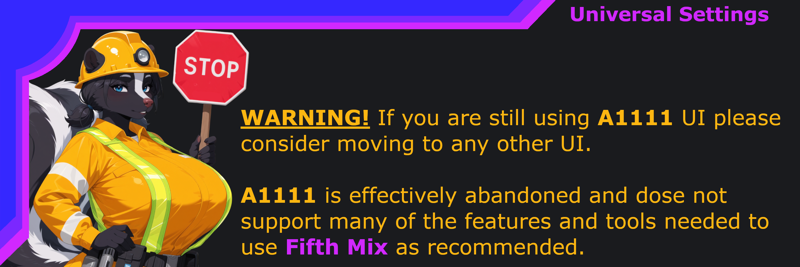 There are other UI choices, but A1111 is seemingly abandoned, and I don't know enough about anything outside of ReForge/Forge. Comfy has a large and supportive community and I know someone will be able to help you if you chose that.
Stable Diffusion UI:
Forge
ReForge
Comfy.
Extensions:
ADetailer (ESSENTIAL) link
Sweet and simple, you know what it dose and I couldn't live without it now. Here's the three ADetailer models I use most, and consider necessities for your library.
Kohya HRFix (RECOMMENDED) built-in w/ (Re)Forge/Comfy
(Kohya Deep Shrink for Comfy users.)
Kohya HRfix is generally required for 1.5x raw resolution and non-standard resolution generation stability.
Sometimes when using both K-HRFix and Forge Couple, they might break. In most cases, this is related to the K-HRFix option for Downscale Factor just keep that at the default (2) and it should be fixed.
Fifth Mix [Screwdriver] and [Vieux Carré] have been thoroughly tested with this tool and I can't begin to recommend it enough.
Forge Couple (QOL) link
(Or any alternative to it, are) One of the next most essential tools you should have available. Opening up many more options for generation, such as for couples, groups, or certain difficult image layouts that wouldn't be possible otherwise.
Tag autocomplete (QOL) link
An absolute necessity everyone should have. Don't forget to change the .csv in your UI options to use the e621 tags.
♥♥♥♥♥♥♥♥♥♥♥♥♥♥♥♥♥♥♥♥♥♥♥♥♥♥♥♥♥♥♥♥♥♥♥♥♥♥♥♥♥♥♥♥♥♥♥♥♥♥♥♥♥♥♥♥♥♥♥♥♥♥♥♥♥♥♥♥♥♥♥♥♥♥♥♥♥
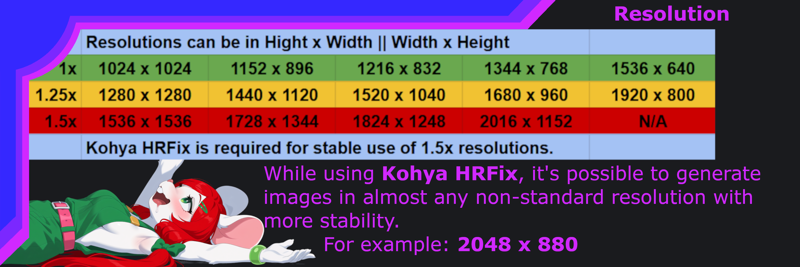 The first row of resolutions represent the base supported resolutions that all SDXL and all fine-tunes built out of it's lineage should be capable of.
But, the further away from square images, both in terms of aspect ratio and resolution you move, most models become increasingly unstable without the support of tools like Kohya HRFix.
However, many newer models are slowly adding more support for higher base resolutions making more of these resolutions attainable without additional tools. I still highly recommend having access to Kohya HRFix, because raw 1.5x without Kohya HRFix can be very temperamental, resulting in very strange, impossible, grotesque and duplicate anatomy.
UI Settings:
Sampling steps: 25-50
CFG: 3-6
Sampling method | Schedule type
RECOMMENDED: Kohaku_LoNyu_Yog | KL Optimal
FALLBACK: Euler A | Automatic
If you don't already have the Kohaku_LoNyu_Yog sampler, this should be it. (Link)
additionally, there seems to be a small mistake in the files for this sampler, huge thanks to user ct_7r for informing me of this and instructions to fix it.
To fix this, go to the custom node installation directory, locate the __init__.py file, and remove the "sample_" prefix from the line SAMPLER_NAMES.append("sample_Kohaku_LoNyu_Yog"). This format differs from all the others and should be very easy to identify.Hires. fix settings:
Upscale by: 2-2.5
Denoising strength: 0.15-0.4
Upscaler: 4x_foolhardy_Remacri (link)
(Use lower denoising with higher upscale percentages.)
 ♥♥♥♥♥♥♥♥♥♥♥♥♥♥♥♥♥♥♥♥♥♥♥♥♥♥♥♥♥♥♥♥♥♥♥♥♥♥♥♥♥♥♥♥♥♥♥♥♥♥♥♥♥♥♥♥♥♥♥♥♥♥♥♥♥♥♥♥♥♥♥♥♥♥♥♥♥
universalized prompting:
Below is a non-exhaustive list of some fairly core prompt tags I've pooled into my prompting framework.
Some of these prompts have more or less impact on the final result, and many prompts will also lose some weight with larger prompts, but they all do something.
Everything has been organized as best as possible and made as easy to copy-paste as I could make it for general use. If you keep notes, I would suggest saving this section in a notepad or somewhere so you can easily add to or modify it for your own needs.
This section will also likely see small unannounced updates periodically.
Base positive prompt:
I personally suggest using the base prompts at or near the end of your prompt, as to not overpower the intended direction.
very awa, masterpiece, best quality, absurd res, hi res, newest, new,Extra positive prompt(s):
Recommended for [Screwdriver]:
I like this extra positive prompt, as it helps reinforce and clamp the desired styling direction. However, it's not required, and you can avoid using it if you'd like.
(digital media \(artwork\), digital drawing \(artwork\):1.2), (anime style, official art, promotional material:1.1)I use this one less, but used in the positive prompt block exactly like this it can help clamp anatomy with minimal style changes. I would advise keeping the weigh low, as seen here.
(realistic, real:0.3), Recommended for [Sea Breeze]:
This extra positive prompt is what I suggest adding with [Sea Breeze] to fully utilize the 2D anime styling this model was built around.
(digital media \(artwork\), digital drawing \(artwork\):1.2), (anime style, cel shading, saturated colors, high contrast:1.1)Or this alternate version for less saturated colors.
(digital media \(artwork\), digital drawing \(artwork\):1.2), (anime style, cel shading:1.1)Base Negative prompt:
worst quality, low quality, low res, compression artifacts, old, oldest, early, ai generated, Extra negative prompts:
signature, watermark, artist name, character name, patreon username, patreon logo, url, blurry, Recommended additions for [Sea Breeze]:
As [Sea Breeze] is a little more capable of other styles, this extension of the negative prompts is to help prevent other styles from diluting the intended styling.
real, realistic, lineless, 3d \(artwork\), 3d animation, traditional media \(artwork\), painting \(artwork\), watercolor \(artwork\),Lighting:
hdr, 4k, 8k,
chromatic aberration, multiple lighting sources, volumetric lighting,
soft shading, soft lighting,
dark, high contrast, low light, low lighting, dimly lit, dim lighting,
Color and Colorized-Lighting:
These tags should assist with focusing the color(s) and colorized lighting. Great for establishing setting and atmosphere in your images.
colored lighting, restricted palette,
muted colors, saturated colors,
warm colors, warm lighting,
cool lighting, cool colors,
And this absolute nightmare will help with lighting the scene in the color(s) of choice.
I don't recommend using more than 2 colors with these prompt blocks, and some colors will overpower others, for example: Pink > Purple
[color] light, [color] lighting, [color] glow, [color] rimlight, [color] shine, [color] refraction, [color] backlight,

red light, red lighting, red glow, red rimlight, red shine, red refraction, red backlight,

green light, green lighting, green glow, green rimlight, green shine, green refraction, green backlight,

blue light, blue lighting, blue glow, blue rimlight, blue shine, blue refraction, blue backlight,

pink light, pink lighting, pink glow, pink rimlight, pink shine, pink refraction, pink backlight,

purple light, purple lighting, purple glow, purple rimlight, purple shine, purple refraction, purple backlight,

yellow light, yellow lighting, yellow glow, yellow rimlight, yellow shine, yellow refraction, yellow backlight,

orange light, orange lighting, orange glow, orange rimlight, orange shine, orange refraction, orange backlight,

white light, white lighting, white glow, white rimlight, white shine, white refraction, white backlight,
Enhancements:
detailed,
detailed lighting, detailed shading,
detailed hair,
detailed eyes,
detailed mouth,
detailed fur,
detailed scales,
detailed genitals,
detailed pussy,
detailed penis,
detailed nipples,
detailed [ect...]
Corrective negatives:
Long/unusual:
long body, long torso, long limbs, long legs, long arms, long fingers, long toes, unusual anatomy, unusual pupils, unusual tail, unusual eyes, merged/fusing/mutated:
merged, merging, fused, fusion, fused legs, fused fingers, fused arms, fused toes, fused eyes, fused mouth, fused shadow, mutated, mutant, mutation, unwanted creature/feral:
micro feral, feral, holding feral, holding animal, inset, cutaway, mascot, chibi, smaller feral, Unwanted characters in background:
group, crowd, crowded, crowd scene, background character, silhouette, shadow creature, ambiguous character, duplicate, cloned, 2girls, 3girls, 4girls, 5girls, 6+girls, multiple girls, 2boys, 3boys, 4boys, 5boys, 6+boys, multiple boys, everyone, absolutely everyone, lineup, queue, harem, male harem, mixed harem, Medium prompts:
Reminder that Fifth Mix is weighted to a clean, modern, 2D-2.5D stylized look, and while these prompts will alter the base styling, use your best judgement about what, where, and how much you use these.
digital media \(artwork\), digital drawing \(artwork\),
anime style, official art,
traditional media \(artwork\),
painting \(artwork\), oil painting \(artwork\), acrylic painting \(artwork\),
watercolor \(artwork\),
marker \(artwork\),
pen \(artwork\),
graphite \(artwork\),
colored pencil \(artwork\),
3d \(artwork\), source filmmaker \(artwork\), blender \(artwork\),
pixel \(artwork\),
photography \(artwork\),
mixed media,
microsoft paint \(artwork\),
sketch, colored sketch, sketch page, guide lines, monochrome, greyscale,
Symbols of emotion:
^^^, +++, puff of air, Anger vein, Spoken anger vein, Blush, Spoken blush, Heart, Arrow through heart, Broken heart, Spoken heart, Notice lines, Shout lines, Smiley face, Squiggle, Spoken squiggle, Sweatdrop, Comedic sweatdrop, Flying sweatdrops, Spoken sweatdrop, Squeans, This prompt typically dose the most heavy lifting out of that block of prompts if you're trying to stop any floating emotion symbols from showing up.
notice lines, Character related prompts:
The prompts below are related to basic descriptive tags for character that should help you dial in on what you're looking for, I can't possible list everything, so most of these are a general guideline on where to start.
Sex:
A starting point for assigning a characters physical proportions and features. I'll just drop this directly from E6 because it's a good place to start for references to a charters body size/shape and features.
andromorph – male body, but with a vulva instead of a penis.
gynomorph – female body, but with a penis instead of a vulva.
herm – female body, with both a vulva and a penis.
maleherm – male body, with both a vulva and a penis.
crossgender - For characters normally male or female being depicted as their opposite gender or intersex.
Anthro/Furry:
Just in case you need some tags to help you further reinforce your anthro/furry images.
anthro, furry, scalie, scales,
plantigrade, digitigrade, unguligrade,
humanoid hands, humanoid feet, hooves, paws, hindpaw, handpaw, pawpads,

snout,
big snout, small snout, long snout, short snout, rounded snout, blocky snout, tapering snout,


head hair,
short hair, medium hair, long hair,
straight hair, wavy hair, curled hair, kinky hair, messy hair,
This page on E621 (link) is a good place to start if you want more tag and tagging related information for anthro characters, I've only offered the most basic suggestions to help you getting started with prompting.
Human:
And some tags you can use as negatives or positives to restrict or enforce humans, or human features.
human, humanoid,
humanoid face, humanoid nose, human ears,
human faced feral,
human skin, human skin color,
Breasts:
A collection of basic prompts related to breast size, shape, and other prompts, you can try.
hyper breasts, huge breasts, big breasts, medium breasts, small breasts, flat chested,

round breasts, pointy breasts,

breasts apart, hanging breasts, sagging breasts, bouncing breasts, floppy breasts,

non-mammal breasts, featureless breasts,

exposed breasts, breast outline, breast out, one breast out, barely visible breasts,
Nipples:
Some nipple prompts to try.
pink nipples, black nipples, brown nipples, dark nipples, light nipples,

non-mammal nipples,

nipple outline, erect nipples,

hyper nipples, huge nipples, big nipples, small nipples, inverted nipples, long nipples,

nipple slip, nipple play, nipple pinch,

hyper areola, huge areola, big areola, areola, puffy areola, puffy nipples,

areola slip, barely visible areola,
Penis:
a collection of prompts related to penises to help get you started with all your phallic needs. (Some of these might be hit or miss, but they're here if you want to try them.)
flaccid, erection, half-erect, cum while flaccid,

hyper penis, huge penis, big penis, small penis, micropenis,

veiny penis, veiny knot,

thick penis, thin penis, long penis, short penis, chode,

small penis humiliation, big balls small penis, small penis appreciation, small penis exposure,  humanoid penis, humanoid genitalia, humanoid genitalia on feral,

animal penis, canine penis, feline penis, equine penis, tapering penis, penis

flared penis, knotted penis, penile spines,

glans, hyper glans, big glans, small glans, dark glans, light glans, glowing glans,

penis blush,

foreskin, long foreskin, tight foreskin, loose foreskin, retracted foreskin, circumcised,

darkened penis, darkened genitalia,
Balls:
and to round off genitalia, pun intended, balls!
hyper balls, huge balls, big balls, small balls,

saggy balls, retracted balls,

balls outline, balls out, barely visible balls,

darkened balls, darkened genitalia,
Eyes:
Use one of these prompts if you want more fine control over a characters base eye shape/design.
jitome,
sanpaku,
tareme,
tsurime,
Danbooru wiki pages for added informational context.
jitome - eyes topped with a flat line
sanpaku - eyes that show white primarily above or below the iris
tareme - eyes with a rounded, drooping shape
tsurime - eyes with an upward outer "point"
Parts of the eyes you can modify with colors:
Eyes (Iris)
Eyes is the color of the iris, and most of my models should be stable and capable of handling this without much hassle. (Use aDetailer to enhance sharpness if desired)
Sclera
Sclera are the outer (usually white) part of the eye, and it should be fairly stable to use sclera color prompts.
Pupils (inconsistent)
Pupils, the eye-holes... using modified pupil prompts has shown to be less stable than other eye parts. (aDetailer and/or in-painting can help, but may still produce unstable or undesired results.)
♥♥♥♥♥♥♥♥♥♥♥♥♥♥♥♥♥♥♥♥♥♥♥♥♥♥♥♥♥♥♥♥♥♥♥♥♥♥♥♥♥♥♥♥♥♥♥♥♥♥♥♥♥♥♥♥♥♥♥♥♥♥♥♥♥♥♥♥♥♥♥♥♥♥♥♥♥
Prompt structure:
How to prompt like me, if you want to attempt to replicate my images, or get similar results to me. This is roughly how I most commonly approach prompting since releasing [Screwdriver]. Do not use [] when prompting though, this is just to highlight how I block out prompts.
Feel free to move any of these prompt blocks around as you desire.
Positive:
[Character (if applicable)], [physical appearance],
[Clothing (if applicable)],
[Setting (location, scenery, objects, background)],
[action/pose/position],
[Lighting (optional)],
very awa, masterpiece, best quality, absurd res, hi res, newest, new,
[enhancements (optional)]
negative:
Reminder, you don't need to use this whole block of negatives. But, as an example, you can do something like this if you wanted to. You don't need to be shy about using large prompts with Fifth Mix, as much of my personal use and testing is built around very heavy positive and negative prompts.
worst quality, low quality, low res, compression artifacts, old, oldest, early, ai generated, signature, watermark, artist name, character name, patreon username, patreon logo, url, blurry,
white light, white lighting, white glow, white rimlight, white shine, white refraction, white backlight,
micro feral, feral, holding feral, holding animal, inset, cutaway, mascot, chibi, smaller feral, group, crowd, crowded, crowd scene, background character, silhouette, shadow creature, ambiguous character, duplicate, cloned, 2girls, 3girls, 4girls, 5girls, 6+girls, multiple girls, 2boys, 3boys, 4boys, 5boys, 6+boys, multiple boys, everyone, absolutely everyone, lineup, queue, harem, male harem, mixed harem,
[targeted removal of other things in specific images]
long body, long torso, long limbs, long legs, long arms, long fingers, long toes, unusual anatomy, unusual pupils, unusual tail, unusual eyes,merged, merging, fused, fusion, fused legs, fused fingers, fused arms, fused toes, fused eyes, fused mouth, fused shadow, mutated, mutant, mutation,♥♥♥♥♥♥♥♥♥♥♥♥♥♥♥♥♥♥♥♥♥♥♥♥♥♥♥♥♥♥♥♥♥♥♥♥♥♥♥♥♥♥♥♥♥♥♥♥♥♥♥♥♥♥♥♥♥♥♥♥♥♥♥♥♥♥♥♥♥♥♥♥♥♥♥♥♥
tips & tricks:
Much of what you can learn here from all my guidance for using Fifth Mix will work on many other models. Not all, perhaps not even most, but many models work similarly enough to Fifth Mix series models that these directions should server well there too.
Getting a particularly "human" feature in your output? This can usually be solved by weighting prompts related to antho/furry features in your positive prompt up, and/or try adding some human related features in the negative.
Still getting obnoxious background characters that you don't want? Tried the recommended tags and then some? This is where you can use tools like Forge Couple to separate the character you're trying to prompt from the background, (Using advanced or mask mode) this is basically the nuclear option to delete unwanted background characters appearing, because it also tends to be harder to build your prompt and has a drastic impact on the final output. But it works.
Generally bigger prompts are better with Fifth Mix, no need to overly express every little thing, but leaving less ambiguity for the the model to fill in on it's own tends to help.
Opposite to the last tip, sometimes less is more! if you're using smaller prompts, you might want to use less enhancement and medium prompts, they have a more dramatic impact on the final output with smaller prompts.
As much as I prefer and recommend the use of e621 tags, sometimes, you might need to fall-back onto some very common, or specific Danbooru tags to solve something.
I always forget to mention this, but if you're ever trying to generate an oc serval... there's sadly a very heavy prompt overlap with Serval-chan of kemono friends, when using the prompt serval, best advice is to first prompt Serval-chan in the negatives, and better describe your oc serval. Similar occurrences are likely to appear with other species with popular characters that unfortunately use their species name in their official name.
♥♥♥♥♥♥♥♥♥♥♥♥♥♥♥♥♥♥♥♥♥♥♥♥♥♥♥♥♥♥♥♥♥♥♥♥♥♥♥♥♥♥♥♥♥♥♥♥♥♥♥♥♥♥♥♥♥♥♥♥♥♥♥♥♥♥♥♥♥♥♥♥♥♥♥♥♥
Credits!
A massive thank you to all the model creators out there, without whom Fifth Mix in all it's flavors would not be possible.
♥♥♥♥♥♥♥♥♥♥♥♥♥♥♥♥♥♥♥♥♥♥♥♥♥♥♥♥♥♥♥♥♥♥♥♥♥♥♥♥♥♥♥♥♥♥♥♥♥♥♥♥♥♥♥♥♥♥♥♥♥♥♥♥♥♥♥♥♥♥♥♥♥♥♥♥♥
Q&A section:
Addressing the most important question: "May I rehost Fifth Mix somewhere else?"
Tentatively, I'm fairly permissive of re-hosting Fifth Mix. But it'll always be a case-by-case basis for how comfortable I am letting it happen or remain up.
In general, as long as Fifth Mix is kept Free to download, Free to use, provides a link/credit back to this page, and the uploader isn't making money off of it. I'm probably not going to be bothered about it.
Can I use [...] Lora with this model?
That's sadly a very complicated answer. In general, if it's a standard LORA that matches the model type (eps or Vpred), almost certainly yes across every mix.
Across the just v-pred mixes:
Lora, Lycoris = Should always work.
DoRA, LoKr, anything else = probably won't.
Can I merge Fifth Mix into another model?
YES! ABSOLUTELY! No need to ask, I encourage you to merge Fifth Mix.
NSFW?
Fifth Mix is intended to handle most NSFW content well, and I promise you, I thoroughly test this behind the scenes.
However due to CivitAI's absolutely asinine policies, and terrible enforcement, I chose to use mostly safe-to-lewd content to show how models will look and feel.
You're welcome to post anything you create though, I don't hide posts.
Model names why not just v1, v2, ect?
Fifth Mix is a merge compilation of models that possess traits I like, all with differing styles, qualities, and capability. While every mix is intended to be a furry-anime fusion with a clean 2D though 2.5D anime-like style, each version will have it's own slight twist. Each mix is not necessarily a progression of all the same qualities as the previous version. I don't think version numbers convey how I approach merging and sharing Fifth Mix.
Why do you merge so many models like that?
Before I got into merging my own models, I would typically have 50-75 models in my Stable Diffusion folder ready to use, and that's a bit much.
So I started trying to merge down a few that I liked, seeing what would come out. I started like almost anyone else, mixing 2 models and seeing what happened. Then I started mixing 3, 4, 5... and so on, in a chain of merges.
Eventually I started to notice that even a little bit of one model being mixed into a chain of merges still had some fairly strong stylistic impact on the merges further down the line.
At the "Fifth Mix" is where I started to see some of the best outputs, any more than that and the last models would start entirely eclipsing the lower weight merges near the beginning of the chain. That's how I ended up accidentally creating the merge process and name-sake of Fifth Mix.
(Fun fact, the original name for Fifth Mix was planned to be "ani-fur")
Artist tags?
I think most artist tags you could imagine will work as long as they're well represented on Danbooru and e621.
For perhaps obvious reasons, I haven't tried them all and probably can't tell you if a particular artist tag works, or if it's accurate.
Will you make Fifth Mix for...
No, as of right now, Fifth Mix will only be for Illustrious and NAI. I have no current plans to create any other major branches for the series into other model lineages.
If there's a new model branch in the future I like, I'll probably attempt to branch out into it if it's possible for me.
Pony v6? Hard NO. Not that I expect anyone to actually ask, since it seems Ponyv6 has really fallen off since Illustrious picked up.
Pony v7? Personally, there's a lot of things surrounding this model I don't like, and what it produces so far also isn't looking very appealing to me either. I won't outright say no, but it's not looking likely.
Anima? Well... Actually, I am considering that one. We'll see ~♥
What's next for Fifth Mix?
First; I need to be very forward about something. I have hundreds of checkpoints on my computer, and thousands of LoRA models... I've been telling myself since I started mixing [Blue Hawaiian] that I need to go through everything and do a serious cleanup.
Now it's entirely unavoidable, every single drive is stuffed full with AI models because of the insane and ludicrous experimentation I've done with [Sea Breeze].
Anyway, it'll take me a few months to actually clean up because I keep notes about the models I use, and I'll have to update my notes as well. Just don't expect this to be a fast process, I need some down time after the last few months, and this is something I'm going to do slowly in the background.
There is however, one thing on my mind that I'm likely to work on next, [Screwdriver v2]. Not a successor, an actual updated v2 model. I know NAI is pretty dead these days, but it'll be a good way to send off NAI v-pred using a lot of what I've learned recently to see if there's anything I can do to refine [Screwdriver] more.
♥♥♥♥♥♥♥♥♥♥♥♥♥♥♥♥♥♥♥♥♥♥♥♥♥♥♥♥♥♥♥♥♥♥♥♥♥♥♥♥♥♥♥♥♥♥♥♥♥♥♥♥♥♥♥♥♥♥♥♥♥♥♥♥♥♥♥♥♥♥♥♥♥♥♥♥♥
Model blurbs:
A vestigial leftover from before the [Screwdriver] page overhaul. I'll keep them around, but they're not important, that's why they're way down here.
[Sea Breeze]
Fifth Mix [Sea Breeze] is a model I've spent months working on as an Illustrious blend to match the 2D anime styling of [Screwdriver] and the anthro capability of [Banana daiquiri]. Going through hundreds of potential mix candidates to condense and merge the models to achieve this was an undertaking, and I think I've come as close as I could have hoped to the desired outcome. I also wanted to make sure this model would be a strong foundation to build upon for any future Illustrious merging, so most of the focus of this mix was put into capturing the anime 2D styling capability.
With that said, I personally think [Sea Breeze] is a little less stable than most of my other models, mostly these issues are related to; eyes can be blurry sometimes; hands and fingers can be poorly generated sometimes; and anthro faces tend to look a little to human sometimes.
I don't think it's excessively bad hence why I'm confident uploading this version, but I do feel it's worth mentioning these shortcomings.
[Blue Hawaiian]
Fifth Mix [Blue Hawaiian] is the spiritual successor to [Paradise], attempting to blend a model that contains the color depth, contrast, cute'n'squishy proportions, and the clean 2D styling to do what I feel I failed to do with [Paradise] over a year ago.
[Screwdriver]:
Fifth Mix [Screwdriver] is the next important step in my AI journey, this mix was primarily merged for it's heavy prompt stability, and style. Though this did come at the cost of the extremely deep, rich, high contrast and color depth that [Vieux Carré] could achieve, however I believe this was a worthy sacrifice.
[Vieux Carré]:
Fifth Mix [Vieux Carré] represents something I've striven to have since first getting into AI, deep, rich, dark color and lighting. That's why this mix's main focus was on enhancing color depth, saturation, and contrast using v-prediction. The styling has been mostly stabilized and cleaned up over [Vieux Carré](Beta), able to create character focused images in a modern, clean 2D anime-like style.
[Vieux Carré](Beta):
Fifth Mix [Vieux Carré](Beta) This mix is a product of my own internal testing with NoobAI v-pred models, it was never intended to be made public, but I've enjoyed using it enough that I felt I should share it. I would say it's an unstable, inconsistent model with some unique traits that might be worth trying to tame.
[Banana daiquiri]:
Fifth Mix [Banana daiquiri] stands as one of the most capable and viable Illustrious models I've mixed, this mix is an excellent 2.5D model for close character focused creations, with a focus on enhancing color depth, richness, and expressive lighting over [Absinthe].
[Absinthe]:
Fifth Mix [Absinthe] represents my foray into model merging, and stands as the foundation of the direction of the Fifth Mix series, being a furry-anime fusion model.
[Paradise]:
Fifth Mix [Paradise] is a sister model to [Absinthe], sharing a very similar merge linage, just tilting a little more to the kawii kemono styling than the rest of the series.
Hey, if you've been reading all of this, thank you for checking out Fifth Mix. I hope it'll live up to your expectations.
♥♥♥♥♥♥♥♥♥♥♥♥♥♥♥♥♥♥♥♥♥♥♥♥♥♥♥♥♥♥♥♥♥♥♥♥♥♥♥♥♥♥♥♥♥♥♥♥♥♥♥♥♥♥♥♥♥♥♥♥♥♥♥♥♥♥♥♥♥♥♥♥♥♥♥♥♥
Notes
⦁ [Sea Breeze]: Pretty standard stuff to what I usually do. 1.5x raw gen on all images, 2.75x upscale with cover image, 2.5x upscale on all other images. All upscale was done with 4x Foolhardy Remacri and ADetailer (Minus one, because that particular image kept getting ruined by ADetailer - a semi-common problem when using ADetailer and forge couple.)
⦁ [Blue Hawaiian]: So, anyway, you might notice the showcase for this model is a bit limited compared to normal. Short answer, I wanted to try some new things, and ended up getting burnt out when my UI got bricked and the first merge corrupted.
So I'll be looking for posts to pin on this one for sure.
⦁ [Blue Hawaiian]: Cover image created at 1.5x raw resolution, and upscaled 3x, all other images 1.5x raw 2.5x upscale; all using Remaci, and Khoya HRfix, a few images skipped ADetailer.
⦁ [Screwdriver]: All showcase images were created at 1.5x raw resolution using Kohya HRFix; upscaled 2.5x using 4x Foolhardy Remacri and ADetailer. (Half truth, all images were intended to use Kohya HRFix, a few do not, see if you can spot them!)
⦁ [Vieux Carré]: well, I guess you don't get a clean version of the cover image, every single time I've uploaded it, it gets flagged for review and this time Civit's dumb ass bot decided it breaks TOS... I'll let you make that make sense.
⦁ [Vieux Carré]: All showcase images were created at 1.25x raw resolutions and upscaled 2.5x using 4x Foolhardy Remacri and ADetailer. Showcase images with two characters also used Forge Couple to facilitate stability and image layout.
⦁ [Vieux Carré](Beta): All showcase images were created at 1.25x raw resolutions and upscaled 2.5x using 4x Foolhardy Remacri and ADetailer. Showcase images with two characters also used Forge Couple to facilitate stability and image layout.
⦁ [Banana daiquiri]: All display images are passed through HiRes with 4x Foolhardy Remacri at 2.5x/2.75x upscaling, and then hit with various ADetailer models as needed.
Description
Premixer:
kiwitrainedCKXL_v02 | azureStarfire_voidStableV5
Prmx_KiwiCKAzVod_3070
Premixer:
azureStarfire_voidStableV5 | bananaKiwiXL_v10
Prmx_AzVodBKiwi_4060
--
artofuraFurryMix_v30 | megaCockNsfwFantasy_human
65 | 35
mix1 | uwumergeFurry_v20
70 | 30
mix2 | Prmx_KiwiCKAzVod_3070
80 | 20
mix3 | Prmx_AzVodBKiwi_4060
80 | 20
mix4 | molKeunMix_deepcobalt
80 | 20
LS_Fifth_Mix_Blue_Hawaiian
FAQ
Comments (4)
I don't even use this for Furry (often) and this is still pretty goated.
Thanks, I do try to make sure my models can handle both anime and furry, so I'm happy to see it used for either. Can't wait to see what you post for this mix ♥
Hey thanks for the pin. I absolutely love your Screwdriver checkpoint. The prompt adherence and flexibility is some of the best I've seen in a Noob finetune. It's probably going to be my primary sample showcase checkpoint for my models.
Hey, thanks ~♥
Screwdriver is also my personal favorite model in the series, I'm glad you're enjoying it.