

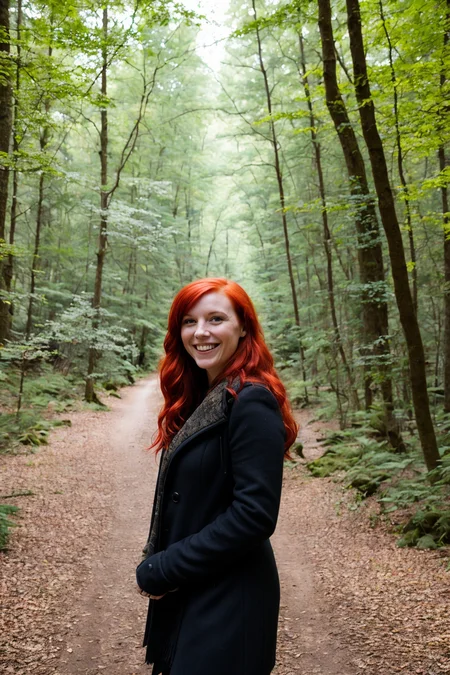


weight: -7.0 to 7.0
positive: zoom in (face close up)
negative: zoom out (full body)
This is NOT perfect. I have tried to make this for a very long time using a dozen different methods and nothing worked. My slider training script was finally able to kick something out that is decently functional. I will continue to work on it because this is the slider I want more than anything else.
The slide in and out is not always smooth, it will hit points that "hang" where the clothing mostly changes for 1-3 weight steps without changing zoom, but it will break through if you keep pushing it. Let me know if you find any thing that can use improvement.
Description
FAQ
Comments (37)
Nice one! I've been waiting for someone to make a decent version of this. In my brief tests, this works better than the other background/distance Lora that I have tried.
I swear all you do is spend your time making insanely useful Lora.
This is a must have built in feature on any SD UI
Could you do the usual LECO process, but instead of matching to latents from a different prompt: decode to an RGB image, zoom in a little bit, encode it, and use that for the loss?
That is very close to how I trained my HD helper https://civitai.com/models/110071/hd-helper . It doesnt use LECO process. I did something I call seed locking which I also did on my nighttime LoRA https://civitai.com/models/99957 . For HD helper, I generated noise with a specific seed at 1024 / 8 . then I scaled that in half using nearest neighbor interpolation, generated with that noise at 512, high res fixed up to 1024 and saved. I did this with over 10,000 wide concept prompts. Then I had a contextual enlarged image essentially which was the same content it would generate at 512 butt at a resolution of 1024. Then I trained at 1024 at with those images with the same seed. Nightime LoRA I generated 500 images at a fixed noise from a specific seed, and a few hundred "night time" images. I converted the daytime ones to night using stable diffusion with a few controlnet modules, and trained on those with the same generation noise, while using the nighttime original images as regularization images.
All of this is to say that yes, that should be possible, but it takes a lot of images to do it. for hd helper, I tried with 1,000 first and it started overfitting before it converged. However, there may be a way to do it on the fly purely in the latent space similar to how the LECO works.
@Ostris perhaps it would be best as a script or extension, rather than a lora? Something like how the hires fix works iirc, where it goes through a few steps at a smaller size and then decode to RGB image and stretch it and encide it and continue the remaining steps. But instead crop the RGB image in a little and stretch it out, effectively zooming in.
But it might impact the composition more than details like perspective distortion / faces looking different at different distances.
In which case perhaps a LoRA not for a zoom, but anti wide-angle as a concept would impart the correct details? Maybe Stable Diffusion has a good enough understanding of camera lens lengths for that to be useful with your current training method: using 50mm as an average embedding, 200mm or so as a positive embedding, and 30mm or so as a negative embedding? Could use all sorts of numbers rather than any specific values, unless some end up being particularly useful in a prompt. Hopefully flattening out the image and having the effect of a "dolly zoom" as the LoRA's strength changes.
This would at least break the problem of zooming in down into different parts, one of composition, and one of style. Unless just using lens lengths for embeddings covers both parts just fine.
how to use it?
add to directory "models->lora" and use <lora:zoom_slider_v1:-5> for example in your promt
A type of LORA that was in demand but not in supply. good is the author.
The author says it can go from -7 to about 7, but I personally think it's about -5 to 5. Once you try +10, you'll understand why the author doesn't recommend it.
If you've ever been mad at SD for not approaching you at all even though you've specified close-up, I recommend it.
I got angry over 100 times myself.
With high numbers (I haven't tried the -ve) you need to make sure the prompt is all about he feature being zoomed in on.
Can I ask how you made this? The approach? I know how to train LoRa but my brain hurts trying to figure out how you gave it the zoom concept?
My guess is that I initially took a photo in large growth and then in Photoshop I made an increase in resolution with each step, I think there were 7-10 steps
https://github.com/ostris/ai-toolkit#lora-slider-trainer That is my repo for training sliders. It has some more info there. Basic concept is finding out a few good prompts for far away and close up shots that the model understands, and spread the concepts with the slider training process. This one took a while because the model doesn't really understand the concept so I had to get a little creative with it to get it to lock on.
You say it's not perfect, but it's still amazing. I know it's an older model but I wanted to comment on how much it's appreciated. THank you so much!
Super! Are you planning to make a version for XL? - would be even more needed there!
yeah,strongly!!!!~~~
yes please! There’s a new method for SDXL https://sliders.baulab.info
Honestly it is the fact that I use a batch of these sliders on most of my images that has prevented me from moving to SDXL. Would love to see these (along with others like Breast Slider, Hair Length Slider, etc) adapted over
Might have some of the same challenges as a zoom slider but I'd love it if you could pull off a "Directional Slider" (i.e. a slider that helps with where the subject is looking). Getting images where the subject is looking completely away from the camera (no face whatsoever) is actually really hard without ControlNet.
Me too
Try weights of "candid".
didn't work on Foocus
so what?
@jtk1996606 what so what?! so don't use it in Fooocus
Thank You!
OMG IT WORKS!!!!! Thanks so much! Tried every prompt and was still getting face closeups!
Could you perhaps remake this for SDXL? I've been using envyZoomXL but I swear it doesn't work the way this one did. :(
good bye, far long shot, close up, etc.. etc...
Tried this out the other day and was pleasantly surprised. I personally haven't had any weird issues at all. It works as advertised. Of course, I've only used it on about 3 checkpoints and I'm sure some are varied.
Where I'm liking this is I can get consistent fully body shots without prompting for it (which only works once in a while). I'm a leg man, so legs and heels is where it's at for me. :-)
Lately I've been having trouble with this on certain checkpoints. When I go minus (for a zoom-out), the subject is mostly standing sideways. No prompting seems to stop it. Anybody have a fix for this?
i am looking into your sliders and see so many useful loras, amazing work, I haven't checked them out yet, but I really need a lora for skin color, like green or blue, that would save me so much pain,
pony and sdxl ether one is good, if anyone knows any skin color lora I would appreciate it
Is there something similar for Illustrious???
Been trying to get whole body photos for a LONG time.... :(
download only gives me a flux version instead of a sd 1.5
Uhh, okay, this definitely needs more explanation. Never had it even remotely make the same person, just random individuals.
Was that a feature that this promoted? I'm not sure you commented in the right place. This seems to be for controlling how close the subject is in the images you generate not for making the person from the sample images.
Details
Files
zoom_slider_v1.safetensors
Mirrors
zoom_slider_v1.safetensors
zoom_slider_v1.safetensors
zoom_slider_v1.safetensors
zoom_slider_v1.safetensors
zoom_slider_v1.safetensors
zoom_slider_v1.safetensors
zoom_slider_v1.safetensors
zoom-slider.safetensors
zoom_slider_v1.safetensors
距离滑块_v1.safetensors
zoom_slider_v1.safetensors
zoom.safetensors
zoom_slider_v1.safetensors
zoom_slider_v1.safetensors
zoom_slider_v1.safetensors
lrazoom.safetensors
zoom_slider_v1.safetensors
zoom_slider_v1.safetensors
zoom_slider_v1.safetensors
zoom_slider_v1.safetensors
zoom_slider_v1.safetensors
zoom_slider_v1.safetensors
zoom_slider_v1.safetensors
zoom_slider_v1.safetensors
Available On (1 platform)
Same model published on other platforms. May have additional downloads or version variants.