


Checkpoint // MIDNIGHT_NAI-XL_vPred
MIDNIGHT_NAI-XL_vPred (MDNT_NAI-XL_vPred as the shorthand alternative) is a specialized fine-tuning of the NoobAI-XL (NAI-XL) model, designed to enhance anatomical precision, compositional coherence, and versatile style integration.
Usage Recommendations
// VAE: To achieve optimal results with MIDNIGHT_NAI-XL_vPred, it's essential to load the appropriate Variational Autoencoder (VAE). This model is intentionally provided without a baked-in VAE to offer advanced users greater flexibility. Ensure that the sdxl_vae is correctly loaded to maximize compatibility. You can find the SDXL_VAE at Civitai or Hugging Face. Otherwise, use MDNT_NAI-XL_vPredV1_VAE, which has the VAE already baked in, eliminating the need for separate VAE loaders. No baked-in VAE for V2.
// Sampling Methods: MIDNIGHT_NAI-XL_vPred is optimized specifically for Euler (normal). Use ModelSamplingDiscrete with V-prediction and ZsNR set to true. Other samplers may not provide stable results, and V-prediction models do not support other samplers.
// Custom Workflow for comfyUI users: For an optimized generation process, consider using the custom workflow MIDNIGHT1111_Chasm 2025-02-05, which is also available on huggingface.co. This workflow is tailored to leverage the strengths of the NAI-XL_vPred model, providing a streamlined and efficient image generation pipeline.
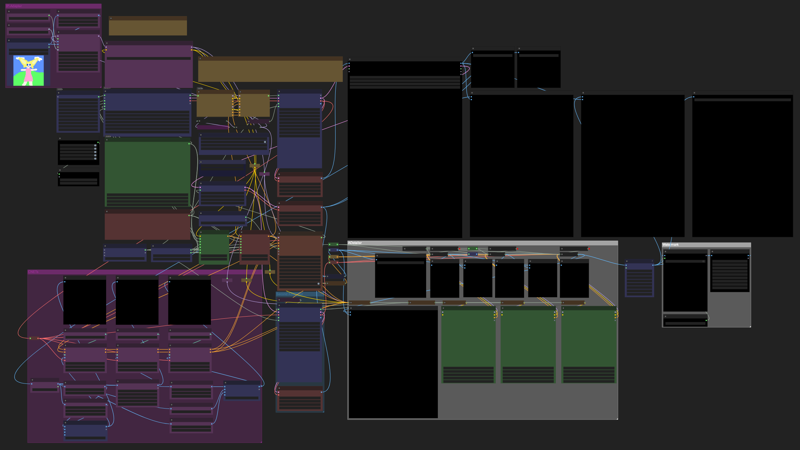
Note: The above image is a preview of the MIDNIGHT1111_Chasm workflow.
CFG Scaling: Dynamic CFG Plugin is bypassed as a backup for potential future needs.
Manually adjust CFG scaling within a range of 3-4 for the best balance. For optimal results, a preferred setting of 3.5 is recommended.
Trigger Word Lists
To enhance the model's performance and specificity, the following trigger word lists are included:
- danbooru_character_webui.csv
These lists provide recognized tags for various artists and characters, facilitating more accurate and tailored image generation. Those can be also found noobai-xl-nai-xl-artist-wildcards-e621danbooru
How to Use
// Method I: reForge
1. Installation: If not already installed, follow the instructions in the reForge repository to set up.
2. Usage: Launch WebUI and use the model as usual.
// Method II: ComfyUI
1. Installation: Follow the setup instructions in the ComfyUI repository.
2. Workflow Sample: Utilize the provided ComfyUI workflow sample for guidance.
// Method III: WebUI
1. Installation: Follow the setup instructions in the WebUI repository.
2. Navigate to the WebUI Directory: Before updating or switching branches, ensure you're inside the stable-diffusion-webui folder
command:
cd stable-diffusion-webui3. Switch to the Development Branch: If you want to use the latest features from the development branch, run:
command:
git switch devgit pull⚠️ Note: The dev branch may contain bugs. If stability is your priority, it's best to stay on the main branch.
4. Update WebUI (Main or Dev Branch): To pull the latest updates while on either branch, run:
command:
git pull🔄 Restart WebUI after updating to apply changes.
5. Configuration: Ensure you're using a stable branch, as the dev branch may contain bugs.
// Acknowledgments
Special thanks to:
Development Team: Laxhar Lab
Coding Contributions: Euge
Community Support: Various contributors
// Additional Resources
Guidebook for NoobAI XL: English Version
Recommended LoRa List for NoobAI XL: Resource Link
// License
This model is licensed under the CreativeML Open RAIL++-M License. By using this model, you agree to the terms and conditions outlined in the license.
// Changelog
2025-02-07: Added VAE Baked-In Version:
For those who prefer a version with the VAE baked in, it is available MDNT_NAI-XL_vPredV1_VAE.
Availability on Hugging Face
This model is also available on Hugging Face for ease of access, packaged files, and verification of its original source:
🔗 Hugging Face - MidnightRunner/MIDNIGHT_NAI-XL_vPredV1
🔗 Hugging Face - MidnightRunner/MIDNIGHT_NAI-XL_vPredV2
Created by Magnabos.co | Creative Artist
2025 © Midnight1111
Description
Fine-tuned SDXL model utilizing V-Prediction architecture, now @ version 2.
FAQ
Comments (4)
EDIT: Fixed, leaving this here for anyone else that may have this issue with this or other models, which I have. You need to use sdxl_vae as a vae... it's just not mentioned anywhere on this page as of the time of posting this. There are so many checkpoints that have baked in vae's that I completely forgot this was even a thing.
I got it working in ReForge... mostly. I followed all of your text very carefully. I set the advanced/discrete sampling type to v_prediction, and have ZeroSNR toggled on.
Original Post:
Whenever I generate an image, it looks correct as it's generating, but as soon as it finishes, it's like 25% of the color/saturation vanishes and it has a gray transparent filter over the image. I can't figure it out, tried everything, other than all of the schedulers. I'm using Euler but not sure which scheduler to use, they all seem to produce slightly different levels of artifacting (white spots).
Not sure if it's some extension I have installed causing it or what, as far as I know, nothing is on that shouldn't be.
Thank you for sharing your experience with the MDNT_NAI-XL_vPred model. I'm glad to hear you've managed to get it working in ReForge.
The model is intentionally provided without a baked-in VAE to offer users greater flexibility. But I do understand that this might lead to some confusion for some users. Thanks to you, I've updated the model's description to emphasize the importance of correctly loading the sdxl_vae to maximize compatibility. You can find the VAE at Hugging Face.
If you prefer a version with the VAE baked in, I have one available and can publish it upon request, aye?
@midnight1111 Sounds good. I don't mind having to load a vae, it's just that I haven't done it in a very long time since so many people just release them baked in lately. I think being able to try other vae's on checkpoints without it baked in is actually a good idea, as I remember getting fun results with that last year with certain Pony checkpoints, but I get that some people just want simplicity/complete packages.
Really liking this checkpoint so far, but I've only tried v1. I'm not too informed on V-pred or NoobAI yet, but I've read into them lightly. My impression of it so far in any checkpoint trained under that umbrella is that it can be highly unstable/hard to get good results sometimes, but it seems to be very good at variety and accuracy when it does get things right, with a seemingly great deal of flexibility on prompting.
@GoblinC I agree, having a complete package that's just one click away for Civitai generations can be really useful without bringing VAE in. It’ll definitely be beneficial once Civitai is ready for all models gens.
If you decide to try v2, you might notice improvements in contrast. It offering a lighter touch where v1 could feel a bit heavy. It’s also great for creating content with high upscalers or darker schemes without overdoing it. Feel free to share your results or any feedback—I’d love to see how it works out for you!