


Checkpoint // MIDNIGHT_NAI-XL_vPred
MIDNIGHT_NAI-XL_vPred (MDNT_NAI-XL_vPred as the shorthand alternative) is a specialized fine-tuning of the NoobAI-XL (NAI-XL) model, designed to enhance anatomical precision, compositional coherence, and versatile style integration.
Usage Recommendations
// VAE: To achieve optimal results with MIDNIGHT_NAI-XL_vPred, it's essential to load the appropriate Variational Autoencoder (VAE). This model is intentionally provided without a baked-in VAE to offer advanced users greater flexibility. Ensure that the sdxl_vae is correctly loaded to maximize compatibility. You can find the SDXL_VAE at Civitai or Hugging Face. Otherwise, use MDNT_NAI-XL_vPredV1_VAE, which has the VAE already baked in, eliminating the need for separate VAE loaders. No baked-in VAE for V2.
// Sampling Methods: MIDNIGHT_NAI-XL_vPred is optimized specifically for Euler (normal). Use ModelSamplingDiscrete with V-prediction and ZsNR set to true. Other samplers may not provide stable results, and V-prediction models do not support other samplers.
// Custom Workflow for comfyUI users: For an optimized generation process, consider using the custom workflow MIDNIGHT1111_Chasm 2025-02-05, which is also available on huggingface.co. This workflow is tailored to leverage the strengths of the NAI-XL_vPred model, providing a streamlined and efficient image generation pipeline.
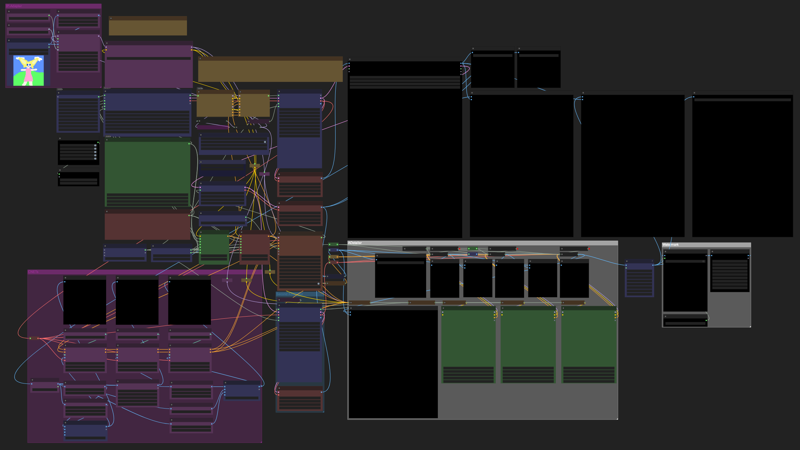
Note: The above image is a preview of the MIDNIGHT1111_Chasm workflow.
CFG Scaling: Dynamic CFG Plugin is bypassed as a backup for potential future needs.
Manually adjust CFG scaling within a range of 3-4 for the best balance. For optimal results, a preferred setting of 3.5 is recommended.
Trigger Word Lists
To enhance the model's performance and specificity, the following trigger word lists are included:
- danbooru_character_webui.csv
These lists provide recognized tags for various artists and characters, facilitating more accurate and tailored image generation. Those can be also found noobai-xl-nai-xl-artist-wildcards-e621danbooru
How to Use
// Method I: reForge
1. Installation: If not already installed, follow the instructions in the reForge repository to set up.
2. Usage: Launch WebUI and use the model as usual.
// Method II: ComfyUI
1. Installation: Follow the setup instructions in the ComfyUI repository.
2. Workflow Sample: Utilize the provided ComfyUI workflow sample for guidance.
// Method III: WebUI
1. Installation: Follow the setup instructions in the WebUI repository.
2. Navigate to the WebUI Directory: Before updating or switching branches, ensure you're inside the stable-diffusion-webui folder
command:
cd stable-diffusion-webui3. Switch to the Development Branch: If you want to use the latest features from the development branch, run:
command:
git switch devgit pull⚠️ Note: The dev branch may contain bugs. If stability is your priority, it's best to stay on the main branch.
4. Update WebUI (Main or Dev Branch): To pull the latest updates while on either branch, run:
command:
git pull🔄 Restart WebUI after updating to apply changes.
5. Configuration: Ensure you're using a stable branch, as the dev branch may contain bugs.
// Acknowledgments
Special thanks to:
Development Team: Laxhar Lab
Coding Contributions: Euge
Community Support: Various contributors
// Additional Resources
Guidebook for NoobAI XL: English Version
Recommended LoRa List for NoobAI XL: Resource Link
// License
This model is licensed under the CreativeML Open RAIL++-M License. By using this model, you agree to the terms and conditions outlined in the license.
// Changelog
2025-02-07: Added VAE Baked-In Version:
For those who prefer a version with the VAE baked in, it is available MDNT_NAI-XL_vPredV1_VAE.
Availability on Hugging Face
This model is also available on Hugging Face for ease of access, packaged files, and verification of its original source:
🔗 Hugging Face - MidnightRunner/MIDNIGHT_NAI-XL_vPredV1
🔗 Hugging Face - MidnightRunner/MIDNIGHT_NAI-XL_vPredV2
Created by Magnabos.co | Creative Artist
2025 © Midnight1111
Description
Fine-tuned SDXL-based model utilizing the V-Prediction architecture, now available with a baked-in VAE.
FAQ
Comments (7)
holy this model is really good at 3D.
I don't know if this is a "problem" with all vpred models or just this one, but when resampling an upscaled image even 0.35 denoise will completely change the output. I have to use the same sampler settings and around a 0.2 denoise to match the hires workflow for regular models.
It's still really good :)
Sticking around ~0.18 denoise usually helps maintain consistency, and matching the sampler settings is definitely key. It’s not a bug, just how v-pred processes data more aggressively. The noise prediction is more dynamic, making outputs more reactive to small denoise changes.
Always stay what sampler: Euler Normal is your best chance.
Why is v2 further done in the model list than v1? Is v2 a worse version?
Possibility, v2 is a bit lighter in colors and accelerated. I noticed I’ve used v1 more.
@midnight1111 I see, thank you!
Can you put the prompts in your images examples please?