UPDATE: Improved notes and user experience. Let me know what you think.
Also I will be tipping Buzz to everyone who upload and tags the model, show me you beautiful work! :)
V1.5 720P is out: information on previous version right after.
I've added ComfyUI-MultiGPU, and it's a game-changer! This advancement allows you to run Hunyuan at resolutions that were previously impossible. Performance on my workflow was already solid, but with this addition and with sage anttention enabled I managed to get these generation times
3090 24 gb of ram. 97 frames, 24 fps, two LoRAs loaded.
720x480 217 secs ( 3.6 minutes )
960x544 362 secs (6 minutes)
1240x720 800 secs (13 minutes)
Credit to firemanbrakeneck for teaching me how to install sage, this is the guide you need but it is a pain in the ass.
Full credit to Silent-Adagio-444, the mastermind behind this plugin, who also helped me implement and fine-tune it for my workflow.
I'll keep the instructions as simple and brief as possible. You'll need to experiment with the node settings depending on your system.
Instructions:
Install ComfyUI-MultiGPU via Comfy Manager or Git.
install ComfyUI-GGUF (this is required!)
Download the GGUF version of the LLM from this link and place it in the Unet folder.
Set up UnetLoaderGGUFDisTorchMultiGPU. I have it set to 4.5, but if you have a lower VRAM card, you may need to increase this number. Experiment to find the best value for your system.
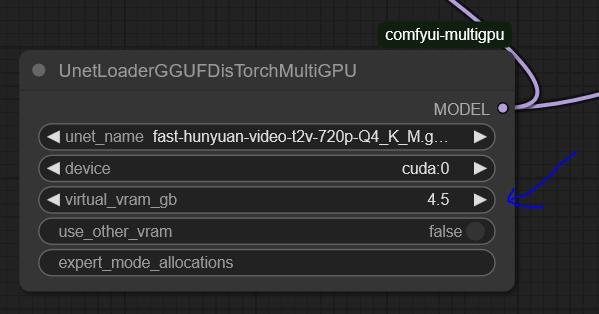
the settings here are optimized for my system: RTX 3090 (24GB VRAM) and 64GB RAM.
You'll need to tweak the settings to find the optimal configuration for your hardware.
For 720p, I use Fast Hunyuan GGUF Q4_K_M.
The less VRAM you allocate, the slower it will be. No free lunch!
Find the optimal balance for your setup.
General info about the workflow and the previous version:
Hi everyone, Bizarro here after countless hours of optimization, I’m happy to share the workflow I’ve been using to extract maximum quality and performance from Hunyuan.
Credit where it's due, this workflow is based on This youtuber workflow I’ve been tweaking settings for weeks to get the best quality possible.
I’ve also finally solved the issues many had with multiple LoRAs! 🚀 You can mix up to three LoRAs without losing quality and even put several characters in the same scene. It works best with two, but I managed to do three in the example (Bizarro LoRA, Wonder Woman LoRA, and Thanos LoRA).
Clarification: I got a bit lucky with the example generation was the first attempt actually I have since discovered it is hard to juggle the LoRAs for consistent results. the Workflow is very fast and the results are pretty great. I will add more examples as I create them. The workflow is great for combining a Lora style with a Lora character as well.
You have to work properly with the prompt make sure you describe the characters, for instance "a Caucasian male" clothes, body size etc, where the character is situated in the frame.
This workflow is highly optimized for a 3090 and can generate 97 frames at 960x544 in less than eight minutes. If you’re using a card with less RAM, try using a different smaller GGUF version or and reduce quality to 480p.
[For more experiments follow me on X
I ramble all day about video generation and also create funny videos.]
This is the GGUF version I’m using, and you can get it here: here:
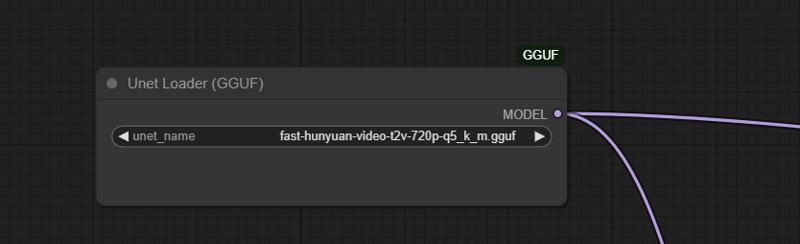 I tried many LoRA nodes, but they were all really bad. The final breakthrough came when I found this node:
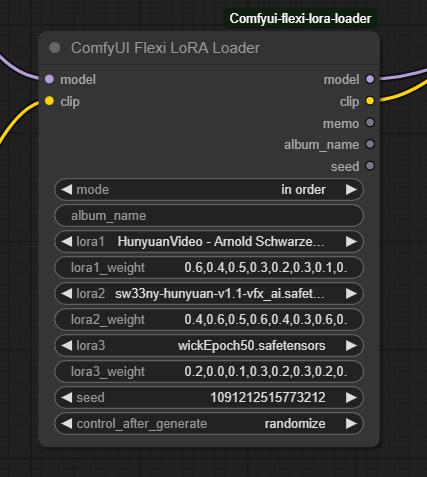 Make sure to set the mode to "In Order." Just select the LoRAs you want and describe each character in detail using the proper trigger words.
Multiple LoRA weight values correspond to different steps in the denoising process, controlling how much influence the LoRA has at each stage. Higher weights in early steps shape the overall structure, while later weights refine details. This allows for more nuanced blending, ensuring that a LoRA’s effect isn't applied uniformly but adapts dynamically throughout the image or video generation process.
It works really well with two characters, but if you’re patient, you can make it work with three as well.
This will work not only for characters but also for all kinds of loras.
This works not only for characters but for all kinds of LoRAs.
I’d love to see what you come up with!
Love,

Mr. Bizarro
Description
Hi everyone,
I've added ComfyUI-MultiGPU, and it's a game-changer! This advancement allows you to run Hunyuan at resolutions that were previously impossible. Performance on my workflow was already solid, but with this addition, I've finally managed to run Hunyuan with LoRAs at 720p for 99 frames in just 16 minutes.
Full credit to Silent-Adagio-444, the mastermind behind this plugin, who also helped me implement and fine-tune it for my workflow.
I'll keep the instructions as simple and brief as possible. You'll need to experiment with the node settings depending on your system.
Instructions:
Install ComfyUI-MultiGPU via Comfy Manager or Git.
Download the GGUF version of the LLM from this link and place it in the Unet folder.
Set up UnetLoaderGGUFDisTorchMultiGPU. I have it set to 4.5, but if you have a lower VRAM card, you may need to increase this number. Experiment to find the best value for your system.
This workflow is optimized for my system: RTX 3090 (24GB VRAM) and 64GB RAM.
You'll need to tweak the settings to find the optimal configuration for your hardware.
For 720p, I use Fast Hunyuan GGUF Q4_K_M.
The less VRAM you allocate, the slower it will be. No free lunch!
Find the optimal balance for your setup.
Love,
Bizarro
FAQ
Comments (122)
Does this multigpu node also make the usual smaller gens noticeably faster for you, or just enable increasing the max past 24gb? It still sounds like a fantastic efficiency improvement, but otherwise probably not as practical for me.
Edit: Also, I think you're missing sageattention? It increases speed and I think lowers vram a good chunk (went from 5s -> 2.5s at one point as I recall), assuming it works with multigpu. I use blehsageattentionsampler, just plug it in between ksamplerselect and samplercustomadvanced.
Not an expert but I think it allows for higher res more frames as you can ofload as much as you want
@topcarlocksmith844 As I understand from a cursory glance at the git, not quite as much as you want - still limited by available ram. And one must consider the overhead of swapping. So any experimental data would be informative.
hi guys, there is not free meals. the ability to to push this to 720 and even 129 frames comes at a cost: generation times. It doesn't make it faster per say, but in lower resolutions reduces the strain on the GPU
@mckenna Gotcha, thanks. In that case I think sage might be even more important.
@firemanbrakeneck yes man but I tried 100 times and can't make it work on windows pinokio instalation and even portable.....
@mckenna I see, that's unfortunate. Hadn't heard of pinokio, I take it that's like chocolatey, automated installation thing.
What seems to be the issue: Do you have cuda 12.4? Did you pip install sageattention? Is comfy itself failing when the node is used?
@firemanbrakeneck https://discord.com/channels/1121039057993089076/1330129817588465664 here is the interaction I had with them. all the info is in there. teacache works, so I assume that triton is installed but always get an error when running comfy. if you have any clue of what is wong suggestion welcome :) thanks for the help!
@mckenna Which channel is that? I don't think I'm registered to it.
Right, pinokio's. I'm on it. I messaged you on discord.
Hey all, owner of the MultiGPU node here.
@topcarlocksmith844 has it correct! You can use a DisTorch loader to offload as much of your UNet as you can afford in DRAM. There are other nodes in ComfyUI-MultiGPU that allow you to move your CLIP to cpu (highly recommended - it will take longer but you will again have more VRAM for generations) and VAE (harder to recommend unless you have a second video card as tiled VAE takes FOREVER on CPU.
If you have 64G of main memory, you can load all 25 gigs of the full hunyuan-video-t2v-720p-BF16.gguf 25G into DRAM even though it is larger than your card. I ran tests with the full model on my 3090 with the full model and saw almost no slowdown in generation times for medium to high pixel loads.
I have a reddit article that goes through some of the technical details here.
Happy to answer any questions here, too!
Cheers!
@pollockjj766 My man, you are a hero. It's as if we've all collectively forgotten our CS lessons (locality of reference, memory hierarchy in particular come to mind) and decided moore's law / bigger number better is enough to solve everything nowadays.
Amazing workflow twice faster generation ( I am still using 736x464) and the output is more accurate than whats the basic wf creates!
Gasp, twice for same size? I'm sold. How much vram / ram do you have?
yes it is very good and less painful on the card.
thanks for the buzz brother!!!!
@firemanbrakeneck Rtx 4070 12GB
@mckenna Actually I am happy to avoid the install of sageat
@sikasolutionsworldwide709 you says this as I am braking my brain trying to install it right now :)
I set up the Multi GPU, so how high resolution can the resolution go? I have a 3090 with 64gb, so pretty much same config as you. Also is it better to go with higer res, or just upscale later?
I will give 1280 x 720 a test tomorrow, when I have some time.
hi brother! 720p check the instructions. you can upscale with whatever method you like to use after. I wanted to keep it as light as posible without unnecessary moving parts. in general is best to use v1 for fast work and then run the best clips at 720
Hey, you have a great config for this, @trashkollector175.
You can basically just consider the UNet of the model off your system and in DRAM. As @mckenna said, it is really all about speed versus "pixel load". In my testing with only 5% of the model on the 3090 compute card, here were my generation stats:
- 8 sec/it “low” = 368×640×65 frames = generates 15 megapixels (MP) worth of workload
- 69sec/it “med” = 560×960×129 frames = generates 68MP worth of workload, or 4x "low"
- 190sec/it "large” = 736×1280×129 frames = generates 121MP worth of workload or 8x of "low"
You're kicking ass with this, well done!
gladly my friend, would love to see some of your results tagged in the model :)
Maybe I'm looking over this and it has been answered before, if so sorry about that, but what is the reason for multiple lora weight values? (0.7,0.6,0.4,0.5,0.3,0.2,0.3,0.1,0.1,0.5,0.2)
he multiple LoRA weight values correspond to different steps in the denoising process, controlling how much influence the LoRA has at each stage. Higher weights in early steps shape the overall structure, while later weights refine details. This allows for more nuanced blending, ensuring that a LoRA’s effect isn't applied uniformly but adapts dynamically throughout the image or video generation process.
@mckenna Oh nice, thanks for the explanation.
I've tested the workflow with my 48GB RAM and 12GB RTX 3060, can confirm that it works great. I'm able to do resolutions with this where other workflows straight away give me a 'out of memory' error. Thanks for putting this together. 😉
@biggerthanbig That's great to hear. That 48G of DRAM puts you in a good position to capitalize on Virtual VRAM. Having run the full FP16 HunyuanVideo GGUF (25G) and putting it all on DRAM as one of my benchmarks, you should be able to increase both quality (loading a better quant or go full FP16) and quantity (more latent space on your compute card.)
It should be said that allocating any Virtual VRAM over your model load size won't accomplish too much. I wish I could extend latent space across cards, but I doubt I'll be the person to crack that. For now, all you get is "PCIe-attached storage" for your 3060's HunyuanVideo UNet. :)
Cheers!
@pollockjj766 Well I'm glad for your hard work. I'm finally able to make videos closer to the examples I see on here and not just a messy video with blurry figures. 😅
I did do a little test with 5/10/15/20 DRAM, (30 steps, 121 frames 720x368, full model), 20GB did shave off almost two minutes compared to 5GB.
@biggerthanbig Thank you so very much! If you haven't, please "star" the github repo, tell your friends, and upvote @mckenna's awesome workflow. :) @mckenna deserves the lion's share of the credit on helping you achieve your awesome results. It was a joy to collaborate with him on this.
Cheers!
Brother McKenna, you are doing good work here. Keep it up. This is the best workflow by far.
thank you brother If you can leave a positive review that would help a lot :)
I've got a 3090, 4060ti 16gb, and 64gb DRAM. I feel like 15-18 mins for generation is too long. What would be the best way to use this workflow?
you can use it at a lower resolution but if you have a dual system will be faster than that
@mckenna though settings wise, is there a way to utilize both VRAM and DRAM or just one?
@yuupersaw yes you can decide how much normal ran you want to use by changing the value as per instructions
@mckenna hmm nothing seems to be speeding up generation other than lowering resolution but that kind of defeats the purpose…
@yuupersaw performance will not be improved by this, you get to run it a 720p but the price is a loner waiting times do you have sage/ tripton enabled?
@mckenna I haven't, do you know of any guides or good tutorials? Thank you, I appreciate your help and efforts, the greater community benefits from all your contributions! :)
@yuupersaw yes bro I will add to description in a few moments. (I just installed and performance is insane
)
@mckenna you're the best, thank you so much!!
Hey @yuupersaw, just agreeing with what @mckenna is saying. The Virtual VRAM is really designed to free up more of your card for larger/longer generations. It can't really help with speed at any resolution/duration unless you were bumping into memory management issues already.
Cheers!
@pollockjj766 Thanks so much for chiming in, currently doing some experimentation, I noticed when I put virtual_vram_gb =16gb, DisTorch allocated 14.4gb from the 4060 ti and 1.60 GB from DRAM. I might be overlooking something but, to make generations faster, wouldn't it be best if you set the virtual_vram_gb to the highest possible value in order to speed up generations? Or am I thinking about this the wrong way?
@yuupersaw check new description for instructions for sage. (tldr it is not simple but it works) Also if you can don't forget to leave a review
@yuupersaw Re: allocation - Great question!
So, here is what my testing tells me:
1. My dual 3090 with NVLink was the fastest. Hands down (15%)
2. It did not seem to matter if I put 85% of the model on DRAM or 85% of the model on VRAM especially for longer generations
3. The oddball of the group was 33% 3090 compute / 33% other 3090 / 33% DRAM - it was the slowest. When I looked at NVTOP, there were slowdowns and lots of traffic.
Taking cues from that data, I also looked into how llama.cpp distributes layers in an automatic fashion, and the tendency there is to minimize devices.
So! To your situation. The logic I use in the code if you turn on "use_other_vram" is to only fill up your largest non-compute device to 90% and then move on to the next one until all is allocated. That is why your non-filled amount was conveniently 10% of 16 gigs, or 1.6G. :)
Having done lots of tests on my own rig, and actually preferring DRAM unless I am connected via NVLink with my 3090s, I would have you run 16 gigs with "use_other_vram" on and off and see how your system performs. All you are doing is basically reversing the order of where you put layers. Given all the different hardware configs out there, I started with those two simple configs.
For more complex configurations outside an "auto" mode, you still have an option. The "expert_mode_allocations" is an override string that will allow you to control, to the layer, where you place your model. You can experiment with that to your heart's content. :) The Virtual VRAM creates the allocation string every time you run, so you have a baseline in your log already. :)
Cheers!
Hey Everyone!
I am the owner of the ComfyUI-MultiGPU custom_node
I am happy to ask questions about using Virtual VRAM (which I developed with feedback from Mr. Bizzaro himself!) or about how to best apply any of the parts of ComfyUI-MultiGPU to your workflows.
My honest belief that if you are using GGUFs that there is no workflow out there that can't benefit from the DisTorch Virtual VRAM loaders by offloading at least some of the model to another storage location on the PCIe bus.
I will also be looking at these comments to see if I can help answer any that are already here.
I wrote a reddit article on the background and technical details and an article here introducing the concepts Virtual VRAM leverages.
Cheers!
I like the ingenuity to make low VRAM systems more efficient. Great job. The confusing part is the name multi gpu, it sounds like its meant for systems with multiple gpus. But its really just segmenting the GPU, and also using DRAM? Hopefully I understood this correctly. It sounds like there are lot of complicated things going on to make this happen. As a developer myself, my head was spinning a bit .. ha ha.
Hey, @trashkollector175
Re: Confusion with the name - Yes, the custom_node originally started out as a way to assign whole parts of the model to other GPUs that resided in the system. It has since evolved to include the Virtual VRAM functionality as well (and could always offload the VAE or CLIP entirely into DRAM before). It is a bit like llama.cpp that only used to be for running Meta's LLaMA models efficiently on CPUs using quantization techniques and now is ubiquitous. While ComfyUI-MultiGPU pales in comparison, it does suffer a bit on first impressions in the same way. That's why I need all of you to let people know! =) Star the repo! Make lots of workflows with it and show people the benefit! :) All or any of those things would be awesome.
Re: "just segmenting the GPU" - I think you are close! How I think about it is that the GGUF UNet that comes in is already segmented (as a bunch of GGML layers). Every compressed GGML layer in the UNet is already self contained. All I am doing is telling where each of those GGML layers should reside before the compute card calls upon the GGUF pipeline to "dequantize" the layer and use it for inference.
I hope that makes sense? I can do this technique only with GGUFs. That means UNet for anything that has been quantized so far - which is most models and the code exists to do it for pretty much anything Comfy supports natively. It also supports CLIP - and for CLIP really only the T5 and HunyuanVideo's llava llama at this time. I can't "segment" the VAE because we don't quantize it in that way.
As much as I would like there to be some black magic here, it is honestly about seven lines of code where I figure out where I want all the GGUF slices to go with device_assignments, which allocates memory for model pieces using the user's Virtual VRAM target with reasonable logic from my own experiments and learning how llama.cpp does things. After that, it is literally one line of code m.to(self.load_device).to(target_device) that does the moving. One time per model load, and we never look at it again until you load another model. The efficient gguf library does all the heavy lifting of managing where are model parts are and fetching them to compute when we need them!
Hope that helps! It's honestly all there in the code.
Cheers!
I would also point out that for those of you having success and have tons more DRAM to spare, this Virtual VRAM works on all GGUF quants. That means the 13G Q8_0 as well as the 25.6G -FP16.gguf, unquantized models both might now be usable!
In other words, those of you with spare 25gigs could be running the best possible version of the model on your hardware without any speed penalty whatsoever.
https://huggingface.co/city96/HunyuanVideo-gguf/resolve/main/hunyuan-video-t2v-720p-BF16.gguf?download=true
Impressive, well done!
@pollockjj766 Hey pollock, had a chance to test this with skyreels (t2v / i2v) yet?
Also, does the virtual vram / splitting (distorch?) only work with gguf? The unet loader doesn't seem to have it, and I get overloaded - what does it do in that case?
ComfyUIFlexiLoRALoader: - Value not in list: lora1: 'bizarroHUNYUAN.safetensors'
cant find it...
also - Value not in list: clip_name1: 'clip_l.safetensors is it default hunyunan cli_l ??
bizarroHUNYUAN.safetensors this is my lora that is not released just change it to something else or none. Value not in list: clip_name1: 'clip_l.safetensors is it default hunyunan cli_l ?? you need to put hunyuan models in the right folders...
So what kind of improvement is sage giving you? Are the render times faster?
it is indeed faster, specially for the lower quality gens. check the updated workflow.
@mckenna the install instructions are insane... I am holding off on sage.. I also have comfy running thru Pinokio.. so not sure how well these instructions apply.
@trashkollector175 badly. here is what I did. install portable comfy and follow the instructions. It will not work with pinokio nor stabilitymatrix
Thank you, this looks amazing! I noticed that your note on the dualclipggufmultigpu says to put the files in the unet folder? Is this accurate because I can only select the downloaded file if it is in the clip folder for example it seems, I did that and it's working.
I think that might be an error, @Champluu - the CLIP file should go in the CLIP directory. Glad to hear you got it working.
@pollockjj766 ok =). What do you think about adding more passes to refine a good result or upscaling?
@Champluu I think that @mckenna is probably going to give you better answers than I can, as those are areas of his expertise, whereas mine is the nodes from the MultiGPU custom_node that you were using to load your model. :) I would hate to lead you astray. He has been active answering questions here, so hopefully my mention will have him jumping on your question.
Cheers!
@Champluu hi there I might add some upscaling, I personally upscale in topaz so is not high priority. If you manage to add you self you can dm me and I will include it in the workflow.
Sorry for this it is corrected now. To little sleep for Bizarro lately.
@pollockjj766 Yeah sry, saw that right after =). I was able to produce a 96 length video (640 x 896) in 3 min 25 secs, that's amazing. I then tried to double the video length and got the allocation error, I then upped virtual vram to 5 GB. The workflow runs up to the sampler but in the log it stays at 0% and does not seem to continue even after an hour and even though the gpu utilization is on 99%. Do I need to check or change something to make sure it runs correctly? Or is upping the length so tough on ressources and the general production time, that it just takes way way longer? At the momemt it seems like I'm stuck everytime the allocation error occurs. I would also like to help you with this project if you want, I have a 4090, and can send you screenshots or test things for you.
EDIT: I think I just have to up the virtual ram some more, I will do some testing
@Champluu I am sure I can help, but I will need a little more information about your system before I can be more directive in that help.
What are your system specs? The DisTorch method essentially is moving parts of the UNet off of your compute video card onto your DRAM. If you have 32G of DRAM and 16 of that is usually not being used, you could up that "Virtual VRAM" number higher, up to the size of the model you are attempting to load.
If you could share a log file from one of your generations (from the terminal you launch Comfy), I include plenty of information that will help me find the optimal solution for you.
You also mention you toggled the "use_other_VRAM" which suggests you might have more than one GPU on your system? If that is the case, the log files will tell me all I need to know there, too.
The logfile will look something like this.
Cheers!
PS - yes, generations can take a long time. Here were some numbers from my initial testing:
- 8 sec/it “low” = 368×640×65 frames = generates 15 megapixels (MP) worth of workload
- 69sec/it “med” = 560×960×129 frames = generates 68MP worth of workload, or 4x "low"
- 190sec/it "large” = 736×1280×129 frames = generates 121MP worth of workload or 8x of "low"
So you can see, it does not scale linearly and you should expect longer generation times based on the load you are feeding it.

@pollockjj766 13900k, 4090 (just 1, I was misunderstanding the option), 64 ddr5, interesting, thanks for the explanation, I get it now. I tested it and it works great =)
@Champluu Really glad to hear that. I honestly believe that there isn't a HunyuanVideo creator out there that this can't help. If you are so inclined, please star the repo and share with others the success you've had using the workflow that @mckenna has so expertly put together. Cheers!
Took a while to make it work, but i figured it out.
ComfyUI-MultiGPU alone isn't enough, it also needs the ComfyUI-GGUF custom node.
Also, i had to put the llava model in the clip folder instead of unet.
@AIArtsChannel - glad to see you got it working. Yes, ComfyUI-MultiGPU requires ComfyUI-GGUF to wrap around its DisTorch loaders so everything works correctly.
And I believe the llava-llama model in CLIP instruction was in error from Mr. Bizarro. :)
hey I will add this to the instructions. I forgot since I had this installed previously.
Thanks for pointing out the mistake in notes. I corrected it now. and sorry for the confusion! let me know how is it working for you :)
SAGE results for 1024x672 - 105 frames
W/o sage 13:53 (old workflow)
W/ sage 7:07
It was really painful to install sage, and thought I might blow up my pc, but it does actually work and makes a difference.
WOW that's huge gains for me its less. Still totally worth it. what settings are you using I have it at auto did not have time to experiment yet
@mckenna I'm using auto... I didnt try the other options. Yea... I didnt expect such a huge improvement. The first time I ran it... I was almost not believing it... I've been rendering more videos and the speed is consistent at about 7 minutes for 1024 x 672 - 105 frames. so it wasnt a fluke. At lower resolutions the difference isnt as striking. but as you get into higher resolutions I am noticing a big difference. the quality is really good . I might try to increase the resolution a bit more, to find the sweet spot. I also made sure to close all other runnings apps in case anything was using VRAM/DRAM. I am running an Intel I9 with 24 cores.
Literally took me 2 days to install Sage. I had to take a day off in between because I was gonna lose my mind.
@hishiryo I know what you mean...
@hishiryo brother hishiro passed the initiation by fire :) welcome brother!
Getting the following error, even with ComfyUI-MultiGPU node installed.
Missing Node Types
When loading the graph, the following node types were not found
DualCLIPLoaderGGUFMultiGPU
UnetLoaderGGUFDisTorchMultiGPU
hi there, what I would do is uninstall the node and reinstall from manager. Then hit F5 for a good refresh. if that doesn't work @pollockjj766 may be able to help, he is the mastermind behind the node.
@mckenna nope, no difference. Are these two node types dependent on something else? I don't see them listed in the MultiGPU node list (latest build).
I noticed when I loaded the workflow, comfui DID NOT identify ComfyUI-MultiGPU as the missing node, I had to install that manually via the manager.
I'll ask pollock in his thread if not sure.
Wait nm, it now works after I installed a load of other nodes for the Hun all in one workflow...
W/e, just happy that it works... ¬_¬
@Idelacio Glad to hear it, brother! 🙂
Download the latest version I’ve improved the user experience with better notes, too.
Also, if you can, please share some clips and tag my workflow as a resource. I’ll be sending buzz to clips that are tagged! 🚀
the nodes you actually needed were ComfyUI-GGUF, i guess you installed the along others.
@mckenna you should write it somewhere
Okay so ... I knew going into this that I will break my comfyui, but I don't care, I am on holiday so have time to tinker. SAGE IS AN ABSOLUTE NIGTMARE AND WANT TO MAKE ME SAY MEAN STUFF , But even with a broken comfy this still works, although for now I have to bypass the Pathch Sage Attention KJ LOL. Even with that bypassed it's the fastest thing I have ever used in comfy to produce amazing quality. What I notice is similar to any other versions or workflow is that I have to use 1280x720 if I wanna have the best quality, anything lower will produce a very very slight blur, but in this one even that slight blur is almost irrelevant, still looks amazing. However, because I don't really know what would be the best setting for the numbers in the lora, sometimes the face does not come out accurate, it still looks like a human, and flawless, just not the person the lora was trained on. I noticed in the old school lora's if I lower the Clip strenght to 0.1-0.15 and have the model strenght over 0,70 it will produce perfect results , so I am kinda trying to figure out what would that be in these numbers, if I am correct, the first 5 numbers would have to be higher, and the last 5 lower, not sure if I can use the same number 5x, or have to variate them a little. Also I am thinking about mixing this into a video to video workflow, it is almost 3am me typing this out, so my brain is wired tired. All the work is for tomorrow. I may reply to this message with future results lol. Also also, there is something else broken in my comf now, it starts really weird hahaha, I am so surprised it still works tho, and not just works but actually makes stable good looking videos in shorter iterations, sorry for the essay XD
I share you sentiment. Sage installation if a modern day rite of passage of sorts, like fire ants for indigenous cultures :) that why I recommend doing in it in a separated portable comfy so you don't get in trouble. would love to see the videos you are producing. I will read this comment latter and give a more detailed answer. thank for the feedback!
Just use linux
@colinw2292823 I guess I am to normie for Linux never tried honestly, at some point I will...
@mckenna I honestly thought so too but start with ubuntu & use chattGPT for the commands until you learn it (im still learning this part myself).
Its actually shocking how similar they have it to windows now but with far less bloat. + things like Sage/flash/triton just work
@colinw2292823 I will try at some point but I am more focused on creation now :) it is the logical development of things...
GGUF model produces total crap for me, I tried bypassing your workflow so that the model is the only thing that changes... going from non gguf to gguf makes the image totally nuked like a JPEG quality 1. This is without the multigpu node
make sure you are using v1 if you want to get rid of gguf. all the clips here where done with gguf but is hard to say why your system has problems with it...
Hi Bizarro!
is there a solution to use it with a i2v workflow?
thanks verymuch!!!
waiting for gguf... will probably come out soon.
I'm getting this error when I run the workflow, does anyone have any ideas on what I need to adjust?
SamplerCustomAdvanced
[WinError 2] The system cannot find the file specified
Do you have any suggestions on how to conquer feauture blending when using multiple character Loras? When I use your workflow, my characters keep blending even when using prompts like "Character A is on the left, Character B is on the right" etc.
yes play with the strength of each Lora, also set the loras in the same order in which the characters appear, also a bit of luck :)
@mckenna all right, thanks! Will see if I can find a configuration that works
Very good work, and thanks for sharing. I modified the workflow a bit for my poor 12GB VRam graphics card, then included another triple Lora in series with the other one, and they would use the same seed, etc., so I could use 4 Loras at the same time.
Thanks! Great Idea with the loras, how do you include it? I often need 4 Loras myself... can you share screenshot?
@mckenna The 4th Lora was the character, I'll tell you in a moment since I'm currently running your workflow with 4 Loras.
@mckenna I just uploaded a short video and image with 4 Loras. In my workflow I also set it for 6 Loras, but I also converted the Seeds into input for the 2 Flexi Loras and the RandomNoise, then I added the Seed node (rgthree) to be able to choose Seed (although I don't know if this is useful for anything hehe but it looked good xD)
@mckenna I also don't know if adding 2 Flexi Loras could cause the workflow to not work correctly and not generate videos well, although at first glance it seems that it doesn't come out badly, although with a poor 3060 it takes time to make videos with that resolution, but I prefer it to take longer and look better hehehe
Hi, please help me to solve this problem: teacache_hunyuanvideo_forward() takes from 8 to 11 positional arguments but 12 were given
try deactivating teacache it may help.
@mckenna That helped, thank you. Maybe the version is not suitable, please tell me what version you have?
@calvincandy70185 I personally have stopped using tea cache cos it makes the video shifty, tend to cause a lot of hallucinations. Since we use the fast model it is fine to run it without teacache.
Hi, how did it go with putting 2 Flexi Loras to be able to put more than 3 Loras? I hope it's okay. A question, is there a website or some tutorial for the prompts for Hunyuan? I'm going crazy with the movement, camera, etc. errors because of the Prompts, an example: I'm trying to make Goku move his hands to do the Kamehameha and then throw it but he starts making weird movements and things hehehe Also ask what models of Loras can be used: SD, XL, Pony... can they be mixed with several types? Greetings and thank you very much for your contributions.
hi. only Hunyuan loras are supported. I still need to test double Lora. As for the prompts follow me on twitter I give a lot of good info in there. but if you need a special movement you need to train it.
@mckenna I asked because I saw this video and its workflow: https://civitai.com/images/53308405 where it uses several types of Loras (IL, SD 1.5, XL and Hunyuan) and the truth is that it looks very good, now I'm trying to make a video with 6 Loras to see how it goes, although I don't know if it really helps to put those Loras, then I'll put the video and that way you can also see my chaotic Workflow hehehe
Is there any chance of you developing a version of this for Wan? Or is it possible to tweak this workflow to work with it as is?
probably it is possible but I am more focus on content creation rigth now. experiment with it :)
ISSUE: I keep getting an error that says TeaCacheForVideo node does not exist. I have tried installing it on the back end, no dice. It doesnt even come up as an option in ComfyUI. But it IS installed apparently. No idea what is going on here.
I switched to version 1.1.2 and it worked for me :)
@WANGkz Can you share? i can't find teacacheforvideo in nodes in Manager T_T
I change for the new version node and work perfect
How can i add a upscaler?...
is this just for using a character lora with an action lora, or can it be used to get 2 or more action loras to play well together?
it can be used how ever you like :) I had success doing what you mention.
@mckenna I wasn't sure because lora mixing is something I've been working on with prompting and the hunyuan video lora loader and a mixture of blocks settings but have mostly mutated results. Other lora creators for the model have expressed that two action loras will not mix in a scene so that's why I'm skeptical. Also I'm running on 12GB vram so learning from my mistakes is very limited 😆
@Pity_the_Foo not saying it's easy. Lora combination for Hunyuan is quite complicated. I had some success so I know it is possible.
@mckenna yeah same, VERY limited success but nonetheless enough to know there has to be a way to get it to work. Unfortunately my main GPU for this is a simple 1080 TI, so 11GB but do have some access to a 3060 12GB, still very underwhelming when you have to wait like 5 min for a single frame to generate. And that's without any batches running and literally just a single frame to see if it's doing what I want.
Considering this workflow is based on a 3090 I imagine it will freeze my computer as I'm trying to tweak settings and whatnot. Also not sure if sage attention is something I can get going on this thing, doesn't it require triton? I know people say they have made triton work on windows but it's supposed to be much better on Linux right?
@Pity_the_Foo you can tweak settings and make it run on your card. you need to add more virtual memory (workflow default is 3090 but it runs on simple cards)