


I've spent a lot of time learning from others and tweaking this workflow, and I thought someone might find it useful. it is very customized to my need and way of thinking / working, but hopefully some part will make sense / help you.
What it can do :
Save configuration of different checkpoints (recommended sampler, scheduler, cfg, positive and negative tags). I love to play with various models, and having a workflow per model was a pain, and keeping track of what settings worked for which model was cumbersome. This workflow adresses these issues.
Hint image will be resized to fit the picked resolution, will be used as latent if you set denoise below 1, and can be used by various control nets (depth, canny, scribble, openpose and tile)
FaceID IPA can be enabled (setup can be troublesome though, I've installed my comfy with miniforge and it worked like a charm). The workflow has a "FACE" prompt in the create group, that must match a folder in your input directory (change the path in the Face IPA group to match your setup). I usually put between 3 and 6 face photography of the subject, 512px square PNG.
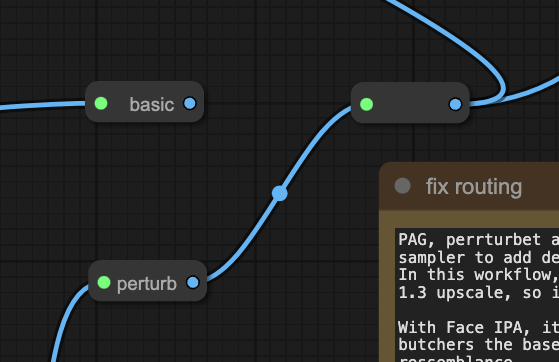
PAG / Perturbed Attention Guidance, discovered this last week and I think I like it. In this workflow, it will run after the basic ksampler, on an 1.3 x upscaled image. It adds 14 steps to the render process, so it's a personal choice. It can be toggled on and off (but you also need to wire the routing manually).
Face Detailer is there, but It might not be optimal, if you have any advice....
Upscaler is there too, nothing fancy.
for prompting, you can :
have an llm write the prompt based on the Hint image (Florence2)
pick a random line from a text file
mix english with your natural language, via google translate
Image saved will have correct metadata for Civitai (models and loras)
Tricks used :
Fast Group Bypasser node, from rgthree, can be setup to match only Groups of a certain color :
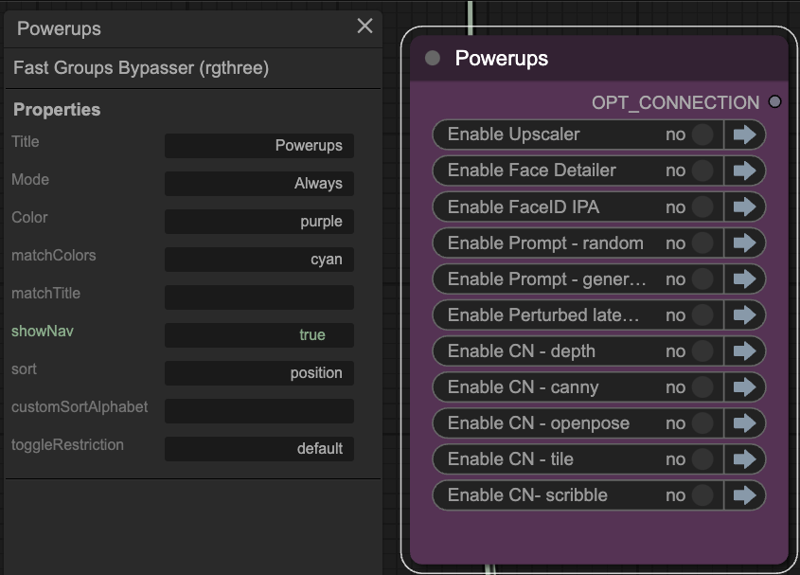 This way I've got 2 distinct "toggles" block, one for the power-ups, one for the models.
Worth noting : if you click the arrow next to a toggle, if will center your view on the selected group.
Reroute node can have a label, right click on the output to add / change :
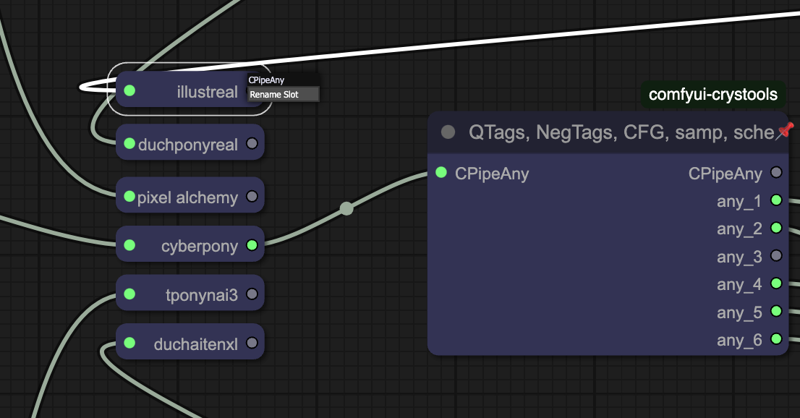
So my workflow uses this when a condition is not possible with Comfy, for the model choice above, and for perturbed attention :
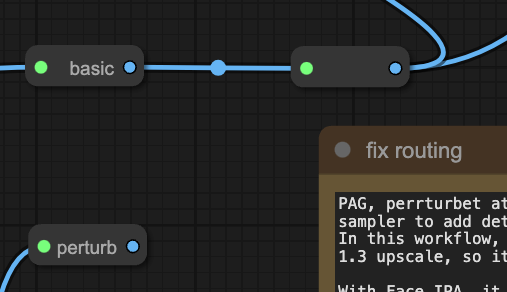 Here it's off, to wire it you just have to move the connexion :
And a pretty obvious one, but I've only found it recently : you can drag an image from the viewer to the workflow ; it will re-create the workflow and seed used in this image generation.
What I tend to do is run a batch without anything fancy (PAG, face detailer or upscaler), then pick one picture I like and try to improve it.
Setup
Install missing custom nodes and pray ? It won't work for the save image node I use, you'll have to clone it.
cd <ComfyUI directory>/custom_nodes
git clone https://github.com/nkchocoai/ComfyUI-SaveImageWithMetaData.git
I've tried to add notes on the workflow, but my main advice is don't hesitate to trash parts of it for now, replace nodes or stuff you don't need, etc...
Most control net should be available on Comfy Model Manger.
Description
Better UX :
bookmark to return to the Create group
moved the reroute connexions for models and perturbed next to their toggles
reworked groups to be more coherent (CN, prompts, upscale, etc...)
New features :
DMD2 upscale option
Bjorn Nodes for random prompt gen
FAQ
Comments (6)
Warning : V2 does not have the comment / explaination nodes, if you need them get V1 first
Looks great, can't wait to learn from it!
If I may ask: How can I download all the used checkpoints/loras/etc? f.e. with pixel alchemy, which version should I download? (Sorry if this is a noob question)
If I may ask a second question: I really like the Add Lora button. How do I add a model?
for the models, I'll go with the latest version. But you can (and should) use the models you want, not the one I like. Same is true for LORAs, none are required. If you want to use DMD2 upscale, you'll just need this one https://huggingface.co/tianweiy/DMD2/blob/main/dmd2_sdxl_4step_lora.safetensors
To add a model, duplicate a group, and the related re-route node, and rename everything. But I think 8 model is enough, so I'll just rename the group and the matching re-route node
thank you for the fast answer!
If I may ask, is there a youtube channel or blog you could recommend to learn comfy?