
[Recent Changes]
I have updated v1.1 beta to v1.11. The nodes have been replaced with new ones to better support multiple LoRAs, and some width and height nodes in the v2v group have been modified to make resolution adjustments easier.
+(v1.11)Fixed an issue with incorrect connections between the output and decode nodes. If you have downloaded a previous version, please download it again.
+There may be issues with the latest version of ComfyUI. If you encounter problems with InstructPixToPixConditioning node, use 'Switch ComfyUI' in the ComfyUI Manager to roll back to version v0.3.13 and then restart ComfyUI.
LoRA can be dynamically applied based on the situation, adjusting to different stages of generation.
This is not a workflow I implemented, but the original author has mentioned that uploading it to Civitai under my account is fine if desired. For convenience, I have modified some nodes and am sharing it here.
Most LoRAs for Hunyuan Video are trained for real-life humans, which can cause various issues when applied to 2D characters. This workflow enables LoRAs to be applied at different stages to mitigate these problems.
I primarily use this for anime-style video generation, but I believe it will also be beneficial for real-life human subjects.
+If any group names or notes seem a bit off, it's probably due to my English skills. I appreciate your understanding!
I have uploaded two versions of the workflow:
Includes Tea Cache and Wavespeed
Uses only ComfyUI core nodes (Tea Cache and Wavespeed removed to avoid potential issues in some environments).
⚠️ The version with Tea Cache and Wavespeed may cause issues in some environments (especially on Windows without Triton). If you experience problems, try using the core-only version.
I do not cherry-pick results, so the explanations are based on images generated after modifying the workflow.
T2V Generation Example:
Same prompt, same seed, and all settings fixed.
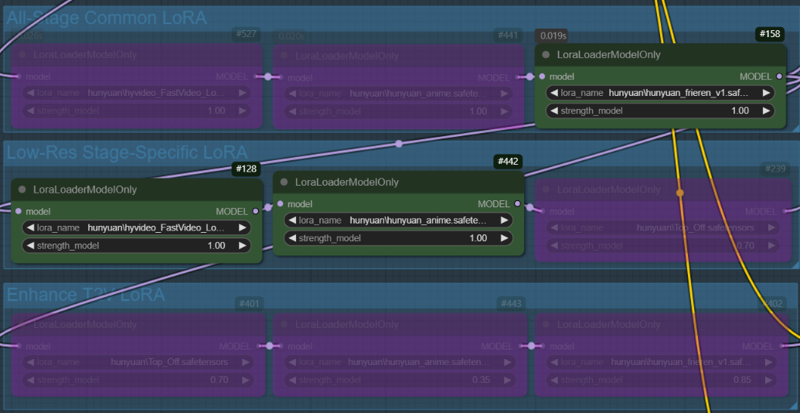
Case 1: A character LoRA is used across all nodes. In the low-res stage, the fast LoRA and style LoRA are applied, while no LoRA is used in the enhance T2V stage(In this stage, only the all-stage LoRA (character LoRA) is applied).

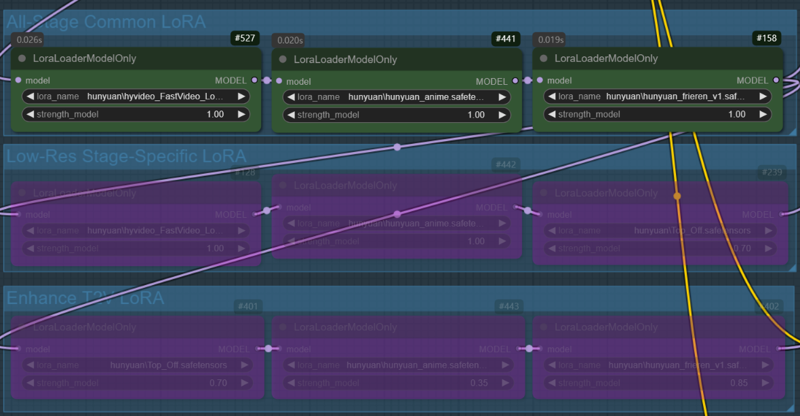
Case 2: All LoRAs used in Case 1 are applied across all nodes

V2V Generation Example:
Same prompt, same seed, and all settings fixed
In the V2V example, the video created in the T2V stage will be used. (case.1)
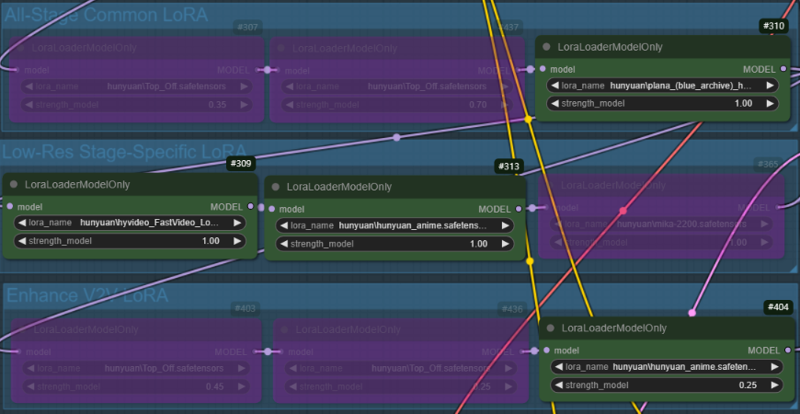
Case 1: A character LoRA is used across all nodes, while Fast LoRA and style LoRA are applied only in the low-res stage. In the enhance V2V stage, the style LoRA used in low-res are applied with reduced weights(1->0.25).

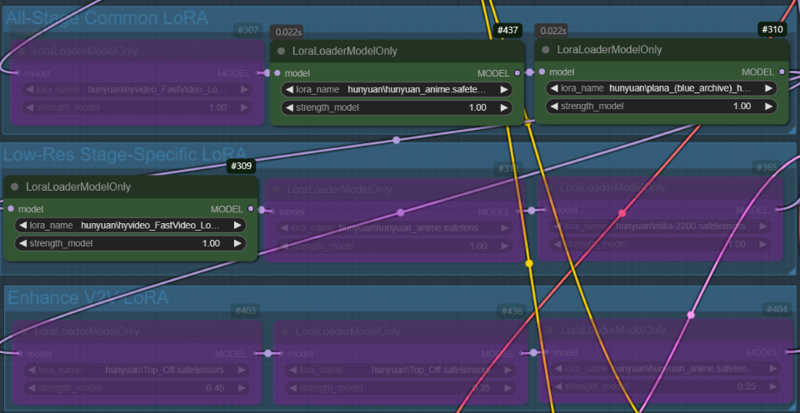
Case 2: Same as Case 1, but the weight of the style LoRA is fixed at 1.0.

Description
Separated low-res and enhanced prompts for better control. However, generation time may be slightly longer due to processing the prompt node twice.
FAQ
Comments (7)
I appreciate this step by step and showcase of the vids with showing how the nodes look. It makes it more digestible to understand. I really do want to try this but I'm getting low on my storage space. How much gb am I looking at to have everything set up and be able to push out vid gens like this?
It depends on which model you choose. The larger the model, the better the performance, but it also requires more VRAM. Here’s an estimate of the storage space needed:
Main Models (Choose One)
-BF16 model: 25GB
-FP8 model: 13GB
-(GGUF) Q5_K_M model: 9GB
-(GGUF) Q4_K_M model: 7.6GB
Other Required Components
-LoRA models: ~150MB to 350MB each (depends on how many you use)
CLIP1: 240MB
CLIP2 (LLaMA3 FP8 scaled model): 15.6GB
VAE: 480MB
Total Estimated Storage Required
-Minimum setup (smallest model: Q4_K_M) → ~24GB
-Maximum setup (largest model: BF16) → ~42GB+
@PEERLESS It is a fallacy to claim all data must be held in VRAM. This misrepresents how AI works. If one needs to read a model once per iteration, and the calculation time in heavy, and the model relatively small, it is better kept out of VRAM, so the VRAM can be used for essential working set intermediate and output data. A fast model will only be optimal on a powerful GPU if in VRAM, but a slow model (which most better image generation models are) can be read in from external RAM as needed.
@blobby99 That is a valid point. However, most users do not have 64GB+ of RAM and 24GB+ of VRAM. I usually base my responses on users with 32GB of RAM and 12-16GB of VRAM, as that is the more common setup. While dynamically loading models from system RAM is possible, many users prefer keeping models in VRAM when feasible for better performance.
mate what is the custom node for applyfbcacheonmode?
https://github.com/chengzeyi/Comfy-WaveSpeed
This is not a required node. If you prefer, you can delete it using the Del key and continue using the workflow.
Just in case, I have re-uploaded the workflow with only ComfyUI core nodes(w/o tea cache, wavespeed). If you encounter any issues, please try downloading it again.