


For business inquires, commercial licensing, consultation and large scale image captioning for datasets contact me under [email protected], for custom LoRAs visit my ko-fi page.
Checkpoint Type: SDXL, Realism and Realistic
Follow me on Twitter: @YamerOfficial Discord: yamer_ai
If you have enjoyed this checkpoint:

Yamer's Realistic is a model focused on realism and good quality, this model is not photorealistic nor it tries to be one, the main focus of this model is to be able to create realistic enough images, the best use with this checkpoint is with full body images, close-ups, realistic images and beautiful sceneries, for example futuristic cities or insides of a home.
Give this model a chance and let your creativity guide you and the perception you have on the world!
This model is not nsfw focused but it can crate nsfw content, it is preferrable to use a LoRA for specific nsfw content, I also recommended to use words such as: Realistic, Ultra realistic, Photorealistic etc..., to give the resulting image an even better and more accurate realistic look to it.
If you want to explore fields that are not realistic focused I highly suggest to use my LoRA for abstract work and a better ethereal look: Yamer's Style.
No refiner is needed for this model to produce good quality results.

Adetailer is not required to achieve a realistic looking image.

The main style of this model is realistic but that can change with a specific prompt that aims at an anime look for example.
𝐕𝐞𝐫𝐬𝐢𝐨𝐧 𝟓 𝐮𝐩𝐝𝐚𝐭𝐞 𝐧𝐨𝐭𝐞
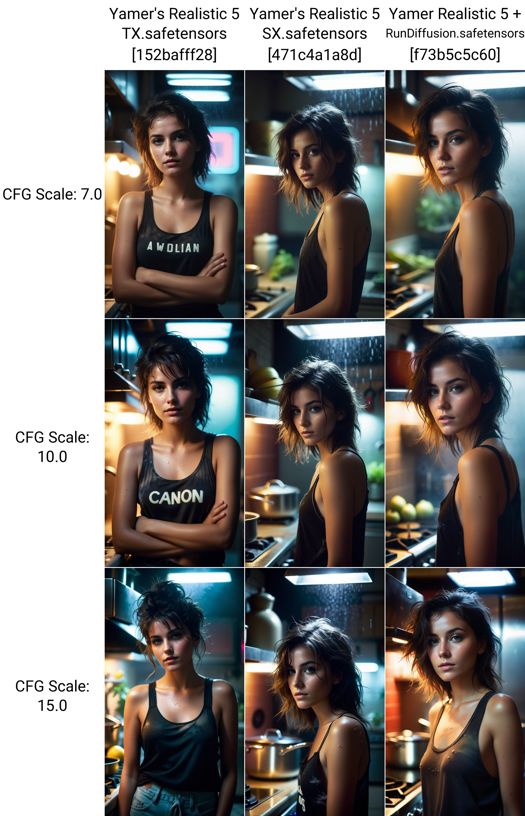
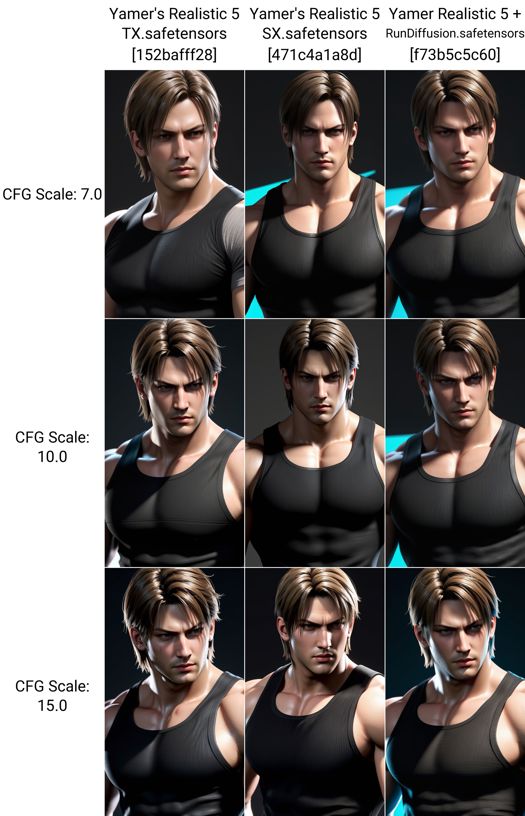
After some time I decided to make some change in the way I release models, the new version will be released in 3 separate models, these 3 models while being similar can still be better with some prompts, that is why it is up to you to decide which is better.
The new version 5 is separated in: TX, SX and RX.
One version can be better with colors or saturation than the other 2; The prompt used in this example is the same, steps, seed and sampler were the same for all images.
Version RX (Realistic + RunDiffusion), SX and TX have been uploaded, enjoy all the current versions of the checkpoint!
Special thanks go to the RunDiffusion team that helped with the release of Realistic 5 + RunDiffusion Photo! Show them some love :3
Version 1, 2 and 3 have the SDXL VAE already baked in, "Version 4 no VAE" does not contain a VAE; Version 4 + VAE comes with the SDXL 1.0 VAE already baked in.
V5 TX, SX and RX come with the VAE already baked in.
Thank you for using my models and writing a review, all forms of support are appreciated, it takes me a lot of time to produce this kind of checkpoint every time! ❤️
Recommended settings:
Image resolution: 1024x1024 (standard SDXL 1.0 base resolution)
Steps: 30 to 150 (Lower steps may produce image artifacts and other unwanted results)
Restore Face: Not needed to generate high quality images (Not used in the showcase)
Clip skip: 1 and 2 (Works good with both settings)
CFG: 5 to 20
Hires Upscaler: 4x_foolhardy_Remacri or 4xUltraSharp
P͓̽e͓̽r͓̽s͓̽o͓̽n͓̽a͓̽l͓̽ ͓̽R͓̽a͓̽t͓̽i͓̽n͓̽g͓̽:͓̽
Quality: 9/10
Realism: 8/10
CFG resistance: 15/30 (going above 15 may result in bad images)
Hires steps: 10-50
Style: 8/10
NSFW: 7/10
1) If you look too closely at the form, you'll miss the essence.
2) Art is not perfect and will never be, it can only improve overtime.
3) I don’t paint dreams or nightmares, I paint my own reality.

-Tally Hall -Yamer -Frida KahloDescription
This version comes with a VAE already baked in.
Enjoy the beautiful images you will be able to create and let me know if you like the model!
This is a merge of various models: Yamer's Anime V4 + VAE, LEOSAM's HelloWorld, Realism from HaDeS, and RealVisXL. Have fun with the checkpoint!
FAQ
Comments (6)
Yamer can we get some sort of indication from you what the differences are between TX, SX, and RX?
I second this please.
The three versions are highly similar, differing primarily in the dataset used; Only a small percentage varies between models. These versions slightly adjust the way a prompt is handled. The reason for this lies in the fact that all versions are part of Version 5, divided into three checkpoints instead of one. This division aims to empower the community to choose the model that aligns best with a specific prompt.
If you for example have a prompt and you are not able to create something that satisfies you, instead of using another checkpoint with another style you can swap between TX, SX and RX and get similar results in the same style.
In summary, all three versions share the same style, with slight variations in the datasets used.
The names TX, SX, and RX hold no inherent meaning; They were assigned that name to distinguish and categorize the models more effectively. I hope this answer satisfies you! :3
There is no simple answer to explain the exact differences between the model, you have to use them and see yourself the difference with a prompt or a style.
If you are curious download the SuperMerger extension for stable diffusion and see the exact block differences between TX and SX.
After installing the extension go to the main page of SuperMerger, click on "analysis", put under checkpoint A: Realistic TX and under checkpoint B: Realistic SX, when you are done with that under where it says analysis mode the button "Both", the final step is to click "Run Analysis" and after some time you should be able to see the various block weight differences between the 2 checkpoints.
@Yamer thanks for the explanation that's exactly what I'm doing I'm experimenting with the same prompt across your various versions and 8 notice the subtle differences and realizing what versions work best for certain things. Appreciate your work and efforts! Amazing models.🙌
@StecFX I'm happy to hear that, if you are interested in accessing future checkpoints before others check out my ko-fi page! There I will soon upload secret checkpoints for those that have the legendary supporter membership or higher! ;3
Details
Available On (1 platform)
Same model published on other platforms. May have additional downloads or version variants.