
💖 Support & Share the Magic!
Love these embeddings? Like, add to collection, and tag this resource in your creations—I’d adore to see what you make! 🎨✨
👉 Looking for amazing anime model? Check out JANKU by yours truly, you won't be disappointed. It is highly tested with my embedding! It also has ONSITE generation support!
👉 More goodies on my profile! Follow for updates!
👉 Join me on our discord server (https://discord.gg/tWrKk3jcXx)! Share art, ask for help, or just chat. We have CivChan bot plus games there!
☕ Support future updates: Buy me a coffee or tip buzz! Every bit helps. Thank you for fueling the art! 🚀
Want to improve your images with zero effort even more? ✨
TrendCraft is the only detailer LoRA trained on the last 30 days of trending CivitAI images —just plug into Pony XL , Illustrious , SDXL, or Noob Vpred workflows for instant, viral-ready upgrades. No prompts, no work. 🪄🔥
🎨 Lazy Embeddings: For Creators Who Hate Typing (But Love Results) 🛋️
Why waste time typing prompts? 💤
Lazy Embeddings = pre-loaded magic for Illustrious/NoobAI/SDXL/Pony XL. Just drop lazypos + lazyneg and go . No copy-pasting, no tears.
⚡ How to Be Lazy (Illustrious/Noob/SDXL):
Positive Prompt: Start with
lazypos(orembedding:lazyposfor ComfyUI).Negative Prompt: Start with
lazyneg(orembedding:lazyneg). If you are using onsite generation, make sure to use lazyneg v3.1 or higher.Done. Seriously. 🙃
Pony XL Users:
Positive:
lazyup(orembedding:lazyup).Negative:
lazydn(orembedding:lazydn).Pro Tip:
lazympos+lazyup= ✨ next-level quality ✨
🔥 If Hands Suck:
Add lazyhand to your NEGATIVE prompt. Too lazy? Just use lazyhand + lazyneg (boom , fixed).
Wet and Shiny Skins:
Add lazywet to NEGATIVE prompt to remove wetness and water drops from skin. It will reduce/remove shiny skin as well! It is a must have in all my prompts when doing SFW.
🙈𝐍𝐒𝐅𝐖:
Block not safe for work with lazy𝐍𝐒𝐅𝐖 in negative prompt. If you want more use it in positive prompt!
Mature characters: Use lazy𝐥𝐨** in negative to make characters more mature and don't get flag on CivitAI!
Realism/Anime: Use lazyreal in negative if you want only anime output. In positive, if you want realistic people output.
🌟 Why Lazy Wins:
⚡ Zero Effort: Skip the prompt grind.
🛠️ Universal: Works with any Illustrious/Noob/Pony/SXDL model.
🤖 Battle-Tested: Trained on prompts real artists actually use .
💡 Peak Laziness: lazypos + lazyneg = flawless art with 2 words . Check the examples—it’s easier than scrolling TikTok .
Stay Lazy. Generate Smarter. 🚀
(Because life’s too short for repetitive typing.)
Protip: Embeddings don't cost any extra buzz for using. If anything, it will save you buzz since you won't generate bad images!
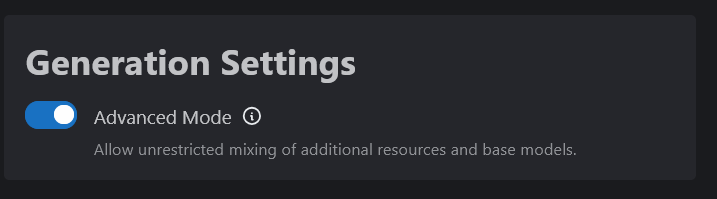
🛠️ Can’t See Lazy Embeddings for Onsite Generation?
Enable Advanced Mode:
Go to Account Settings → Toggle “Advanced Mode” → Now you can select Lazy Embeddings for any model.
 🚀 ComfyUI Users:
Drop embeddings into your
embeddingsfolder.Positive Prompt:
embedding:lazyposNegative Prompt:
embedding:lazynegPro Tip: Use ComfyUI-Custom-Scripts for autocomplete magic! (Though
lazypos/lazynegare short enough to remember 😎)
💫Examples done with my model, JANKU:
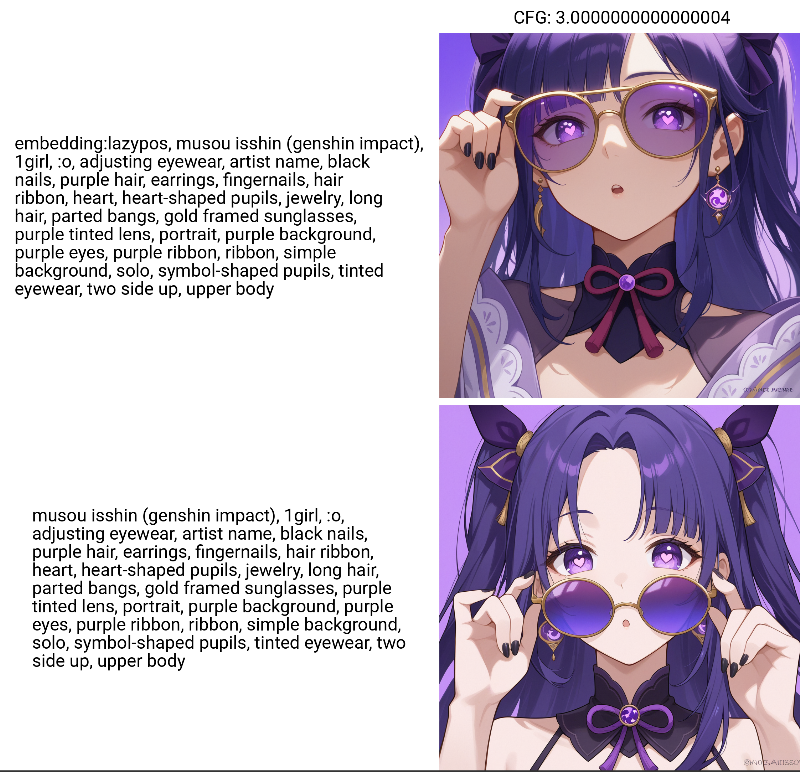 Here is what they are doing under the hood so you don't have to type it! Please note I'm always taking feedback and updating these embeddings. I use them daily!
Illustrious XL / NoobAI / SDXL - see below for Pony XL
Positive prompt (lazypos v2.0):
masterpiece, newest, absurdres, best quality, amazing quality, very aesthetic, ultra-detailed, highly detailedNegative prompt (lazyneg v3.0):
low quality, worst quality, lowres, username, sketch, censor, blurry, distorted, bad anatomy, signature, watermark, patreon logo, artist nameProtip: Use lazyhand embedding in NEGATIVE if you want to fix the hands for the seed!
Pony XL
Positive prompt (ponyup):
score_9, score_8_up, score_7_up, score_6_up, score_5_up, score_4_upponyup7 only includes score_9, score_8_up, score_7_up
ponyup6 only includes score_9, score_8_up, score_7_up, score_6_up
Negative prompt (ponydn):
score_4, score_5, score_6Other versions:
lazympos
masterpiece, best quality, amazing qualityDescription
Added lazympos works for all models including Pony. Only replace lazypos with lazympos if your new lora is not working as expected. M stands for minimum, so what this does is add the minimum amount of positive prompts so your lora doesn't break. For Pony users, use lazyup and lazympos for best quality!
FAQ
Comments (16)
Added lazympos. Only replace lazypos with lazympos if your new lora(s) is not working as expected. M stands for minimum, so what this does is add the minimum amount of positive prompts so your lora doesn't break. You can also use lazympos for Pony models!!
Shoutout @Pilox for bringing it to my attention. I also encountered this issue with 2 loras today one is my new $20 is $20 concept and another lora from another creator.
What exactly is in the lazympos? I usually put depth of field in my negative so I'd rather not use the normal version for most images.
lazympos will be perfect for you then. lazympos has only quality modifiers. no lighting or background related tags.
Added instructions in description on how to use embeddings for other models for onsite generation with screenshot. TLDR: Account Settings -> Advanced Mode turn it on!
I added lazyhand to my prompt on a Pony model and it gave everyone four arms. This is not a complaint. I see it coming in quite handy in certain situations. :)
Did you already have issues with hand before you put in lazyhand? Only use it when there is issues with hands to avoid it or just go next seed. Let me know, maybe I can make some adjustment for Pony. Happy to improve it for everybody as I use it too!
@janxd I was just running it on a small batch to see what it did. Next time I use it I'll regenerate an image with bad hands with it.
@waifubeans thank you, if you can please share prompt with seed along with models and loras. I will check it out and figure out the issue!
do you drag these downloads into models folder or lora folder
embeddings folder not the ones you mentioned
Hello! Can you tell me what lazympos is doing? I mean, like how you put what is doing the normal one.
Lazympos adds the minimum amount for a good image. It is only 2-5 tokens of quality prompts. It has like 5% of what lazypos has. Start with lazypos first 👍
@janxd Ok, i´m trying both(with lazyneg) and i´m liking more the results with lazympos, at least with the model i´m using. Thanks!!
@tabien it also depends on your prompt. if your prompt is very long, use lazympos.
@janxd I'm using the on-site generator. Which I suppose it's not ComfyUI. So, to use the embedding all I have to do is start the prompt with lazypos?
@JackSiren Yes lazypos or lazympos and with negatives use lazyneg. Add lazyhand if hand issues with what you're trying to generate.