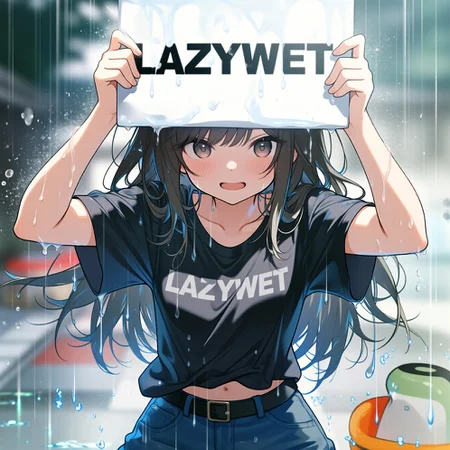
💖 Support & Share the Magic!
Love these embeddings? Like, add to collection, and tag this resource in your creations—I’d adore to see what you make! 🎨✨
👉 Looking for amazing anime model? Check out JANKU by yours truly, you won't be disappointed. It is highly tested with my embedding! It also has ONSITE generation support!
👉 More goodies on my profile! Follow for updates!
👉 Join me on our discord server (https://discord.gg/tWrKk3jcXx)! Share art, ask for help, or just chat. We have CivChan bot plus games there!
☕ Support future updates: Buy me a coffee or tip buzz! Every bit helps. Thank you for fueling the art! 🚀
Want to improve your images with zero effort even more? ✨
TrendCraft is the only detailer LoRA trained on the last 30 days of trending CivitAI images —just plug into Pony XL , Illustrious , SDXL, or Noob Vpred workflows for instant, viral-ready upgrades. No prompts, no work. 🪄🔥
🎨 Lazy Embeddings: For Creators Who Hate Typing (But Love Results) 🛋️
Why waste time typing prompts? 💤
Lazy Embeddings = pre-loaded magic for Illustrious/NoobAI/SDXL/Pony XL. Just drop lazypos + lazyneg and go . No copy-pasting, no tears.
⚡ How to Be Lazy (Illustrious/Noob/SDXL):
Positive Prompt: Start with
lazypos(orembedding:lazyposfor ComfyUI).Negative Prompt: Start with
lazyneg(orembedding:lazyneg). If you are using onsite generation, make sure to use lazyneg v3.1 or higher.Done. Seriously. 🙃
Pony XL Users:
Positive:
lazyup(orembedding:lazyup).Negative:
lazydn(orembedding:lazydn).Pro Tip:
lazympos+lazyup= ✨ next-level quality ✨
🔥 If Hands Suck:
Add lazyhand to your NEGATIVE prompt. Too lazy? Just use lazyhand + lazyneg (boom , fixed).
Wet and Shiny Skins:
Add lazywet to NEGATIVE prompt to remove wetness and water drops from skin. It will reduce/remove shiny skin as well! It is a must have in all my prompts when doing SFW.
🙈𝐍𝐒𝐅𝐖:
Block not safe for work with lazy𝐍𝐒𝐅𝐖 in negative prompt. If you want more use it in positive prompt!
Mature characters: Use lazy𝐥𝐨** in negative to make characters more mature and don't get flag on CivitAI!
Realism/Anime: Use lazyreal in negative if you want only anime output. In positive, if you want realistic people output.
🌟 Why Lazy Wins:
⚡ Zero Effort: Skip the prompt grind.
🛠️ Universal: Works with any Illustrious/Noob/Pony/SXDL model.
🤖 Battle-Tested: Trained on prompts real artists actually use .
💡 Peak Laziness: lazypos + lazyneg = flawless art with 2 words . Check the examples—it’s easier than scrolling TikTok .
Stay Lazy. Generate Smarter. 🚀
(Because life’s too short for repetitive typing.)
Protip: Embeddings don't cost any extra buzz for using. If anything, it will save you buzz since you won't generate bad images!
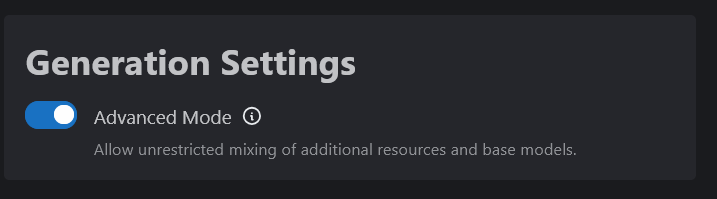
🛠️ Can’t See Lazy Embeddings for Onsite Generation?
Enable Advanced Mode:
Go to Account Settings → Toggle “Advanced Mode” → Now you can select Lazy Embeddings for any model.
 🚀 ComfyUI Users:
Drop embeddings into your
embeddingsfolder.Positive Prompt:
embedding:lazyposNegative Prompt:
embedding:lazynegPro Tip: Use ComfyUI-Custom-Scripts for autocomplete magic! (Though
lazypos/lazynegare short enough to remember 😎)
💫Examples done with my model, JANKU:
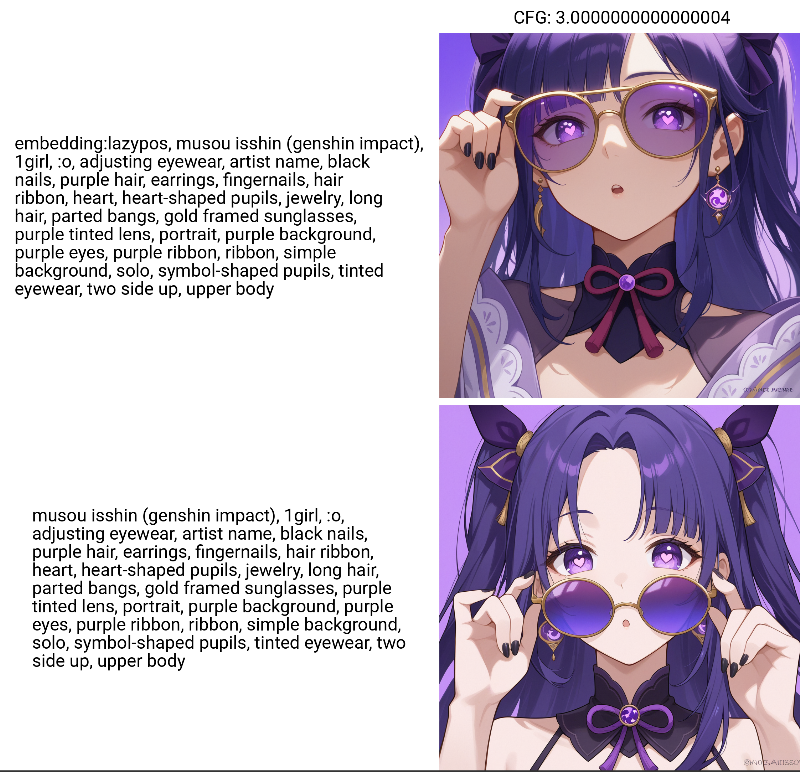 Here is what they are doing under the hood so you don't have to type it! Please note I'm always taking feedback and updating these embeddings. I use them daily!
Illustrious XL / NoobAI / SDXL - see below for Pony XL
Positive prompt (lazypos v2.0):
masterpiece, newest, absurdres, best quality, amazing quality, very aesthetic, ultra-detailed, highly detailedNegative prompt (lazyneg v3.0):
low quality, worst quality, lowres, username, sketch, censor, blurry, distorted, bad anatomy, signature, watermark, patreon logo, artist nameProtip: Use lazyhand embedding in NEGATIVE if you want to fix the hands for the seed!
Pony XL
Positive prompt (ponyup):
score_9, score_8_up, score_7_up, score_6_up, score_5_up, score_4_upponyup7 only includes score_9, score_8_up, score_7_up
ponyup6 only includes score_9, score_8_up, score_7_up, score_6_up
Negative prompt (ponydn):
score_4, score_5, score_6Other versions:
lazympos
masterpiece, best quality, amazing qualityDescription
Put lazywet in negative to remove wet skin and lower shiny skin.
FAQ
Comments (65)
Today I solve a big problem with Illustrious based models. Introducing lazywet embedding!
When using it in negative, it will remove wetness on skin and water drops on the chin and chest area of characters. It will also reduce the shininess of skin as well. It works really well, tested with JANKU v6.
I tried to keep it under 75 tokens with the usage of lazyneg, but I wasn't successful. I will keep optimizing it in the future.
Looking forward to see what everybody makes with it! Thanks for checking it out!
Thanks so much for this! I've spent so much time after a good generation having to go into GIMP to get rid of this wetness manually.
Should I use this in combination with Smooth embeddings/LoRAs?
That depends on if you like the output
@janxd Too many embeddings doesn't lower image quality?
@AzulAuthority Not how it works. If you want to learn more, research how ComfyUI handles tokens after they reach 75.
Amazing. Just started to mess with Illustruous and this is amazing to use.
Is it normal that lazypos tends to make "2girls" not work? I noticed I had trouble getting multiple characters and after some testing it seems to strongly affected by lazypos.
Should I add embedding picker node onto my workflow or just a ordinary prompt node work as good?
you can use regular prompt node by like this embedding:lazypos
Would you consider making a lazyfeet for bad feet?
there is no tags out there that can fix feet, just use another seed or feet detailer to fix it
Can you make one for pixel art?
I used the 'lazyneg' version of this embedding in my negative prompt, but it seems to kill the lighting and artistic vibe. It made the whole image look flat and uniformly bright. Even spamming tags in the positive prompt didn't help; the issue only went away after I removed it
Since I discovered this model, I never generate anything without it. There’s a huge difference in quality between using it and not, especially when it comes to hands. It's truly the best! Thank you so so much for creating this. Seeing 4 fingers was driving me crazy, but this fixed it!
哥,这个要怎么用的
LazyPos sometimes puts the text "lazypos" in the image. Be careful when using it.
most likely have something incorrect in your setup. if it adds lazypos into your image, that means the prompt is being read literally as lazypos.
@janxd That's not really helpful honestly. I just use regular prompting. What could possibly be adding the text?
@rommix0 You also didn't provide what you are using and example images too right? How can I help? I tried to explain to you why it is happening which is lazypos is being read as a word and then it is put onto the image.
@janxd That's what I like to know too. I just simply use lazypos in the prompt in separated comma fashion as most people do. No workflow I necessarily need to share here.
Does it have unique interaction in sampler types? I typically use Euler.
@rommix0 Are you using Comfyui? You need to type it as embedding:lazypos not lazypos. Whichever tool you used, you can find a guide online on how to use embeddings online.
@janxd Okay that is actually useful since I do use Comfy as my main driver. That's is something I can do.
I honestly have no idea how to use this.
webui上能用吗,怎么用
Gemini3‘s answer was: ComfyUI doesn‘t automatically recognize the author-defined “wakeword,” it only depends on what the file on your hard drive is called, so I need to follow the prompt given in the post or based on Gemini. I used comfyui, with a weight difference of A111.
author said that for comfyui, you had to use you lazy tag like this : "embedding:lazyxxxxx" instead of just "lazyxxxxx".
have you tried it ?
Can we get listings for what is 'under the hood' for Lazyhand, Lazyreal, and Lazywet? Especially the hands so when I do get a malformation I can better understand what I may need to prompt for that is not already included.
So,in my understanding,if there's someting I want to use,I need to type "embedding:lazy****" in Civitai onsite Generator,am I correct?
for civitai onsite, you just use lazypos. no need for embedding.
@janxd Ok got that,thx
Always when using lazypos, and lazyneg it appears that the images are getting extremly nsfw, even when using lazynsfw in the negative prompt they are way more nsfw then using only the model itself without any embedding. Is this a normal behavior?
Thank you @LawOfAI 😍
Could we get a lazyup for illustrious?
Woh, Lazyloli in pos is truly peak!!
Thank you for deleting your account.
@LuminalArt you welcome
bruh, why so many people putting lazyhand in pos prompt? while description saying its for neg?
LazyNegative's lazyneg and lazyneg v3 have the same hash, but what's the difference?🤔🤔🤔
what does lazy embeddings do actually? how do i put it in comfy ui work flow?🤔
It automatically adds a bunch of terms for you, listed in the description. For Comfy, put it in the embedding folder and trigger it the prompt box with "embedding: " and whatever the name of the file is. (At least for me, it brings up a list you can pick from, though that might be from something I installed.) Also, you can use civcomfy to download it and put it in the right place, which is very nice.
When I download, I only get lazypos.safetensors. How do I download all of them?
Update - I'm an idiot. It's on the UI next to 'lazypos' oops
Would it be possible to know what tags are comprised inside the lazyhand, lazyloli and lazyreal embeddings? So I can know what tags to avoid in my prompts
lazyNSFW has a strong tendency to make females trans if there's no male in the image (disembodied dicks appear in hands sometimes as well). I guess it's handy if that's what you want, but limits/destroys the embedding's usefulness if you want anything NSFW that doesn't include an uncovered penis (no groping through clothes, no FxF, no female exhibitionist stuff, etc.).
Should have called that one lazypenis, much more accurate.
Edit: Using it as a positive prompt in Illustrious
I see what you did there.
Lazy Feet when ? 👀
Tried to select lazyhand as a resource but it does not show up.
CivitAI Folks, need these?
LazyHAND = Change URL
Model&format=SafeTensor or Other
Can you explain further what am I supposed to do with that?
@dtm1922797 When you click on download for the embedding and get an error message, look at the webpage URL Address at the top of the browser. Manually edit it per the comment and it will allow you to download the file.
For some reason on online generator if you use lazyneg you get watermark and bar censor if someone can test it maybe its on my part
same.
Same
yup don't think any of these embeds are working for me with civitai
lazyneg and lazyhand generate censor bar and water mark in comfyui,I tried using one, then the other, and both together, and it happens in both.
Is there a way to get this on comfy cloud?
Would you be willing to train lazyhand embeddings or LoRa for Anima models?
what prompt lazyhand have?
any plans for anima?
I tried lazyloli with WAI and Hyphoria, and it doesn't do much. When I put it in negative prompt, is works as positive instead.
i know what kind of man you are
Oh nooooooooooooooo!
There is always lazypos copyright in most outcomes. Unfortunately, I had to return to not-lazy promts.
what are the prompts within lazyhand?