




Comfy SD Krita Plugin
Make AI art between canvas and nodes with Krita.
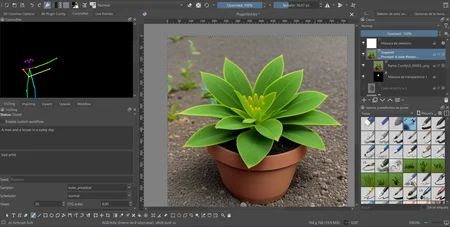
 This is a mutation from auto-sd-paint-ext, adapted to ComfyUI. With this plugin, you'll be able to take advantage of ComfyUI's best features while working on a canvas.
Supports:
Basic txt2img.
Basic img2img.
Inpainting (with auto-generated transparency masks).
Simple upscale and upscaling with model (like Ultrasharp).
Multicontrolnet with preprocessors. Annotator preview also available.
Lora loading with Automatic1111 format.
TI embeddings.
(Advanced) Run custom ComfyUI workflow from Krita.
(Advanced) Modify the default behaviour of each mode by injecting your own custom workflows!
Import latest ComfyUI generations with one click.
How does it work?
This plugin offers a (somewhat) user friendly UI which can allow the user to make AI art in a rather simple way (for those that don't like the nodes), while also giving the option to use traditional digital art and edition tools to work on generated images. The plugin creates the necessary workflow under the hood to be run on an active ComfyUI instance. Generated images are then requested by the plugin and added to the canvas, and are also stored on your ComfyUI outputs directory. You are also given the possibility to work with your own custom workflows and inject them to the plugin to alter the behaviour of your generations.
Requirements
Krita (of course).
ComfyUI (of course).
Installation
The custom nodes
Simply open a command line prompt and go to your ComfyUI's custom nodes directory.
Run the following:
git clone https://github.com/JasonS09/comfy_sd_krita_plugin_nodesThen run the following:
git clone https://github.com/Fannovel16/comfyui_controlnet_aux
The plugin
Clone this repo somewhere:
git clone https://github.com/JasonS09/comfy_sd_krita_plugin --recursiveLocate
pykritafolder (Open Krita -> Settings -> Manage Resources -> Open Resource Folder).pykritashould be in that directory.Open a new command prompt as Admin.
Make a symlink of
krita_comfyandkrita_comfy.desktoppresent in this repository (in the frontends/krita directory). Windows commands example:mklink /d your-pykrita-dir\krita_comfy "your-local-repo-dir\frontends\krita\krita_comfy"mklink your-pykrita-dir\krita_comfy.desktop "your-local-repo-dir\frontends\krita\krita_comfy.desktop"Your plugin is ready. If it is not loading, make sure it is enabled.
Enabling the plugin
First save your custom Workspace, it will change after we are done.
Go to Settings > Configure Krita. It will open the Config menu.
On the Left panel select "Python Plugin Manager"
Check "ComfyUI Plugin" in the checkbox list on the left panel and click OK to close the menu.
After restarting Krita your Workspace should be populated by new dockers, you can show/hide them in the Settings > Dockers checklist.
Rearrange your Workspace and save it with a name (like "ComfyUI").
Found this useful? Buy me a coffee!
Description
FAQ
Comments (5)
I hope this works, integrating SD with a graphics program is the future.
Tried it out, working pretty good with some minor kinks. I love that you're creating this. Thanks so much. Looking forward to batch size applying to inpaint soon.
I'm confused about what to do with the plugin. "Clone this repo SOMEWHERE" anywhere? Please explain- I'm really new at this. I messed up somewhere and it won't function. the plugin shows up but does nothing. dummy it down for me please. thank you.
This is awesome. Thank you very much, I was using auto-Sd from day one and it was sad to see it being drop.
I've been using PS for a while but i do most of my editing with krita.
PS is a frustrating experience, to say the least. It is both great and bad.
Krita brush are the best to mix AI image. Thank you again.
Dude, you're really good at this. And fast too. Would you be willing to make some plugins for InvokeAI or even help on their front-end stuff? They've almost got an interface that combines krita with AI in one application.