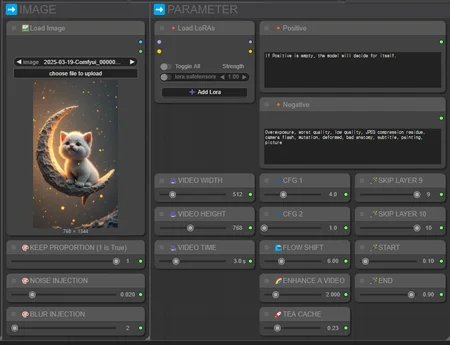
Simple Wan wrapper released
Requires Comfyui version v0.3.27 or higher.
https://github.com/Flow-two/flow2-wan-video
(OPTIONAL) Triton & SageAttention Installation
https://civarchive.com/articles/12851/easy-installation-triton-and-sageattention
Installation
option 1
Download archive zip.
flow2-wan-video.zip extract to
ComfyUI\custom_nodesGo to
ComfyUI_windows_portable/folder and Run command topython_embeded\python.exe -m pip install -r "ComfyUI\custom_nodes\flow2-wan-video\requirements.txt"
option 2
Go to comfyUI custom_nodes folder,
ComfyUI/custom_nodes/Go to
ComfyUI_windows_portable/folder and Run command topython_embeded\python.exe -m pip install -r "ComfyUI\custom_nodes\flow2-wan-video\requirements.txt"
Upscale Model
https://huggingface.co/mixfox/Upscale-Models/blob/main/4x_foolhardy_Remacri_ExtraSmoother.pth
to ComfyUI/models/upscale_models
Wrapper Features
Various image settings (blur, saturate, noise, quality)
Various model patcher integrated into one
Support for frame interpolation
Support for upscaler
Support high quality sampling preview
Support teacache retention mode
Support model auto download
Version 1.0
Features
Easy and simple parameter setup
Supports various parameters to minimize artifacts
Supports Skip Layer Guidance (SLG) to minimize artifacts
Two-step sampling process for faster sampling speed and relatively less noise
Faster sampling speed with TeaCache support
Supports various samplers
Easy upscaling control
Supports various frame rates for frame interpolation
Supports lower VRAM usage with the introduction of gguf
Nodes
ComfyUI-Custom-Scripts
ComfyUI_LayerStyle
rgthree-comfy
ComfyUI-KJNodes
ComfyUI-VideoHelperSuite
ComfyUI-Frame-Interpolation
ComfyUI-mxToolkit
Warning: You are fully responsible for any legal or ethical violations that may occur in the production of this video. It is important to comply with all relevant laws and regulations when creating and distributing the video, and to be cautious not to infringe on the rights of others.
Description
First release
FAQ
Comments (27)
Welcome back!
welcome back n ty for ur work! I have a problem, updated all nodes and COMFYUI but still can't change some settings:
🎥VIDEO WIDTH
🎥VIDEO HEIGHT
🎥VIDEO TIME
ComfyUI: v0.3.27(2025-03-21)
Manager: V3.31.7
At sample1, CUDA usage fluctuates and runs slower.
previous workflow can run at full speed.
So glad you're back I love you so much ! <3 Love all !
I was worried when you suddenly disappeared. I'm glad you're back.
speed and stable
this version is more efficient in memory management
there are no crash
when I open some browser in the background like the previous version
Previous one was fast enough, but it crashed sometime (Well, It might be my problem). I can feel that this version is MUCH stable than before, so I could run overnight.
I noticed that load diffusion model isn't connected to anything. where does that need to connect?
Welcome back! I appreciate that!!
Really appreciate your workflows. I've used a couple of your older ones. So I am still new. Which setting should I adjust to try to get a better adherence to the prompt? Seems I get better vids conforming to my prompt on those older ones. Or it could just be a random bad streak of clips im generating. I see 2 cfg sliders, but don't know what they do. Thanks!
No Text to Video version? ....but this I2V works flawless on my pc, have high quality videos!!
Think I had a heart attack when I couldnt find your workflows anymore lol thanks for this latest one, going to test it out now, is t2v coming to?
Thank you so much for this workflow! It is definitely the most noob friendly of those I have tried and is much less prone to OOM and various artifacts. I would like to know as a noob, what do I need to touch to make a batch of videos instead of just 1.
Error:
mat1 and mat2 shapes cannot be multiplied (769x4863 and 5120x5120)
t2v when?? you're the best
really great, thank you. i'm wondering if there is some more reliable of prompting for movement? i'm getting a lot of very static videos.
I get an error saying AssertionError: All tensors must have the same dtype.
that has to do with sageattention. all my tensors are fp16 that I am aware of. Maybe I will have to try downloading different models.
It works if i run with sdpa, just not sage attention
when I specify 5 seconds for the video, I get a 10 second video, where it simply loops a 2nd time. did you introduce something that broke this.. its kind of odd.
I'm running two client terminals, and it requires more than 128GB of memory to fully execute the tasks. The graphics memory is insufficient, but the system memory is prone to running out. Are there any solutions to this problem?
I've adapted this to use Florence2Run as an optional prompt generator. Best Wan workflow I have used so far. Wondering if I can adapt this for Hunyuan. I also adapted it for Wan t2v and seems to work (had to remove a bunch of image related nodes).
Can you please let me know how to save the video? Only I can see is preview on the browser, nothing created in output folder
"UnetLoaderGGUF - Unexpected architecture type in GGUF file, expected one of flux, sd1, sdxl, t5encoder but got 'wan'"
Hm, what is the problem here?
Why is the lora-clip not connected in this workflow?
It works pretty well.
One question: Is there a way to view the live generation of each frame before the final preview is created? This way I'd save time if I detect something going wrong early. It seems like 'PreviewMethod' of Manager only shows the first frame, and the 'preview frames' node only shows everything once it's totally done.
The current workflow is very convenient, but I think you can only specify the start image.
Are there any plans to change the node modification in the future to support generation with start and end images?
Big fan of the workflow Wan_I2V_GGUF_Lite_v1c.json
The workflow points to your account but it has this whole backend setup separated from the main flow (working with constants). And also included Florence2 to enhance the prompt.
So something totally different then this one.
How come you deleted that one? Or will there be any updates on that one :P ?
Really great workflow— The generation quality and rendering time are excellent, but I consistently run into issues with hand morphing.
Looks like we don't have an active mirror for this file right now.
CivArchive is a community-maintained index — we catalog mirrors that volunteers upload to HuggingFace, torrents, and other public hosts. Looks like no one has uploaded a copy of this file yet.
Some files do get recovered over time through contributions. If you're looking for this one, feel free to ask in Discord, or help preserve it if you have a copy.