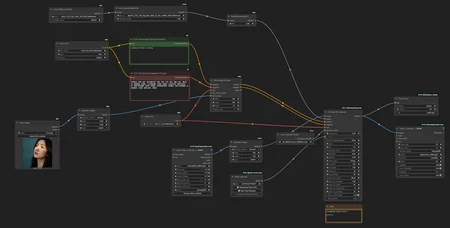
Just would like to share my personal WAN I2V workflow I use the most. Let me know if you need any help or details.
Description
My personal Wan2.2 I2V workflow + Upscale workflow (separate file)
FAQ
Comments (26)
Is umt5_xxl_fp16.safetensors better than e4m3fn?
Also what is the point of the "upscale" node in the sage file? It seems to only upscale the input image...what's the purpose? Id like the upscale the end video
>Is umt5_xxl_fp16.safetensors better than e4m3fn?
Well, yes, at least it's supposed to be :) I always try to use fp16 models anywhere in my workflows for best quality.
>what is the point of the "upscale" node in the sage file
Just an auxiliary node to resize the input image to required resolution in case I need it.
For video upscaling please make sure you download the correct version of the workflow (there will be two files in the archive, video upscale workflow goes as a separate file): https://civitai.com/models/1389968?modelVersionId=2147835
In your Reddit post, you mentioned "GIMM VFI," but I can't find it in your workflow.
https://www.reddit.com/r/StableDiffusion/comments/1nerohs/the_silence_of_the_vases_wan22_ultimate_sd/
It’s literally just one additional custom node. Please find it here: https://github.com/kijai/ComfyUI-GIMM-VFI
I use -r model at 0.75 ds_factor and 2x interpolation.
@DigitalZombieAI Thanks, tried using the -f model, better quality but took longer than the -r model, and sometimes I got oom
Thanks so much for your upscaler workflow, I used it, the result is like magic, it fixed the whole set of different noticeable artifacts the original video had, thanks a million :) it's super good.
I have 64GB of RAM and an RTX 5090 GPU, but when I try to upscale a 10seconds 640x960 video, I get an out-of-memory error. How should I modify the settings?
10 sec with that resolution looks too much for Wan2.2 even with 32gb vram. Try to split by 5 sec clips.
@DigitalZombieAI I tried changing it to 5 seconds, but it still failed. The OOM error occurred after the progress bar of Ultimate SD Upscale reached 100%. Maybe I should try to input a lower resolution video.
@chiaki0202 Well, yes, as an option. Basically USDU tile height/width and amount of input video frames shouldn’t exceed the height/width/length you can do img2vid with regular wan2.2 workflow without OOM.
https://github.com/brandschatzen1945/wan22_i2v_DR34ML4Y/blob/main/Video_UpScale_variant.png <- maybe this could work for you? almost the same but different on how it works?

@brandschatzen1945598 Thank you. I'll try it later.
@brandschatzen1945598 It's work for me. Thanks.
Thanks for sharing. Would upscaling also look good in your opinion with 4x_NMKD-Siax_200k.safetensors or perhaps another upscaler you can recommend that is in a safetensors format? I'm trying to avoid using .pth files, and I haven't found a .safetensors version of the x8 upscaler you're using.
I think yes, 4x_NMKD-Siax should work. Sometimes I use 8x_NMKD_Faces as well.
@DigitalZombieAI Thank you for sharing your experience. :)
I am really new to all of this. Is there any benefit in having a second diffusion model added for high pass? Really trying to understand how to get the best nsfw i2v. It is hard making heads or tails of everything... Thanks!
I’d say it’s necessary for Wan2.2 which consists of two models by design: high and low. If I get your question right 😊
Do you have any similar workflows that include both? Thank-you for the response. A complete newbie question - if you do use 2 diffusion models, I assume it takes about twice as long to generate the video? Do you need a beefier computer with a dual model setup?
@ajunk01805 if you mean img2vid Wan2.2 workflow then check the downloaded archive, it should include two files: upscaler workflow and wan img2vid one which uses both low and high models.
For upscaling there is no need for high model, so only one low model is used.
Wan2.2 architecture was specifically divided into two models so you don’t need more vram but yes, it may take more time. However with speed loras wan2.2 is even faster than just wan2.1 + TeaCache + TorchCompile.
@DigitalZombieAI Awesome, Thanks a lot. Appreciate the help/info!
Edit: can you point me in the direction of the 'downloaded archive'. I am new to this site and don't see any such reference on this page.
@ajunk01805 here is a direct link: https://civitai.com/api/download/models/2147835?type=Archive&format=Other
@DigitalZombieAI Thank-you so much. I really appreciate your help.
forgive the stupid question, i just want to confirm something: i have a WAN video i just made with I2V. so for the upscale workflow, i'm supposed to use the T2V low noise model and T2V low noise lightning lora? not i2v at all? should i just paste in my original prompt? also, what if i used a different WAN model like SmoothMix? Should I still just use the regular base model?
Hello, yes, upscaling with T2V model (lora) gave better results in my tests. You can use same prompt but not so necessary since noise level that gets added during upscaling is low. Regarding SmoothMix I'm not sure, if it's a finetune of the original T2V wan 2.2 low model then just replace it in the load model node.
I see we're still having the slow-motion problem