
For anyone downloading the 1.0 version be warned you might encounter some issues, but There is an UPDATE in the works, the workflow is kind of broken because of UE links on the newest comfy update i think. So next version it will be more organized, but will have more LINES everywhere.
And after some thorough testing, i've Achieved some nice quality improvements on output, Enough so you can use just the first render to only animate dances and movements, and i am currently working on what the second pass should be for, and that is, the hardcore NSFW tasks that need more guidance, it will take a while but this is getting good.
Bellow are some results with the Q6 GGUF model, 2 seconds of video made on 16GB of VRAM. First image is the input, Last image is the last frame of the generated video with no color correction done, 2.5D images are not as blurry as before and i think it's good enough for even trying to extend the video.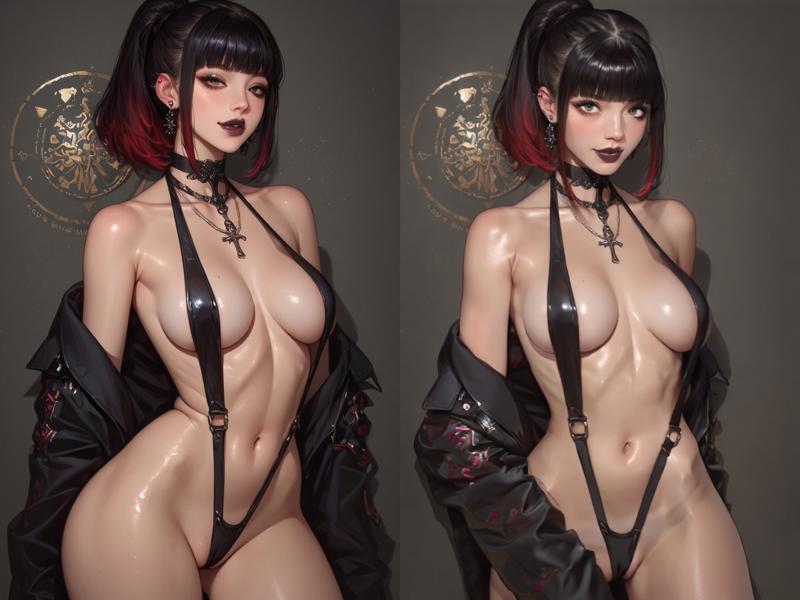
to full control over motion, dancing etc, low vram with GGUF Q4 with very good quality.
i don't even know if i am uploading this correctly, and i have little time. just throwing this on the internet hopefully someone crafts something better with this as base.
GGUF of wan fun models can be found here https://huggingface.co/city96/Wan2.1-Fun-14B-Control-gguf/tree/main
This is very node heavy, it has some instructions inside thrown around, please use some tool like comfyui manager to download whatever nodes you need.
Some nodes that don't auto download a lot of times and can break the gguf loader
https://github.com/city96/ComfyUI-GGUF
https://github.com/pollockjj/ComfyUI-MultiGPU
git clone these if the gguf loader is red.
Just pointing out, finding yourself in this workflow at first is a PAIN! I'm not good at crafting workflows, i usually just slap whatever seems to work best but i did what i could to make the first version to be more "organized"...
Here's some, maybe useful help.
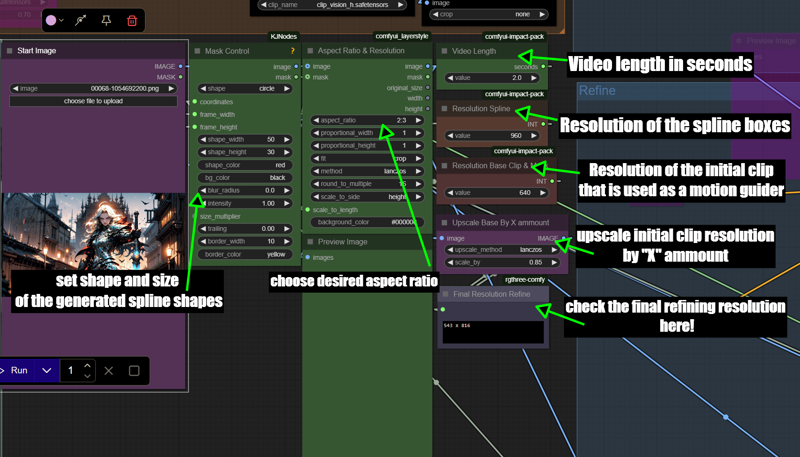
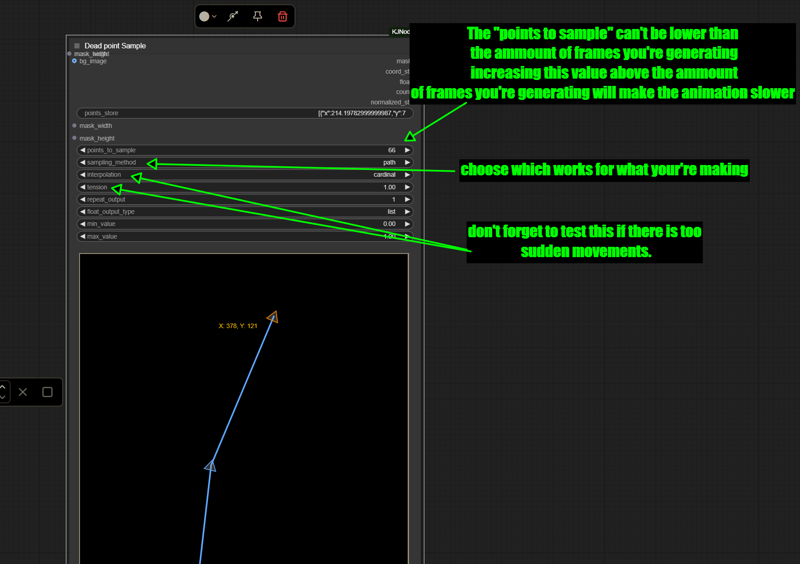 you can bypass splines, combine multiple, also neat little trick is if there's too much camera movement is to just create a 2 point spline in a corner where there's just static stuff, it will tell the model to not move "or stray too much" from that point, works with body parts, clothing etc.... combine as you wish.
If you're interested in posting here whatever you've made or anything you've found to work better feel free to do so i will read it and test it too.
Description
FAQ
Comments (33)
Hello, can you explain the significance of this workflow? I don't quite understand its function.
Using Splines as a way to guide motion, extra control that don't rely only on text or having to use a existing video to guide the image. For example: you can use a lora but you feel the motion is really slow, you can make guiders it with a fast motion path, or if you want it slower, decrease the "points to sample " in the spline editor making the guider slower, you can guide hands, body motion etc. crafting those spline paths that are super easy to set up... i just uploaded this because some ppl might have some fun experimenting it, i am now personally using this to make live wallpapers since i have a lot of extra control that don't rely only on text and RNG seeds.
@Kung_fu_porn Hi, how can I adjust the video length and the video resolution, i mean, where is the section for those options ? Nice flow btw, i have some good works with it.
@Kung_fu_porn Thanks for your answer, I think I should try it, it looks great and I need to learn and use it. Thank you
@binhphap5 it's in between the groups, to the right side where you can choose your starting image, you control it based on seconds, the default is 2 seconds, i will upload some images of it soon i think.
@binhphap5 just posed some guiding pictures in the workflow page, check it out it might help a little
This looks amazing!
You mentioned that you need to run a render and then stop it before the background in the spline editor gets picked up. Do you mean the background of the other 3 spline editors? Because for the second one I can just right click > background image to set it.
Edit: I've ran it completely and the background for the other spline editors hasn't changed. Am I doing something wrong?
Make sure you Insert a initial image first into the workflow, the start image is a purple node where you can drag and drop it or choose a image, run the workflow untill you see the 5 splines populate with your base image, if it starts to render then something is wrong. also there's a "Get node" under each spline that retrieves the resized input image you used in the workflow. right click on it and go to setter, dig around and find the connector and manually connect it to each spline. i tried to make the workflow the less spaghetti as i could, but maybe that causes some issues idk.
Also I'm sorry the workflow is not very friendly :/ i'm not that good at crafting these
@Kung_fu_porn No worries man, I'll figure it out. The spline editor can be a bit buggy and it seems there is a problem with anything everywhere node too because I had to reconnect them manually.
@funscripter627 i just read the latest comfyui update seems to have broken the anything everywhere node, maybe it was that, and yes i personally don't like those splines they are very buggy, sometimes you have to clone one of them and reconnect them if "create a new spline" isn't working etc, this goes way back in the CogvideoX days, Kijai never managed to polish it fully i think.
Not sure why, but whenever I try to load this, a lot of the nodes seem messed up and the links in them dont work (Comfy pops up a huge list of link error messages). I have all the custom nodes installed but for whatever reason the workflow doesnt seem to load correctly.
Ive got everything in comfy updated and current, so I doubt its a version compatibility error.
I have the same. Never had issues with other workflows. Hope OP will update their own ComfyUI and fix any potential issues, then reupload. The workflow looks pretty sick ngl
@princenazjak my comfy was installed last week tho... but i guess recently we had quite some changes so i will possibly do a new comfyui sage install soon, in which i will clean up a lot of this workflow mess and implement the new sampling quality changes that i've discovered recently. but it's good to "if you have the time" check the anything everywhere connections and the "set/get" built in comfy nodes. tho it may amount to further frustration :/ it's worth a try until i can fix this mess
@Kung_fu_porn a lot of the connections are just missing as well, like theres nothing connected to the VAE, those are all missing for some reason. Definitely something odd going on. I updated my comfyui because my older install wouldnt load this workflow either. Maybe that install was too old and the current one is too new =p
Why can't i find node OptimalStepSchelduer ?
as far as i know that's a comfycore node implemented by comfyui, you'd have to update your comfyui to get it.
Hi buddy, I'm getting this error when I try to run it:
SamplerCustomAdvanced
mat1 and mat2 shapes cannot be multiplied (769x4863 and 5120x5120)
Tried a few different resolutions but it is still happening.
bypass the Skip layer guidance node and try again, it might be an issue with your KJ nodes
@Kung_fu_porn Thanks lad, it worked!
I'm really hopin' you make a clean and simple workflow, with a step-by-step and the option to turn off nodes that aren't a must (like upscale, interpolation, and stuff).
Cool workflow , tried to see how it works , cleaned up it a bit and posted version for current (I think) comfyui
For anyone confused by excessive complexity of this workflow: you obviously can use this just the same way as any other type of control in default (Kijai) wan fun workflow. So generate a video with moving shapes using Spline Editor and Create Shape Image Along Path nodes, plug it in WanVideo Encode, and thats all
Ah , did few tests .You're right , anything works for control ...
Ty for pointing that out
是的,这个作者我真是理解不了他为什么做的如此复杂
waiting for the new version!
How to deal with this error?
When loading the graph, the following node types were not found
UnetLoaderGGUFDisTorchMultiGPU
reddit reference "That node does require ComfyUI-GGUF; do you have that installed? (The nature of ComfyUI-MultiGPU means that Comfy Manager doesn't know that ComfyUI-GGUF is required.)"
@al123sdaw I did install ComfyUI-GGUF in \ComfyUI\custom_nodes but still have the same problem
I don't know why the author is so critical of this workflow, this is stellar work. This produces some amazing 2 sec clips. My next step is to produce some longer clips because after 2 seconds the coherence disintegrates with the fun 14b gguf.
Why does my generated movie have black shadows? I can’t even describe what it was.
how to use Spline Editor?
Now my backup really makes sense. I'm so glad I did it. After the node update, nothing worked anymore.