


This workflow is now discontinued as I will focus on other AI models.
I made a new worklow for HiDream, and with this one I am getting incredible results. Even better than with Flux!
It's a txt2img workflow, with hires-fix, detail-daemon and Ultimate SD-Upscaler.

HiDream is very demanding, so you may need a very good GPU to run this workflow. I am testing it on an L40s (on MimicPC), as it would never run on my 16Gb VRAM card.
Also, it takes quite a bit to generate a single image (mostly because the upscaler), but the details are incredible and the images are much more realistic than Flux (no plastic skin, no flux-chin).
For v.1.0: You can also use GGUF model files, just replace the "Load Diffusion Model" node at the beginning of the WF with the "Unet Loader (GGUF)" node. See below:
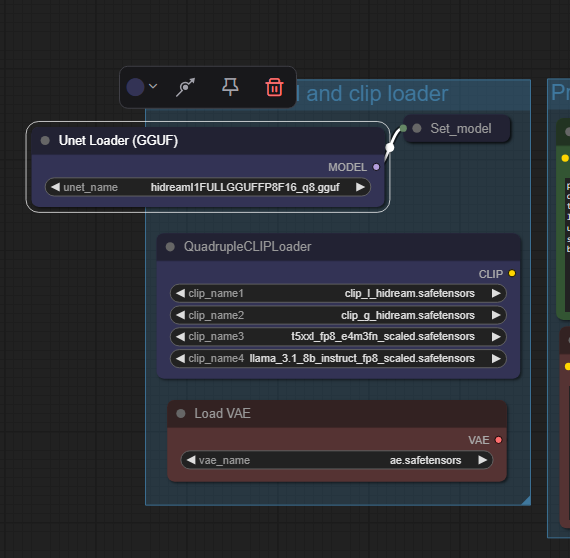 In v.1.1 the two model-loader are both available, you can choose which one to use just selecting the standard model or the GGUF one in the "Model switch" node.
On my RTX 4070 Ti Super with 16Gb Vram I can run the workflow with the Q8 GGUF model file. Results are excellent!
HiDream E1 (image editing module) - for version 1.1
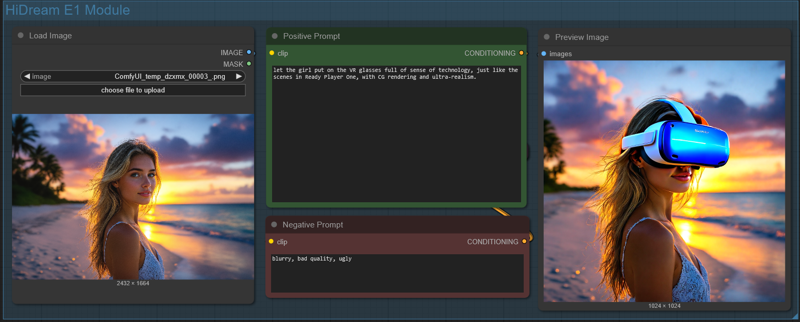 Just load an image and write what you would like to change in the positive prompt (you can also add a negative prompt). Due to model limitation, the image will always be resized and cropped to a 768x768 image (larger images will show a terrible lateral shift) and then resized to 1024x1024. It can't run in the Ultimate SD Upscaler, since the HiDream E1 model would overcook the image during upscale (so do not activate the Upscale Module!).
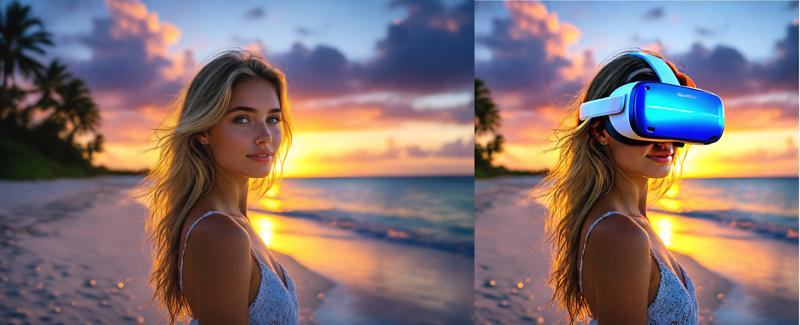
Results, for photo-realistic images are not that good, so do not expect any incredible output. But still, by using the right settings, you can achieve decent results.
 ==========================================================
⚡️ Buzz for the Best Images ⚡️
Every weekend, I will reward some Buzz to the best image added to the Workflow's gallery!
Description
New in v.1.1
you can load both standard HiDream models or GGUF versions
added a HiDream E1 module to use the new image editing model by HiDream
added a 4 split prompt node (you can write a specific prompt for each text-encoder now)
added a post-production module: now you can modify brightness, contrast, saturation, sharpness of the final image before you save it.
FAQ
Comments (2)
I don't understand exactly how the Edit version of HiDream works. Hopefully, you'll soon make a video to go along with this workflow as an explainer. Thank you for your efforts!
Hi, I made a small modification to the v.1.1 workflow, as it had some troubles with HiDream E1. I also added a short explanation about how to use it in the workflow description. I hope this helps!