


This workflow is now discontinued as I will focus on other AI models.
I made a new worklow for HiDream, and with this one I am getting incredible results. Even better than with Flux!
It's a txt2img workflow, with hires-fix, detail-daemon and Ultimate SD-Upscaler.

HiDream is very demanding, so you may need a very good GPU to run this workflow. I am testing it on an L40s (on MimicPC), as it would never run on my 16Gb VRAM card.
Also, it takes quite a bit to generate a single image (mostly because the upscaler), but the details are incredible and the images are much more realistic than Flux (no plastic skin, no flux-chin).
For v.1.0: You can also use GGUF model files, just replace the "Load Diffusion Model" node at the beginning of the WF with the "Unet Loader (GGUF)" node. See below:
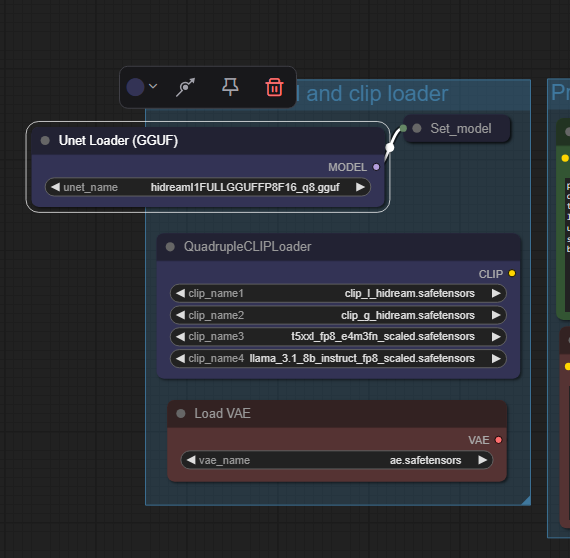 In v.1.1 the two model-loader are both available, you can choose which one to use just selecting the standard model or the GGUF one in the "Model switch" node.
On my RTX 4070 Ti Super with 16Gb Vram I can run the workflow with the Q8 GGUF model file. Results are excellent!
HiDream E1 (image editing module) - for version 1.1
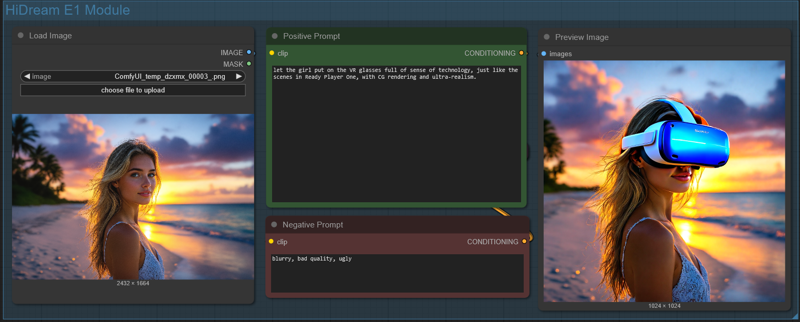 Just load an image and write what you would like to change in the positive prompt (you can also add a negative prompt). Due to model limitation, the image will always be resized and cropped to a 768x768 image (larger images will show a terrible lateral shift) and then resized to 1024x1024. It can't run in the Ultimate SD Upscaler, since the HiDream E1 model would overcook the image during upscale (so do not activate the Upscale Module!).
Results, for photo-realistic images are not that good, so do not expect any incredible output. But still, by using the right settings, you can achieve decent results.
 ==========================================================
⚡️ Buzz for the Best Images ⚡️
Every weekend, I will reward some Buzz to the best image added to the Workflow's gallery!
Description
I replaced Cubiq (ComfyUI-Essentials) nodes as they are not updated anymore, and also some other nodes that could have some trouble.
I also updated the Inpaint module, using Compositing as this technique improve the output a lot.
FAQ
Comments (16)
Is the download link updated? I pulled it into comfy and it still has lanpaint?
I had trouble uploading. I got a 404 error every time I tried to save the new version, but the file uploaded seems fine. I just downloaded it, and it works. It's the 1.3_final version. Try once more. Maybe CivitAI is having problems updating the pages.
@Tenofas working now. 1 small issue i see is there is no switch active for the inpaint module. Otherwise it is looking good! :)
@aceflier72811 To switch on/off Inpaint you have to use the Workflow switch, in blue, above the green Modules Switches.
You can also use the https://github.com/edelvarden/comfyui_image_metadata_extension save image nodes, no need to save all the data in text/string form.
I was using the "save image with metadata" node in my workflows but the one mentioned above is better as it automatically saves the most important data and you can provide extra metadata on top, stuff like shift, detail deamon amount or different notes.
Most important change to the workflow is the thing that you do not need to get all the data to the save node yourself and it makes it more readable as a result.
Thanks, good hint.
coming from A1111 I can work with most things in this awesome workflow, but I don't get inpainting. Can someone clue me in?
Can you fix the gguf loader? It won't run unless I download and load a gguf model, even though I've chosen the switch for standard instead of gguf. I don't want to waste the hard drive space on a model I'm not using.
If you do not have "any" GGUF model downloaded (even for other models like Flux), the only way is to remove the Unet Loader (GGUF) node and the Model switch nodes... connect the "Set_model_to_lora" node directly to the Load Diffusion Model and you are done.
I'm back to using hidream I dont know if was an update that broke the SD upscale but its broken now IDK why. I redownloaded this workflow still has a red circle on the sd upscale. My own workflow with sd upscale is working so I'm guessing its something else?
Thanks for the workflow. But it does not work for me at all. Up-to-date Comfy, no missing nodes, clicking run produces "Failed to get input node 2 for group node child 265:3 with slot 0" ... comfyui only shows that, no node is marked whatsever, great work by ComfyUI. I had always problems with downloaded workflows. I have no clue why they are so many problems with compatibility to be honest :/
I tried to remove nodes, which helped, but now it requires FP16 even I don't use it. Sorry, but sometimes it is better to separate workflows. in this state, it is not possible to find what is wrong, and you are forced to download 40GB file, you don't need to use.
I also encounter "Failed to get input node 2 for group node child 265:3 with slot 0". I dont know how to solve it.
Wow this is quite the workflow! My generations are much cleaner than before just using the standard Hi-Dream workflow. I bumped up the standard model to use the FP16 weights and am running this on a RTX 5090.