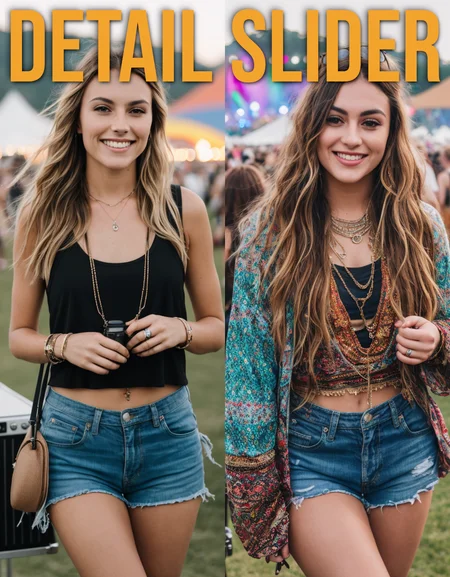
weight: -5.0 to 5.0
positive: more detail
negative: less detail
Description
-5.0 to 5.0
FAQ
Comments (33)
Nice work 👌
Detail adjustment LORA.
Many users will consider enhancing elements such as the main character description and clothing, but this LORA will try to enhance all of them. Especially the background.
Instead of making some character shine, it seems like a good idea to pop in an unnamed 1girl and enjoy the change. Embrace the chaos.
I love how little this affects rest of the picture apart from details. Especially keeping the dynamic range more or less intact is impressive. Good job! 💪
dunno if you take requests, but would be AMAZING if you had a slider like this for skin detail. negatives making skin smooth and perfect, while positives making skin be more detailed/rough/realistic
anyways, thanks for your work. these are the best LoRAs for SD hands down.
I have spent some time on it, but I haven't ended up with something I am happy with yet. It tends to turn into an age slider as more detailed skin usually means wrinkles, etc. However, I have some new methods. I will try again.
I've been using this as a replacement for CyberAlchemist's Detail Tweaker. While Detail Tweaker has worked great for me for some time, it does come with a cost. It impacts the image in ways I can't really put my finger on - more than just details - and other LORAs don't always play nice with it. So far, I've found that Detail Slider works with more LORAs, with less impact to the image, and produces great results. It also seems to have a much higher threshhold (higher range) before it loses coherence. That's a big deal. You can get much more out of Detail Slider than other add-detail-add-ons that I've used. Kudos to the creator and thank you for sharing it with the community!
One of your best sliders! I use it in all my prompts. Realy impressive.
How do you use it? I can't see any slider after loading. Sorry if this is a noob question :) Thanks in advance
I have literally no idea either. The only thing I can imagine is you add the lora then manually write a factor of detail in the lora name? But how do they animate it like that I wonder?
It is not a physical slider, though one could be made for it. It is called a slider because the transition from a high negative value to a high positive value results in a smooth transition of an effect, making it behave like a slider you can dial in where you need want it. To use, just set your LoRa multiplier weights anywhere between -5.0 and 5.0. Higher is more detail.
Here is how to use a Lora: stable-diffusion-art.com/lora/
please Waist Slider, bro ;)
Sorry for my ignorance, but I can't make it work, tell me how to do it, where to put it and how to activate it. Thank you
Amazing, can u make age slider please! ♥
Thank you. I will not be doing an age slider. I understand the need as everyone in SD looks like a early 20s something. Prompting a different age will give you an elderly person or a baby. It is hard to tweak. That being said, there is too much porn on here for me to release something that can adjust age down.
Could you please give detailed instructions on how to use this LORA? I paste it into my promt, but I don't see any changes. And I don’t understand where I can set the strength -5 to 5 for this LORA? Her maximum strength is 1.
What ui are you using? Most UIs give you free reign over they weight you use, if yours does not, you may want to try another.
Could you please give detailed instructions on how to use this LORA? I paste it into my promt, but I don't see any changes. And I don’t understand where I can set the strength -5 to 5 for this LORA? Her maximum strength is 1.
It's weight, not strength mate, 😉, as any other lora, try using the <lora: command, hope that helps, also, pay attention to the positive and negative prompt, don't use both at the same time.
it doesn't sound like the lack of instructions for this lora is your issue..... it sounds like you don't understand how to use loras in general.... maybe do a google search before you ask a single creator to teach you how to use stable diffusion? further, if you want someone to tell you how to do something before you ask google, you're a plebe. like, you don't want to spend your time learning how to do it, so you'll waste someone else's. what happened to this world?
@myk3 oof. dude. ease off
Click on one of the example images, on the right hand side it shows the settings on how it is used. (for the next person who is confused). This works on everything on this site.
<lora:detail_slider_v4:1>
Paste that ideally at the beginning of your prompt. It's set to the default weight of 1 after the colon, but you can tune it to your liking (0.5, 2.3, 4.5, etc)
@The_Rev i like this guy ...
Simply The Best! Thank you!
amazing lora, gives very cool results
This is the only detail lora that doesn't make pic darker.
over 3.5, too much
general review
This is The only lora that doesn't get darker shadows. When the shadow gets darker, it tends to change from realism to 3d. From 0 to 2, it doesn't deviate much from the basic framework, but it does change in more detail in my promport. From 3 onwards, it starts to change, but from 3.5 and above, it starts to be too bright and there are a lot of unnecessary additional elements. Personally, I have a max of 3.5, but if you want to create a really hectic messy room, I recommend it over 4.
This is the most recommended detail lora in sd1.5
Thank you for making it
are there any example jason files that show how this works? Kinda new to this stuff. Thanks
a must use lora.
Thank You!
Best. Awesome!
Details
Files
detail_slider_v4.safetensors
Mirrors
detail_slider_v4.safetensors
detail_slider_v4.safetensors
detail_slider_v4.safetensors
detail_slider_v4.safetensors
detail_slider_v4.safetensors
ostris_detailSlider_v40.safetensors
detail_slider_v4.safetensors
ostris_detailSlider_v40.safetensors
detail_slider_v4.safetensors
detail_slider_v4.safetensors
S_detail_slider_055.safetensors
detail_slider_v4.safetensors
detail_slider_v4.safetensors
DetaliSlider.safetensors
detail_slider_v4.safetensors
detail_slider_v4.safetensors
detail_slider_v4.safetensors
detail_slider_v4.safetensors
Available On (6 platforms)
Same model published on other platforms. May have additional downloads or version variants.