
2025/09/18
⚠️ Usage Notice If you encounter issues running this workflow, try disabling the following two nodes:
WanVideo Tea Cache (native)
Skip Layer Guidance WanVideo
Based on my tests, the workflow runs fine once these two nodes are turned off. There's no significant drop in speed or output quality, so feel free to give it a try.
2025/6/10
I accidentally deleted the old version, so I've created a new one with more detailed explanations. = =川
Simple Workflow for Video2Video with Upscaling, Smoothing, and Interpolation
Here's a straightforward workflow for achieving video upscaling, smoothing, and interpolation, designed for ease of use – just drop in your video!
簡單的影片轉影片工作流程:包含放大、平滑和插幀
這是一個簡單直接的工作流程,旨在實現影片的放大、平滑和插幀功能,操作非常簡單 — 只需放入您的影片即可!
ビデオ2ビデオの簡易ワークフロー:アップスケーリング、スムージング、補間を含む
これは、ビデオのアップスケーリング、スムージング、補間を実現するための簡単なワークフローです。使いやすさを重視しており、ビデオをドロップするだけで完了します!
動畫用的放大
Upscaling for Animation
(アニメーションのアップスケーリング)
https://github.com/xinntao/Real-ESRGAN/releases/download/v0.2.2.4/RealESRGAN_x4plus_anime_6B.pth
真人用的放大
Upscaling for Live-Action
(実写のアップスケーリング)
https://huggingface.co/lllyasviel/Annotators/blob/main/RealESRGAN_x4plus.pth
Choose one or both to download, then place them in the ComfyUI\models\upscale_models folder.
請選擇一個或兩個進行下載,然後將它們放置到 ComfyUI\models\upscale_models 資料夾中。
どちらか一つ、または両方をダウンロードして、ComfyUI\models\upscale_models フォルダーに配置してください。
Wan 2.1 t2v 1.3b
English
Download the files, then place them in the ComfyUI\models\diffusion_models folder.
Chinese (Traditional)
下載檔案,然後將它們放置到 ComfyUI\models\diffusion_models 資料夾中。
Japanese
ファイルをダウンロードして、ComfyUI\models\diffusion_models フォルダーに配置してください。
PS: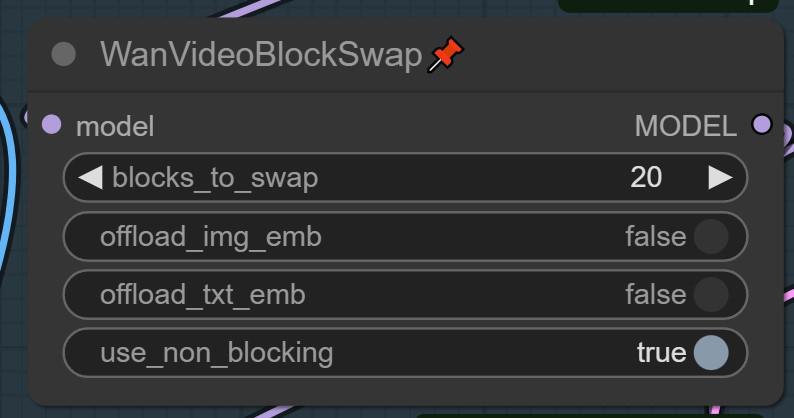
use_non_blocking should be true by default. It seems I've turned it off in my workflow.
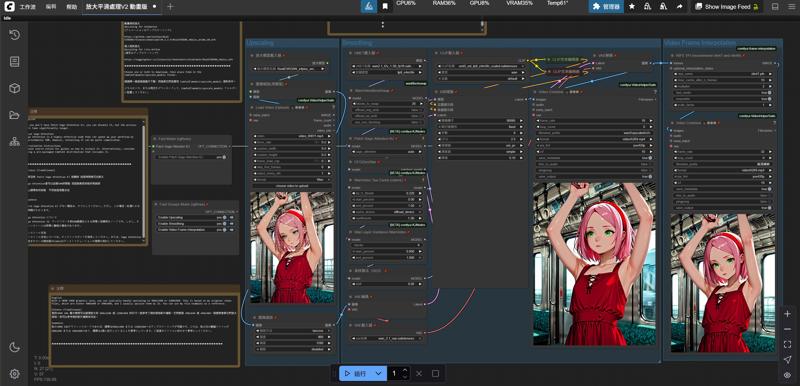
--------------------------------------------------------------------------------
這是我參考 以下兩個工作流
所合併起來的用法
我有想辦法解決VRAM滿的方式 就是添加了 WanVideoBlockSwap
因為我本身沒有使用GGUF模型 我個人習慣用官方版本
所以你們有自己喜歡用的版本 就自己替換節點
下面是我參考兩個工作流的網址 他們工作流給了我很大的想法
Simple Video Interpolate and Upscale - v1.0 | Wan Video Workflows | Civitai
Wan i2v with 720p smoothing - v1.1 | Wan Video Workflows | Civitai
然後改善並且合併 你們可以使用看看
遇到無法使用的節點就去下載 這是基本
英文不是我的母語 所以我是用DEEPL翻譯的
Description
Simple Workflow for Video2Video with Upscaling, Smoothing, and Interpolation
Here's a straightforward workflow for achieving video upscaling, smoothing, and interpolation, designed for ease of use – just drop in your video!
WanVideo BlockSwap
use_non_blocking should be true by default. It seems I've turned it off in my workflow.
Need it? Click to open.
FAQ
Comments (13)
Works like a Charm, insanely good man. 4090 can do 1080p with tiled VAE on 32GB of RAM. Gonna try VisionX T2V on this and see what happens.
Edit1: Would love to experiment with a prompt box just to see what happens.
I'm so glad it's working well for you! My main goal was to help people generate videos they like first. I've seen too many workflows that directly generate a video, then upscale it and add frame interpolation all at once. If the initial video isn't good, it wastes a lot of time.
That's why I created this workflow; it's simple and efficient. You just need to drop in your video, and that's it. If you want to increase the resolution later, you just adjust the width and height. This was my primary aim. The two prompt boxes, for me, are just for transitional use. I've tried adding negative prompts before, but I couldn't see any difference, so I stopped trying.
very nice job
can i add a style or character lora to inpaint or re-style the video
I haven’t tried other approaches since I’m currently just using it for video-to-video upscaling. I haven’t tested other use cases yet, but feel free to give it a try.
Stopped work after ComfyUI updates. Not sure what update affected current version 0.3.59
Expected all tensors to be on the same device, but got mat1 is on cuda:0, different from other tensors on cpu (when checking argument in method wrapper_CUDA_addmm)
Anbody know how to fix ?
I think the issue might be with the "WanVideo Tea Cache (native)" and "Skip Layer Guidance WanVideo" nodes. It seems that after the recent update, these two nodes aren't fully compatible with the current version. I just ran some tests—once I disabled both, everything worked fine. You might want to give that a try. The performance difference is pretty minimal, and it doesn’t seem to affect the results much.
@FLOW0308 Disabling of "WanVideo Tea Cache (native)" and "Skip Layer Guidance WanVideo" not works for me. But I disable "WanVideoBlockSwap" - and error gone.
工作流运行到K采样器就弹出显存不足报错,明明显存占用不高啊
It changes the face dramatically during motion (example woman bouncing up and down) even though the denoise is just 0.10 and from 704x704 original reso upscaled to 720x720. Also, loras i used in generating the the original video (such as bouncing boobs) the bouncing is reduced after upscaling.
Hi ! Is RealEsrgan better than Remacry ?
I think my current workflow is a bit outdated, but I still recommend it for those who prefer something simple and convenient. Personally, I've switched to using the seedvr2_ema_7b-q8_k_m.gguf model and workflow. If you're interested, feel free to look it up online and explore it further.
hmm ran out of memory? 4070 12gb memory
Allocation on device
This error means you ran out of memory on your GPU.
TIPS: If the workflow worked before you might have accidentally set the batch_size to a large number.