


This workflow is now discontinued as I will focus on other AI models.
Chroma is a new 8.9B parameter model, still being developed, based on Flux.1 Schnell.
It’s fully Apache 2.0 licensed, ensuring that anyone can use, modify, and build on top of it.
CivitAI link: https://civarchive.com/models/1330309/chroma
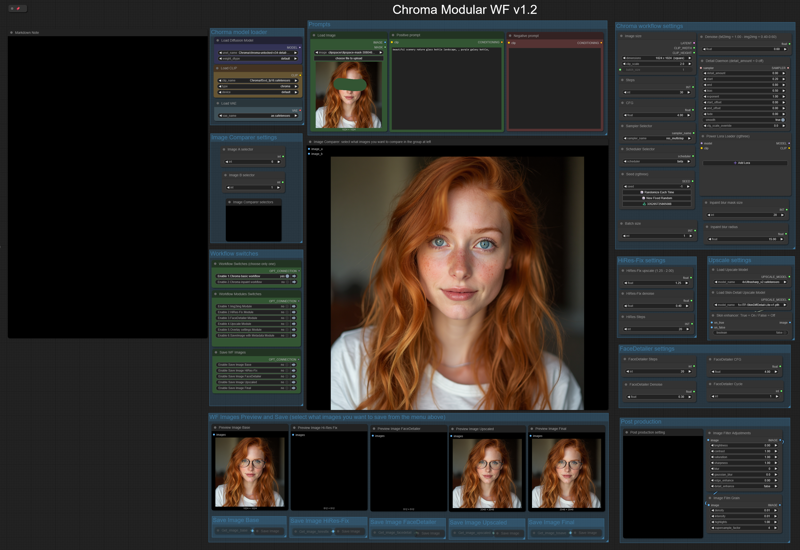
Like my HiDream workflow, this will let you work with:
- txt2img or img2img,
-Detail-Daemon,
-Inpaint,
-HiRes-Fix,
-Ultimate SD Upscale,
-FaceDetailer.
The model is still being trained, so there are many updated versions (latest today, June 8th, is the v35). Here are all the versions: https://huggingface.co/lodestones/Chroma/tree/main
In brief, this model is:
Training on a 5M dataset, curated from 20M samples including anime, furry, artistic stuff, and photos.
Fully uncensored, reintroducing missing anatomical concepts.
Built as a reliable open-source option for those who need it.
Being based on Flux.1 Schnell, it should run on low-Vram GPUs, so you can use it locally very easily.
You will need one of the t5xxl text encoder model files that you can find in: this repo, fp16 is recommended, if you don’t have that much memory fp8_scaled are recommended. Put it in the ComfyUI/models/text_encoders/ folder. The VAE is the same as FLUX or HiDream, so you should already have it.
Important: You must load an image (any image) in the Load Image node (at the left of the Prompts nodes) before running the workflow; otherwise, the workflow will give you an error. You must do this the first time you use the workflow only, and you must do it even if you are not planning to use that image for img2img or inpaint.
==========================================================
⚡️ Buzz for the Best Images ⚡️
Every weekend, I will reward some Buzz to the best image added to the Workflow's gallery!
Description
I replaced Cubiq (ComfyUI-Essentials) nodes as they are not updated anymore, and also some other nodes that could have some trouble.
I also updated the Inpaint module, using Compositing as this technique improve the output a lot.
FAQ
Comments (7)
Inpainting not working. Attached image.
Will check, thanks.
Ok, it should be fixed now, please download the workflow again.
@Tenofas Yea it works, ty!
I also notice that it takes too long with this updated workflow for img2img processing. The other workflow version was faster at this. More specifically it seems the high-res fix module causes this long processing.
Is it possible to get an update on the Workflow.
I dont know why, but the basic Workflow does not work, it outputs nothing. - It would also be nice to have the workflow SAVE each output steps image.
Especially for Basic Workflow- it should save. (Once it outputs)
I am working on v1.2 right now... anyway, v1.1 should work fine... I am using it and it works. I will see what I can do about saving each output image... maybe with a switch to give user the option to save or not... stay tuned.