This is a very simple workflow to run Self-Forcing Wan 1.3B + Vace, it only uses a single custom node, which everyone making videos should have: Kosinkadink/ComfyUI-VideoHelperSuite. Everything else is pure comfy core.
You'll need to download the model of your choice from here lym00/Wan2.1-T2V-1.3B-Self-Forcing-VACE · Hugging Face, and put it inside your /path/to/models/diffusion_models folder.
This workflow can be used as a very good start for experimenting. You can refer to this [2503.07598] VACE: All-in-One Video Creation and Editing for how to use Vace. You don't need to read the paper of course, the information you are interested in is mostly at the top of page 7, which I reproduce in the following:
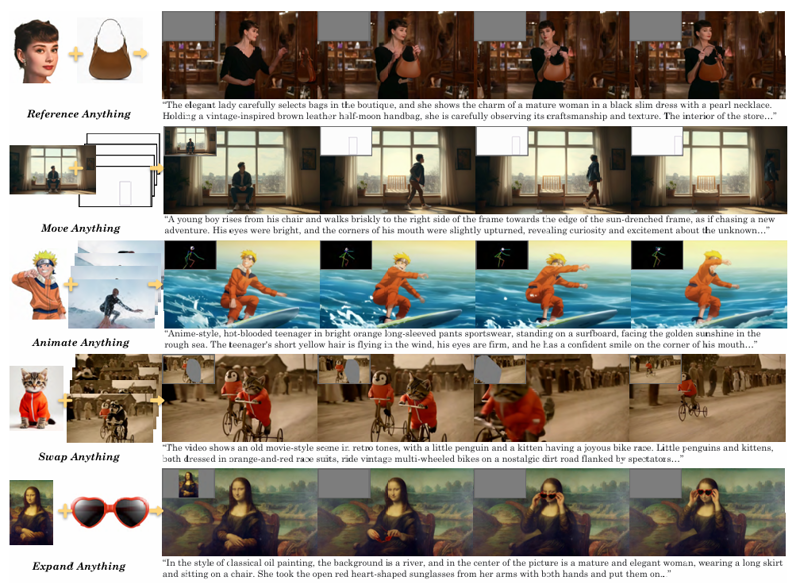 Basically, in the WanVaceToVideo node, you have 3 optional inputs: control_video, control_masks, and reference_image.
control_video and control_masks are a little bit misleading. You don't have to provide a full video. You can in fact provide a variety of things to obtain various effects. For example:
if you provide a single image, it's basically more or less equivalent to image2video.
if you provide a sequence of images separated by empty images: img1, black, black, black, img2, black, black, black, img3, etc... then it's equivalent to interpolating all these img, filling the blacks. A special case of this one to make it clear is if you have img1, black, black, ..., black, img2, then it's equivalent to start_img, end_img to video.
control_masks control where Wan should paint. Basically if wherever the mask is 1, the original image will be kept. So you can for example pad and/or mask an input image, like this:
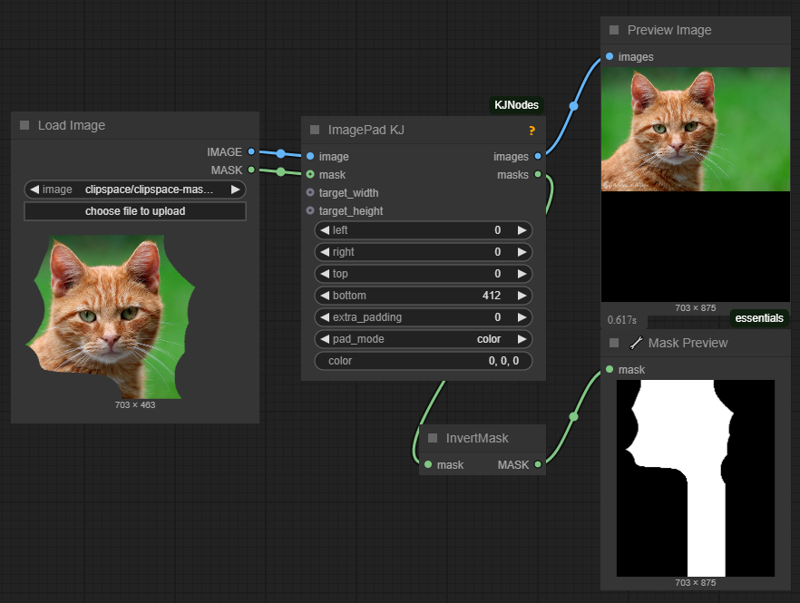 and use that image and mask as control_video and control_mask, and you'll basically do a image2video inpaint and outpaint.
If you input a video in control_video, then you can control where the changes should happen in the same way, using control_mask. You'll need to set one mask per frame in the video.
if you input an image preprocessed with openpose or a depthmap, you can finely control the movement in the video output.
reference_image node is basically an image that you feed to Wan+Vace that serves as a reference point. For example, if you put the image of someone's face here, there's a good chance you'll get a video with that person's face.
Description
FAQ
Comments (8)
do you have any other example workflows? how could i insert a sequence of images to create a start and end image?
I'll probably create more workflows for this, including the one you requested here.
try this someone put it together. not tried it yet as waiting on model to download https://pastebin.com/a8F8Nc9e
Thank you for sharing.. Works well. I wonder what resolutions are supported. Like exact dimensions. Since as far as I know Wan 1.3b only supports 480p videos.
I got very good results at 480x832x81 or 832x480x81. So it's highly probable you can get good results around this resolution, for example 576x864. But this something we have to try.
in my experience it can go as far as base sdxl (1200x1200) before it distorts bodies.