Switched over to InfiniteTalk model
Please note : this version uses subgraphs, please update your UI if necessary.
No spaghetti nightmare -- like some workflows.
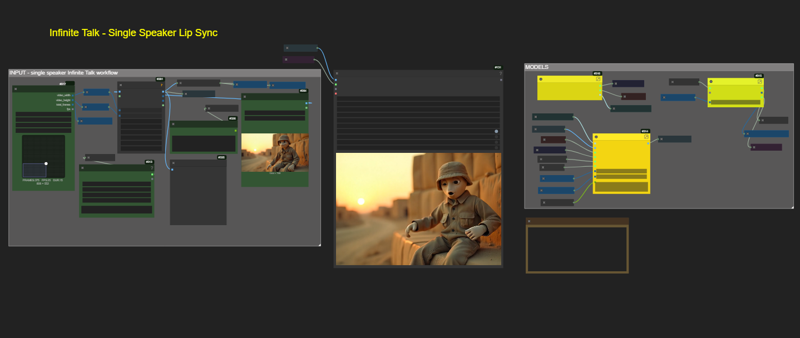

Description
Version 1, take an avatar/character/still image, and animate to speak. Upload and image and corresponding audio file. generate a speaking avatar.
FAQ
Comments (24)
Why did u mention"DO THIS AT YOUR OWN RISK" too many times?
Yea, it's not really anything too scary, but just in case the Wan Video Wrapper breaks, it could mess up your other workflows. But I havent see that.
This wf looks really safe, i'm going to try it out XP
I'm getting OOM no matter what i do, tried some lighter models and incresing blockswap, nothing works, any chance you could release a gguf version?
How much VRAM do you have? I have 24GB, but if you have a lot less, you might have to experiment with increasing the Block Swap to 40. This will swap to main memory, but it will also run a lot slower. But you may at least be able to run this instead of getting an error. As for the GGUF, if I one becomes available, I will update the workflow.
I have 16gb, i''ll set it to 40 and see if that helps
Impossible, i lowered vid seconds, resolution, all block swap ranges 20-40, every model i can think of, always OOM, this wf is unusable for me on a 16gb VRAM card.
@skyrimer3d That's really disappointing that this doesnt work with 16GB, I actually haven't had a single allocation error and I've generated 20+ second videos. I'll see if I can somehow reduce my VRAM by running multiple instances and see if I can reproduce this. But the Blockswap is usually what can avoid the Allocation Error.
One more thing... If you are running any additional apps that are consuming VRAM and RAM, shut those down so you can free up as much memory as possible. Also if you do use BlockSwap, 64GB of RAM is probably about what you want to have. If you have let's say 32GB you might struggle just to block swap.
I am using Multitalk on 12gb with a different workflow, other has got it working on 6gb. You got this, keep on until it works. I had restart ComfyUI cause a huge chunk of memory was locked for some reason. I suspect using HiDream will require a comfyui restart to use any demanding workflow after it. For me swap at 30 blocks until it worked. I have to use over 64gb ram, also the low_mem_load set to 'true' on the bottom of the Lora Node. If not you can get my workflow on Discord and see if that helps.
@R3G4L having trouble getting it running and I have a 3090 + 64 gb, whats your discord? Maybe you can help me get this going. Benji posted a workflow today that runs multi talk on top of a video clip, for me that's the grail work flow
@bwaylabs yeah I have that Benji V2V workflow in a tab ready to try out. Got sidetracked. Look up R3G4Lai I can drop the json file of the settings on the Benji i2v workflow that worked for me, I added interpolate and upscale groups to it etc. I'm no expert.
@R3G4L ok cool I added you on discord. I just can't get it to run, it disconnects every time at the model loader node, it's not giving an OOM it just goes to "pause" then closes out. I've been running vace a lot, but the gguf workflows seem to be the only ones that work for me. something is setup wrong on my end
Kijai wrote he NEVER will support gguf on his github, so this is only for the rich ppl under us having 24gb vram gpu...very sad move from him.
@skyrimer3d try a lower resolution (change VID height and VID width nodes to lower values)
Also try this multitalk model instead as its smaller: WanVideo_2_1_Multitalk_14B_fp8_e4m3fn
It works for me
same here. Hope to see native nodes for multitask
@bwaylabs I also have rtx3090 and 64gb RAM and I got OOM. I also tried wan gguf version but still no luck
@eakkawat okay i will st op trying to make it work.
Here to see wtf wan2.1_i2v_480p_14B_fp8_e4m3fn.safetensors is to be found.
But i will safe myself soime time coz i only have 12G
I have 4090 yet still takes 16minutes for 5 seconds of sound to generate a 480x480 video, why?
@Gooodis do you have sage attn enabled? Also, do you have any other apps using VRAM. I would shut down all other apps that might potentially be using VRAM. Yes, that's way too long... something doesnt seem right. If you dont have sage attn, please take a look at setting it up, its worth it. Too complicated for me to add instructions here.
I'm using a black background with a character, I'm getting a strange background pattern, any ideas what settings to change please to keep the background black throughout?
BTW it works really well apart from that
Honestly not sure, because I haven't seen it happen. But maybe in your prompt you can trying saying "solid black background" and see if it makes a difference.
paste the full error, and maybe I can help.