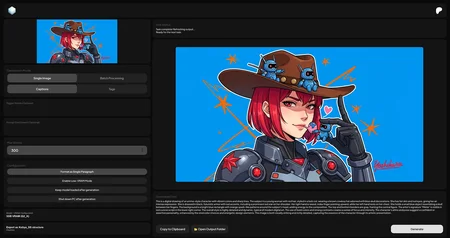
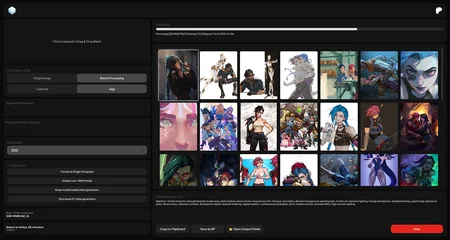
Caption Creator is a portable Windows app for generating high-quality text from images. Create captions, tags, JSON, YAML, Illustrious prompts, or fully custom outputs for image datasets, LoRA training, AI prompting, and folder organization.
Run everything locally with built-in GGUF models, or connect your own vision model through LM Studio or Ollama. Your images stay on your computer.
Website · Online Version · Releases · Patreon
Highlights:
Multiple output types: Captions, Tags, JSON, YAML, Illustrious, and Custom prompts.
Single or batch workflow: Process one image, many images, or queue multiple jobs.
Local-first generation: Use bundled models, LM Studio, or Ollama vision models.
Model management: Download, select, delete, load, and eject models from the app.
Professional workflow controls: Max words, trigger words, prompt enrichment, Low-VRAM mode, custom output folder, and original filename preservation.
Fast result actions: Copy output, open the run folder, or export the current run as a ZIP archive.
Modern desktop UI: Frameless dark interface with live status, progress, previews, gallery output, and an About panel.
How to Use:
Download and unpack the latest release.
Launch
Caption Creator.exe.Open Model / VRAM Configuration.
Download a built-in model that matches your GPU, or
choose Custom (LM Studio) / Custom (Ollama) and select a running vision model.
Choose Single Image or Batch Processing, then add images by clicking, dragging, or pasting in Single Image mode.
Pick an output type: Captions, Tags, JSON, YAML, Illustrious, or Custom.
Adjust optional settings, then click Generate or add the job to the Queue.
Copy the result, open the output folder, or save the run as a ZIP archive.
Description
FAQ
Looks like we don't have an active mirror for this file right now.
CivArchive is a community-maintained index — we catalog mirrors that volunteers upload to HuggingFace, torrents, and other public hosts. Looks like no one has uploaded a copy of this file yet.
Some files do get recovered over time through contributions. If you're looking for this one, feel free to ask in Discord, or help preserve it if you have a copy.