WAN 2.2 💠 T2V / I2V / S2V / T2I🔹4-6 steps🔹Loop 🔹SVI Video extend 🔹WanVideoWrapper Workflow🔹K3NK

NOTICE: IF YOU ARE NEW TO COMFYUI, I DONT RECOMMEND STARTING WITH THIS WORKFLOW, IS AN ALL IN ONE WORKFLOW YOU WILL GET CONFUSED.
I UPDATED v2.3, YOU CAN CHOOSE IF YOU WANT RES4LYF OR WVW SIGMA SPLITTING
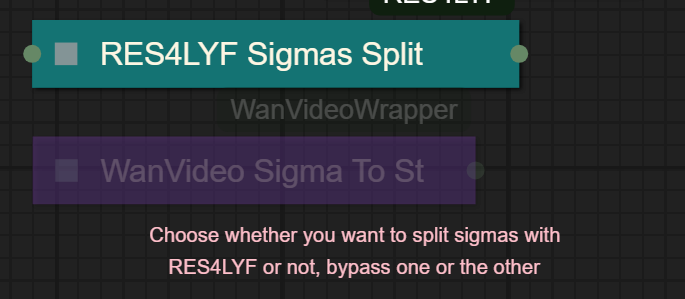
Since v1.8 im using subgraphs, you need latest comfyui with the latest frontend updates, also probably you will need to update Comfyui Manager.
For me was: setting nightly vers on the manager then update confy from the manager too.
* i allways leave the image overlay enabled, it will error if you dont have an image on it, sorry :S
v2.0
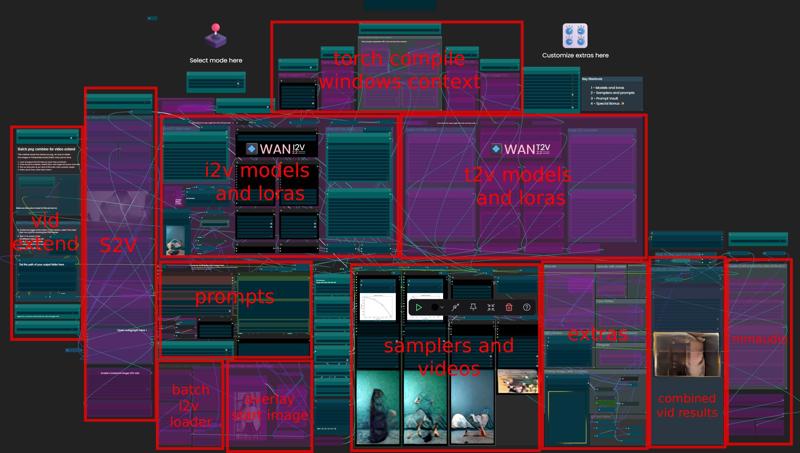
You can choose whether to merge with the loras or not, change the lora connection from the model loader to the set loras node, after that uncheck merge_loras
The toggled i added for radial sage, requieres Sage Attention to be installed, if you dont have it you should unplug the conexion i made to the attention type on the model loaders..
Be sure to update WanVideoWrapper nodes ..
The workflow works just fine with Wan2.1 if you bypass first sampler and model loader
This workflow is included with all my uploads as metadata, drag and drop a vid to comfyui.
I run a 4090 locally

You can use it as other modes if you activate this option for enabling the required nodes.
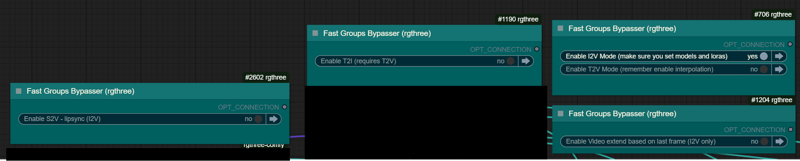
Make sure you load the correct models on the model loaders
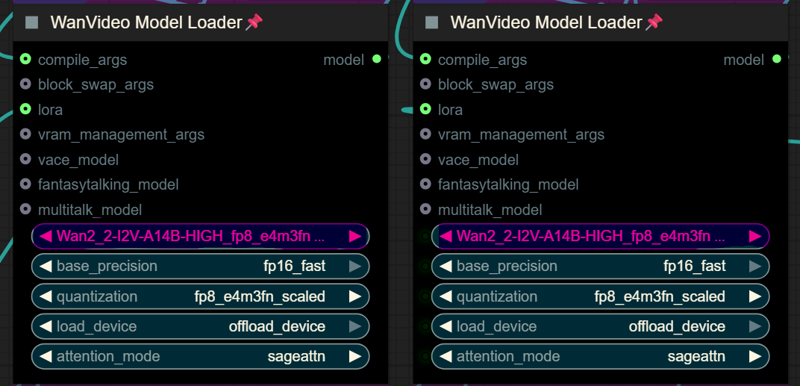
Kijai's WanVideoWrapper Node
Wan2.2 Kijai's models
Lightx2v LoRa needed for lower steps (faster generations)
Wan22-Lightning Lightx2v alternative, newer and better in some scenarios
NSFW Clip Vision (not really needed in wan2.2)
RES4LYF Nodes
MMAUDIO
https://huggingface.co/Kijai/MMAudio_safetensors/tree/main
once installed replace nodes.py file in the mmaudio node folder with this one: https://github.com/phazei/ComfyUI-MMAudio/blob/master/nodes.py
WAN 2.2 💠 T2V / I2V
MMAUDIO NSFW
https://huggingface.co/phazei/NSFW_MMaudio (download and rename it to "mmaudio_nsfw_large_44k_v2_fp16.safetensors")
BOYONODES
K3NK IMAGE GRAB

Description
Both AIO and I2V only workflows are in the same .zip
Updated K3NK nodes in github. Added toggle for joining png files with blending (for svi) or not (for traditional last-start frame)
Rehooked the Save latent (now is a custom K3NK node with pass throught due to ordering of file saving was messed up in the latest comfyui versions somehow..?)
Updated the node that concatenates PNG so it wont eat sysram on longer vids
FAQ
Comments (82)
Low vram (8go) supported?
i think WanVideo Model Loader supports gguf directly , download one of those and load it instead of the regular models i use, i also optimized the PNG cooncat node so it wont eat your sysram
savelatenthabsolutepath node not loading on most recent comfyui install...clean installation too
i have v0.11 , leme check, btw i changed the name of the node, coz is not absolute path, thats the one i used for reference, ive updated it, make sure you update the nodes
@K3NK Still no success, I think there is a PR on the git for the node saying its not imported.
@dilladick730 mmmh, i renamed the nodepack, maybe is that, just delete the old nodes and do a fresh git clone here https://github.com/K3NK3/ComfyUI-K3NK-ComfyUI-Nodes.git
@K3NK Yep did fresh clone, but still have only 2 nodes being imported. Is there a problem in __init__.py ? How do the latent nodes even get imported in the repo?
@dilladick730 damn im sorry i forgot to update that file :S
should be good now
@K3NK Awesome, thanks!!
hey sorry for the stupid questions, but what's the main difference between using SVI and not using SVI ? I get one just compiles the pngs into a video, but are the latent used in that case ? Or are they only used with SVI extend ? I'm also confused about what "First sample with SVI" is used for ...
SVI uses 5 frames fron the end of the prev sequence and 5 frames from the start of the new sequence and blends them in the concatenate step, so it gives you better transitions, kind of.. but you need a lora and can mess the overal quality.. i just found out using svi as first sampler (theres a toggle for that) can build up the burning of the svi lora, i think the best is to start without svi and then use it for the second sequence
@K3NK I see ...
kind of unrelated but btw do you know why there is a "K3NK Image Grab" node within the "Extend with SVI?" group (bottom right of it) ? On my side it's configured to look for latent too and as a result it gave a black image to florence2, which caused problems as you can imagine. my understanding is we should give florence2 the input image, so I don't get why we need another "K3NK Image Grab" here
@wris3 is for florence, in case you want to autoprompt, yeah, when it defaults it adds the latent .. ill chack for removing those
Hi, I'm having a bit of an issue. When running I2V, when it gets to the step WanVideo High Noise Sampler (#2), the process just freezes and works infinitely. My GPU usage goes to zero but memory usage stays almost 100%. Any troubleshooting tips would be great.
here is the output from the comfyui logs:
[ComfyUI-Manager] All startup tasks have been completed.
Using per-step cfg list: [1.5, 1.25, 1.0, 1.0]
Rope function: comfy
---------- Sampling start ----------
65 frames at 640x1024 (Input sequence length: 43520) with 4 steps
Generated new RoPE frequencies ?it/s]
0%| | 0/4 [00:05<?, ?it/s]
@Sehax513 if you hit the max vram the process will get stuck, adjust resolution or duration or blockswap
@K3NK got it to start generating, however the resulting vid is grainy and low def? Any tips?
@Sehax513 you prolly had the loras/models high and low mixed up, cant really tell
The thing that helped me was in WanVideo Block Swap change blocks_to_swap to 40 and use_non_blocking to false
Hi, thank you for great workflows, i need some help with the errors i get. what's a "pattern.png?", it looks like trying to look for something but i'm not sure, what is pattern.png is supposed to be ?
No files found in 'G:\reForge\stable-diffusion-webui-reForge\Outputs\9\' with pattern '*.png' ?
what the hell is wan22-G4GG1NGv6-11epoc-high-i2v-k3nk.safetensors?
new deepthroat lora, prolly releasing soon
There's a FPS switch node can't use, anyone know why Comfyui-ergouzi-Nodes can't import to use this node?
Hi K3nk,
Love your workflows, but just trying the new one and I'm getting this error:
WanVideoSampler
The size of tensor a (147) must match the size of tensor b (146) at non-singleton dimension 4
Can you help please mate?
Thank you
i think that might be coz you have 2 different size videos inside your output folder? when this error happens? did you changed the current_index number for extending video?
@K3NK Hello mate, I didn't change anything from the point of it working, some stuff got updated and after that it did not work.
I'll download your workflow again and double check though, we all know how easy it is to change something without realising.
I'll come back with an update as soon as I've tested it,
Thanks for the reply :)
I've just tried your latest workflow I2V ONLY, this gives this error:
RuntimeError: The size of tensor a (147) must match the size of tensor b (146) at non-singleton dimension 3
I'll try the other workflow tomorrow mate as it's late now.
@skpManiac seems like the i2v only had the last toggle (for joining the videos) toggled on.. download again or just toggle off the final step toggle at the far right
Thanks mate, it all seems to be working now, the new update is massive and I'm confused as to what it all does, but I will just play around like I did before :)
I also use a raretutor workflow for S2V (song to video), I'd love yours to do that too, but I'd probably need it to work similar to the raretutor one as it's fairly easy to follow :)
Thanks for your replies and helping me sort this, it's much appreciated :)
for me all the mmaudio nodes are missing. and nomatter how hard i try to get it i cant...
did you fix it?
@STRAN6E yes . i wrote you . i updated everything up . went to mmaudio folder. open a cmd console from it . and wrote pip install -r requirements.txt
it downloaded some stuff. now its works.
Love your workflows! Tnx bro!
What is avg speed I2V 4sec 5-8 steps on 4090?
What version of ComfyUI are you using @K3NK? Updating ComfyUI to latest seems to have broken parts of your workflow, like textConcat in the Multi PNG extender. I remember this being an issue in the past, too. Something about setting paths that way seems to regularly break on Comfy updates.
EDIT: On extending video clips. I found a solution , on youtube "How to Extend Any Video (using Wan 2.2) | ComfyUI" by super comfy.
Great stuff! This is already sooo much more efficient then my own cobbled together shitty I2V workflow, but I need help with sth:
In the I2V only Workflow regarding the 7 steps you listed to connect the videos together: "5. Enable the toggle at the bottom of this section, called "final step"
- There is no such node at the bottom section of that area, the only "final step" nodes I can find are the two ones to the right of the main outputs node. Enabling these as well as enabling the SVI node toggle (to the right of the K3nk node toggle, did you mean the SVI toggle as final step?) result in the creation of the same latest video, not combining anything.
The output path is set and steps 1-4 are followed without issue.
Help with this would be greatly appreciated!
screenshots allways helps xD
@K3NK hey sorry, I fixed it, I followed the steps blindly like an idiot. You have to enable the SVI toggle as you enable the k3nk node toggle-which is not mentioned in the steps... the result is amazing! Very smooth!
@stirner727 yeah, svi is optional really, but the toggle is near the k3nk one .. glad you figured out :D
could there ever be a tutorial? Im honestly a beginner but i want good transitions between my videos, and reading the descripting is so goddamn confusing, is there any video or anyway i could understand all this stuff?? so far I know the loras and the svi i learned about it from the comments here, please any help would do!!
i already receive missing nodes message
MMAudioSampler
MMAudioModelLoader
MMAudioFeatureUtilsLoader
what is the problem?
i got a portable version and i close the stuff. went to the update folder. did a full comfy update. then inside pressed everything . even confy an update. then i went to the custom folder , and every issued node like MMAUDIO . i opened a CMD console in it . and wrote this magic chant : pip install -r requirements.txt
and it downloaded some extra something. now its looks terrible compare to the old one but it just fixed prettymuch...
@u4126613475 im using comfyui desktop. did everything and it is not working already.
i have
apple_DFN5B-CLIP-ViT-H-14-384_fp16.safetensors
mmaudio_nsfw_large_44k_v2_fp16.safetensors
mmaudio_synchformer_fp16_2.safetensors
mmaudio_vae_44k_fp16.safetensors
in models\mmaudio ...
i installed the custom_nodes\MMAudio also and replaced the nodes.py in the folder. i also opened the cmd in custom_nodes\MMAudio and entered pip install -r requirements.txt, result: ERROR: Could not open requirements file: [Errno 2] No such file or directory: 'requirements.txt'
ChatGPT recommended me some other alternative thing to write and everything was successful, but still receive missing files:
MMAudioSampler
MMAudioModelLoader
MMAudioFeatureUtilsLoader
....
what am i doing wrong?
im noob btw
Hi, I'm using the official WAN 2.2 model with 6 steps in this workflow, but my animations are coming out distorted or strange. Can anyone help me, please?
You might be using the wrong files (safetensors), mine are perfect, see the video I just shared.
@skpManiac Hi, thanks for your reply. The only difference I've made is switching to the official WAN 2.2 FP8 model because I have an RTX 5080 16GB.
@lolbleach001584 I'm using a 5090 waterforce, and getting fantastic results (well , I was until today as I had to format my PC)
I will try to share my workflow once I'm back up & running.
Hi K3nk,
I've got your lates awesome workflow working perfectly (v2.54), but I am missing the beauty of Florence in T2V, is this at all possible?
Thank you :)
is an old lost switch node, i replaced it with rgthree one, you can download the .zip file again
same here. How to replace with rgthree?
I suppose i'm dumb, i can't find the wan 2.2 fp i2v 14b fp16 model in kijai's archive
Is it possible to add a video upscaler to this? I now creat at 512x96 pxl and at 10step, I create 4s movie in a decent amount of time. But when Im done with all videos and happy with the result I want to upscale the movie to 1080x1920. If i render in that resulotion direct it take a lot of time on bad videos. Any suggestion on a time effective way to do this?
with wrapper you need to use tricks, is not working as with native nodes, as for now theres only a method to upscale before processing the low noise using svi or just just the regular upscale models for upscaling the final video, theres nodes for regular upscaling in the AIO workflow
Can I get guidance on how to get through the sageattention and triton errors?
@olympuscreative im on windows and i have it working, is tricky but theres an installer that you could try.. ive used this if i remember correctly.. https://www.patreon.com/posts/easy-guide-sage-124253103
also, use deepseek instead of copilot or gemini.. allways make them search the internet, they love to make things up..
Maybe this helps:
https://youtu.be/Z8JlJdXdVg4?si=1ep0MnCz-Odla5Jz&t=135
Since I started following pixaroma, I've never had any more trouble with my ComfyUI Windows Portable.
https://www.reddit.com/r/StableDiffusion/comments/1jb6sin/cant_import_sageattention_no_module_named/ I followed the first response and it worked fine for me
@mnsis yo no conseguía instalarlo ,le pase la carpeta del portable a opencode se lo pedí y me lo dejo funcionando
Everything is working perfectly for me, but for some reason, penises aren't rendering correctly. They look either like a piece of rubber, a stick, or a sausage. I didn't install the "wan22-G4GG1NGv6-11epoc-high-i2v-k3nk.safetensors" LoRA, as I couldn't find it. I'm encountering the same problem with other LoRAs, such as "Ultimate DeepThroat I2V Wan2.2 Video LoRa - K3NK, Ultimate BBC DeepThroat I2V Wan2.2 Video LoRa - K3NK, SideView Deepthroat T2V Wan2.2 Video LoRa - K3nk". Could you tell me what I'm doing wrong?
wan2.2 needs high and low models, both, using only one will give you that results..
I am using Wan2_2-I2V-A14B-HIGH_fp8_e4m3fn_scaled_KJ.safetensors + Wan2_2-I2V-A14B-LOW_fp8_e4m3fn_scaled_KJ.safetensors, as well as the Wan22-Lightning Lightx2v alternative LoRAs (high_noise_model.safetensors and low_noise_model.safetensors). I also tried various other text encoders and different LoRAs of yours—such as Ultimate DeepThroat I2V Wan2.2 Video LoRa - K3NK—but nothing seems to help.
@solder912219 do you have a screenshot of your lora loaders? upload it to imgur or smth... you prolly loaded the models the wrong way.. cant really tell without seeing the wf
Thank you for taking an interest in my issue. I have uploaded three images below: in the first, I followed your workflow exactly; in the second, I loaded alternative LoRAs; and in the third, I added custom LoRAs as well. https://ibb.co/9m9knh10
@solder912219 youre mixing high on the low one.. make sure youre loading the correct loras on the correct loaders
@K3NK K3NK Could you please explain in more detail? I’m completely confused 🙏
It’s really important for me to figure this out — I’d really appreciate your help (coffee is on me).
Am I supposed to load the same model in both High and Low, or should those be different models?
Could you please give me a specific example:
which model should go into High
which model should go into Low
which LoRA should go into LoRA High
which LoRA should go into LoRA Low
If possible, please write it using actual model names so I can clearly understand what exactly needs to be loaded and where.
Thank you so much!
@solder912219 all the loras and models have high / low on the file name, just load the correct ones xD
wan22-ultimatedeepthroat-i2v-102epoc-high-k3nk.safetensors goes to the high lora loader
wan22-ultimatedeepthroat-I2V-102epoc-low-k3nk.safetensors goes to the low lora loader
@K3NK What an idiot I am. It finally worked! Thank you so much.
I’m really sorry if I missed this, but is there a 'guide' for getting this workflow running properly on Runpod?
Like, which ComfyUI template should I install—the official 'latest' one? Cuda 11.8/12.1? Or the 'hearmeman' one-click? Does it change anything ?
Also, it’s a lot to ask but is there a script for JupyterLab that can install all the custom nodes, models, LoRAs, etc., add SageAttention… or at least a script template to fill with the links
That would be amazing! I’m not a total beginner and I’ve managed to get a few other workflows running, but I’d really like to tackle this 'beast' :)
Thanks in advance for any help!"
All these workflows are as confusing as shit, no wonder people hate ComfyUI.
TypeError: ImageResizeKJv2.resize() missing 1 required positional argument: 'image'
What is going on? I enabled I2V and loaded one image. Do I need to load more, sorry but just looking at this mess makes my head hurt.
Bro, if you can't figure that one out, you're screwed. Wait until they come out with the consumer-friendly version.
Share a screenshot in imgur l with the red box when you run it, as far as I know you don't have the proper nodes toggled, missing image means input image is not going through
Try WAN2GP
Perhaps I can find some help here. Been trying to install the K3nk nodes, but the Manager says the are not installed. I have done the manual git method and the files are in the custom_nodes folder. Any suggestions?
That might be coz the _ nodes _ .py file, try downloading fresh from the repo as today, I'll check it again later just in case
Hello
i have an error when i excute the workflow :
valueError: Set LoRA node does not use low_mem_load and can't merge LoRAs, disable 'merge_loras' in the LoRA select node.
But in nodes WanVideoSet High Loras (pointed in red) there is no option to merge or unmerge
merge loras is in node wan video select multi and is set off
Thanks advance for our help