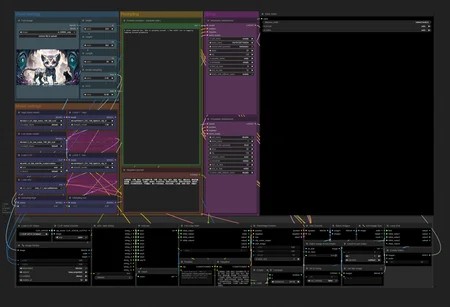
A very simple WAN 2.2 workflow, aimed to make as simple as the native one while being able to create any number between 1 and 10 videos to be stitched together.
Uses the usual attempt of previous video's last frame to next video's first frame.
You manually only need to input it like the native workflow (as in: load models - optionally with LoRAs -, load first frame image, set image size and length).
The main difference is the prompting:
Input multiple prompts separated by "|" to generate multiple videos using the last frame.
Since there's no VACE model of 2.2 available currently you can expect a loss of motion in between, but generally speaking even 30-50 second videos turn out better than with WAN 2.1 according to my (limited) tests.
Support me through paypal: [email protected]
Description
FAQ
Comments (60)
Why is Wan 2.1 VAE used instead of 2.2 VAE ?
The native workflow came like this.
I didn't really look into the details, didn't seem to cause a problem. Might try and swap it around.
There is no 2.2 VAE. Wan 2.2 uses the same VAE as 2.1.
48ut Only the new Ti2V 5B model in Wan2.2 uses the updated Wan2.2 VAE.
The T2V 14B and I2V 14B models are still using the older Wan2.1 VAE.
arman947 Thank you!
@arman947 You think they'll ever update it to a Wan2.2 VAE for the 14B, or they just aren't interested with Wan 2.5 out? (Just curious about your thoughts on this)
I tried this, it took 2 hours or so doing something, i don't know what, it kept showing wan bars progressing up to 100% over and over, until i just go bored and stopped it, using 16gb VRAM card and 32gb RAM.
Depending on how much prompts you fed it, it loops and loops the samplers.
Sadly ComfyUI native nodes only calculate the number of nodes that needs to run, and don't calculate with them running multiple times, so if you give it more than 1 prompt, comfy will mistakenly think it's 100%+ after the first loop.
Otherwise the time it takes is pretty linear, for example if 5 seconds take 5 minutes on native nodes / single loop, 10 seconds will take 10-11, 50 seconds will take ~55ish. If you run out of RAM and have to swap models all the time, it's a roughly 20% extra time needed.
yorgash That's the strange part, I had a photo of a girl and the prompt was "girl dances | girl jumps", that's it. You have strange models on clip and more so I used the usual ones instead, maybe that's the reason.
ComfyUI progress sometimes is stuck while the prompt is long time done. Just watch the console progress and do not trust ComfyUI progressbar / percentage done. I have this problem each day every day after computer wakes from sleep and I run a workflow from previous day.
16gb VRAM and 64gb RAM, I have canceled the workflow after 1h:15m, it loops way too many times. I always check the console. It looped ~9 times for what should be 3 prompts after the " | " string split, with other loop workflow I was getting a result in minutes, with this workflow it seems to loop endless.
torriti Now that just could not be right.
Normally it loops exactly as many times as the number of prompts it gets, so this shouldn't happen unless something is broken in your ComfyUI. I have tested that on 5 very different computers and ComfyUI environments.
yorgash But that's what happened to me too, ao there's something going on here. I'll update Comfyui and try again just in case, but i believe it's up to date.
skyrimer3d I didn't doubt that happened, just saying it's still not right :)
Knowing Comfy there could be any number of reasons, but this is one of the more "ah okay it works" flows I've seen in loop category.
Just as a test, could you try it with some stupid settings like 1 steps on both high and low, with some 200x200 res, length set to 21 and see what's up?
yorgash I've checked this one with a similar concept and it worked: https://civitai.com/models/1829052/wan-22-for-loop-video-with-scenario , i've updated comfyui now a few nodes, i'll give it a look and see if yours works asap.
yorgash I tried the test you mentioned, it processed completely, but it showed 9 loading bars of 1/1 (steps, i suppose). That would explain why it takes forever, since it's 22 steps on default. EDIT: Made a second test, this time i didn't even touch your prompt, just added the models, a pic and set 200x200, 21 secs, 1 step. This time i got 10 loading bars instead of 9 for some reason.
@
skyrimer3d Can you screenshot the multiple load bars? I don't really know what those are, I always only have one load bar at a time, maybe an extension?
In short what should happen with 2 prompts and the settings goes: Load Clip/Vae/Model 1, enter loop1, Clip encode, generate prompt1 on high noise, load model 2 generate prompt1 low noise - > loop2 - > clip encode, load model1, generate prompt2 high noise - > load model2, generate prompt2 low noise - > VAE decode, batch image to video.
Any excess steps should be out of ordinary. Maybe we'll be able to spthe problem.
yorgash here: https://ibb.co/G48Zsszz Can you share a link to download clip-vit-h-14-laion2b-s32b-b79k.safetensorsclip-vit-h-14-laion2b-s32b-b79k.safetensors , i found https://huggingface.co/laion/CLIP-ViT-H-14-laion2B-s32B-b79K/tree/main but i can't find that specific file, and it's the only model that is different in my setup from your setup, i'm going to download model.safetensors and try with that.
skyrimer3d Remind me about the file, currently working and have no access to any file sharing.
The loaders are right, 32GB RAM has to unload because can't hold 2 WAN models, and WAN 2.2 consists of two.
So it loads Model A then Model B, and for the second prompt it loads model A then B again.
yorgash I saw the same issue the first time I ran it with a single prompt that had no | s
So here is what I did.
In the QOL Split String function disconnect the strings greater than the number of loops you want it to take. It is 10 by default and seems to use this as the counter. I left only string1 and string2 connected and it only iterated twice.
This is a great Workflow. Thank you for creating it.
In the QOL Split String group disconnect the strings down to the number of loops you want it to take. So if you have no | then just leave String1 connected. If you have ||||| then connect up to string5
Marauder73 You're welcome!
Maybe different versions of QoL nodes made the diff? :O Worked fine for me with nightly version
I don't understand why people are complaining. This is incredible!!! Ive always had trouble stitching things together myself. Always something ended up breaking, or the results looked terrible. This does it all for you plus it actually looks good. WTF.
my only issue is a lack of lora support. Unless im missing something?
Thank you!
I have LoRA loaders next to the models (2 for both), and while for example it does support causvid / light LoRAs, the others are either/or.
By the way after testing I found out possibly the best compromise at quality / prompt adherence is letting the high noise model go default (3.5cfg, 10 steps), and the low noise can have causvid or lightx LoRA at 1.00 with cfg also set to 1, and 10 (or even less) steps.
@yorgash What were your results with those settings?
Dude, I totally agree. After a couple of attempts, I was able to find the settings that work best for my use case (turning old art into animation), and I'm super impressed with the prompt adherence I got. Even though the quality gets worse as the video gets longer (I've done 12-15 second videos so far), I'm super happy with the results. :)
Let me just say this is the most convinient "extended" video workflow I've used, I love the flow of just giving the number of prompts and than it will create that same number of clips and put them together. thanks for sharing !
Any one have workflow?
This is fantastic. well-engineered, easy to use. thank you for helping me make sense of this technique!
Thanks for the workflow. Why is LLM Party node needed in this workflow?
I can't be 100 percent sure now, since I'm away, but I think that weird thing that concat - created batch out of the single prompt was part of the LLM Party node suite.
I might recreate it later in a simpler manner using as few custom nodes as possible, since ComfyUI since then has made quite some useful nodes native.
@yorgash Yes, it will be very cool. Because the LLM package is very heavy just for one node
@yorgash update please, still waiting for you:) you workflow best for loops
This is awesome! Just a question in general? Is it normal for the video to naturally degrade in quality after each iteration of " | " ? It would be awesome if the quality remained as the original image as it get noticeably worse the longer it goes.
Sadly it happens, partially depending on the source used, how closely WAN can match the style by default, the last frame generated (for the next video's first frame) and of course, on your luck.
While you can maintain a closer overall style consistency using FFLF (which I also made in a similar fashion), FFLF has less smooth transitions. VACE has the best control keeping motion and style, but it degrades in quality the most by far.
Currently there are compromises to make, though settings and finer control can make quite a bit of a difference, and luck is still a big part of any open source long video generation.
Ah gotcha - either way this is an EXCELLENT and easy-to-use workflow! Thank you very much! I'm trying to add an upscaler or even a blockswap to help with my low-VRAM / high RAM situation. Thanks again! :)
@rawrasaurussss134 Would love to hear your findings/results!
Thank you. Where can I find the QOL Split String node? I can't find it via the manager.
edit: Got it. It was named as Quality of life suit by omar92
Great workflow. Works very well. Thank you for sharing. It could use an option for upscaline or interpolation in the end though. Maybe that's something you'd want to add in the future?
I can add them both, I have separate wf for that, but I see how it'd be beneficial to have here.
Though as sometimes I make ~40-50 sec videos, upscaling and interpolating might end up a bit too difficult in those cases.
I also have a video splitter workflow for cases like this with the option to use WAN2.2 low noise to rework the video as well. It's a weird and resource hungry beast, but it can sometimes be absolutely gorgeous at say 2560x1440 upscale.
MADE, i would donate if u had youtube videos.... because i am noob in video creation, and i cant understant how to make the workflows works...
Hello! I sadly have no video tutorials (I am a noob at that), but basically you have to do two things with this workflow:
1) select a start image
2) enter a prompt for the video
The difference between this and standard WAN 2.2 wf is that you can enter the prompt like this:
"Prompt1 | prompt2", so then the model will stitch multiple segments together.
Great workflow thanks a lot! Is it also possible to use the same multiprompt method using T2V instead of I2V? Would be absolutely amazing.
+1, mostly got it working, but fails one the batching stage. I think it needs to skip the first index, but can't figure out the right combo of nodes
@jakely its awesome to see that you at least tried it. I already tried it myself, i would consider myself more or less experienced with comfyUI workflows but I'm kinda late to the "wan party" 😅 ... all the different models and loras that can/have to be used in specific combinations for separate parts of the sampling is still a bit confusing to me. (Just messing around with wan for a couple of days) - even tho i was able to build similar loops for sdxl based video generation, seeing your I2V loop nodes makes it absolutely clear; if you weren't able to get it working so far, I surely wont 😅🤦♂️ ... Maybe you'll end up with a working variant in the future. Would be dope af. Anyways, thanks for the sick I2V workflow!
@jakely whoops its still early over here. I thought u were the OP. What I said also applies to you i guess 😅👌
Just found this and tested it out. My first test was a bit of a disaster, but cool at the same time. The problem was the animation (I'm animating art) didn't stay consistent, but it stretched the video out to 15 seconds. I think I set the steps too high, and the frame length too long. I'm doing a second pass now.
The question I had was why it's using Wan2.1 lightning LoRa? Is it possible to swap this out with the more current Wan2.2 lightning loras for high/low noise? Have you tested it with them?
I'm going to test it out myself later, just was curious what your results were, if any.
EDIT: I just tested it out and yes, the new loras work and seem to have improved the quality of the video output. Style is more stable. I'll have to do more testing, but very pleased so far. The video does degrade, but it's worth it.
Really pleased with the results, and the speed seems pretty good. Question - and maybe this can be an idea for a feature update, or alt version - but would it be possible to set a keyframe between each extension? How could that be accomplished? I figure if you could set keyframes on the side and just let it run, this could be the perfect tool to create extended animation clips. Thoughts?
Thanks for the work flow, but how do you get it to loop?
From the description:
Input multiple prompts separated by "|" to generate multiple videos using the last frame.
Has anyone got this workflow working well with GGUF models? With 8 GB VRAM I can't use non-Quanticized models. I've tried Q3 and Q4 of A14B; Q3 of the SmoothMix GGUF I'm using now in a DigitalPastel workflow. I've tried with and without light2x LoRAs. I've tried adjusting Steps and CFG. I can get close, tantilizingly close to full clarity but always there's a bit of, uh, fuzziness and / or a reddish tinge. I'd sure love to be able to make one continuous 30 video but I'm at a loss figuring what's needed.
It's weird. Using the SmoothMix i2v GGUF's that work on 4 Steps with Euler Simple with my usual workflow I can use that model here with 2 Steps AND the lightx2v LoRA and it's close, it's so close to clear; just a little fuzzy. At first I was fiddling with the LoRA's strength but now I'm running through different sampler and scheduler combos. I seem to be on the right track since some combos make it a bit fuzzier whereas others make it totally fuzzy. So far though, I've yet to find a combo that yields a clear output. Adding a step or two makes it fuzzier. It's like I need something between 2 Steps and 3.
Hi ! Thanks for your work. I'm trying this workflow but it seems that every "batch" it starts from the first fram, not the la ones... what i'm doing wrong?
For anyone trying this workflow (as of today, on the latest stable version of ComfyUI), here is some things that I ended up applying as improvements:
Issue #1: the initial list always was returning a 10-loop, if you only have 3 prompts, there will be a 7 loop waste of processing.
Solution #1: (Get rgthree custom node pack, you probably already have it) Put a Power Puter node between the "listConc" and the count and For Loop start nodes, like so:
listConc => Power Puter => count & For Loop Start
Set the output type to "*" and put this 3 lines of code on it:
arr = a
filtered = [x for x in arr if x != ""]
return filtered
this will remove any empty items in the list, so it only loops what is necessary.
Issue #2: As the first frame of the animation (or initial image) is appended to the image batch, it causes a "stutter" on the video as the initial frame appear twice in a row.
Solution #2: We need to remove the 1st frame from the generated video segment. For that I used this sequence of nodes (node pack in parenthesis):
🔧 Get Image Size (comfyui_essentials) => use count on Math Int (comfyui-easy-use), subtract 1 => use result on Wan Extract Last Images (wan22fmlf ), passing the video segment to it => use result on the image2 input of BatchImages
and with that you can have the smoothest sequence while not trying to do black magic with overlap frames (I sure tried to do it but with no success)
EDIT: It is not an issue, but with the prompt list filtering the comparison made to check if the frames would be appended is rendered useless, so those 3 nodes can be removed as well (the "Empty", "Compare" and "Batch image if non-empty" ones)
EDIT #2: Also the nodes related to getting the last frame can be simplified to a single "Wan Extract Last Images" (wan22fmlf) with num_frames = 1. If you made the changes I suggested above you are already using that node pack so the isn't more overhead about that.
Thank you, this has been bugging me for a while:)
@ThatSketchyKid I am glad it helped someone :)
@AYBABTU Always remember, You dont have to wear a cape to be a hero my friend haha thanks again:)
Doesn't work
comfyui_LLM_party failed to import