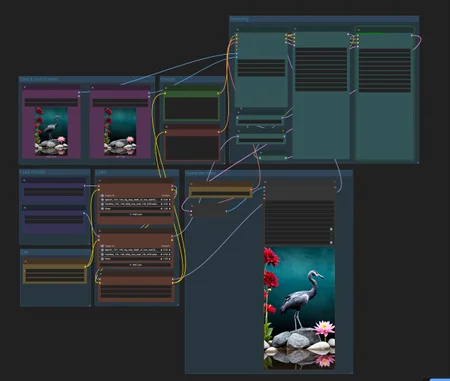
Wan2.2 Start Frame – End Frame Workflow (ComfyUI)
Create stunning, controllable AI videos using the Wan2.2 model with start and end frame control. This workflow is especially powerful when combined with consistent character LoRA’s, allowing you to animate your custom AI characters smoothly.
✅ What this workflow does
Allows you to define a start and end frame for better motion control
Determine FPS (I advise 24fps or 30fps for this workflow)
Works perfectly with character LoRA's for realistic results, like my character LoRA's
I use this setup on an RTX 4090 and can render a 5-second video in under 150 seconds.
⚠️ Before You Start
If you're new to ComfyUI or haven’t installed the Comfy Manager, I highly recommend starting with my Photorealistic ComfyUI workflow guide first. It covers the basics of installation and file setup. You can find it linked in my Discord or bio.
🧠 Required Models & Files
Diffusion Models (choose based on noise level)
📁 Place these in:C:\Users\your-name\Stability Matrix\Data\Packages\ComfyUI\models\diffusion_models
LoRA Models (not needed for V2, see "About this version")
📁 Place these in:C:\Users\your-name\Stability Matrix\Data\Packages\ComfyUI\models\loras
VAE
📁 Place in:C:\Users\your-name\Stability Matrix\Data\Packages\ComfyUI\models\vae
Clip
📁 Place in:C:\Users\your-name\Stability Matrix\Data\Models\TextEncoders
Final check
Make sure your ComfyUI is updated to the latest version if you get any error messages after installing everything.
🤖 Make your own Character LoRA
Want to learn how to make consistent Character LoRAs from scratch?
Join my private Discord:
https://huslyo123.carrd.co/
🙏 Credit where credit is due
This workflow is a remix of several brilliant community contributions, including:
✨ Want to create consistent character models, explore A1111 workflows, and get exclusive guides & tips? -> https://www.fanvue.com/huslyo123/fv-3
Curious what’s included? Full overview here → https://huslyo123.carrd.co/
Description
If you like this workflow and guide, leave a thumbs up on this page. It really helps a lot!
V1
FAQ
Comments (19)
hi its not starting without clip_vision module, connected to clip_vision start, end image
Hi! I just tested it again on a clean install and didn’t run into any errors. After placing the files in the right folders, the workflow worked for me. What is the error you get?
I think I know what went wrong; I have added to the guide:
--
Clip
📁 Place in:
C:\Users\your-name\Stability Matrix\Data\Models\TextEncoders
Update your comfyui version 0.3.48 fixes it
Huslyo123 do model change has something to do with it? i have 4070 12gb, so i changed the model loader to unet loader with gguf model. i finally able to generate by adding load clip vision, then clip vision encode node for both first and last frame. then passed both image link through them to wanfirstlastframetovideo. dont know all these steps were necessary, or i just needed to 0.3.48. but as now its working, i am not going to touch anything. he he.
afidjahan afidjahan Nice! You could always try reloading the workflow in a clean tab and see if the ComfyUI version change alone did the trick, just to isolate what really mattered. But honestly, if it's working now, no need to touch anything. Sometimes that’s the best approach.
alcaitiff alcaitiff Thanks for thinking along! That was exactly it. I’ve updated the guide accordingly.
I also modified this workflow for GGUF and can confirm that updating ComfyUI fixes this problem. Theres no need for clip vision.
Hey, looks great. I have it running, but instead of the bird flying away it just sort of fades out. This is using the same seeds as in the workflow, but same behavior with other seeds. Any idea what could be causing this?
Weird, did you change any settings like noise seed, motion strength, frame count, sampler, or CFG?
Huslyo123 Thanks for your reply, very cool! No changes. I noticed steps was set to only 4 (2 per sampler), and since my previous message I see I can get better results if I increase steps to 10+. Do you actually get movement like in your example with only 4 steps?
logicflint I just re-downloaded the workflow and tested it (different seed), and yes, with 4 steps on both samplers I do get this output. Settings were 24 fps and 121 length, and the bird flies away nicely. Screenshot of the key settings: https://imgur.com/a/XbkpXO6
Huslyo123 Weird, I just tried again with three random seeds and the bird just sort of slowly vanishes in place (Back to the Future style, if you happen to also be old enough to remember) :-) with no wings flapping or anything. I'm on an RTX4090, same as you I think, so seems this should work. Really wish I could figure out the issue. I'm on the latest ComfyUI, etc. I'm starting to get reliable transitions, but only when I increase to 10+ steps, and seems almost sure to be fine if I throw 20 steps at it like I've seen in some other workflows -- But then it's like an 8 minute process instead of 3 minutes or whatever. Anybody else who sees this behavior, please chime in here and maybe we can figure out the common factor(s)! Thanks again, Huslyo!
Can confirm the same behavior with the provided test workflow, settings and seed; The bird just fades out.
Appetizer101 Thanks, appreciate it. And does it work fine with 20 steps? (10 each sampler)
logicflint logicflint I’m old enough to remember ;-) I’ve also got the RTX 4090. Just re‑downloaded and reloaded the workflow, but this time I swapped the images so the bird flies into the frame. Workflow settings: https://imgur.com/a/p19gnjQ Video: https://civitai.com/posts/20542336
Seems to work with these settings on my end without issues. I’ve had cases where using very different images took a couple of attempts, but with these sample images it works right away. Maybe a Wan2.2 expert can chime in here and take a look.
Huslyo123 I'm no expert but maybe using t2v accelerating loras with i2v workflow is causing problems.
Using 10 steps looks little bit better, but most of the movement is still blurred out
I had the same problem (newest COmfyUI and a Notebook with RTX 4080 with 12GB VRAM). The bird doesn't fly away but blur out. I think i have found the problem. The both pathes (high_noise and low_noise) have different nodes and parameters. That's not good. The Loras and the parameters of the loras have to be the same (for example both need - or doesn't need the still_rank32 Lora, use the sage_attention node or leave it in both pathes). Now the workflow runs for me.