
Based on Wan22-Lightning
With some enhencment and weight balance.
(The official model was too powerful, so I wrote a script by Python based on the Torch and Diffusers library, tweaking the official model's power. I also incorporated some of my own trained LoRas models that enhance image quality, character and color contrast, to maximize image quality without sacrificing the performance of the prompt words. The official lightning LORA, you need to use weight = 0.3-0.5 or the denoise will be underfitting. and mine is weight = 1.0)
[No relation with LORA but Wan22 itself] Not Suggestion to generate in low latent which lower than 432pixls or 480P, which will reduce the quality of motions and details, which can not fixed by LOW-Noise CKPT.
Waiting for the updata of cache-tools nodes in github is a better way to effectly imrpove the results, but still need some days to wait (wrote at 2025-08-07).
Animation style has a bit improved.
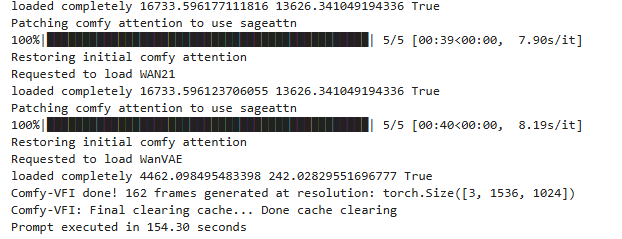 Result from 4090 - 24G GPU
Use CFG =1, and Weight = 1, steps = 4+4 or 5+5 or (best 6+4) or (more motions but slow a bit to 210s 8+6)
RunningHub Online ComfyUI and AI generator:
Invitation Code: rh-v1005 --- 500 RH For Free
Description
High-noise
FAQ
Comments (36)
What did you do? How is this different from the lightning LoRAs?
"With some enhencment and weight balance." is the most vague shit ever lmao. this just looks like someone reuploaded the exact lora without changing anything. if they did change/train: why not say so? being so unclear makes me think scam.
The official model was too powerful, so I wrote a script by Python based on the Torch library, tweaking the official model's power. I also incorporated some of my own trained LoRa models that enhance image quality, character and color contrast, to maximize image quality without sacrificing the performance of the prompt words. lightning you need use weight = 0.3-0.5 or the denoise will be underfitting. and mine is weight = 1.0
crombobular Scam? hope I can really do that. I made loras for 3 years, and if you just do not like me, please use the official one, which I provided link in introduction.
Aseer - ok so ... you merged some wan2.1 LoRAs with it then? Can you elaborate a bit about "tweaking" the "power"?
leisure_suit_larry Wan2.2 LORA, I made and published 4 already on civitai. the LORAs used in this ACC are not published.
leisure_suit_larry leisure_suit_larry And for the Python, I published a FLUX version (https://civitai.com/models/851687/flux-lora-compression-tool-paseer), .exe document. You can download and try it on FLUX.
Aseer dude, ignore the trolls. they arent contributing to shit lol. appreciate the work.
crombobular I've been on here since near day one. Aseer has been contributing here for years. Sometimes, you might not realize how tricky it is to describe things in another language. Now try to do it in another character set.
Hi, what GPU did you use for your posted results?
Thanks.
4090 24G
So brainstorming time guys. One thing I've learned is that WAN 2.2 can generate noisy but coherent videos at below standard resolutions, like 256x256, and it seems like this could be leveraged to accelerate things. For example, why run the high noise model at full resolution when you can just run it at a much lower resolution, upscale the frame, then send them off to the low noise model. I think this shouldn't hurt the models capabilities much, since the high noise model by its nature has a high noise output, which is then refined by the low noise pass. The low noise pass doesn't need the image to be clean, it just needs it to be coherent to create a base for scene movements.
So basically what we need is a workflow that runs the first pass at a lower resolution, then uses the full resolution on the second pass.
At 256x256 and 4 steps, the first pass only takes less than 1/3rd of the time, which means you can almost cut total processing time in half. Throw in an extra step on the second pass maybe to clean things up, and you still could get a significant gain in overall speed.
I think the model is not designed to work with such resolutions; it will essentially hallucinate into unpredictable noise, which will ultimately have a negative impact on the final composition.
I tried this, but every method of upscaling the latents in between the samplers causes massive degradation, even if you decode, upscale, encode. Let me know if you find a method that works. It would be nice if it works since the low noise steps also have more vram leeway because of cfg at 1, making it easier to run higher resolutions than normal.
I found that high noise model can be run with cfg at 1 without significant quality loss, like in dual sampling workflows. But for low noise model cfg should be increased to 6. This is what you can do if self-forcing LoRa is unacceptable due to reducing the quality of movement.
shlakoman cfg is to control the movement and general content with your prompt, not really about quality, and movement is set almost entirely in high noise.
Thanks for testing~~
wewewew Encode is a lossy step. You would need to resize the latent while it's still latent, not image. And maybe 256 is shit, but even 512 is faster than most full resolution renders.
Have you noticed that the movements generated at low resolution are neither as beautiful nor as large in amplitude as those at high resolution?
brnlittokhoes311 Resizing latent was even worse, completely broken output for low noise sampling. The NNLatentUpscale node also threw an error, guessing it's not compatible with wan latent or something.
wewewew Oh, I got it mixed up. For high noise, the cfg needs to be increased, and for low noise, it can be reduced to 1
Not sure why someone is mad about a potential lora merge lol even if that's what it was. Thanks for the contribution
I'm so confused by the application of the Lightning Loras. which platform are you using Huggingface or Wan2GP? I've read comments stating a two step process. you also stated best with 6 steps low 4 steps high. how are you specifying that level of processing. that level of granularity doesn't seem accessible in Wan2GP... if you have more details you feel up to sharing please help. I'm using Wan2GP I need a step by step guide. I have a 64mb 5090 laptop. I spent all my savings on it and still could barely afford a Hasee brand. i'm doing well speed wise using the LTX Distilled but Wan 2.2 takes 40 minutes... if theres a way to run Lightning on Wan2GP please help me to understand.
5090 is very enough to use the Wan22, if there are more than 3mins to generate one video, here must be something wrong. then you said 40mins, that is not right.
And, you can firstly try my WorkFlow. https://civitai.com/models/1827827/wan22-t2v-workflow-paseer.
the lora I wrote in notes of brown box.
40 minutes with the standard wan 2.2 not w/ any speed up models or 4-step
I've downloaded your workflow and opened it in comfyUI. I'll post my results.
I found a note in requirements..txt of the Wan2GP git folder that states hf_xet slows everything down. I uninstalled it. maybe that was the issue. I'm migrating over to a manual instal of ComfyUI
SplashMatic If you solved your problem, please share your experience here, I would tip 1000 buzz to you.
Aseer Yes I was. works amazing 230 seconds for 1536x1024 video 5 sec length on a 64GB Ram Hasee lntel I9 14900HX RTX 5090 24GB VRAM laptop
Aseer are there any plans for a I2v, TI2v, or a FLF2V that would be superb. I built Sage Attention 3 and installed it as the attention engine and it lowers the quality of the output dramatically. there may be some mix of your Loras and CFG/model strength settings that make it useable idk. theres also the issue of the proscribed method of Using Sage Atention 2 for the first and last steps and Sage Attention 3 for the rest. I haven't figured out how to implement this if youknow a node combo that works i'd loike to know too! lol. anyhoo the precision of the model needs to be FP4 for Sage Attention 3 to really show its talents I think. i'm not 100% sure but the FP4 chips in the Blackwell GPUs aren't really taken advantage of with FP8/16 precision.
SplashMatic SplashMatic sageAttention seems need time to really solve the problem, but works well on Qwen-Image and Wan2.1, and I just noticed that you read my 6+4 in not right meanning, that should be 6-high and 4-low, which can make the motion better.
Using this LoRA dramatically improves image quality and color contrast. I have no idea how it works — it’s like magic. It’s a hidden gem that truly deserves more recognition.
I used to work with lightx2v_T2V_14B_cfg_step_distill_v2_lora_rank256_bf16, but the difference is night and day. This LoRA is nothing short of revolutionary.
Huge thanks to the creator for making such an amazing tool! 🙏
输入:rh上大佬啊
Woohoo! I love it. I replaced the original lightning LoRA in Comfy with these and I'm much happier with the results. It's also listening to the prompt more. I'm blown away by Wan 2.2 but prompt-following has been troublesome. Particularly trying to fly through landscapes. I'm now trying to prompt in Chinese. I thought I understood the language barrier until I had to deal with a completely different character set. One that's not on my keyboard. That's a real challenge.
The results are almost similar to lightx2v. Unfortunately, there was no dramatic improvement in motion. However, we confirmed that this lora is effective in preventing context collapse due to movement. lightx2v is still an excellent speed lora, and this lora can be said superior version of lightx2v