LCM-LoRA - Acceleration Module!
Tested with ComfyUI, although I hear it's working with Auto1111 now!
Step 1) Download LoRA
Step 2) Add LoRA alongside any SDXL Model (or 1.5 model, if using the SD 1.5 version)
Step 3) Set CFG to ~1.5 and Steps to 3
Step 4) Generate images in ~<1 second (instantaneously on a 4090)
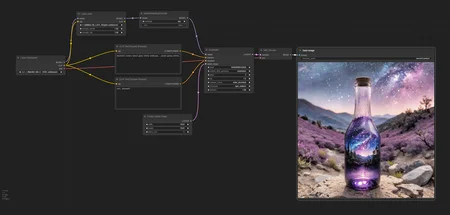
Basic LCM Comfy workflow attached as "Training Images" in zip format.
Read more about the concept here;
https://github.com/luosiallen/latent-consistency-model/blob/main/LCM-LoRA%20Technical%20Report/LCM-LoRA-Technical-Report.pdf
Original HF link - SDXL; https://huggingface.co/latent-consistency/lcm-lora-sdxl/tree/main
Original HF link - SD 1.5; https://huggingface.co/latent-consistency/lcm-lora-sdv1-5
Description
FAQ
Comments (131)
Generating an SDXL image in less than a second is absurd. I did not expect to see realtime SDXL generation as a LoRA...
It really works for the presented workflow with the specified checkpoint, but not for any others. I can generate the specified prompt using 2 steps in less than a second and the results are fine. But that's it.
For me it is misleading and useless.
@Standspurfahrer If you use the most recent ComfyUI update, this LORA (this SDXL one, haven’t really tried the SD1.5 version) works with just using the lcm sampler in the regular kSampler node, with a CFG of about 1.0, and sgm_uniform scheduler, you don’t need any specific checkpoint or the workflow given here. (And you can add other LORA pretty freely.) For any particular prompt and checkpoint combination, the sweet spot for steps can be anywhere between 3-8, and ideal CFG may be up to (in my experience) about 1.7. What will completely blow thing up is forgetting to drop the CFG down or forgetting to set the scheduler to sgm_uniform; the defaults for either of those values will produce horrible results.
there is a comfyui node inside the workflow called "model sampling discrete". From which project/repo does it come from?
If you mean the node being red with no missing custom nodes, I had the same issue. I updated all through comfyui manager, restarted server, reloaded workflow and then it worked fine.
yes u have to update comfyUI and restart--> advanced->model
update of comfyui fixed it, thx!
Already decent in the a1111 webui.
Can't wait for updates.
Thanks for sharing.
Oh really? Do we need any extension or does it just work?
@theally Just like that.
Here, I renamed the Lora to 'Fast'.
You should use the default filename (<lora:LCM_LoRA_Weights:0.69>).
- CFG 1.5 (1 to 2 regarding the expectations.)
- Euler A
- Steps 8
I can't see the Lora in the webui, but just use it in the prompt and it works.
<lora:Fast:0.69> (multiplier ~0.69 from my tests)
I did add a new channel in my discord to use it as default.
3sec per image, 768x1280, with a 3060 without hires, like the posted ones below.
NB: It's fantastic for Deforum. Also with Hires.
ADetailer may require a lower strength than usual.
Edit:
Testing further. For DPM++ samplers it's more like :
- CFG 1.5 (1 to 2 regarding the expectations.)
- DPM++ 2M Karras
- Steps 8
<lora:Fast:0.15> (multiplier ~0.15 from my tests)
Hard to say for dpm++. Euler a seems somehow simplier to manage.
These settings may of course not fit everyone and every model.
To adjust.
Cheers ! 🥂
@_Wizz_ I tested and it does work! Thanks for the information
Hi. Does the presence of this lora in the generation affect the final image? I mean with and without it we will get the same image?
Definitely no.
Let me post you a comparison below.
@_Wizz_ Thanks for the comparison and such a quick reply) We'll try it out)
@PamLe Tested further, and Hires is the way.
See the new images posted below.
Cheers ! 🥂
@_Wizz_ thanks)
@_Wizz_ How many hires steps are you using? I've testing it and it looks like the sweet spot is 6 but for some reason it is not improving the image much as the opposite of using more steps without the loRa
@thesilvermoth Hey, i'm using the same payload with or without the Lora.
Hires steps: 3, Hires upscale: 1.5, Hires upscaler: 4x-UltraMix_Balanced, Denoising strength: 0.4-0.5
Assuming you're using Euler a. I gave up on dpm++ for now. I think we need a new dedicated sampler, or at least some adjustments to be fully compatible.
@_Wizz_ Thanks for your answer! I'll try those settings
There is already a dedicated sampler for in ComfyUI for LCM in the regular kSampler node; it looks like you absolutely must use the sgm_uniform scheduler with it, and low CFG (1.0 is a good starting point.)
Fixed: use <lora:LCM_LoRA_Weights:0.3> (or whatever weighting) for what's downloaded here.
Original: A1111 1.6.0 compatibility? I've thrown it into my SDXL LoRA directory - it doesn't show up in the refreshed / restarted WebUI. Using <lora:fast:0.69> (for instance) results in "unknown network" - is there additional work for A1111 to be happy like how @_wizz_ reports?
Okay, I just used the version downloaded here and <lora:LCM_LoRA_Weights:0.69> and it did indeed load and work. Now to get generating...
Hey, 'Fast' is because I renamed the Lora for my convenience.
It may not be clear for everyone, indeed. You need to use the file's name, as always.
The fact it doesn't appear in the webui is because it's probably not a 'standard' Lora and is not fully supported yet.
Soon.
Edited my comment, thanks.
Cheers ! 🥂
@_Wizz_ I noticed that using DPM++ 2S a Karras at 4 steps the output is very good aswell. Slightly different from Euler a 6 steps. I think Euler a is better but the difference isn't huge. I'm still testing different combinations
I've tried it even in Fooocus (why not)
2m exponential is better than karras (at least) for my example.
i'm lazy so copy this promts (without negative) https://civitai.com/images/3321867
CFG=1.5
DPM++2m_sde_expo
6 steps.
+ focus styles.
longer promt == better(?) for simple promts, i've get artifacts.
@therav Hi in fooocus did you use it simply as lora or did you use another way??Because using it as lora keeps the same speeds for me .....thanks!
@Mrsunshine yes, just as Lora with weight=0.3.
it's lora anyway. the trick is number of steps (4-8) required for good image against regular 20+ steps.
Although, it's turned out - it's not fully supported in a1111 and fooocus cause you need to choose LCM sampler.
LCM sampler - generate better hands, but overall quality the same.
PS in fooocus you have to select "options for devs and debug" to chooose number of steps. or it will use default 30\60 steps.
Automatic1111 - nope, no error message, LoRA not visible. Moved on.
You need to change model version from SD1 to SDXL in this lora settings
The Lora simple doesn't appear but you can use it. Don't be that lazy and read the comments guys.
@rob52840 Don't give up. Try these methods.
LCM LoRA - Make Stable Diffusion images up to 10x FASTER! Sd 1.5, SDXL & SSD-1B - YouTube
Have tried, it looks like it could even work on some heavily tuned models (like my kohaku-xl)
but need some parameter tuning for it XD
still trying to find the best param
(Using a1111 backbone
A model is a model, finetuned or not. You should succeed.
Cheers !
This isn't working for me in A1111 1.6.0. When the LoRA is enabled (strength 1) it creates a worse quality image that has something like a broken glass effect on it.
Steps: 4, CFG: 1.5, SDXL base model, 1024x1024, DPM++ 2M Karras / DPM2
Try a lora strength of about 0.15 for DPM++ 2M Karras, that is working for me, although 5 or 6 steps with Euler a at 0.6-0.7 gives me the best results so far
It's kind of working with those settings, but doesn't seem worth using compared to DPM++ 2M Karras with a normal step count and no LCM LoRA.
@bomber055 its a trade off between quality and speed, just gotta find the right balance
With the images I'm generating it's not even a tradeoff. The generation data from the sample images below doesn't produce the images shown, so something isn't working right.
@bomber055 Hey, yes it's not fully supported yet in a1111 webui.
The LCM-Lora need a dedicated sampler.
Euler a is fine.
But don't expect a perfect result with DPM++, yet.
For now, just use Euler a even if your model is made for dpm++.
It's already a miracle that it partially work.
Soon.
Cheers ! 🥂
You'll be much better off avoiding the 2M and 3M variants.
I know it might not be as big for you guys with monster rigs, but there is also a 1.5 version available with provides the same kind of performance benefits for 1.5.
Is this the A1111 update?
While this works for me in A111 the quality of the pictures when used with any character LoRA comes out terrible. The entire image is effected, especially the color and facial features. If it were possible to use this without it effecting the image I would be on cloud 9.
try reducing the weight of the lcm-lora and play around with cfg (1.0-2.0) and step count (2-8). also the type of sampler you use is a huge factor
@eurotaku Ah I see. How can I get the LCM sample for A111?
as far as anyone knows the LCM sampler itself isnt fully supported by A1111 not just yet but only the Lora itself is fully supported By A1111 could be waiting for a very long while for the LCM sampler itself to be supported
@Lumico
Hey, you can/will easily found a fork or a PR on Github for this.
Ofc, as always, every a1111 will take a while. It should be faster on the/one dev branch, tho.
At this point, i'm personally not even interested by using the LCM Sampler, will try it at some point, but Euler a is fine.
For me, thanks to @bankenichi's advice, I have weight at 0.6/6 steps/1.7 CFG/base SDXL on A1111. The result is ACCEPTABLE considering its 1/5 generation time. But the result is kind of SD1.5 ones with some blur and broken details. The most painful thing is that I can't refine the result by reusing the seed with the normal procedure without LCM LoRa.
Glad to hear you got it working, there are definitely some models it works better on and tweaking the settings is a pain, but the time save is huge. Gotta keep experimenting
@bankenichi Tried some more and find lcm is tend on simplifing the image with a more concise layout and less elements in the background and somtimes cannot handle complex ideas. I was thinking of use lcm as a method to quick test prompts and then refine pics with a normal workflow. But as they have a different tendency on image, it wont be very practical.
@Yatching Im using to test how loras interact with each other and with certain models, then when I want to make a good quality image I go back to my standard workflow. Saves me a lot of time since I have an older GPU
This isn't working for me in ComfyUI
Model loader -> LoraLoader -> ModelSamplingDiscrete -> connect to Model of your sampler. Also you can download LCM Sampler along with Custom sampler to create more consistent results, but it's slightly difficult to create a good workflow with CustomSampler.
the gif as the first main image makes SDNext and Automatic1111 loop on downloading it every time we open them...
despite the mentioned troubleshooting steps, all my images come out either really blurry, nonsensical or really smeared out
I'm getting the best results using the provided settings, but it's still pretty far from usable.
I'm running A1111, and I've tried Euler a, Euler and LMS, none of which provided good results
Interestingly, DPM++ 3M SDE produces the best images. Apart from a few nonsensical parts, it's producing pretty sharp images. Maybe there are more samplers that secretly work best?
I think you have to use the LCM sampler.
@MachineMinded I do feel kind of stupid seeing that I missed this small detail, mixing up two samplers, however, I'm still getting the same issue
@MachineMinded There's no LCM sampler on automatic1111, currently. but there's already a discussion about it.
https://github.com/AUTOMATIC1111/stable-diffusion-webui/issues/13952
try these settings:
Euler a
lora weight 0.65
5 steps
Cfg Scale 2
We probably need the LCM sampler, but still kinda works for me on those settings
@AIArtsChannel If you install the animatediff extension it will also install the LCM sampler. I'm using LCM with SDXL right now, and the LCM sampler. The quality isn't great, though.
@AIArtsChannel still not absolutely perfect but a wonderful improvement nonetheless! Thank you so much!
Believe it or not, but UniPC works best for me especially with AnimateDiff
@sealouse animatediff just generates noise for me :/
DPM samplers far superior....
This is really awesome.
kinda works on Automatic1111, but it will probably require an update for better compatibility.
here are my settings:
Euler a
lora weight 0.65
5 steps
Cfg Scale 2
Yeah - mine "works", but the quality is not great.
Works in 15steps x 0.65
This setting indeed works pretty well without sacrificing too much quality, but 15 steps doesn't reduce generation speed that much. I wonder if anyone ever find a better setting. I was using weight 0.6 cfg 1.5 10 steps, images are acceptable, but not great.
A1111 full LCM support is here:
If you have AnimateDiff extension in latest version, LCM sampler will appear on Sampling method list.
How to use it:
Install AnimateDiff extension if you don't have it, or update it to latest version if you have it already. LCM will appear on Sampling method list.
Get LCM Lora
Put it in prompt like normal LoRA
Set sampling method to LCM
Set CFG Scale to 1-2 (important!)
Set sampling steps to 2-8 (4=medium quality, 8=good quality)
Enjoy up to 4x speedup
To be honest, I had kind of written this off from the low quality, but now that the instructions for the LCM sampler are here, the quality got a huge boost. Even at good quality I'm seeing a 2x speed boost over the already fast Euler at 20 steps. The normal high res fix also makes it even better at a 1.5 upscale with 8 steps. Very impressed and I see using this in general for playing around and only going back to the standards if I want something really high quality.
Nice tip for the sampler !
Just tested and can confirm.
Way better result !
Cheers ! 🥂
And you my friend, you are the real hero
Game changer!!
Thanks so much for sharing this little pro workflow.
Amazing improvement.
@jasonsystema Your welcome, brotha! ✨
OMG, that is awesome! Testing it already with a couple of samplers, CFG scales, and sampler steps to get the best results.
I must try it with this LCM sampler.
Have you tried it with different LoRA weights or 1 is just right?
@MrDravcan I've only used the LCM lora weights between 1 and 2.
@MrDravcan I've had good results using: DPM++ 2S a Karras / DPM++ 2Sa / Eular a -- especially with adjusting the LCM 1.5 lora to 0.6-0.8 (eg <lora:LCM15_lora:0.6>).
Here's a recent post showing the results - https://civitai.com/posts/851365
You are a king who deserves a crown. Really, thank you !
@shentk463169 而你我的朋友,是真正的英雄
@Lembont Thank you and your welcome! I'm just the messenger and this very important info definitely needed to be shared with you all ✨
@lianshuailong Thanks, brotha! Enjoy ✨
LCM lora is not showing up in LORAs tab in a1111, is it working for you?
@3dave LCM Lora is showing up in my LORA tab section just fine for me- where did you place yours? It should be inside of your Lora folder for A1111.... stable-diffusion-webui / models / lora
(Edit) I found a solution for the issue I described below where skin textures look like plastic using the LCM sampler with upscalers models in hires fix. I'm now using LCM sampler as the initial image generation sampler and euler a as the hires fix sampler. You can add the hires fix sampler by checking the box under settings: user interface "Hires fix: show hires checkpoint and sampler selection." I'm now very happy with these results
Thank you for posting this. It seems like the LCM sampler is not playing nicely with all of the photo upscale models in hires fix. I'm using the SD 1.5 LCM Lora The upscaled images are over sharpened and skin texture looks like plastic (very little texture and shiny). I've tried all of my downloaded upscalers and played with different numbers of steps and weights. I'll stick with euler a for now. Have any of you had any luck figuring out this issue?
@Meat5taiN Wow, super thanks. I've also noticed that LCM sampler doesn't work as well with upscaling as Euler a. Thanks for the tip, maybe it will help eliminate the grain that was created when upscaling images. Thank you very much ❤
This is great, but only cause I had no idea I could get coherent images at less than 5 steps in SDXL, The lora seems to do nothing for me. Maybe because Im not using a lot of details in some of my sample images or maybe because I have 3090ti and its already fast?
This seems very dependent on model settings but the results are impressive, the coherency of the images compared to the steps and cfg needed is kinda crazy, would be useful for abstract art videos esspecially
Thanks for sharing news and method! I played with this yesterday extensively, it works great and without a doubt, i gain over 100% speed increase (respect to the time) on LCM sampler m. It is incredibly useful for making videos which has 768x768 or 1024x1024 dimensions. Details are not sames as SDE samplers but still good see / watch on video output.
Accidentaly, this LoRA open Custom Sampler for me... This is something amazing when you can change settings of scheduler. Everyone should to try this.
Does anyone else have the problem with the SDXL Lora that it is filtered into the SD 1.5 Lora section in Automatic 1111 Webui? I had to go into the settings icon for the Lora and change "Stable Diffusion version" to SDXL to get it to show up when an SDXL model is loaded. It might confuse new people (It did me).
Yes, it happens to me on A1111, even using with dev branch, it is doing same buggy switch.
Must-have LoRA! It's just a game changer! Is it possible to create one for sd 2.1 version?
It's possible, but he didn't train these. Also, 2.x is not used that much so there's low interesting in making one for it.
This is seriously amazing stuff, I have noticed you need to lower the high res and denoise steps when upscaling though.
Did you figure out any reasonable settings for highres fix? I've plotted 1-10 steps with increments of .05 for denoise, however the noise level in the final image is crazy...
@elendeldeslawinpho I use the Paseer version now, much better results all round
@Corbe Thanks, I will give that one a try :)
It's doing nothing good at all... :-(
(SD1.5)
Anyone get this error "Error while deserializing header: HeaderTooLarge loading network"?
Sometimes I get this error isntead:
Failed to match keys when loading network /models/custom/lcm.safetensors: {'lora_unet_mid_block_resnets_1_conv1.alpha': 'diffusion_model_mid_block_resnets_1_conv1', 'lora_unet_mid_block_resnets_1_conv1.lora_down.weight': 'diffusion_model_mid_block_resnets_1_conv1', 'lora_unet_mid_block_resnets_1_conv1.lora_up.weight': 'diffusion_model_mid_block_resnets_1_conv1', 'lora_unet_mid_block_resnets_1_conv2.alpha': 'diffusion_model_mid_block_resnets_1_conv2', 'lora_unet_mid_block_resnets_1_conv2.lora_down.weight': 'diffusion_model_mid_block_resnets_1_conv2', 'lora_unet_mid_block_resnets_1_conv2.lora_up.weight': 'diffusion_model_mid_block_resnets_1_conv2', 'lora_unet_mid_block_resnets_1_time_emb_proj.alpha': 'diffusion_model_mid_block_resnets_1_time_emb_proj', 'lora_unet_mid_block_resnets_1_time_emb_proj.lora_down.weight': 'diffusion_model_mid_block_resnets_1_time_emb_proj', 'lora_unet_mid_block_resnets_1_time_emb_proj.lora_up.weight': 'diffusion_model_mid_block_resnets_1_time_emb_proj', 'lora_unet_up_blocks_0_upsamplers_0_conv.alpha': 'diffusion_model_up_blocks_0_upsamplers_0_conv', 'lora_unet_up_blocks_0_upsamplers_0_conv.lora_down.weight': 'diffusion_model_up_blocks_0_upsamplers_0_conv', 'lora_unet_up_blocks_0_upsamplers_0_conv.lora_up.weight': 'diffusion_model_up_blocks_0_upsamplers_0_conv', 'lora_unet_up_blocks_1_upsamplers_0_conv.alpha': 'diffusion_model_up_blocks_1_upsamplers_0_conv', 'lora_unet_up_blocks_1_upsamplers_0_conv.lora_down.weight': 'diffusion_model_up_blocks_1_upsamplers_0_conv', 'lora_unet_up_blocks_1_upsamplers_0_conv.lora_up.weight': 'diffusion_model_up_blocks_1_upsamplers_0_conv', 'lora_unet_up_blocks_2_upsamplers_0_conv.alpha': 'diffusion_model_up_blocks_2_upsamplers_0_conv', 'lora_unet_up_blocks_2_upsamplers_0_conv.lora_down.weight': 'diffusion_model_up_blocks_2_upsamplers_0_conv', 'lora_unet_up_blocks_2_upsamplers_0_conv.lora_up.weight': 'diffusion_model_up_blocks_2_upsamplers_0_conv'}
I've tested this against the checkpoint version and this is a better of balance of speed versus quality. I can now get 25 second renders on my GTX 1070 - that might not sound very fast, compared to a say a 4090, but that's less than a quater the time compared to my renders on the OG SDXL! Amazing work!
Any Suggestions on what 1.5 Models work best with this?
I'm looking for Realistic and 3D models that are very Flexible and don't hinder creations or limit using NSFW etc.
Thanks In Advance! :3
Does the SDXL Comfy workflow available here work for you? 👍 Or no? 👎
XL is not officially supported, they say that the results will be better at 1.5
I must be doing something wrong but when adding the SDXL variant to a positive SDXL prompt all I see is image distortion on both strength of 1 and 0.5. I get better results without this lora added at all even on CFG 1-1.5 and steps of 3-10. This is with Automatic 1111.
I have not tested with SD1.5 yet.
XL is not officially supported, they say that the results will be better at 1.5, but it is not officially supported either, but for some reason it is better with it.
This is some type of sorcery.
It works with standard samplers as well.
Edit: not all samplers
DPM++ 2M Karras. 30 steps. All good! Amazing speed renders! Sorcery Indeed :-)
An amazing LORA, it works really well.
Doesnt like to work with vladmatic or i am doing something wrong
How to get this to work with automatic? Just adding it like any lora produces unfinished generations (so basically as if i didn't have some magic lora that only requires me to use 4 steps)
Works fine for me with A1111 > Model > Cartoon Style. Sampler DPM++ 2M Karras at 30 steps. CFG 7. Strength 1. I don't use Eula samplers and tend to stick with the DPM series for improved efficiency and consistent quality of the output. Nuff Said.
hi whre i should put the lora? i put on stablediffuse/models/lora it wont detect, i use sd_xl_base_1.0.safetensors
also this is outdated, the huggingface link is a newer version (Edit: SDXL only, 1.5 OK)
The two months old one is newer than the 6 weeks old one... Where are you seeing that updated one
@ishadowx sorry i should have specified SDXL. the SDXL upload here is outdated, the 1.5 is OK
Stupid question, how much I should set LoRa strength weight?
If you're going to attempt to get some kind of semi-usable pictures at 5 steps, set it to 1.0
If you're trying to get as good pictures as possible at something more reasonable like 10 steps, set it to 0.2
At 20+ steps, don't use it.
Critical Note: (A111) This only works with the LCM sampler. You get the LCM sampler in A1111 when you install the AnimateDiff extension.
Hi! Could you explain where to getthat LCM Sampler?
Install the Animatedifff extension in your A1111 extensions section of the application. It installs the LCM sampler with that extension.
@cainezen Oh, so I just install the AnimateDiff extension, got it. Thought I need to get the LCM through that somehow. Thanks!
@durtypicturz Nope. Just install the extension. Restart A1111 and the sampler should be there.
I wrote LCM sampler in A1111 and you are not required to use LCM sampler for LCM LoRA. See https://github.com/AUTOMATIC1111/stable-diffusion-webui/pull/14583 and https://github.com/continue-revolution/sd-webui-animatediff?tab=readme-ov-file#lcm
@conrevo First, thank you for this LoRa!
Second, what samplers work best with LCM LoRa? I've been using Eular A primarily.
Thanks again!!
LCM LoRA here for SDXL is outdated. Go to huggingface instead for newest version
Hi it does not works to me in SD 1.5 and A1111 1.5.2
I added the LORA and set all you mentioned but it takes same length as usual without the LCM and then only noise or fragments of a render is a result.
I also used EULER A and EULER
What am i doing wrong?
Does that needs a LCM Model?
Because you write "any model"
This thing works like a gain coefficient. It doesn't work on its own. That is, if you have HDR Lora, for example, it will amplify its effect. I just generate on the page and it`s all ok.
Working well on CyberRealistic, EulerA, CFG 2, Steps 10.
Speed generations doubled.
Thanks.
Details
Files
LCM_LoRA_Weights.safetensors
Mirrors
LCM_LoRA_Weights.safetensors
LCM_LoRA_Weights.safetensors
LCM_LoRA_Weights.safetensors
sdxl_lcm_lora.safetensors
sdxl_lcm_lora.safetensors
90525551-24b5-43fe-9dfc-4c6d9cffe157.safetensors
sdxl_lcm_lora.safetensors
sdxl_lcm_lora.safetensors
pytorch_lora_weights.safetensors
sdxl_lcm_lora.safetensors
pytorch_lora_weights.safetensors
LCM_LoRA_Weights.safetensors
sdxl_lcm_lora.safetensors
sdxl_lcm_lora.safetensors
sdxl_lcm_lora.safetensors
sdxl_lcm_lora.safetensors
Available On (1 platform)
Same model published on other platforms. May have additional downloads or version variants.