
Flux.2 Klein 9B UPDATE - SEE VERSION DETAILS
QWEN IMAGE EDIT v2511 UPDATE - SEE VERSION DETAILS
Firstly, this is a concept that Qwen Image Edit (and Flux.2 Klein 9B) can do already, kind of. It's pretty good at Outpainting by using the prompt Remove the white parts. You can even add a context image, but for Qwen Image Edit it's not great/doesn't work the best. Look at the examples for ideas of what it can help with. This was trained exclusively on photos, but seems to work for anime as well. Trained using Runpod with help from the Ostris Tutorial Here.
Suggested prompt for all uses: Remove the white parts, use the image for context.
For Uncropping/Outpainting: The intended purpose is to take a cropped image, expand the canvas size higher than the actual image and fill it with white. Use that as Image 1.
Use the image of the persons head as Image 2. I suggest an image of a head that cropped to a square. Maybe rotate it so it makes sense if it were transferred onto Image 1 directly.
If the image quality or even backgrounds are too different between the two images you may need to add additional context like hair color, location, etc, but less details is better in my experience. If you'd like a more unified quality, I had success using this with this Upscale LoRa. You could try other colors but I have not tested with/trained on anything but white.
For Inpainting: You can use photoshop or the white paint from the built in Comfyui Mask Editor, see the below example: 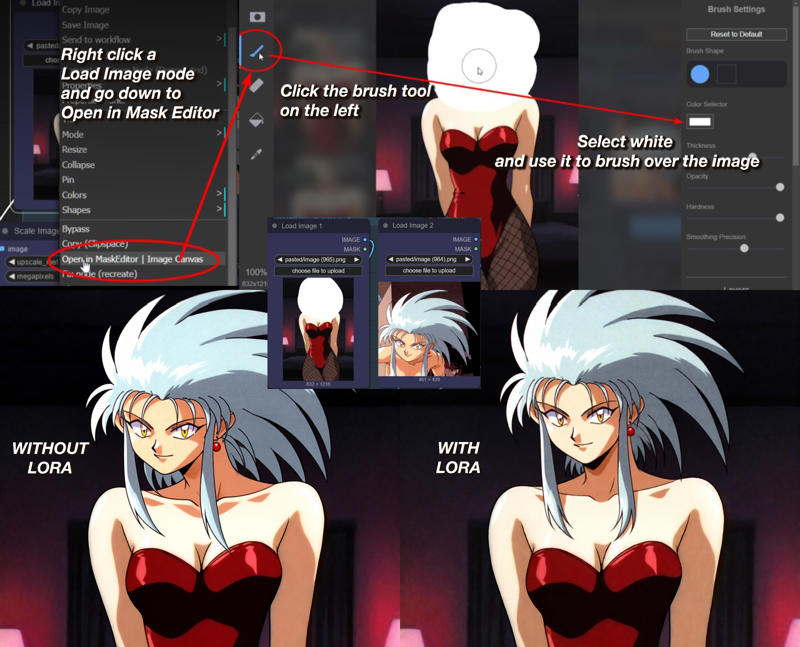
Description
Suggested prompt for all uses: Remove the white parts, use the image for context.
For Uncropping/Outpainting: The intended purpose is to take a cropped image, expand the canvas size higher than the actual image and fill it with white. Use that as Image 1.
Use the image of the persons head as Image 2. I suggest an image of a head that cropped to a square. Maybe rotate it so it makes sense if it were transferred onto Image 1 directly.
If the image quality or even backgrounds are too different between the two images you may need to add additional context like hair color, location, etc, but less details is better in my experience.
For Inpainting: You can use photoshop or the white paint from the built in Comfyui Mask Editor, see the description for example image.
FAQ
Comments (24)
Can you upload a single output image with the workflow embedded
Haha you don't want my workflow. It's requires a bunch of random unneeded stuff and uses a specific nunchaku qwen edit. But sure gimme a bit.
@cranpeach is it possible to use loras with nunchaku qwen?
@Primaveri I had to make some changes to some code https://www.reddit.com/r/comfyui/s/3ZKgVgs7Rq
here's a video using it, go 15 min in. you can get all the wf for free on his discord channel. he makes the best videos. https://www.youtube.com/watch?v=9sD5Ekavjgo&t=787s
This is enabled for on-site generation, but that appears to be a mistake, given I can't input images for the qwen generator here.
Maybe turn it off if you have the time?
Ah didn't know that. updated!
In your before/after example character's neck and shoulder is totally fucked up ^^"
this lora work very good. For a hint, actually the qwen editor can turn the desired area to white color directly which is more efficient than doing that manually. Prompt is like this: Remove the whole head, turn to white color or Remove only the face, turn to white color.
Good to know! Honestly I haven't tested this model to it's full potential I'm sure, I bet you could probably even just tell the model "replace the head, use the image for context" and bypass the white step altogether
@cranpeach i tired what you suggested, but not work. I think the white part is work as a mask or something to tell the model what it should edit, and white mean no mixture of original picture part.
@takomli2013979 Agreed. I tested it out as well and the white part definitely is doing something. Still testing stuff like "replace the bra, use the bra on the right for context" and it did work with mixed results. I have other loras for that usage anyways.
where workflow to use this?
So I'm not much of a workflow maker, I did attach an image with the workflow for another user who asked, but it's not great and requires Nunchaku qwen edit and some other things to work https://civitai.com/images/109217086
@cranpeach not problem
Yep, that's all I use it with, and all the examples are generated with it. https://civitai.com/images/109217086 is an image with an attached nunchaku workflow, although if you have your own I'd recommend that 🤣
dis gold
Hoping for a 2511 version! This lora's one of my favorites 🙂
now you have it